Code2Video writes Manim code through a Planner, Coder and Critic instead of generating pixels
[ICML 2026] Video generation via code
At a glance
- What is it?
- Code2Video from Show Lab at the National University of Singapore turns a knowledge point into an educational video by having agents write executable Manim code. It comes with the MMMC benchmark of 117 learning topics. There are no GitHub releases, and the setup depends on external LLM API keys.
- Who is it for?
- Use Code2Video if you want educational explainer videos that you can inspect and regenerate because they come from Manim code, and you are comfortable supplying your own LLM API keys. Do not treat it as a general text-to-video tool or an installable product, since there are no releases and the topics are knowledge points.
- Can I use it commercially?
- Yes. MIT is a permissive licence: you can use, modify and sell software built on it, as long as you keep its copyright and licence notices.
- Is it still maintained?
- Yes. The repository last received commits 76 days ago.
- What is it written in?
- Mainly Python, according to GitHub's language statistics.
Answers come from the project's GitHub data, last synced on November 7, 2026, and from our analysis. They are not legal advice.
Star history
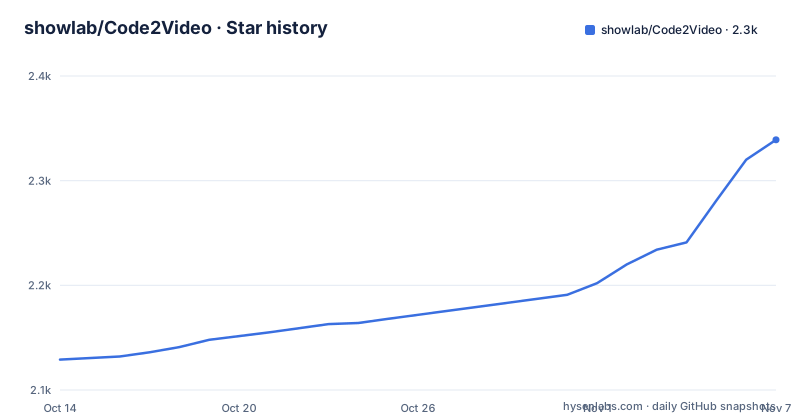
- showlab/Code2Video2,339 ★ · +210
| Repository | 2026-10-14 | 2026-11-07 |
|---|---|---|
| showlab/Code2Video | 2.1k | 2.3k |
210 Stars in the last 24 days, measured from the daily GitHub snapshot. Compare with other projects
Editorial analysis
Executable Manim code is the video, which makes every frame reproducible
Code2Video describes itself as an agentic, code-centric framework that generates educational videos from knowledge points. The key contrast it draws is with pixel-based text-to-video models. Instead of sampling frames, it writes executable Manim code and renders that, which the authors credit with clarity, coherence and reproducibility.
In this design the code carries both timing and layout. The README calls executable code the unified medium for temporal sequencing and for spatial organization of the video. If a scene has a misplaced label, the fault is in a file you can open and edit, not in a model that you can only reprompt.
The comparison section sets Code2Video side by side with Veo3 and Wan2.2 on three learning topics: the Hanoi Problem, Large Language Model and Pure Fourier Series. The README presents these as embedded videos and gives no numbers beside them, so the comparison is something you watch rather than a measurement you can quote.
Three agents split the work: Planner, Coder and Critic
The framework is a modular tri-agent design. Each agent has one job.
The Planner handles storyboard expansion, turning a knowledge point into a sequence of scenes. The Coder performs code synthesis, and the README stresses that the result is debuggable. The Critic refines layout with anchors, which targets the usual failure of generated animations, where objects overlap or drift off the frame.
The three work together for structured generation. That separation has a consequence for anyone running it: a bad video can be traced to a stage. A weak storyline points at the Planner prompts, broken rendering points at the Coder, and crowded scenes point at the Critic. The repository keeps its prompts in a top-level prompts directory, its source in src, and its JSON inputs in json_files, so each of those stages has a place to look.
MMMC supplies 117 topics modelled on 3Blue1Brown and a human-made reference set
Alongside the code, the authors released MMMC, described as the first benchmark for code-driven video generation. It covers 117 curated learning topics inspired by 3Blue1Brown, across diverse areas. The dataset is hosted on Hugging Face under YanzheChen/MMMC.
On 2025-10-06 the maintainers updated the ground truth human-made videos and the metadata for MMMC. A reference set of human-made videos is what lets the project score generated output against something, and the README names three evaluation dimensions: efficiency, aesthetics and end-to-end knowledge transfer.
The benchmark is also where the project's icon problem was patched. On 2025-10-11 the authors reported issues on ICONFINDER and put the Code2Video auto-collected icons into the MMMC assets folder as a temporary alternative. If your run depends on icons, expect that part of the pipeline to rely on that fallback location.
Setup starts with LLM API keys, and the requirements file was slimmed by 80 to 90 percent
The Quick Start has four steps: requirements, configure LLM API keys, run agents, and project organization. The second step is the one to plan around. The agents are driven by large language models, so you must supply API credentials before anything runs, and each generated video costs whatever those calls cost you. The commands for each step are in the README itself, so copy them from there rather than from a summary.
On 2025-11-06 the maintainers optimized requirements.txt, which they report cut installation time by 80 to 90 percent. They credit a contributor, daxiongshu, for the change. An older environment built before that date may carry a heavier dependency set than a fresh one.
Because Manim renders the output, a working Manim setup is part of what the requirements step has to deliver. The README's requirements details are the thing to check on your own machine first.
There are no GitHub releases, so the main branch is the only version you can pin
The repository has no GitHub releases. You cannot pin a tagged version and read a changelog entry for it. The code you clone is whatever main held that day, so record the commit hash if you want a result you can regenerate later.
The project is not archived. The last push was on 2026-08-24, and the update log shows regular activity: the arXiv paper, code and dataset were released on 2025-10-02, the project was accepted to the Deep Learning for Code workshop at NeurIPS 2025 on 2025-09-22, to ICML 2026 on 2026-05-01, and passed 2000 stars on 2026-08-23.
The license is MIT. The repository also ships README.zh-CN.md, a Simplified Chinese version, plus an assets directory and a figures directory. Those paper-and-demo assets sit in the same tree as the source, so a clone carries more than the code needs to run.
It generates teaching videos from knowledge points, which limits what you can ask of it
The input is a knowledge point and the output is an educational video. That scope is stated in the overview, and the examples are teaching topics such as the Hanoi Problem, Large Language Models and Fourier series. Nothing in the README describes advertising clips, live-action footage or free-form scenes.
Because the output is Manim animation, the style is that of mathematical explainers. A topic that needs photographs or real-world footage is outside what a code-rendered animation produces. The 117 MMMC topics are the project's own measure of range, so a subject far from those areas is untested territory.
The project is research code attached to a paper, with a citation section in the README. Treat it as a reference implementation of the Planner, Coder and Critic idea. Anyone planning to run it at scale should budget for the LLM calls and for debugging the generated code, because the framework's own selling point is that the code is debuggable, which also means it can need debugging.
Editorial conclusion
Use Code2Video if you want educational explainer videos that you can inspect and regenerate because they come from Manim code, and you are comfortable supplying your own LLM API keys. Do not treat it as a general text-to-video tool or an installable product, since there are no releases and the topics are knowledge points. Before building on it, read the Quick Start in the README to see which LLM providers it expects and what each run is likely to cost you.
Frequently asked questions
What is the best educational video maker according to Code2Video's authors?
The README makes no ranking claim. Code2Video is an agentic framework that generates educational videos from knowledge points by writing executable Manim code, and it compares itself against Veo3 and Wan2.2 on three topics.
How do you code a video with Code2Video?
Code2Video uses a Planner to expand the storyboard, a Coder to synthesize debuggable Manim code, and a Critic to refine layout with anchors. The executable code is what produces the video.
How to create educational video content with Code2Video?
Install the requirements, configure LLM API keys, then run the agents on a knowledge point. The README's Quick Start walks through those steps in order.
Official sources
Add this badge to your README
If you maintain this project, the badge below links readers to this analysis and shows its maintenance status from the daily GitHub snapshot. Paste the markdown into your README; add ?metric=license or ?metric=stars to the image URL for a different field.

[](https://hysenlabs.com/projects/showlab-code2video)Star history chart for your README
[](https://hysenlabs.com/projects/showlab-code2video)Was this useful?