Show-Harness copies franka.yaml and then reads robot_franka.yaml
Just a VLM Agent Can Play Robots
At a glance
- What is it?
- An embodied harness from NUS Show Lab that lets a vision-language model drive Franka, Piper, ManiSkill and Isaac Lab through one action vocabulary, where the real-robot quick start names three different config paths, the project states its own virtualenv pins conflict, the linter runs two rule families with the unused-variable check disabled, and the manifest is at 0.1.0.
- Who is it for?
- The design decision here is that the model emits discrete action units and a per-embodiment interpreter turns each unit into motion, which keeps the VLM responsible for every physical decision and lets one prompt set drive four very different robots. That is worth studying whether or not you run it.
- Can I use it commercially?
- Yes. Apache-2.0 is a permissive licence: you can use, modify and sell software built on it, as long as you keep its copyright and licence notices.
- Is it still maintained?
- Yes. The repository last received commits 1 day ago.
- What is it written in?
- Mainly Python, according to GitHub's language statistics.
Answers come from the project's GitHub data, last synced on November 22, 2026, and from our analysis. They are not legal advice.
Star history
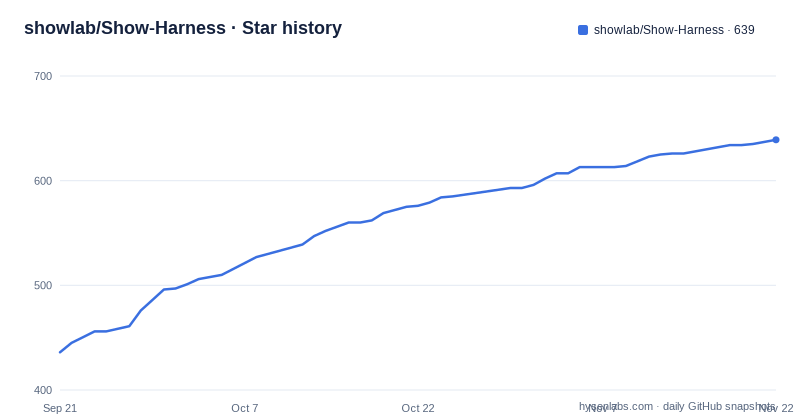
- showlab/Show-Harness639 ★ · +203
| Repository | 2026-09-21 | 2026-11-22 |
|---|---|---|
| showlab/Show-Harness | 436 | 639 |
203 Stars in the last 62 days, measured from the daily GitHub snapshot. Compare with other projects
Editorial analysis
The quick start copies franka.yaml and then reads robot_franka.yaml
The real-robot instructions name three different paths for one config file. Step one says to copy `configs/site/franka.yaml.example` to `configs/site/franka.yaml` and fill in the robot address and camera serials, with the Piper equivalent given as `site/piper_arms.yaml.example`. Step four runs `python scripts/check_setup.py --robot-config configs/robot_franka.yaml`, and step five runs `python scripts/run_real.py --robot-config configs/robot_fran` before the line stops. So the file the reader is told to create is not the file the commands read, and the run command's path is cut off mid-name. The preflight itself is the most substantial part of the sequence: it checks the environment, the site config and calibration, the VLM backend live, and that the robot and cameras answer. That check is worth running even after the path is fixed, because it is the only step that proves the hardware is reachable before an autonomous rollout starts.
The project says its own venv pins conflict, so there is no single install
The environments section opens by saying separate virtualenvs are needed because their pins conflict, and that you should start with the base one and add the rest only when needed. `bash scripts/setup.sh base` builds `.venv` for the harness itself, covering collection, running a robot and driving a served model, and `bash scripts/setup.sh serve` builds `.venv-vllm` for local model serving through `scripts/serve_vlm.sh`. Running the setup script with no arguments prints which of them already exist, which is a small courtesy that saves a rebuild. A third variant, `base --real`, adds the Franka and Piper hardware layer with RealSense, ROS shims and a teleop window, and the text is explicit that zero-shot and simulation work do not need it. Training is a fourth environment, self-contained under `train/` and built against upstream LLaMA-Factory.
Serving is a separate process, so the harness needs no model server of its own
One architectural choice is worth isolating from the environment sprawl. Serving a model is its own process, which means the harness talks to any OpenAI-compatible endpoint without `.venv-vllm` existing at all. The text names the two obvious cases: a hosted model, or a colleague's server. That matters for the credentials step, where you copy `configs/secrets.env.example` to `configs/secrets.env` and add an API key for the backend you use, with `GEMINI_API_KEY` as the default, or serve a local model with the serve script instead. So the same harness runs against a frontier model it cannot inspect and against a small fine-tuned one, and the difference between the two modes is where the weights live rather than what the harness calls.
The safety floor is calibrated per table and every run refuses to cross it
Step three is the one to read twice. You calibrate the safety floor and the begin pose for your table, the shipped values are examples, and every autonomous run refuses to descend below the calibrated floor. That is a hard interlock rather than a prompt instruction: the constraint lives in the runtime, so a model that decides to reach further than it should is stopped by the controller rather than by its own judgement. The begin pose matters for the same reason, since a policy that is safe relative to one starting configuration is not automatically safe relative to another. The config file also carries a robot address and camera serials, which means the harness is pointed at specific hardware by name, and the preflight is what confirms that the robot and cameras answer before anything moves.
Ruff is configured for two rule families with the unused-variable check off
The manifest is small. The package is `showharness` at version 0.1.0, it needs Python 3.10 or newer, and the license is a file reference rather than an SPDX expression. Linting is Ruff with `line-length = 100` and `target-version = "py310"`, and the rule selection is `select = ["F", "E9"]` with a comment describing the intent as correctness-focused: undefined names, unused imports and variables, and syntax errors. The one exception is `ignore = ["F841"]`, which is the unused-local-variable rule, so the configuration disables precisely the check its own comment claims to cover. Line length at 100 is inert here, because the E family beyond E9 is not selected. The exclude list is also worth reading: `baselines`, `experiments`, `rebuttal` and `.ai` are all skipped, so four directories including a rebuttal directory are outside the linter entirely.
Version 0.1.0, six LoRA adapters, and no base model named
The manifest version is 0.1.0 for a project with a published paper, a project page, a model collection and a dataset. The news section for 2026.09 records the public release of the harness, the GUMI collectors, the plugin suite and the training pipeline, six LoRA adapters on the models repository, and the demonstration corpus on the dataset repository, alongside a separate survey of multimodal embodied agents covering the range from computer-use to robot-use. What the released artefacts are is adapters rather than a named base checkpoint, and the visible text does not name the base model they attach to. That is the first thing to look up before downloading anything, because an adapter is inert without its base and the two are not interchangeable. The citation is machine readable, with a `CITATION.cff` at the root next to the license and an English and Simplified Chinese pair of readmes.
Plugins are one directory and one boolean, and disabled means identical output
The plugin claim is specific and unusual enough to be worth quoting exactly: one directory, one boolean, and byte-identical to no plugin when disabled. That is an ablation guarantee rather than a feature list, and it is the property that makes the rest of the evaluation legible. If a component can be switched off and produces the same bytes as its absence, then a difference in a result is attributable to that component and not to a side effect of loading it. For a harness that sits between a model and real hardware, that matters more than usual, because a plugin that quietly changes observation format or timing would otherwise contaminate every comparison. The plugin suite is released as part of the same 2026.09 public drop as the harness and the training pipeline.
GUMI turns the browser into the robot, and the same keys take over mid-rollout
The demonstration collector is the piece that removes hardware from the loop. GUMI maps every action unit to a key or a button, so a human, or a GUI-driving agent, performs a task by playing the robot in a browser, and each step is recorded as an observation-action pair ready for training. The synthetic path runs like this:
bash scripts/setup.sh base
.venv/bin/python gumi/collect_rollouts_web.py data/rollouts_demo --sim
# open http://localhost:8600 and drive the gripper with WASD / arrow keys
Dropping `--sim` points the same servers at the real Franka and Piper rigs, which is the claim to notice: the simulator and the hardware are behind the same interface rather than two implementations. The same key bindings also power live human takeover during an autonomous rollout, so a person can seize control mid-run without a separate mode. The design constraint stated alongside is that there is no teleoperation hardware requirement and no post-processing step, with the keyboard interface, the dual-arm interface and the agent operators documented under `gumi/`.
Editorial conclusion
The design decision here is that the model emits discrete action units and a per-embodiment interpreter turns each unit into motion, which keeps the VLM responsible for every physical decision and lets one prompt set drive four very different robots. That is worth studying whether or not you run it. The GUMI collector is the other half: demonstrating a task by playing the robot in a browser, with no teleoperation hardware and the same key bindings taking over live during an autonomous rollout, is the cheapest demonstration data path in the set. Three things to check before pointing it at hardware. The quick start's config path does not line up, since it copies one filename and the commands read another. The venvs cannot be merged, because the project says the pins conflict. And the safety floor is not advisory, since every autonomous run refuses to descend below the calibrated value, so calibrate it deliberately rather than accepting the shipped example. The last commit on the default branch main is dated 30 September 2026 and there are no GitHub releases.
Frequently asked questions
Which robots and simulators does Show-Harness support?
Franka, the AgileX Piper in single and dual arm configurations, ManiSkill and Isaac Lab, all sharing one action vocabulary and one prompt set. Embodiment-specific interpreters ground each discrete action unit into motion deterministically, so the model stays responsible for every physical decision.
How do you collect training demonstrations with Show-Harness?
With GUMI, which maps every action unit to a key or button so a human or a GUI-driving agent plays the robot in a browser and each step is recorded as an observation-action pair. Run gumi/collect_rollouts_web.py with --sim for a synthetic tabletop, drop --sim for the real rigs, and open http://localhost:8600.
Why does Show-Harness need separate virtual environments?
Because their pins conflict, as the project states. scripts/setup.sh base builds .venv for the harness, scripts/setup.sh serve builds .venv-vllm for local model serving, base --real adds the Franka and Piper hardware layer, and training builds its own environments under train/ against upstream LLaMA-Factory.
What safety limits does Show-Harness apply on a real robot?
You calibrate a safety floor and a begin pose for your table, the shipped values are examples, and every autonomous run refuses to descend below the calibrated floor. A preflight script checks the environment, the site config and calibration, the VLM backend live, and that the robot and cameras answer.
Official sources
Add this badge to your README
If you maintain this project, the badge below links readers to this analysis and shows its maintenance status from the daily GitHub snapshot. Paste the markdown into your README; add ?metric=license or ?metric=stars to the image URL for a different field.

[](https://hysenlabs.com/projects/showlab-show-harness)Star history chart for your README
[](https://hysenlabs.com/projects/showlab-show-harness)Was this useful?