Simple-Calendar: offline is the headline, syncing anyway is the feature list
GitHub describes it as A simple calendar with events, tasks, customizable colors, widgets and no ads.. The repository metadata lists Kotlin as its primary language. The metadata lists the GPL-3.0 license. This article stays within the project description and details documented in the GitHub repository README.
At a glance
- What is it?
- An Android calendar app whose selling points are no ads, no unnecessary permissions, and no internet access, with a feature list that nevertheless includes CalDAV sync, calendar exchange, and sharing. Read as a whole, it is a small app with a careful presentation.
- Who is it for?
- This app fits someone who wants a calendar that opens instantly on a train, shows no ads, and does not demand permissions it does not need. Two things to check before you install.
- Can I use it commercially?
- Yes, with conditions. GPL-3.0 is a copyleft licence: if you distribute software that includes it, you must release that software's source code under the same licence. Running it internally without distributing it does not trigger that obligation.
- Is it still maintained?
- Probably not. The repository last received commits 28 months ago, on June 26, 2024.
- What is it written in?
- Mainly Kotlin, according to GitHub's language statistics.
Answers come from the project's GitHub data, last synced on October 21, 2026, and from our analysis. They are not legal advice.
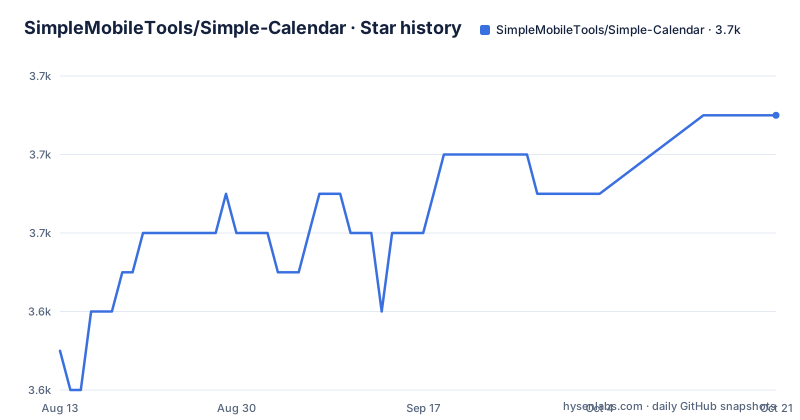
Star history
- SimpleMobileTools/Simple-Calendar3,653 ★ · +6
| Repository | 2026-08-13 | 2026-10-21 |
|---|---|---|
| SimpleMobileTools/Simple-Calendar | 3.6k | 3.7k |
6 Stars in the last 69 days, measured from the daily GitHub snapshot. Compare with other projects
Editorial analysis
The app names a year that has already passed
The readme calls the product Simple Calendar 2023, repeatedly, in headings and in the download line, and the tagline describes it as a planner designed to do what such a planner should do in 2023. That is a marketing decision with an expiry date, and it has expired: the most recent tagged release is from October 2023 and the most recent commit to the branch is from June 2024. Nothing in the file suggests the app is abandoned, since the repository is not archived, and there is a changelog at the root rather than a farewell notice, but anyone arriving from a search today is reading a page that describes a release two years back. One small detail in the same area is worth knowing before you install: the package listed on the third-party app store carries a suffix marking it as the paid flavour of the same application, so the free listing and the store version are not obviously the same artefact.
No internet access, and a sync feature
The first block of features makes the privacy argument explicitly: no ads, no annoying popups, and no internet access needed, which the readme ties to privacy, security, and stability rather than leaving the claim floating. The problem is that the next blocks contradict it. There is CalDAV support for syncing with hosted calendar services, an interoperability line naming several of them by vendor, a share action for getting an event out through social media and email, and a store listing for the application. None of those are problems in themselves; a calendar that syncs can still work offline between syncs. But the marketing sentence and the feature list describe two different products, and a reader who installs on the strength of the first one is going to meet the second one.
Events come in from outside and go back out
The data model is more generous than the offline framing suggests. The widget supports exporting and importing events through the standard calendar file format, and the whole settings file can be exported as text and imported on another device, which is the pattern people use when moving to a new phone. Event creation is described as flexible in times, duration, reminders, and repetition rules. There is duplicate detection for families, with an organisational feature for copying an event and managing several people at once, plus an importer for public holidays, contact birthdays, and anniversaries. That last one is the most useful item on the list and the least mentioned, since a calendar that knows your contacts' birthdays is worth more than most of the sharing features.
Five views, a list mode, and a filter by type
The readme describes switching between daily, weekly, monthly, yearly, and event-focused views, and then adds the option most people actually use: a plain list of upcoming events instead of a month grid. For a personal planner that list is the feature, and it is buried in a paragraph about the monthly view. Two smaller capabilities sit alongside it. Personal events can be filtered quickly by type, which is how you separate work from family without colour-coding everything. And an event's location is shown on a map, which is quietly useful for anything with an address attached.
Customisation is concentrated in the widget and the alarm
Almost every customisation option is about the home-screen widget or about notifications. The widget is offered with a large number of options for reminders, notification appearance, the small month view inside it, and overall appearance. On the alarm side, the sound, whether it loops, which audio stream it uses, and the vibration pattern are all configurable, and the themes and per-calendar colours are there too. What is absent is equally notable: the readme promises no complicated features, and there is no sign of anything approaching a plug-in system, external integrations beyond the calendar sync, or an account of your own. There is also a promise about permissions, stated in the same breath as the ads: no unnecessary ones, which for a calendar app means no request for contacts, location, or storage beyond what the calendar and its widget need. It is a local-first app with a customisable surface, which is a defensible thing to be, and the permission claim is the part of that positioning a technical reader can verify by installing it and watching what it asks for.
A keystore template sits next to the build file
The repository root shows how a released Android application is put together. There is a sample keystore properties file, which is the standard way to keep signing credentials out of version control while telling the build where they live, so a fork needs its own keys before it can produce an installable build of the same shape. A release automation directory sits alongside it, which is how the store listings get their text and screenshots, and a graphics directory holds the artwork that automation consumes. The rest is conventional: an application module, the Kotlin build scripts, a properties file, the wrapper for both shell families, and the usual editor and ignore files. Nothing here is unusual, and the keystore sample is the one file worth reading before you start a fork.
Thirty languages, and a donation list instead of a price
The last section is a support page rather than a paywall. It lists a bank transfer reference and then five cryptocurrency networks with their addresses, followed by two payment platforms and a membership page. Nowhere in the file is a price stated, and the application is described as open source, which is the arrangement most of these projects converge on: the build is free and the funding is voluntary. The translation count is the other number worth noting, since more than thirty languages is a real maintenance commitment for a project whose releases stopped in 2023, and it is one more reason to check the current state of the store listing before you plan around a specific version.
Editorial conclusion
This app fits someone who wants a calendar that opens instantly on a train, shows no ads, and does not demand permissions it does not need. Two things to check before you install. Read the privacy claim against the feature list, because the app markets itself as working with no internet access while offering exchange sync and sharing, so what leaves the device is worth understanding on your own setup. And note the maintenance dates, since the last tagged release and the last commit are both older than the year the app names itself after.
Frequently asked questions
Is the Simple calendar app free?
The readme describes it as open source with no ads, and no price is stated anywhere in it. Support is handled through a donation page listing a bank transfer, five cryptocurrency networks, and two payment platforms, so the funding is voluntary rather than a purchase.
Does Simple Calendar work without internet access?
That is the stated pitch: no internet access is needed, which the readme links to privacy, security, and stability. The same file also lists CalDAV syncing with hosted calendar services and sharing events through social media and email, so the two claims sit oddly together.
What can I import into Simple Calendar?
Events can be exported and imported through the standard calendar file format, the settings themselves can be exported as a text file and imported on another device, and the app can import public holidays, contact birthdays, and anniversaries. Events can also be duplicated, which is useful for recurring family schedules.
How do I build or fork Simple Calendar?
The repository contains the application module, the Kotlin build scripts, and a sample keystore properties file, which is where you put your own signing credentials before producing an installable build. A release automation directory and a graphics directory sit at the root, and the Gradle wrapper is committed for both shell families.
Official sources
Add this badge to your README
If you maintain this project, the badge below links readers to this analysis and shows its maintenance status from the daily GitHub snapshot. Paste the markdown into your README; add ?metric=license or ?metric=stars to the image URL for a different field.

[](https://hysenlabs.com/projects/simplemobiletools-simple-calendar)Star history chart for your README
[](https://hysenlabs.com/projects/simplemobiletools-simple-calendar)