SolVPN is a folder of raw text files, not a client or a service
Auto-updated V2Ray configs (every 30 min) – pre-tested for connectivity
At a glance
- What is it?
- SolVPN publishes V2Ray subscription files, four protocol files and a per-country directory that you paste into an existing client. Nothing is compiled, nothing is released, no license file exists, and the description's claim of pre-tested configs sits next to a disclaimer saying the configs are publicly collected.
- Who is it for?
- SolVPN suits someone who wants a starting set of V2Ray configs to try from several regions without running a collector themselves, and who is comfortable pasting raw GitHub URLs into a client. It does not suit anyone who needs a private endpoint, a stable address or terms they can rely on, because the configs are described as publicly collected, performance may vary, and the repository carries no license file.
- Can I use it commercially?
- Not without permission. GitHub finds no licence file in the repository, and without a licence all rights are reserved by default: you may read the code but not reuse it. Check the README, or ask the authors, before using it.
- Is it still maintained?
- Yes. The repository received new commits within the last day.
- What is it written in?
- GitHub does not report a main language for this repository.
Answers come from the project's GitHub data, last synced on October 22, 2026, and from our analysis. They are not legal advice.
Star history
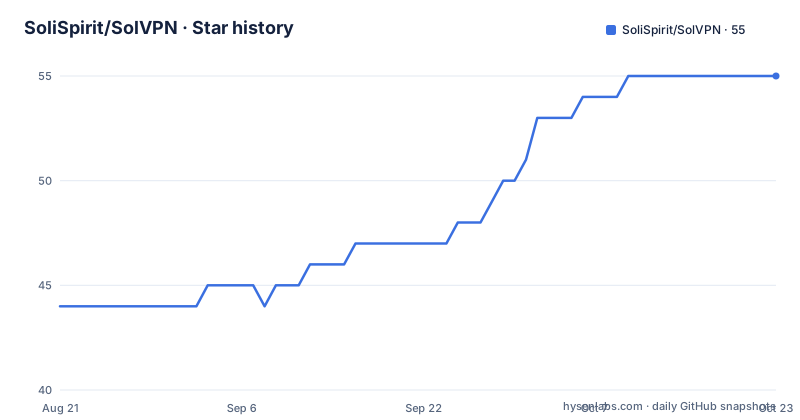
- SoliSpirit/SolVPN55 ★ · +11
| Repository | 2026-08-21 | 2026-10-22 |
|---|---|---|
| SoliSpirit/SolVPN | 44 | 55 |
11 Stars in the last 62 days, measured from the daily GitHub snapshot. Compare with other projects
Editorial analysis
The repository has no code in it, only text files under three folders
The top level tells you what this is. There are three directories, `Countrys/`, `Protocols/` and `Subscribes/`, one loose file called `all_configs.txt`, eighteen README files in different languages, and nothing else. No source directory, no build file, no package manifest, no LICENSE file.
That shape has consequences worth being blunt about. There is no binary to audit, which is also to say there is no code to audit. There is nothing to build and nothing to break. What you consume is a list of connection parameters hosted on GitHub's raw content endpoint.
The repository description states that the configs are auto-updated every 30 minutes and pre-tested for connectivity. There are no GitHub releases, so the only record of any change is the commit log, and the last push landed on 2026-09-30.
The primary language field is empty and no license is recorded. For a file collection rather than software that is arguably academic, except that the files are configuration that a client will act on.
The import path is five steps and the first one needs a client you already have
Nothing here installs anything. The documented flow starts from an existing V2Ray client, with V2Box named as the recommended one, and V2RayNG and Shadowrocket listed as also supported.
The steps are: open the client, go to Subscriptions, paste any link, click Update or Refresh, then connect.
That middle step is the entire interface. There is no account, no API key, no configuration file, no website. The subscription URL is the only thing you exchange with this project.
The links themselves are raw content URLs under a `Subscribes/` path on the main branch, and the README shows them running from `sub1.txt` upward:
https://raw.githubusercontent.com/SoliSpirit/SolVPN/main/Subscribes/sub1.txt
https://raw.githubusercontent.com/SoliSpirit/SolVPN/main/Subscribes/sub2.txt
https://raw.githubusercontent.com/SoliSpirit/SolVPN/main/Subscribes/sub3.txt
Because the links point at a branch rather than a tag, the content behind a given URL changes underneath you, which is the point of an auto-updated feed and also the reason to expect a subscription to look different after a refresh.
Protocol files and subscription files are two different ways in
The repository offers its contents through two routes, and they are not equivalent.
The `Protocols/` directory has one file per protocol: `vless.txt`, `vmess.txt`, `shadowsocks.txt` and `trojan.txt`. Those are protocol-specific lists, so if you only want Shadowsocks or only want Trojan, you take one file rather than the whole pool.
The `Subscribes/` directory is the general route, and there is also `all_configs.txt` at the repository root, which by its name is the union of everything.
Which one you use is a question about what your client does with a subscription. A client that refreshes a subscription expects a feed it can re-pull, and a protocol file is just another feed of the same kind. The practical difference is filtering: subscribing to a whole list gets whatever is in it, while a protocol file narrows the mix without narrowing the geography.
The README advertises four protocols and lists them as VLESS, VMESS, SS and Trojan, with SS being the abbreviation for Shadowsocks.
Countrys/ is a directory you browse, which makes it the one manual step
Country configs are handled differently from everything else, and it shows in how they are linked. Instead of a raw file URL that a client can pull, the README points at the `Countrys/` directory as a GitHub tree.
That is a browse-and-pick arrangement. You open the directory on GitHub, look at what is inside, and take from it manually. There is no documented way to subscribe to a single country.
The practical difference shows up the moment geography matters. Subscription files are undifferentiated pools, so what you get is whatever the collector happened to gather, mixed. The country directory is the only place in the repository where the contents are organised by something other than protocol.
If your use case depends on a specific region, that is the part to inspect before importing anything, and it is also the part with no automation behind it.
The description says pre-tested, the disclaimer says publicly collected
The two halves of the README describe different products, and reading them together is the honest way to assess what you are importing.
The feature list advertises free and premium-like configs, high speed optimized servers, regular updates, easy import and one-click subscription support. The repository description goes further and says the configs are pre-tested for connectivity.
The disclaimer, at the bottom, says the configs are publicly collected, that performance may vary, and to use them responsibly. The FAQ is equally unpromising about reliability, answering the question of why some links are slow with the observation that servers vary by region and load.
Those statements are compatible, and reconciling them is the reader's job. A connectivity check says a config answered at some point, which says nothing about latency, throughput, uptime, or who else is using the same endpoint. Servers that vary by region and load are, by definition, shared resources, and a shared resource has no owner making promises about it.
Eighteen README translations and not one line of licensing
The one piece of real engineering effort visible in the repository is documentation reach. Alongside the English README there are translations for Persian, Arabic, Russian, Simplified Chinese, Turkish, Hindi, Spanish, French, German, Italian, Portuguese, Japanese, Korean, Indonesian, Vietnamese, Polish and Ukrainian. That is seventeen translations, which is a deliberate investment in distribution rather than in tooling.
The licensing situation is the opposite. There is no LICENSE file in the tree, and no license identifier in the repository metadata. For a text collection that is an unusual gap, because the files belong to someone else and there is no stated permission to redistribute it.
For a user that is mostly academic. For anyone who wants to take the file list and publish it somewhere else, or to build a tool on top of the collection, the question of what they may do with it has no answer in the repository, and the answer has to come from the people who run it.
The usage instructions and the client support list are repeated identically across the translations, so the choice of language has no effect on what the project claims.
Editorial conclusion
SolVPN suits someone who wants a starting set of V2Ray configs to try from several regions without running a collector themselves, and who is comfortable pasting raw GitHub URLs into a client. It does not suit anyone who needs a private endpoint, a stable address or terms they can rely on, because the configs are described as publicly collected, performance may vary, and the repository carries no license file. Before importing anything, read the disclaimer rather than the feature list, and treat every link in it as disposable.
Frequently asked questions
How do I import SolVPN configs into a V2Ray client?
Open the client, V2Box being the recommended one, go to Subscriptions, paste any subscription link, and click Update or Refresh. V2RayNG and Shadowrocket are also supported.
Which protocols does SolVPN publish?
Four: VLESS, VMESS, Shadowsocks and Trojan, each with its own file under Protocols/. The subscription files under Subscribes/ mix the protocols, and all_configs.txt at the repository root holds the combined list.
Why are some SolVPN configs slow?
The README's answer is that servers vary by region and load. Its disclaimer also states that the configs are publicly collected and that performance may vary, so no individual endpoint is claimed to be reliable.
How often are SolVPN configs updated?
The repository description states they are auto-updated every 30 minutes. There are no GitHub releases, so the commit log is the only record of what changed, and the last push landed on 2026-09-30.
Can I pick SolVPN configs for one country?
Country configs are kept in a Countrys/ directory that the README links as a GitHub tree rather than as a raw file, so choosing by country means browsing the directory and taking what you want by hand.
Official sources
Add this badge to your README
If you maintain this project, the badge below links readers to this analysis and shows its maintenance status from the daily GitHub snapshot. Paste the markdown into your README; add ?metric=license or ?metric=stars to the image URL for a different field.

[](https://hysenlabs.com/projects/solispirit-solvpn)Star history chart for your README
[](https://hysenlabs.com/projects/solispirit-solvpn)