Kondo calls itself rm -rf with a prompt, and its release page is three months older than its last commit
Cleans dependencies and build artifacts from your projects.
At a glance
- What is it?
- Kondo is a Rust workspace with a command line cleaner and a separate desktop interface for removing dependency and build directories across more than twenty ecosystems. The project states plainly that it is essentially rm -rf with a prompt, warns you to keep backups, and has shipped three tags in three years.
- Who is it for?
- Kondo earns trust the honest way, by stating what it is in the same words as the shell command it imitates and by pointing at the line of code that makes the claim. Use it on directories you can restore, keep the backup the project insists on, and read the help output before enabling symlink following or a filesystem restriction, since the readme names both options without explaining either.
- Can I use it commercially?
- Yes. MIT is a permissive licence: you can use, modify and sell software built on it, as long as you keep its copyright and licence notices.
- Is it still maintained?
- Activity is slowing. The repository last received commits 7 months ago.
- What is it written in?
- Mainly Rust, according to GitHub's language statistics.
Answers come from the project's GitHub data, last synced on November 22, 2026, and from our analysis. They are not legal advice.
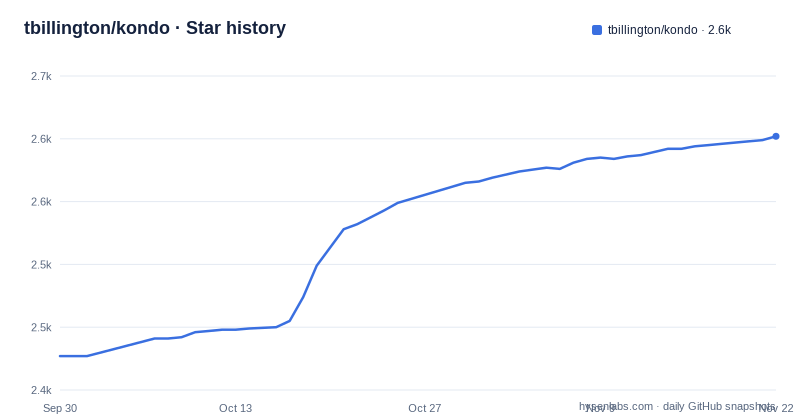
Star history
- tbillington/kondo2,602 ★ · +175
| Repository | 2026-09-30 | 2026-11-22 |
|---|---|---|
| tbillington/kondo | 2.4k | 2.6k |
175 Stars in the last 53 days, measured from the daily GitHub snapshot. Compare with other projects
Editorial analysis
The safety claim points at one line of one file at one commit
Twice, once in the installation section and once at the top of usage, the project repeats the same warning: Kondo is essentially `rm -rf` with a prompt, to be used at your own discretion, and you should always have a backup of your projects.
The word essentially is a link, and it points at line 236 of `kondo-lib/src/lib.rs` in a specific commit, not at the current head of the branch. That is the strongest claim in the readme, because a reader can open one line and check whether the deletion goes through a confirmation step. It is also a claim that only stays meaningful for that commit, so a later refactor that moves the delete elsewhere leaves the sentence pointing at stale code.
The line lives in the shared crate rather than in either front end, which is why one sentence can describe both products. The workspace has three members, a command line binary, a library, and a desktop interface, and both binaries act through the same library code, so the interface inherits the confirmation behaviour rather than implementing its own.
Building from the root gives you the CLI and nothing else
The workspace manifest names three members, `kondo`, `kondo-lib` and `kondo-ui`, and then narrows that list for ordinary commands with a default-members entry containing only `kondo`.
That single line explains an instruction in the readme that otherwise looks like advice rather than a requirement. The development section says you can run `cargo build` and `cargo run` from the project root to build the command line tool, and that you must first navigate into the `kondo-ui` directory to do the same for the interface. The navigation is not a convention. Without a default-members narrowing, a build at the root would compile the desktop interface too, and it would need a graphical toolchain and its platform libraries.
The same manifest also configures the development profile to emit line tables only, which keeps file and line information in debug builds without carrying full debug data. For a tool that deletes directories, that is the difference between a panic message that points at a file and line and one that points at an address.
The release profile is sized around a dependency the CLI never loads
The release profile in the workspace manifest is tuned hard, and the reason is written in a comment next to it: without these settings the bevy executable is over 200MB.
The settings are thin link time optimization, a single codegen unit, no debug info, `panic = "abort"` and symbol stripping. Two of them matter beyond file size. Aborting on panic means a failing thread takes the whole process down instead of unwinding, so anything that relied on catching a panic, including a wrapper that hoped to report a failure and continue, cannot do that in a release build. Stripping removes the symbols that make a core dump useful.
The dependency that motivates all of this belongs to the desktop interface, not to the cleaner. The command line binary carries the same release profile anyway, because profiles are set per workspace, so the smallest of the two products is compiled under settings chosen to tame the largest.
Three tags in three years, and the newest one is three months behind the source
The release record is three entries with no patch component at all: v0.7 on 2023-07-06, v0.8 on 2023-12-19 and v0.9 on 2026-01-23. The gap between the second and third is about eighteen months, and the gap between the third and the last commit to the repository, dated 2026-04-24, is another three months.
So the binaries offered on the releases page, and the builds distributed through the package managers, are all older than the code in the repository. Anyone who wants the current behaviour has to install from source, and anyone tracking the project has no signal between a tag and a commit other than the commit date itself. The workspace root carries no version field either, so the tags are the only place a version number for the product exists.
Coarse tags have a second effect. With no patch level, two builds that differ by a handful of commits are still the same version string, which makes it awkward to describe a fix to someone who installed from a package manager, since their binary reports the number the newest tag reports.
Six install routes for the CLI and four for the interface
The command line tool is offered through winget, Homebrew, MacPorts, Arch Linux, a source build, and binaries on the releases page. The desktop interface is offered through winget, Arch Linux, a source build, and the same releases page. Homebrew and MacPorts carry the cleaner and not the interface.
The packaging metadata reflects the split in another way. Two repology project links are embedded, one under the name `kondo` and one under `rust:kondo-ui`, so the cleaner is packaged under a name of its own while the interface sits in the namespace used for Rust crates that have no distribution of their own.
Both source installs clone the same repository and install one member of the workspace:
git clone https://github.com/tbillington/kondo.git
cargo install --path kondo/kondo
The interface source path installs the other member, and its instructions add a prerequisite that the cleaner does not have, a Rust toolchain plus platform specific dependencies on Linux. That link points at the platform notes of a different project entirely, which is the clearest sign in the readme that the interface is built on someone else's toolkit.
The two options that decide how much gets deleted are the two it never explains
Beyond the age filter, the usage section names three more options in one sentence and sends the reader to the help output for the rest: quiet mode, following symlinks, and a filesystem restriction.
Two of those decide how much is reachable. Following symlinks changes whether a link inside a scanned tree is descended into, and a filesystem restriction is the option that would confine the tool to a subtree. Neither is described here, and the readme states no default for either. For a program the project itself compares to `rm -rf`, that is the paragraph a cautious reader wants and does not get.
The age filter is documented with two different sentences that agree. The prose says projects not modified for at least the given period are selected, and the comment beside the example says only projects with a last modified time greater than three months. What that timestamp belongs to, the directory itself or the files inside it, is not stated, and neither is what happens to a directory that is old but is not one of the recognised project types.
Twenty-three ecosystems are named and the badge claims twenty plus
The inventory runs to twenty-three entries, each with the languages it covers, and the badge above it claims twenty plus supported project types. The count is a floor rather than a claim of exactness, and the entries are not all the same kind of thing.
Several are ecosystems, several are build systems, and several are tools that own a directory the way Cargo owns `target`. One is a version qualifier: the Godot entry reads 4.x and names C# and GDScript, so a project on an older engine version is outside what the list covers. Others are broader than a language, Python and .NET both appear with the languages they serve, and .NET is annotated with C# and F#.
The headline claim is about breadth rather than depth, and the readme gives no per-entry detail. Nothing says which directory each type owns, whether a recognised type nested inside another is handled, or what a project type gets added when a new tool defines a new cache directory.
Eight alternatives are linked and none of them is described
The closing section names eight other projects and links each one: The Tin Summer, Detox, Sweep, npkill, Cargo Cleanall, Cargo Sweep, Cargo Wipe and cargo-clean-recursive.
There is not one sentence about what any of them does differently. No sentence says which ones are terminal tools, which are graphical, which scan a filesystem for candidates and which clean up a Cargo workspace, and no sentence says what Kondo does that the list does not.
The names suggest the split the readme leaves unstated. Five of the eight are Cargo specific, which places them in the same territory as one of Kondo's own twenty-three ecosystems rather than against the whole product, while the others read as general disk tools. A reader choosing between Kondo and Cargo Wipe, or between Kondo and npkill, gets nothing from this section to decide on.
Editorial conclusion
Kondo earns trust the honest way, by stating what it is in the same words as the shell command it imitates and by pointing at the line of code that makes the claim. Use it on directories you can restore, keep the backup the project insists on, and read the help output before enabling symlink following or a filesystem restriction, since the readme names both options without explaining either. Install from source rather than from a package manager if you need the code from the last three months of commits, because the newest release is v0.9 from 2026-01-23 while the last commit is dated 2026-04-24. And treat the interface as the weaker half of the project: it ships through two package channels instead of six, and it is the crate whose size profile is tuned around a dependency the command line tool never loads.
Frequently asked questions
How do I install Kondo and what does it remove?
The command line tool installs with `winget install kondo`, `brew install kondo`, `sudo port install kondo` or `pacman -S kondo`, or from source with `cargo install --path kondo/kondo` after cloning the repository. It cleans dependency and build directories such as `node_modules`, `target` and `build` across 23 named ecosystems including Cargo, Node, Python, Gradle, Maven, Unity, Unreal Engine, Zig, Terraform and Turborepo.
Does Kondo delete source files, and what is its own safety warning?
The project states twice that Kondo is essentially `rm -rf` with a prompt, to be used at your own discretion, and that you should always have a backup of your projects. The word essentially links to line 236 of the library crate in one specific commit, and the readme names no dry run and no undo.
What do the Kondo --older and -o options do?
They filter projects to those not modified for at least the given period, so `kondo --older 3M` keeps only projects whose last modified time is greater than three months old, with `-o3M` as the shorthand. The readme sends you to `kondo --help` for the full option list, which is also where quiet mode, symlink following and the filesystem restriction are described.
How do I build the Kondo desktop interface from source?
Navigate into the `kondo-ui` directory first, because the workspace lists only the command line crate as a default member, then run `cargo build` and `cargo run`, or install it with `cargo install --path kondo/kondo-ui`. Its build needs a Rust toolchain and, on Linux, platform specific dependencies belonging to the toolkit it is built on.
What is the latest release of Kondo?
v0.9, dated 2026-01-23, following v0.8 from 2023-12-19 and v0.7 from 2023-07-06. The tags carry no patch component, and the last commit to the repository is dated 2026-04-24, so released binaries are older than the current source tree.
Official sources
Add this badge to your README
If you maintain this project, the badge below links readers to this analysis and shows its maintenance status from the daily GitHub snapshot. Paste the markdown into your README; add ?metric=license or ?metric=stars to the image URL for a different field.

[](https://hysenlabs.com/projects/tbillington-kondo)Star history chart for your README
[](https://hysenlabs.com/projects/tbillington-kondo)Was this useful?