CognitiveKernel-Pro runs generated Python against the web with no safety checks
Deep Research Agent CognitiveKernel-Pro from Tencent AI Lab. Paper: https://arxiv.org/pdf/2508.00414
At a glance
- What is it?
- A Tencent AI Lab framework that pairs a deep research agent with the supervised fine-tuning recipe used to produce it, released alongside two HuggingFace datasets and a Qwen3 checkpoint. Its web engine executes the Python the model writes, and the documentation says so plainly and recommends a sandbox.
- Who is it for?
- CognitiveKernel-Pro suits a research team that wants to reproduce or extend a deep research agent rather than call a hosted one, since the SFT recipe, the datasets and the checkpoint are all published and the GAIA example gives a concrete starting point. The web engine is the obstacle: it runs the Python the agent generates, the documentation states there are currently no safety checkings, and the sandbox instructions are part of setup rather than an optional appendix.
- Can I use it commercially?
- Check first. The repository uses a licence we do not classify automatically, so read its LICENSE file before any commercial use.
- Is it still maintained?
- Yes. The repository last received commits 24 days ago.
- What is it written in?
- Mainly Python, according to GitHub's language statistics.
Answers come from the project's GitHub data, last synced on November 13, 2026, and from our analysis. They are not legal advice.
Star history
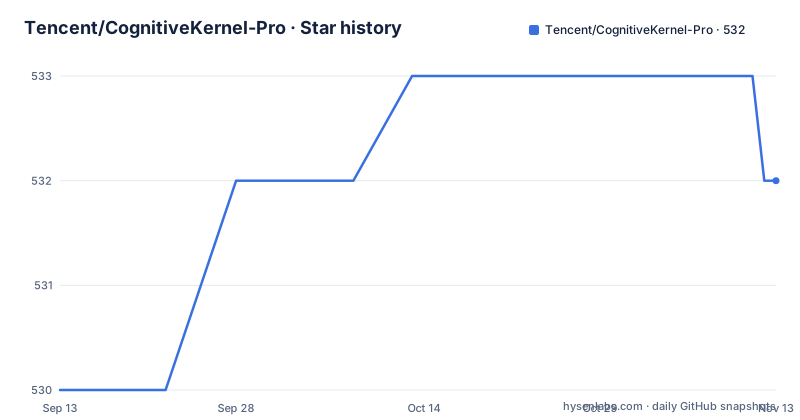
- Tencent/CognitiveKernel-Pro532 ★ · +2
| Repository | 2026-09-13 | 2026-11-13 |
|---|---|---|
| Tencent/CognitiveKernel-Pro | 530 | 532 |
2 Stars in the last 61 days, measured from the daily GitHub snapshot. Compare with other projects
Editorial analysis
Two products in one repository: the agent and the recipe
The framing in the title is the thing to understand first. CognitiveKernel-Pro is a framework for deep research agents and for training agent foundation models, and the repository ships both halves rather than only the inference side. The two headline claims are stated as bullets at the top. The first is that it is a state of the art open-source agent that uses as many free tools as it can, with one exception: the Google Search API is the only paid tool, and it can be swapped for the free DuckDuckGo API if that matters. The second is that the fully reproducible open-source supervised fine-tuning recipe outperforms RL-based models such as WebDancer and WebSailor without needing reinforcement learning at all. Reinforcement learning recipes are still provided for further gains, specifically subgoal-GRPO, and the manuscript was updated on 04/22/2026 to include the RL experiments and that algorithm.
One paid tool, and DuckDuckGo is the swap
The cost story is narrow but it is not zero, and the documentation is upfront about where the line sits. Search is the single commercial dependency, handled through the Google Search API. Everything else is either an open model endpoint or a package you install yourself, which is why the dependency list is long and unglamorous: document parsers and converters including `pdfminer-six`, `pdf2image`, `python-pptx`, `mammoth`, `markdownify` and `puremagic`, audio work through `pydub` and `SpeechRecognition`, `youtube-transcript-api` and `bs4` for web text, `openpyxl` and `biopython` for spreadsheets and sequences, `boto3` and `botocore` for AWS, and then the agent plumbing with `langchain`, `langchain_openai`, `transformers`, `selenium`, `helium` and `smolagents`. Python 3.12 is the recommended version. If you are running this at scale, the DuckDuckGo substitution is the one lever the project hands you for reducing the bill.
The web engine executes generated Python with no safety checks
This is the most important sentence in the setup guide, and it appears twice, once for Linux and once for macOS: it is recommended to run this program in a sandbox since the generated Python code is directly executed and currently there are no safety checkings. The mechanism is a Playwright-powered web server, and the agent writes Python to drive it, so the trust boundary is your own machine rather than a remote container. The documentation's own mitigation is to strip the user's sudo access, and the commands are provided for both platforms. On Linux that means writing an `ALL=(ALL) NOPASSWD: !ALL` rule into a file under `/etc/sudoers.d/`, restricting it to mode 440, removing the user from the sudo group with `deluser`, and renaming the machine to localhost with `hostnamectl`:
deluser ${USER} sudo
hostnamectl set-hostname localhost
Anyone evaluating this project should read that block as a requirement, not as a suggestion.
Linux and macOS differ down to the privilege strip
The web engine needs system packages that differ by platform, which is why there are two separate scripts. On Linux the dependency line installs poppler-utils, a default JRE, the LibreOffice common and Java common packages plus LibreOffice itself, and ffmpeg, after which you start the server with `sh ck_pro/ck_web/_web/run_local.sh`. On macOS the equivalent uses Homebrew, installing LibreOffice as a cask plus poppler and ffmpeg, and starts through `run_local_mac.sh`. The privilege strip is the part that differs mechanically rather than conceptually: macOS has no `deluser`, so the sudo removal is `dseditgroup -o edit -d "$USER" admin`, and the hostname change is `scutil --set HostName localhost` rather than the systemd equivalent. Both platforms then run the same Python entry point. The web server listens on a configurable port and is referenced from the agent configuration as the browser host.
One configuration slot accepts vLLM, GPT or Claude
Model selection is done through environment variables that the agent configuration interpolates, and the same variable takes several shapes. `LLM_URL` can be a plain OpenAI-compatible endpoint, which the examples point at a self-hosted vLLM server at `http://xx.xx.xx.xx:8080/v1/chat/completions`, or a prefixed identifier such as `gpt:gpt-4.1`, or a bare `claude:` prefix. `VLM_URL` follows the same pattern for the multimodal path. The main arguments are then a Python dictionary literal carrying the web agent model target, the multimodal model target and the web environment keywords including the browser address, which is why `PYTHONPATH` has to point at the repository before any of it runs. Sub-agents can be pointed at a different model from the main agent, which the extra configuration example shows by keeping GPT-4.1 for the sub-agents while the outside main agent is given something else. Reflection adds its own variables, including a separate evaluator model target.
Two datasets and a Qwen3 checkpoint on HuggingFace
The training artefacts are published alongside the code, which is what makes the reproducibility claim checkable rather than rhetorical. Two datasets sit under the CognitiveKernel organisation on HuggingFace, one ending in Query and one in SFT, and a model checkpoint is published as Qwen3-8B-CK-Pro, so an eight-billion-parameter base is what the released recipe was applied to. There is also a companion repository for WebAggregator, introduced by the 10/17/2025 technical report on synthesising deep research agent data, titled Explore to Evolve and concerned with scaling evolved aggregation logic through proactive online exploration. The repository itself is unusually flat for something of this size: a `.gitignore`, a `LICENSE.txt`, a `readme.md` in lower case, a `results.png`, a `data/` directory, and `ck_pro/` holding effectively everything else, with paths in the documentation referring into `ck_pro/ck_web/` and `ck_main/_test/`.
Four dated updates and three ACL 2026 acceptances
The updates section doubles as a roadmap, and the dates tell you how the work moved. In October 2025 the focus was data synthesis, with the WebAggregator report. By April 2026 the project had turned toward self-evolution: on 04/08/2026 three components were reported as accepted at ACL 2026, with WebAggregator in the main track on synthesising deep research agent SFT and RL data, an inference-time scaling paper in the Findings track on self-evolving agents through test-time rubric-guided verification, and a paper in Findings on offline RL for better critical step assignment. On 04/20/2026 a technical report followed on training agents for spontaneous, reward-free self-evolution through world knowledge exploration. Then on 04/22/2026 the main manuscript itself was revised to fold in the RL experiments. The last push to `main` was 2026-04-29, the repository is not archived, and there are no GitHub releases, so there is no tag to pin and the paper is the only version marker.
Editorial conclusion
CognitiveKernel-Pro suits a research team that wants to reproduce or extend a deep research agent rather than call a hosted one, since the SFT recipe, the datasets and the checkpoint are all published and the GAIA example gives a concrete starting point. The web engine is the obstacle: it runs the Python the agent generates, the documentation states there are currently no safety checkings, and the sandbox instructions are part of setup rather than an optional appendix. Read those instructions and follow them before anything else if you run this. After that, verify which model endpoint you point it at, because the same configuration accepts a self-hosted vLLM URL, a prefixed GPT target or a Claude prefix, and the sub-agent model can differ from the main one. Finally, note the licence position, since the repository records no standard identifier and the MIT badge in the readme is commented out, so check LICENSE.txt against your own plans.
Frequently asked questions
What paid services does CognitiveKernel-Pro need?
One, the Google Search API, which the documentation calls the only paid tool in the agent's toolset. It can be replaced with the free DuckDuckGo API if needed. Model access is separate and can point at a self-hosted vLLM endpoint, a prefixed GPT target or a Claude prefix through the LLM_URL and VLM_URL environment variables.
Is it safe to run the CognitiveKernel-Pro web engine on my machine?
The documentation recommends running it in a sandbox because the generated Python code is directly executed and there are currently no safety checkings. It provides commands to strip sudo access for both Linux and macOS, writing a NOPASSWD restriction into sudoers, removing the user from the sudo group, and renaming the host to localhost.
Which Python version and packages does CognitiveKernel-Pro need?
Python 3.12 is recommended. The install list covers document and audio handling with packages such as pdfminer-six, pdf2image, python-pptx, mammoth, markdownify, puremagic, pydub and SpeechRecognition, plus boto3, openpyxl, biopython, youtube-transcript-api, bs4, langchain, langchain_openai, transformers, selenium, helium and smolagents.
What training data and checkpoint did Tencent publish?
Two HuggingFace datasets under the CognitiveKernel organisation, one ending in Query and one in SFT, and a checkpoint published as Qwen3-8B-CK-Pro. The supervised fine-tuning recipe is described as fully reproducible and as outperforming RL-based models such as WebDancer and WebSailor, with subgoal-GRPO recipes supplied for further improvement.
Official sources
Add this badge to your README
If you maintain this project, the badge below links readers to this analysis and shows its maintenance status from the daily GitHub snapshot. Paste the markdown into your README; add ?metric=license or ?metric=stars to the image URL for a different field.

[](https://hysenlabs.com/projects/tencent-cognitivekernel-pro)Star history chart for your README
[](https://hysenlabs.com/projects/tencent-cognitivekernel-pro)Was this useful?