Touying: presentation slides as a Typst package, animated one pause at a time
Touying is a powerful package for creating presentation slides in Typst.
At a glance
- What is it?
- Touying turns a Typst document into a slide deck with progressive animation, speaker notes, themes and PDF bookmarks. It is also the only slide system I have found that will compile the same file as prose.
- Who is it for?
- Touying's real contribution is the claim that a slide is a document with a reveal order, and that most of what makes slide software hard is the tooling wrapped around that idea rather than the idea. Once you accept heading-based slides, the `#pause` model and the rest follow, and the article mode in 0.8 is the payoff: the same source file can be a deck or an essay.
- Can I use it commercially?
- Yes. MIT is a permissive licence: you can use, modify and sell software built on it, as long as you keep its copyright and licence notices.
- Is it still maintained?
- Yes. The repository received new commits within the last day.
- What is it written in?
- Mainly Typst, according to GitHub's language statistics.
Answers come from the project's GitHub data, last synced on November 7, 2026, and from our analysis. They are not legal advice.
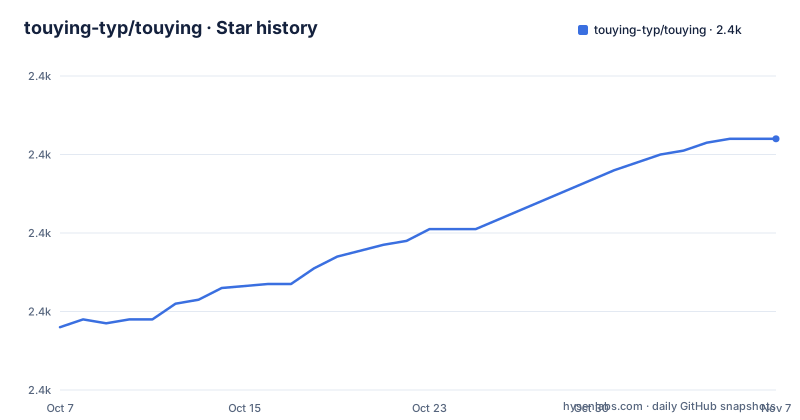
Star history
- touying-typ/touying2,424 ★ · +48
| Repository | 2026-10-07 | 2026-11-07 |
|---|---|---|
| touying-typ/touying | 2.4k | 2.4k |
48 Stars in the last 31 days, measured from the daily GitHub snapshot. Compare with other projects
Editorial analysis
Slides defined by headings, not by page breaks
Touying is a package for Typst, and its central idea is that a presentation is a document. You write headings the way you write a document, and the package turns those headings into slides. The README calls this heading-based slides: write presentations like a document, no boilerplate.
That single choice removes the largest category of friction in slide tooling. There is no slide master to configure, no layout grid to fight, and no separation between the text you write and the structure that renders it. Typst handles the typesetting, which means the mathematics in a technical talk is set by the same engine that sets a paper.
The performance argument follows from the same place. Typst compiles in milliseconds, so live previews update as you type. For a presenter iterating on an argument, that feedback loop is the feature, and it is a direct consequence of the compiler being a few thousand times faster than the traditional slide toolchains.
The repository is a Typst package rather than an application. The tree has `lib.typ` at the root as the entry point, a `src/` directory for the implementation, `themes/`, `examples/`, `docs/` and `tests/`, plus `typst.toml` as the package manifest and `changelog.md`. Six built-in themes ship in the box, named Simple, Metropolis, Dewdrop, University, Aqua and Stargazer, which matches the badge in the README claiming six themes.
Animation is content, not a separate timeline
The feature list leads with rich animation, and the mechanism is worth understanding because it is not the PowerPoint model. Rather than assigning animation effects to shapes in a timeline, Touying interpolates content across states, and the state advances when you say so.
The two entry points for that are `#pause` and `#meanwhile`. A pause splits a slide into subslides that reveal on keypress, and `meanwhile` marks content that stays on screen while later content appears. The difference is the whole trick: `#pause` is a temporal boundary in the source, and because the source is text, animation order is reviewable in a diff.
Version 0.8.0 added two more entry points. `touying-render` renders a piece of content at chosen animation stages, and `animate` combines visibility and styling on a single piece of content. The package also gained full animation support inside equations, including in functions such as `frac` and `mat`, which is a level of detail that suggests the animation model operates on the laid-out content rather than on a wrapper.
Nested animation is supported through `touying-fn-wrapper-raw`, which parses and nests its body so that a pause works inside an alert box:
#pause
#alert[.. #pause ..]
`touying-recall` grew in the same release, from recalling whole slides to recalling any labelled element, and list animations became layout-stable both item by item and when a `parbreak` makes the list non-tight. Stability in that sense matters: an animation that changes layout as it advances produces a deck that visibly reflows in front of an audience.
The same source file compiles as slides or as prose
Article mode is the headline feature of version 0.8.0, and it is the one that makes Touying more than a slide package. The same source file compiles either to slides or to a flowing prose document, with animations collapsed to their final state and images optionally floated to the side.
Think about what that removes. A technical talk usually has a written form, because the argument needs prose and a slide is a poor container for it. With article mode, the written form is not a second document you maintain in parallel. It is the same file, rendered differently, and it cannot drift from the deck.
0.8.0 is also the first release that requires Typst 0.15, which makes it a deliberate breaking point rather than a routine minor release. Anyone on 0.7.x cannot simply update the package.
The internals moved substantially to support this. `src/core.typ`, which the README counts at 6,288 lines, was split into modules and its content handling unified, with several functions previously in utils relocated. A change of that size in a package that people use for conference talks is worth noting, because it suggests a refactor rather than an addition. A `measure` function that overrides Typst's own was introduced, so animated content can be measured, and `touying-reducer` was improved to make integration with other packages more straightforward.
Speaker notes, dual screens and export paths
Presenting is where most slide packages lose the plot, and Touying treats it as a first-class concern. Speaker notes are supported with dual-screen output through tools like PowerPoint, HTML or pympress, so the audience sees the slide and the presenter sees the notes on a second display.
In 0.8.0 the speaker-note panel became a theme-supplied function with documentation to match. That sounds like a small change and is actually a meaningful one: before it, the note panel was fixed by the package, and now a theme author controls it. For anyone who cares about the presenter experience, that is the difference between a usable second screen and a broken one.
The footnote bibliography was rebuilt on real Typst bibliographies in the same release, and `.pdfpc` files can now be written directly as bundle assets rather than through a separate query step. Both are details that only matter if you cite sources in a talk, which for academic audiences is most of them.
Export is layered. PDF export is built in. Experimental editable or visual-fidelity PPTX with speaker notes goes through Tylina, and CLI PPTX and HTML export is available through a separate package, touying-exporter. The README calls the PPTX path experimental, and it also points at a gallery of example decks and a recommended workflow that opens a repository example directly in the web editor for editing, presenting and exporting.
Correct PDF bookmarks and page numbers are listed as a built-in feature. For a package aimed at people who generate documents with Typst, that is table stakes rather than a selling point, and its presence in the list says the author considers it necessary.
What breaks when you upgrade past 0.7
The README maintains a short list of things to watch when upgrading, and it is worth reading in full rather than skimming, because two of the entries are behaviour changes to existing decks.
A `#pause` placed after `uncover`, `only` or `alternatives` no longer skips the subslides those functions reserve. The release notes state that in 0.7.x this happened wrongly, so decks that relied on the old behaviour will now show an extra subslide. That is a fix, but a fix that changes what your audience sees.
`semi-transparent-cover` is deprecated in favour of `alpha-changing-cover` and `color-changing-cover`, which the release says have been overhauled and are now proper cover functions. A deck that used the deprecated function should be migrated rather than left to warn.
The footnote-bibliography configuration changed shape, so bibliography setup needs revisiting. And on a second screen the page background is now confined to the slide half, which fixes a rendering artefact but changes dual-screen output.
The repository maintains a detailed `changelog.md` with a migration guide and a separate guide for theme authors. That second document is the one to read if you maintain one of the six built-in themes or your own, since the speaker-note panel became a theme function and several functions moved between modules in the same release.
The project is not archived and the last push was 2026-09-28, eleven days after the 0.8.0 release on 2026-09-17, with 0.7.4 and 0.7.3 preceding it. GitHub reports 27 open issues against 2,358 stars, which is a reasonable ratio for a package with an active user base.
Where the project actually lives
Touying is one package in a small ecosystem, and the README is candid about that. Slides can be generated and checked with the SeaSlides Skill, edited visually and presented in Tylina, and exported to PPTX or HTML through touying-exporter. Additional themes live on Typst Universe, the package registry, where the README says there is a diverse selection beyond the six built in.
That distribution matters. Touying itself is MIT licensed and the metadata records MIT. The package is consumed through Typst Universe rather than a language package manager, so the version you get is tied to your Typst version, which is the practical reason the 0.15 requirement in 0.8.0 is a real decision point rather than a formality.
Documentation is at touying-typ.github.io, in English and Chinese. The README also points at DeepWiki and Zread for AI-assisted help with the package, which is an unusual pair of recommendations for a Typst package and suggests an audience that asks questions in those places. A gallery wiki collects example decks.
The README page itself is a changelog with a feature list attached. It documents the 0.8.0 release in considerable detail and then stops partway through the help links, with the documentation site taking over. For a package this young and this fast-moving, that is a reasonable division: the README tells you what changed and what broke, the documentation site tells you how to use it, and the examples directory in the repository shows you working code.
Editorial conclusion
Touying's real contribution is the claim that a slide is a document with a reveal order, and that most of what makes slide software hard is the tooling wrapped around that idea rather than the idea. Once you accept heading-based slides, the `#pause` model and the rest follow, and the article mode in 0.8 is the payoff: the same source file can be a deck or an essay. Start with `examples/simple.typ` in the repository rather than the theme gallery, read the migration notes before upgrading past 0.7, and check your Typst version, because 0.8 requires 0.15 and will not build against an older compiler.
Frequently asked questions
What is Touying used for?
Touying is a Typst package for building presentation slides, with heading-based slide structure, progressive animation through pauses and meanwhile, speaker notes for dual-screen presenting, themes and PDF export. It can also compile the same source file as a flowing article.
How do I add an animation to a slide in Touying?
Use the pause function to split a slide into subslides that reveal on keypress, or meanwhile for content that stays visible while later content appears. Version 0.8.0 added touying-render for rendering content at chosen animation stages and animate for combining visibility with styling.
What Typst version does Touying 0.8 require?
Typst 0.15. Release 0.8.0, published 2026-09-17, is the first version that requires it, so upgrading from 0.7.x means changing compiler version as well as package version.
Can Touying export slides to PowerPoint?
Yes, through separate tools rather than the package itself. Tylina provides experimental editable or visual-fidelity PPTX export with speaker notes, and touying-exporter handles CLI PPTX and HTML export. Built-in PDF export is the native path.
Which themes ship with Touying?
Six built-in themes: Simple, Metropolis, Dewdrop, University, Aqua and Stargazer. More themes are published on Typst Universe, the registry where Touying itself is distributed.
Official sources
Add this badge to your README
If you maintain this project, the badge below links readers to this analysis and shows its maintenance status from the daily GitHub snapshot. Paste the markdown into your README; add ?metric=license or ?metric=stars to the image URL for a different field.

[](https://hysenlabs.com/projects/touying-typ-touying)Star history chart for your README
[](https://hysenlabs.com/projects/touying-typ-touying)Was this useful?