fickling: the pickle analyzer that explains its own verdict
A Python pickling decompiler and static analyzer
At a glance
- What is it?
- Fickling is a Trail of Bits decompiler, static analyzer and bytecode rewriter for Python pickle serializations, including PyTorch checkpoints, and it installs as a hook so that loading an unsafe file raises instead of executing. What sets it apart from a pattern matcher is that the exception carries a prose reason and a named variable, and what to watch is that the same tool that blocks payloads will happily write one.
- Who is it for?
- Fickling earns a place the moment your environment loads a file it did not produce, which in machine learning means the first torch.load call against a downloaded checkpoint. Its allowlist hook is the feature to reach for, its exception payload is the feature to log, and its trace mode is the feature to run when a verdict surprises you.
- Can I use it commercially?
- Yes, with conditions. LGPL-3.0 is a weak copyleft licence: you can use it inside commercial and closed-source software, but if you distribute changes to its own files, you must publish those changes under the same licence.
- Is it still maintained?
- Yes. The repository last received commits 2 days ago.
- What is it written in?
- Mainly Python, according to GitHub's language statistics.
Answers come from the project's GitHub data, last synced on November 13, 2026, and from our analysis. They are not legal advice.
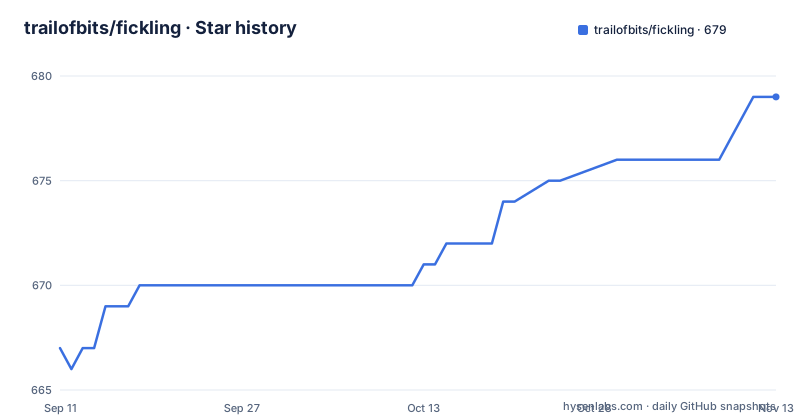
Star history
- trailofbits/fickling679 ★ · +12
| Repository | 2026-09-11 | 2026-11-13 |
|---|---|---|
| trailofbits/fickling | 667 | 679 |
12 Stars in the last 63 days, measured from the daily GitHub snapshot. Compare with other projects
Editorial analysis
Four ways to switch the check on, and only one of them is global
Fickling installs by hooking the pickle module itself, and the documentation offers four granularities for turning that hook on. The recommended one is a single call that enforces a check on every deserialization the process performs, after which loading an unsafe file raises the project's own exception rather than running the payload. The second is a context manager, which checks everything loaded inside the block and nothing outside it. The third replaces the load call with the project's own for a single file, and the fourth inspects a file without loading it at all, which is the one to use when you want a verdict and nothing else. The context manager has a detail that tells you it has been used in anger: on exit it restores whatever was installed when it was entered, so a hook that was already in place stays in effect instead of the module being left unhooked. That is the difference between a nested guard and a leaky one, and it is the kind of behaviour that only gets documented after someone hit it. One flaw to know about if you copy from the documentation: the context-manager example passes a filename string to the standard load call, which expects a file object, so the snippet as written raises a type error before the safety check is even reached.
The safe-environment hook is an allowlist, and the ordering is the whole mechanism
For machine learning specifically there is a second, higher-level hook, and it works by inversion. Instead of trying to recognise malicious imports, it treats the legitimate set as known and blocks everything else. Two lines placed as early as possible in your program install it globally. It hooks the pickle module and, when a model is loaded, verifies the imports that load performs against an allowlist of imports from machine learning libraries considered safe, refusing files that contain anything else. Two operational consequences follow, and both matter more than the mechanism. The first is ordering: the documentation is emphatic that this must run before importing torch, numpy or any other library that uses pickle, because those libraries capture the module reference when they are imported, and a hook installed afterwards is a hook that never fires. The second is the shape of the failure. An allowlist produces false positives on unusual but legitimate models, and the escape hatch is an argument that names extra imports for your case. The project is unusually direct about how to use it: make sure anything you add really is safe and cannot be turned into arbitrary code execution, and if you are not sure, open an issue naming the imports or models so the team can review them and add them to the list if they belong there.
The exception names the call and the variable it was assigned to
This is where Fickling is better than the tools it resembles. When it refuses a file, the exception carries an info attribute with three parts: a severity, a prose explanation, and structured detail. The example in the documentation is worth reading in full because it shows what a good security finding looks like. The severity is the most alarming label the tool has. The explanation says that a call to eval on a byte string is almost certainly evidence of a malicious file, and then adds the reason it is suspicious: a variable was assigned that value and never used afterward. The detail names the two rules that fired, one for the eval call and one for the unused variable. Both halves matter. A security tool that only says unsafe gets overridden by whoever is on call, because there is nothing to argue with; one that shows the exact call and the structural reason lets a reviewer agree, disagree, or recognise a false positive in seconds. The unused-variable heuristic deserves attention on its own, because it encodes a real property of pickle: the format is a stack machine, and the standard trick for smuggling a call is to compute a value and drop it, since the side effect has already happened by the time the value is discarded. Detecting that pattern is what separates analysis from pattern matching.
Tracing the pickle machine without letting it run anything
The command line has a mode that answers the question you actually have when a scanner blocks something: what would this file have done.
fickling --trace file.pklIt walks the pickle virtual machine and prints the execution without exercising any malicious code, which is possible precisely because pickle is a declarative stack program rather than a compiled blob. A file that would call eval, import a module, or reach out through reduce is a sequence of opcodes that an interpreter can follow symbolically, and following it symbolically is what the trace does. This matters for review work, because it converts a yes-or-no verdict into an account you can read and argue with, and it is safe to point at a hostile sample since nothing is executed. The same idea appears in the library through a different door: the decompiler loads a pickled object into a structure that exposes a Python abstract syntax tree, and dumping that tree shows you plain source assigning a list of constants to a result variable. That round trip is why the analysis rules can be written as ordinary tree rules over source code rather than as special cases on raw opcodes, and it is also why the tool is described as a bytecode rewriter rather than only a scanner.
The same tool that blocks a payload will write one for you
There is an injection mode, and it deserves to be named rather than glossed over.
fickling --inject "print('Malicious')" file.pkl > malicious.pklOne flag takes a snippet of Python and writes a file that runs it every time the file is loaded, producing a payload in a single redirected command. The repository ships examples that match: scripts that inject into a PyTorch file and into a published vision model, proof-of-concept generators for the numpy and PyTorch paths, a binary tracer, a hook demonstration, a context manager example, a fault injection example and a file identifier. In isolation this is normal for a security tool. You cannot test a detector you cannot build a sample for, and a proof-of-concept generator is how the maintainers test their own rules and how a defender validates that their hook fires on something real rather than on a synthetic edge case. The reason to raise it is organisational rather than technical: this is a package whose documented feature list includes creating malicious files, and if your environment has a policy about offensive tooling, that fact belongs in the review. Note also what the injection mode is not: it is a rewriter operating on a file you already have, not a scanner you can point at an unknown download without the safety checks enabled elsewhere in your stack.
PyTorch polyglots are why a pickle scanner needs format knowledge
The most interesting section of the documentation is the one about polyglots, and it explains why a scanner cannot be a pickle parser. PyTorch has accumulated several file formats over its life, and because those formats are container formats that embed a pickle stream, a single file can be constructed that is validly interpreted as more than one format at once. A checker that locates the pickle stream and analyses it will look at one interpretation and declare the file clean while a different interpreter, or a different loader, reads something else entirely. Fickling's claim is that it supports identifying, inspecting and creating these polyglots for the PyTorch formats it knows, starting with the earliest one, which is a tar file containing system information, a pickle, storages and tensors, and continuing through the later stacked layouts. That is a claim about coverage of formats rather than about detection heuristics, and coverage is exactly the property that decays: a new checkpoint format is a new thing to support, and until it is, the gap is silent. The reason this matters disproportionately in machine learning is that model files are downloaded automatically, loaded without ceremony, and frequently loaded inside a framework that does not surface the format it used.
One runtime dependency, six extras, and a forked numpy requirement
The dependency story is unusually disciplined and worth reading as a design statement.
# Using pip
python -m pip install fickling

# Using uv
uv pip install fickling
The package requires Python 3.10 or newer and has exactly one runtime dependency, a typing backport that is installed only on interpreters below 3.12. Everything else is optional, and the extras are grouped by job rather than by convenience. The torch extra carries the framework, the vision library, and a numpy requirement that forks on interpreter version, asking for one range on 3.10 and a different, higher range from 3.11 upwards; that fork is the kind of detail that appears when a package supports an interpreter whose available numpy builds stop at a particular release. A lint extra adds the formatter and a type checker. A test extra adds the test runner and coverage and then requires the package's own torch and archive extras, so the suite exercises the real formats. The archive extra exists for 7z support and excludes one specific version of the library, with a comment saying that version was yanked, which is a scar from a real resolution failure rather than a policy. A huggingface extra pairs the model hub client with the torch extra, and a development extra pulls in all of them plus a note about installing a hook runner for git.
The type checker is advisory and the linter is not
The make targets are the clearest statement of what this project considers finished work. Linting runs the formatter in check mode across the tree, runs the linter over the package, and then runs a type checker over the package with the leading dash that make uses to mark a recipe line as non-fatal, followed by a comment explaining that it stays advisory until the annotations are fixed and that this matches the continuous integration workflow.
lint:
	uv run ruff format --check .
	uv run ruff check $(PY_MODULE)
	# advisory until the annotations are fixed, matching lint.yml
	-uv run ty check $(PY_MODULE)
So formatting and lint failures stop you, and type errors are reported and tolerated. That is a defensible position for a security tool in a hurry, and it is honest in a way many projects are not, because the tolerance is written down rather than discovered. The rest of the targets follow the same shape: a fast test path that skips coverage, a full path that runs the suite with coverage and then prints the report, a standalone type check you can run to see the real failure count, a build, a clean that removes the caches including the type checker's own, and editable installs with and without the development extras. Two documentation mismatches are worth noting while you are in the file. The readme says the project is tested from Python 3.9 to 3.13, while the package metadata requires 3.10 or newer and its classifiers run to 3.14.
Editorial conclusion
Fickling earns a place the moment your environment loads a file it did not produce, which in machine learning means the first torch.load call against a downloaded checkpoint. Its allowlist hook is the feature to reach for, its exception payload is the feature to log, and its trace mode is the feature to run when a verdict surprises you. Three things to check before you trust it. Activate the hook before importing torch or numpy, because ordering is the whole mechanism and a late hook protects nothing. Read the allowlist additions your team makes rather than waving them through, since the project says so itself and offers to review them. And decide in advance how your organisation feels about the injection and proof-of-concept tooling in the same package, because a defensive tool that can write the payload is a dual-use artifact by construction and your policy should say where that line sits. Finally, reconcile the version story: the readme, the package metadata and the release tags tell three different stories about which interpreters are supported.
Frequently asked questions
How do I install fickling?
Through pip or uv, and PyTorch support is an optional extra you request as fickling[torch] so the framework is not pulled in by default. The readme says it is tested from Python 3.9 to 3.13, while the package metadata requires 3.10 or newer.
What happens when fickling finds a malicious pickle file?
Loading it raises the project's unsafe-file exception instead of executing it, and the exception carries a severity, a written explanation and structured detail. The documented example flags a call to eval as overtly malicious and adds that the variable it was assigned to is never used, which is the second rule that fired.
How do I protect a machine learning environment with fickling?
Call the safe-environment activation function before importing torch, numpy or anything else that uses pickle. It sets global hooks that verify the imports a model load performs against an allowlist of imports from machine learning libraries, and you can name extra allowed imports per case.
Can I use fickling without writing Python?
Yes. The command line has a safety-check mode that takes a path and checks a pickle file, so a pipeline in another language can call the tool rather than importing the library. There is also a mode that traces the pickle virtual machine without exercising any of the code in the file.
Can fickling show me what a pickle file would do without running it?
The trace mode walks the pickle virtual machine and prints the execution without exercising malicious code. The library can also decompile a file into a Python syntax tree, which is how the analysis rules are expressed over source rather than raw opcodes.
Can fickling create a malicious pickle file?
Yes, and it is a documented feature. An injection flag writes a snippet of code into a file so that it runs every time the file is loaded, and the repository ships proof-of-concept generators and injection examples for the numpy and PyTorch paths.
Official sources
Add this badge to your README
If you maintain this project, the badge below links readers to this analysis and shows its maintenance status from the daily GitHub snapshot. Paste the markdown into your README; add ?metric=license or ?metric=stars to the image URL for a different field.

[](https://hysenlabs.com/projects/trailofbits-fickling)Star history chart for your README
[](https://hysenlabs.com/projects/trailofbits-fickling)Was this useful?