Adversarial Robustness Toolbox: one Python API for evasion, poisoning, extraction and inference attacks
Adversarial Robustness Toolbox (ART) - Python Library for Machine Learning Security - Evasion, Poisoning, Extraction, Inference - Red and Blue Teams
At a glance
- What is it?
- Trusted-AI/adversarial-robustness-toolbox (ART) is an MIT-licensed Python library hosted by LF AI & Data. It wraps models from many frameworks behind estimators so red teams can attack them and blue teams can defend them, and its packaging shows how many optional dependencies that costs.
- Who is it for?
- Use ART if you need to measure or harden a model built in TensorFlow, Keras, PyTorch, scikit-learn, XGBoost or LightGBM against evasion, poisoning, extraction or inference, and you want runnable examples to start from. Skip it if you expect a one-line pip workflow documented in the repository, since installation instructions live on a wiki page.
- Can I use it commercially?
- Yes. MIT is a permissive licence: you can use, modify and sell software built on it, as long as you keep its copyright and licence notices.
- Is it still maintained?
- Yes. The repository last received commits 3 days ago.
- What is it written in?
- Mainly Python, according to GitHub's language statistics.
Answers come from the project's GitHub data, last synced on November 7, 2026, and from our analysis. They are not legal advice.
Star history
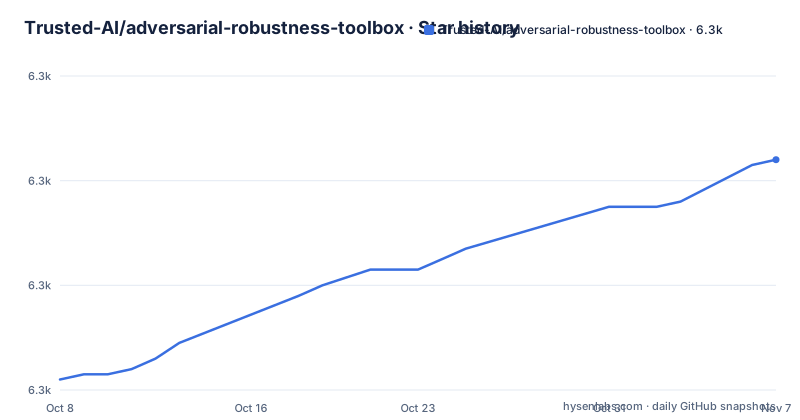
- Trusted-AI/adversarial-robustness-toolbox6,304 ★ · +42
| Repository | 2026-10-08 | 2026-11-07 |
|---|---|---|
| Trusted-AI/adversarial-robustness-toolbox | 6.3k | 6.3k |
42 Stars in the last 30 days, measured from the daily GitHub snapshot. Compare with other projects
Editorial analysis
ART describes four threat classes and two audiences in one library
ART is a Python library for machine learning security, hosted by the Linux Foundation AI & Data Foundation. Its stated purpose is to let developers and researchers defend and evaluate models and applications against four adversarial threats: Evasion, Poisoning, Extraction and Inference. The repository description adds Red and Blue Teams, which is how the project frames its two audiences. Red teams run attacks to find weaknesses, and blue teams apply defences and measure whether they hold.
The breadth claim is wide. ART says it supports all popular machine learning frameworks, and names TensorFlow, Keras, PyTorch, scikit-learn, XGBoost, LightGBM, CatBoost and GPy. It lists data types including images, tables, audio and video, and tasks including classification, object detection, speech recognition, generation and certification.
The license is MIT, the language is Python, and the repository is not archived. The homepage points to a Read the Docs site, while the practical guides sit in the GitHub wiki: Get Started, Attacks, Defences, Estimators and Metrics. A README-cn.md gives a Chinese version of the introduction.
Estimators are the wrapper that lets one attack run against many frameworks
The documentation index has a page for Estimators next to Attacks, Defences and Metrics. That structure explains how ART reaches so many frameworks. A model is wrapped in an estimator for its framework, and the attack or defence works against the wrapper instead of against TensorFlow or PyTorch directly.
The example scripts show the pattern per framework. The examples folder contains get_started_keras.py, get_started_pytorch.py, get_started_tensorflow_v2.py, get_started_scikit_learn.py, get_started_xgboost.py and get_started_lightgbm.py. There are also scripts for object detection with Faster R-CNN and YOLO, and one for a GOTURN tracker in PyTorch.
The consequence is that you pick the estimator for the framework your model already uses, and a framework without one is outside the supported set. The README says all popular frameworks, but the extras in setup.py are the verifiable list: catboost, gpy, keras, lightgbm, tensorflow, and more. A model type that is not in those lists needs custom work.
Attack examples cover FGSM on MNIST, backdoors and poison detection
The examples folder is the quickest way to see what the library does. For evasion, mnist_cnn_fgsm.py runs a fast gradient sign attack against an MNIST convolutional network, and mnist_cnn_features_level_fgsm.py applies the idea at the feature level. For poisoning, mnist_poison_detection.py covers detection, and backdoor_attack_dgm_red.py and backdoor_attack_dgm_trail.py cover backdoor attacks on generative models.
The defence side is mostly adversarial training. Scripts include adversarial_training_FBF.py, adversarial_training_awp.py, adversarial_training_cifar10.py, adversarial_training_data_augmentation.py, adversarial_training_oaat.py and adversarial_training_trades.py. Those file names point to several training schemes, each in its own script, so you can compare approaches on the same data.
A separate notebooks folder holds longer walkthroughs, indexed in notebooks/README.md. The README text itself is short, and the scripts are where the detail is. An attack class name is only discoverable through the Attacks wiki page or these files, so expect to read code.
The core install pulls only numpy, scipy, scikit-learn, six, setuptools and tqdm
The base dependencies in setup.py are small: numpy 1.18.0 or newer, scipy 1.4.1 or newer, scikit-learn 0.22.2 or newer, six, setuptools and tqdm. Everything framework specific is an optional extra. The extras visible in setup.py include catboost, gpy, keras (which adds h5py), lightgbm and tensorflow (which also adds h5py), plus a tensorflow_image variant that adds Pillow and ffmpeg-python.
That design keeps a scikit-learn user from installing TensorFlow. The cost is that a missing extra shows up at the moment you run an estimator for that framework. Check which extra matches your model before a long experiment.
The package is published as adversarial-robustness-toolbox, and the version is read from art/__init__.py. The pyproject.toml holds only tool settings: Black with a line length of 120, ruff with F401 ignored, pytest markers, and mypy with ignore_missing_imports. The README does not print a pip command, and installation is documented on the Get Started wiki page under Setup, so follow that link for the exact line.
The Dockerfile pins TensorFlow 2.9.1 and Torch 1.12.0 on CUDA 11.3.1
The repository ships a Dockerfile built from nvidia/cuda:11.3.1-cudnn8-runtime-ubuntu20.04. It installs tensorflow 2.9.1, keras 2.9.0, numpy 1.22.4, torch 1.12.0, torchaudio 0.12.0, torchvision 0.13.0, xgboost 1.6.1, lightgbm 3.3.2 and many others at fixed versions, then runs pip3 install on the project. The file even prints a reminder to think about upgrading outdated packages.
Those pins date the test environment. They show the versions the container was built against, and nothing in the repository says newer TensorFlow or PyTorch releases are verified in this image. If your stack is recent, expect to resolve version differences yourself.
The Makefile wraps Docker. Building the TensorFlow 2 image uses this command:
docker build -t project-art-tf2 .Other targets are build1 for a TensorFlow 1 image tagged project-art-tf1, run-bash, run-test, run-pep and run-jupyter, which publishes port 8888. The run targets mount the current directory at /project and ~/.art/ at /root/.art/. A comment warns you to add any existing Python environment folder to .dockerIgnore before building, to keep the image small.
Releases stopped at 1.20.1 in July 2025 while main still receives commits
The last push to main is dated 2026-11-02, so development has not stopped. The tagged releases tell a different story. The newest three are 1.20.1 on 2025-07-07, 1.20.0 on 2025-06-30 and 1.19.2 on 2025-06-18. The README header still reads v1.20.
For a security library that matters. Installing from PyPI gives you the last tagged release, and any fix pushed to main since July 2025 is only available by installing from the repository. Whether the newer commits matter for your attack or defence depends on the change log.
Maintainers are named in setup.py: Irina Nicolae as author and Beat Buesser as maintainer. The repository root also includes MAINTAINERS.md, SECURITY.md, CODE_OF_CONDUCT.md and CONTRIBUTING.md, and a Slack workspace is linked for questions. The README says the library is under continuous development and welcomes feedback, bug reports and contributions.
DARPA funding is acknowledged, and the opinions disclaimer is part of the README
The README ends with an acknowledgment that the work is partially supported by the Defense Advanced Research Projects Agency under Contract No. HR001120C0013. It adds the standard disclaimer that the views expressed belong to the authors and do not necessarily reflect those of DARPA.
That is useful context for provenance. The library started as research tooling and now sits under a foundation, which suits teams that need an auditable origin for a security dependency. It does not make the attacks safe to run against systems you do not own. ART is a dual-use tool, and the red team framing means the same code that tests a model can be pointed at someone else's.
A citation guide is linked from the Contributing wiki page, which matters for academic use. If you publish results that use ART, follow that guide, and record the library version, because the gap between the PyPI release and main can change behaviour.
Editorial conclusion
Use ART if you need to measure or harden a model built in TensorFlow, Keras, PyTorch, scikit-learn, XGBoost or LightGBM against evasion, poisoning, extraction or inference, and you want runnable examples to start from. Skip it if you expect a one-line pip workflow documented in the repository, since installation instructions live on a wiki page. Check the release history first: the newest tagged release is 1.20.1 from 2025-07-07, even though commits continue to land on main.
Frequently asked questions
What is the Adversarial Robustness Toolbox?
ART is a Python library for machine learning security, hosted by LF AI & Data under the MIT license. It helps developers and researchers evaluate and defend models against evasion, poisoning, extraction and inference attacks.
How do I use the Adversarial Robustness Toolbox?
Start with the Get Started wiki page for setup, then run one of the get_started scripts in the examples folder for your framework, such as get_started_pytorch.py or get_started_keras.py. Notebooks and the Attacks, Defences, Estimators and Metrics pages go deeper.
What are examples of adversarial attacks on an AI system?
ART groups them as evasion, poisoning, extraction and inference. Its examples include an FGSM evasion attack on an MNIST network and backdoor attacks on generative models.
Official sources
Add this badge to your README
If you maintain this project, the badge below links readers to this analysis and shows its maintenance status from the daily GitHub snapshot. Paste the markdown into your README; add ?metric=license or ?metric=stars to the image URL for a different field.

[](https://hysenlabs.com/projects/trusted-ai-adversarial-robustness-toolbox)Star history chart for your README
[](https://hysenlabs.com/projects/trusted-ai-adversarial-robustness-toolbox)Was this useful?