codex-mcp-server wraps the Codex CLI in six tools, and its only make target rewrites your code
MCP server wrapper for OpenAI Codex CLI that enables Claude Code to leverage Codex's AI capabilities directly.
At a glance
- What is it?
- A stdio MCP server that lets Claude Code drive an already-installed Codex CLI, so every request ends at the OpenAI API. Small dependency surface, thin documentation, and a Makefile whose lint target formats rather than checks.
- Who is it for?
- Read codex-mcp-server as a plumbing wrapper rather than as an agent. If you already have the Codex CLI installed and authenticated, the tool set is small and the session handling is the part worth learning.
- Can I use it commercially?
- Not without permission. GitHub finds no licence file in the repository, and without a licence all rights are reserved by default: you may read the code but not reuse it. Check the README, or ask the authors, before using it.
- Is it still maintained?
- Yes. The repository last received commits 175 days ago.
- What is it written in?
- Mainly TypeScript, according to GitHub's language statistics.
Answers come from the project's GitHub data, last synced on November 15, 2026, and from our analysis. They are not legal advice.
Star history
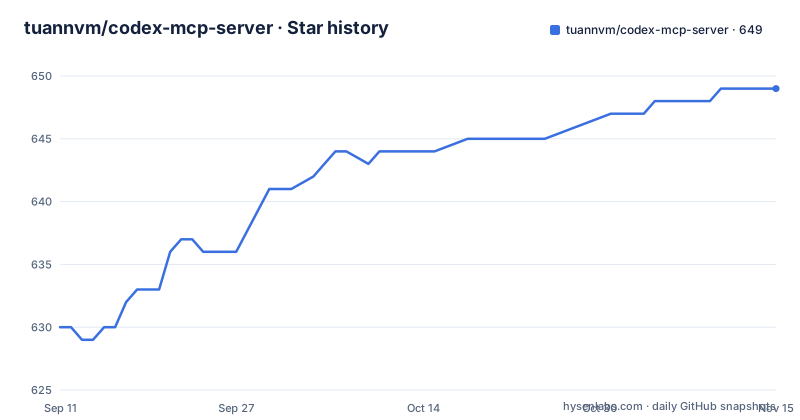
- tuannvm/codex-mcp-server649 ★ · +19
| Repository | 2026-09-11 | 2026-11-15 |
|---|---|---|
| tuannvm/codex-mcp-server | 630 | 649 |
19 Stars in the last 65 days, measured from the daily GitHub snapshot. Compare with other projects
Editorial analysis
The chain has four hops and two of them are local
The architecture is a straight line: Claude Code calls the MCP server, the server calls the Codex CLI, and the Codex CLI calls the OpenAI API. Only two of those three processes are local, and the third is a paid remote endpoint.
The npm install of the Codex CLI is step one, and the auth step comes with it:
npm i -g @openai/codex
codex login --api-key "your-openai-api-key"
There is a second install path for the same CLI, `brew install codex`, and the requirements section sets the floor at Codex CLI v0.75.0 or newer. Neither the key nor the CLI version is checked by the server itself; both are assumed.
The runtime dependency list explains why the wrapper is so thin. Three packages: the Model Context Protocol SDK at `^1.24.0`, chalk at `^5.6.0` and zod at `^4.0.17`. Everything of substance is delegated to the subprocess, which is why there is no model client in here at all.
One consequence follows from the shape of the chain. `codex` accepts `fullAuto true` together with a `sandbox` argument such as `workspace-write`, so a prompt routed through an MCP tool can turn into an unattended run on the far side of a subprocess boundary.
Six tools, and four of them are plumbing
The tool table is the whole API surface: `codex`, `review`, `websearch`, `listSessions`, `ping` and `help`.
`codex` is the main one, described as an AI coding assistant with session support, model selection and structured output metadata. Its arguments carry the interesting bits: `model "o3"`, `reasoningEffort "high"`, `sessionId`, `callbackUri`, and a request for `structuredContent` carrying `threadId` metadata when the CLI supplies it.
`review` is a separate tool rather than a mode of `codex`, aimed at uncommitted changes, branches or commits, with `base "main"` and `uncommitted true` in the examples. `websearch` goes through the Codex CLI too and takes `numResults`, with 15 in one example, and `searchDepth "full"`.
The other three are diagnostics. `listSessions` shows active conversation sessions, `ping` tests the connection and `help` returns the Codex CLI's own help text. That last one is a tell: a tool whose purpose is to surface the underlying CLI's help means the wrapper is a shim, and you will be consulting the Codex CLI's documentation for the real semantics of any argument.
There is also one environment variable, `CODEX_MCP_CALLBACK_URI`, which sets a static callback URI and is explicitly overridden by the `callbackUri` tool argument when both are present.
Sessions live in the server process, so listSessions only knows about this instance
Multi-turn use works by passing a `sessionId`. The documented behaviour is that passing one creates the session on first use, so `listSessions` shows it for that server instance, and subsequent calls with the same identifier resume the context.
The qualifier is doing real work in that sentence. Sessions are scoped to the server instance rather than to you, which means `listSessions` is a view of the current process's state and not an account you can come back to. Restart the server, or run a second instance, and the list starts empty.
That is a coherent design for a local subprocess wrapper. It also means a multi-turn refactor spread across several prompts lives in the memory of one running process, so the practical rule is to keep a session identifier stable for a piece of work and to expect it to vanish when the process does.
On the output side there is a version story worth reading. Under a section titled for Codex 0.87 compatibility, the server says that when the CLI emits a `threadId`, it is returned in content metadata and in `structuredContent`, and that an `outputSchema` is advertised for structured responses. That capability therefore depends on what the installed CLI actually emits, not on what the server was built to handle.
Two version numbers for the CLI, and the compatibility heading is the newer one
The requirements section asks for Codex CLI v0.75.0 or newer. Lower down, a heading names Codex 0.87 compatibility and describes the thread id and structured output work.
Those are two different numbers doing two different jobs, and the document does not say which one is the floor for the feature rather than for the server. A reader on 0.75.0 satisfies the stated requirement and may still find the thread id path inert.
The release history has its own gap. Three tags are visible: v1.4.2 on 2026-03-07, v1.4.3 on 2026-04-07 and v1.4.10 on 2026-04-10. Between 1.4.3 and 1.4.10 there are seven patch numbers with no tags behind them, and the manifest sits at 1.4.10, which does match the newest tag.
More usefully, the last push to the default branch is 2026-05-25, roughly six weeks after the v1.4.10 tag. So the published release is behind the branch, and anyone installing from npm has something older than the default branch.
The Makefile has one target and it runs prettier in write mode
There is a Makefile at the top level, and it is three lines of recipe. The only declared target is `lint`, marked phony, and it runs two npm scripts in sequence: `npm run lint`, then `npm run format`.
`npm run format` is a prettier write across the TypeScript files under `src/`. The write flag is what matters here. Running `make lint` does not merely report formatting problems, it fixes them, and the second command runs unconditionally after the first.
That is a reasonable convenience target for the person who owns the repository and a surprise for a contributor. A command named lint that modifies your working tree, with no dry-run mode and no check variant wired into the Makefile, will show up as unexpected diff noise in a pull request. The package scripts do contain the honest version, `format:check` as a prettier check over the same files, but nothing points a newcomer at it.
The README's development section does not mention make at all. It lists `npm install`, `npm run dev`, `npm run build` and `npm test`, so the Makefile is discoverable only by browsing the tree.
Jest 30 with ts-jest 29 in an ESM package, and ten dev dependencies
The test stack has a version tension worth naming. Jest is at `^30.0.5` and `@types/jest` at `^30.0.0`, while `ts-jest` is at `^29.4.1`. The transformer is a version behind the runner it is paired with.
That matters more than usual here because the package is `"type": "module"`, the build script is plain `tsc`, the dev entry is `tsx src/index.ts`, and the published entry point is `dist/index.js` under a bin name of `codex-mcp-server`. TypeScript 5.9.2 compiles it, the MCP SDK runs it, and Jest with a Jest 29 transformer has to load it.
Ten development dependencies sit alongside three runtime ones: `@types/jest`, `@types/node` at `^24.3.0`, the two `@typescript-eslint` packages at `^8.39.1`, `eslint` at `^9.33.0`, `jest`, `prettier` at `^3.6.2`, `ts-jest`, `tsx` at `^4.20.4` and `typescript`.
Configuration files at the top level match that stack: `eslint.config.mjs` for flat-config ESLint 9, `jest.config.mjs`, `.prettierrc`, `tsconfig.json` and `package-lock.json`. The npm manifest has an empty `author` field, which is where a `files` array of just `dist` and a `directories.doc` pointing at `docs` are also declared.
ISC is claimed three ways and there is no LICENSE file
The licence shows up in the README's own licence section as ISC, and again as a `license` field in the npm manifest. No licence is recorded on the repository itself, and the top-level tree contains no LICENSE file.
The tree is `.github/`, `.gitignore`, `.mcp.json`, `.prettierrc`, `CLAUDE.md`, `Makefile`, `README.md`, `docs/`, `eslint.config.mjs`, `jest.config.mjs`, `package-lock.json`, `package.json`, `src/` and `tsconfig.json`. A `.mcp.json` is present, which is the server's own MCP configuration, and `CLAUDE.md` is committed next to it.
So the terms are asserted twice in files the maintainer wrote and recorded nowhere a third time, with no text to inspect. That is the normal state for many small npm packages and it does not block use, but it does mean the ISC grant rests entirely on the manifest.
The documentation set is three files under `docs/`: an API reference with full tool parameters and response formats, a session management document, and a Codex CLI integration note covering version compatibility and CLI details. The npm manifest also points its `homepage` at the repository README, while the repository metadata itself carries no homepage.
Two related projects are linked from the same author: a Gemini CLI MCP server, and Clotch, described as a Dynamic Island for Claude Code on macOS that monitors sessions across multiple machines and providers in real time.
Editorial conclusion
Read codex-mcp-server as a plumbing wrapper rather than as an agent. If you already have the Codex CLI installed and authenticated, the tool set is small and the session handling is the part worth learning. Before you wire it in, confirm that routing your prompts to the OpenAI API is what you want, that the ISC claim is enough given there is no LICENSE file in the tree, and that a tool argument can set a sandbox mode and a full-auto flag on the other side.
Frequently asked questions
what is codex mcp server
It is a stdio MCP server that wraps the OpenAI Codex CLI so Claude Code can call it. It exposes six tools, codex, review, websearch, listSessions, ping and help, and the chain ends at the OpenAI API rather than at a local model.
how to setup codex mcp server
Install the Codex CLI globally with npm i -g @openai/codex, authenticate with codex login --api-key, then register the server with claude mcp add codex-cli -- npx -y codex-mcp-server. Codex CLI v0.75.0 or newer is required, and brew install codex is an alternative to the global npm install.
how to add codex mcp server
Run claude mcp add codex-cli -- npx -y codex-mcp-server from Claude Code. There are also one-click install links for VS Code, VS Code Insiders and Cursor, each carrying the same config: type stdio, command npx, args -y and codex-mcp-server.
codex mcp server vscode
The README carries a one-click install link for both vscode.dev and insiders.vscode.dev. Both encode the same stdio configuration, where the command is npx and the arguments are -y followed by codex-mcp-server, so nothing needs to be edited by hand.
how to use codex mcp server
Ask in plain language: use codex to analyze this authentication logic, use codex with sessionId "refactor" and then reuse the same sessionId to continue the work, or use review with uncommitted true. Passing a sessionId creates it on first use, and listSessions shows it for the running server instance.
Official sources
Add this badge to your README
If you maintain this project, the badge below links readers to this analysis and shows its maintenance status from the daily GitHub snapshot. Paste the markdown into your README; add ?metric=license or ?metric=stars to the image URL for a different field.

[](https://hysenlabs.com/projects/tuannvm-codex-mcp-server)Star history chart for your README
[](https://hysenlabs.com/projects/tuannvm-codex-mcp-server)Was this useful?