Six agent frameworks and one dated version table inside tylerprogramming/ai
This repository will have different projects using AutoGen and Tutorials
At a glance
- What is it?
- tylerprogramming/ai is a Python hub of AutoGen, CrewAI, PydanticAI, Smolagents and AgentOps sample projects kept beside video code for a YouTube channel, where a version table from September 2026 does the real work. The quick reference snippets are incomplete enough that you will end up in the linked example folders.
- Who is it for?
- Adopt it while you are learning one framework at a time and want to see the import line a given version expects. Skip it for anything shipped to users: there is no package to install, no test suite, and no recorded history when a sample breaks.
- Can I use it commercially?
- Yes. MIT is a permissive licence: you can use, modify and sell software built on it, as long as you keep its copyright and licence notices.
- Is it still maintained?
- Yes. The repository last received commits 7 days ago.
- What is it written in?
- Mainly Python, according to GitHub's language statistics.
Answers come from the project's GitHub data, last synced on November 7, 2026, and from our analysis. They are not legal advice.
Star history
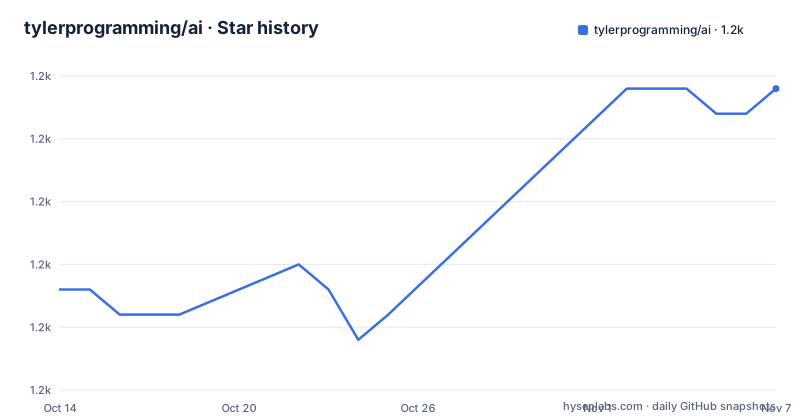
- tylerprogramming/ai1,182 ★ · +8
| Repository | 2026-10-14 | 2026-11-07 |
|---|---|---|
| tylerprogramming/ai | 1.2k | 1.2k |
8 Stars in the last 24 days, measured from the daily GitHub snapshot. Compare with other projects
Editorial analysis
Six frameworks pinned to one September 2026 table
This is a code shelf for a YouTube channel, not a library you pip install. Its repository description still says only different projects using AutoGen and tutorials, which undersells a tree that now spans six frameworks. Under a heading reading Framework Versions (September 2026), a table pins AutoGen at v0.7+, CrewAI at v1.15+, PydanticAI at v2.46+, Smolagents at v1.26+, OpenAI Agents at v0.58+, and AgentOps at Latest. That table is the most valuable content on the page, because every framework named in it has moved on since most tutorial videos were filmed.
Read the topic labels against the directory listing and one gap shows. Topics include langchain, and the pointer to ai-courses names LangChain and LangGraph, yet frameworks/ holds agentops, autogen, crewai, openai, pydanticai and smolagents, with no langchain folder anywhere in the structure block. The last push landed on 2026-09-19 and every file carries the MIT licence, so treat this as a fixed point in time rather than something you wait on.
AutoGen's old import line is gone in v0.7
AutoGen is the one row carrying a warning marker, and the change is not cosmetic. The old `import autogen` form is marked deprecated, and the working pattern moved into two separate packages: `autogen_agentchat.agents` for the agent, `autogen_ext.models.openai` for the model client. Build a client, hand it to an AssistantAgent, then await a streaming run.
from autogen_agentchat.agents import AssistantAgent
from autogen_ext.models.openai import OpenAIChatCompletionClient

model_client = OpenAIChatCompletionClient(model="gpt-5.4-mini")
agent = AssistantAgent(name="my_agent", model_client=model_client)
await agent.run_stream(task="...")
Five lines carry the whole v0.7 shape, and the last one dictates how you launch the file. `await agent.run_stream(task="...")` needs an async entrypoint, yet no async import or runner wrapper appears anywhere in the quick reference, so pasting this block into a plain script and running python on it raises a SyntaxError before any model call happens. Examples for the new API sit under `frameworks/autogen/autogen_v07_quickstart/`, which is where you would find the missing wrapper.
CrewAI and PydanticAI quick references stop at imports
CrewAI receives two lines and nothing that runs.
from crewai import Agent, Crew, Task, LLM
from crewai.flow import Flow, listen, start
No Agent is constructed, no Crew assembled, no task string supplied. Listed beside the v1.15+ row, the feature notes name conversational flows, an LLM overlay and streaming, and the sample directory for those features is `frameworks/crewai/crewai_v115_features/`. What the snippet verifies is only that the flow decorators ship in crewai.flow.
PydanticAI prints one line that cannot execute:
from pydantic_ai import Agent

agent = Agent("openai:gpt-5.4-mini", result_type=MyModel)
result = await agent.run("...")
The name `MyModel` is never defined or imported anywhere on the page, and the run call repeats the top-level await problem from the AutoGen block. Meanwhile the table row promises v2.46+ with TypeSafe models, realtime sessions and tools with context, yet the section heading underneath still reads PydanticAI v2.x and points at `frameworks/pydanticai/pydanticai_v2_features/`. Smolagents at v1.26+ and AgentOps get no snippet at all, one table row each.
Cloning and running one sample takes three commands
Prerequisites are short: Python 3.10+, then either Ollama or LM Studio if you want a local model. Editor choice is listed as VS Code with the Python extension, PyCharm, or Cursor. Nothing pins any of that.
From the repository root, running one sample comes down to three commands:
cd frameworks/crewai/crewai_first_crew
pip install -r requirements.txt  # if exists
python main.py
Two details decide whether that works. The trailing comment on line two admits that requirements.txt may not exist in that folder, and no requirements file appears among the top-level entries, which are a .env.example template, a .gitignore, AGENTS.md, CLAUDE.md, a README and six directories. Line three assumes a main.py sits there, and nothing describes what that script prints or how many model calls it makes. With no lockfile at the root, every run resolves whatever the package index serves that month, against a table frozen at September 2026.
One env template asks for four vendor keys
At the root there is a single environment template, and every value in it is empty:
OPENAI_API_KEY=
MEM0_API_KEY=

SUPABASE_URL=
SUPABASE_KEY=
Three of the four keys have a home in the directory listing. `OPENAI_API_KEY` lines up with the openai folder under frameworks, and the `SUPABASE_URL` plus `SUPABASE_KEY` pair with `mcp_supabase` under integrations. The fourth, `MEM0_API_KEY`, has none: no directory carries that name, and no line explains which memory service the key pays for. Filling this file in means guessing whether it is required, optional, or left over from a sample that was removed. Nothing in the repository settles that, and an empty template gives no hint beyond bare assignment.
Directory layout mixes tutorials with YouTube Shorts
The tree stores four kinds of artifact next to each other, and they do not share an audience. frameworks/ holds the version-specific samples, carrying a comment that they are simple examples, not full courses. mini_projects/ numbers standalone tutorials in order: 00_getting_started, 01_workout, 02_lmstudio, 03_video_captions, then the listing stops, so the count past three is unknown. integrations/ names each folder after its partner: `google_drive_monitor`, `mcp_crewai`, `mcp_supabase`, `n8n_crewai`, `n8n_runner`. tools/ holds utilities that a comment deliberately separates from frameworks, `crawl4ai` for web scraping plus `repo_images`. youtube_shorts/ is short-form video code, a category no snippet on the page uses.
One top-level entry is not a directory at all. `claude_skill_agent_builder` is offered as the agent-builder skill, a Claude Code skill that scaffolds a complete agent project from a task and a framework choice, handing back structure, dependencies and best practices. At the same level, AGENTS.md and CLAUDE.md are instructions for coding agents, which makes the repository a target for a second audience entirely.
The companion ai-courses repository is the structured route
Two neighbouring repositories are linked, and the difference is structural rather than topical. ai-courses is described as full structured learning paths over LangChain, LangGraph and Atomic Agents, which is precisely what this repository declines to be: its frameworks/ comment says simple examples, not full courses. Someone who wants a sequenced curriculum takes the course repo; someone who wants one verified call against a specific framework version takes this one. master-crewai-course is the third option, scoped to CrewAI alone.
None of the three is presented as an installable package, and no framework pinning is documented for the course repos. Pinning is the one thing this repository does state, and it does so in a single table that anyone copying a snippet will have to re-check against the framework's own documentation at the version they actually install. The courses teach sequence; this repository answers a narrower question, which is what the import line looks like after a breaking change.
Where this repository is the wrong tool
Four constraints push it out of production. First, there is no package to install: entry points are folders you cd into, and nothing exports a module or declares entry points. Second, no test suite is described anywhere, so a framework upgrade that breaks a sample leaves you no signal beyond the sample itself failing. Third, the version table is the only guard against framework drift, and a table labelled September 2026 goes stale quietly once AutoGen or CrewAI ships another minor version. Fourth, the repository has no GitHub releases, so when a sample breaks after an upgrade there is nothing to diff against and no record of what moved.
Where it earns its place is narrower. Copying one verified call pattern, comparing five framework APIs side by side, and checking which import names survived a rename all work well here, and the root AGENTS.md and CLAUDE.md make the tree safe to hand to a coding agent. Take the pattern rather than the folder, and pin the framework yourself before anything you copied reaches users.
Editorial conclusion
Adopt it while you are learning one framework at a time and want to see the import line a given version expects. Skip it for anything shipped to users: there is no package to install, no test suite, and no recorded history when a sample breaks. Check two things first, whether the version table still matches the version you plan to install, and whether the async wrapper your script needs sits in the linked example folder rather than in the README snippet. Copy the shape, pin the framework version yourself before anything ships.
Frequently asked questions
What is tylerprogramming/ai used for?
It is a hub of AI agent sample projects, framework tutorials and integrations built around a YouTube channel. Folders are split into frameworks/, mini_projects/, integrations/, tools/ and youtube_shorts/, and the repository describes the framework samples as simple examples rather than full courses.
How do I run an example from tylerprogramming/ai?
You need Python 3.10+ and either Ollama or LM Studio for local models. From the repository root, change into the sample folder, run pip install -r requirements.txt if that file exists, then run python main.py.
Which framework versions does tylerprogramming/ai target?
A table headed Framework Versions (September 2026) lists AutoGen v0.7+ with a breaking change from v0.2, CrewAI v1.15+, PydanticAI v2.46+, Smolagents v1.26+, OpenAI Agents v0.58+ and AgentOps at Latest. The old AutoGen form using import autogen is marked deprecated.
Does tylerprogramming/ai contain LangChain examples?
No directory for it appears in the structure listing, where frameworks/ holds agentops, autogen, crewai, openai, pydanticai and smolagents only. LangChain is named as a topic and in the pointer to the ai-courses repository, which is where the structured LangChain and LangGraph paths live.
What API keys does tylerprogramming/ai need?
The .env.example file at the root lists OPENAI_API_KEY, MEM0_API_KEY, SUPABASE_URL and SUPABASE_KEY, all empty. Only three of the four map onto folders in the listing; no directory corresponds to the memory key.
Can I install tylerprogramming/ai as a Python package?
Not as documented. The only install line given is pip install -r requirements.txt inside a sample folder, and entry points are directories rather than an installable module.
Official sources
Add this badge to your README
If you maintain this project, the badge below links readers to this analysis and shows its maintenance status from the daily GitHub snapshot. Paste the markdown into your README; add ?metric=license or ?metric=stars to the image URL for a different field.

[](https://hysenlabs.com/projects/tylerprogramming-ai)Star history chart for your README
[](https://hysenlabs.com/projects/tylerprogramming-ai)Was this useful?