VisActor VMind repository: nine installable Skills for chart, dashboard and poster work in coding agents
Not only automatic, but also intelligent. An Intelligent data Visualization System, based on LLM.
At a glance
- What is it?
- The VisActor/VMind page on GitHub now opens with VisActor Skills, a set of separately installable packages for Claude Code, Codex, WorkBuddy and Doubao Work. This piece covers what each install route involves and where the packages stop.
- Who is it for?
- Use it if you already work in a Skills-capable agent such as Claude Code or Codex and want chart, dashboard or poster output from a named Skill. Skip it if you expected a standalone data visualization library with its own model access, because the agent supplies the model here.
- Can I use it commercially?
- Yes. MIT is a permissive licence: you can use, modify and sell software built on it, as long as you keep its copyright and licence notices.
- Is it still maintained?
- Yes. The repository last received commits 4 days ago.
- What is it written in?
- Mainly TypeScript, according to GitHub's language statistics.
Answers come from the project's GitHub data, last synced on November 24, 2026, and from our analysis. They are not legal advice.
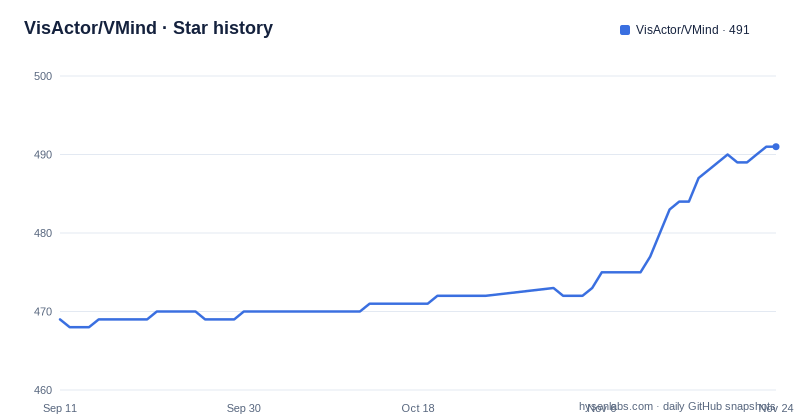
Star history
- VisActor/VMind491 ★ · +22
| Repository | 2026-09-11 | 2026-11-24 |
|---|---|---|
| VisActor/VMind | 469 | 491 |
22 Stars in the last 74 days, measured from the daily GitHub snapshot. Compare with other projects
Editorial analysis
The VMind page now describes agent Skills, not a standalone engine
The repository description still calls VMind an intelligent data visualization system based on an LLM, with the default branch set to develop and a homepage at visactor.io/vmind. The README shown at the top is different: its title is VisActor Skills, and it says the project provides chart, dashboard, data story and poster tools for Claude Code, Codex, WorkBuddy, Doubao Work and other agents that support Skills. The package metadata in pyproject.toml names the project visactor-agent-skills at version 0.1.0 and requires Python 3.12 or newer. The recent releases carry the same naming: skills-v2.1.0 on 2026-11-02, skills-v2.0.0 on 2026-10-29 and skills-v1.2.0 on 2026-10-26. If you arrive looking for a library to import into your own application, read the Skills list first, because that is what the current tags ship.
Nine Skills, each a separate install target
The table lists nine Skills, and each one has its own SKILL.md under skills/. chart-assistant handles business charts, MBB analysis annotations, editable Feishu cards, transparent PNGs and inserting images into documents. chart-storytelling produces analysis reports and business briefings as HTML stories or Web-PPT, with chart scrollytelling and annotations. editorial-magazine makes magazine-style visual posts as HTML or PNG series. life-chronicle builds biography posters with photo walls, center grids, photo rings and editable timelines. person-poster makes person-led data posters with native VChart, editable HTML and high-resolution PNG. The remaining four are visactor-light-dashboard for compact business dashboards, visactor-map2d-dashboard for interactive 2D map dashboards, visactor-chart-editor for field drag-and-drop chart editing, and visactor-map3d-dashboard for 3D globe dashboards. The examples/ folder has a matching subfolder for every Skill except chart-assistant.
Three install routes with different costs
The recommended route is to paste a prompt into your agent that gives the Skill URL, for example https://github.com/VisActor/skills/tree/main/skills/chart-storytelling, and asks it to download the complete directory including SKILL.md, references, templates and scripts, install it, and confirm it can be discovered. The cost is that the agent decides how to install, and it may come back asking for confirmation or import steps. The second route is the command line, run in your project directory, which needs Node.js and npm:
npx skills add VisActor/skills --skill chart-storytelling
npx skills add VisActor/skills --skill visactor-light-dashboard
The installer then prompts you to pick Codex or Claude Code. The third route is a manual ZIP import for WorkBuddy and Doubao Work, covered below. After any route, start a new task and name the Skill you want, since naming it is how the agent picks it.
Renaming data-storytelling leaves old installs stranded
chart-storytelling is a renamed Skill. Anyone who previously installed data-storytelling has to remove that installed copy and install chart-storytelling instead; the old copy does not update itself into the new name. The consequence is practical: if a teammate's agent still names data-storytelling in its prompts or saved workflows, those requests will keep hitting the stale copy or fail to find a Skill. Replace the name in any saved prompt at the same time as you reinstall. The same caution applies to the release cadence, since three tagged releases landed within about a week, so a Skill you installed from a ZIP can fall behind quickly.
Chart and table Skills live in other repositories
VChart and VTable are not bundled here. Chart generation, diagnosis, image replication and React integration are handled by the VChart Skill, and list tables, pivot tables and pivot charts, interactions and diagnosis by the VTable Skill. Both are maintained in their library repositories and installed from there:
npx skills add VisActor/VChart --skill vchart-development-assistant
npx skills add VisActor/VTable --skill vtable-development-assistant
The consequence is that a plain VisActor/skills install does not give you a general chart-coding assistant. If your task is writing VChart code in a React app, you need the VChart Skill from its own repository, and its versions and issues are tracked there rather than in the skills-v* releases.
Manual import depends on app labels that can change
WorkBuddy and Doubao Work do not use the command line. Open GitHub Releases, pick the latest stable skills-v* release, and download the individual Skill ZIP from Assets, such as chart-storytelling.zip or visactor-light-dashboard.zip. The Source code (zip) archive and a bare SKILL.md are the wrong downloads, because each Skill ZIP is the complete package and all bundled files must be kept. In WorkBuddy the path is the Skills section, then Add Skill, then Upload Skill, and you confirm the Skill shows as Installed. In Doubao Work you open Skills management, use the Upload Skill entry, and select either the ZIP or the extracted folder containing SKILL.md, depending on what the file picker asks for. Entry labels may differ between app versions, so follow the current UI. Updating is also manual: download the package from a newer release and replace the installed copy through the app's Skill management page.
The Skills do not bring a model or a runtime with them
Each Skill carries instructions, references and scripts, and the host agent provides model access and runs the tools. A host agent therefore needs filesystem and shell tools of its own, plus Node.js and npm if you use command-line installation, and a browser and network access to preview generated HTML and load external assets. The per-Skill runtime table adds more: chart-assistant needs Node.js 18+, HTTPS access for PNGs, authorized host tools or lark-cli for document insertion, and the Chart Assistant ISV app for editable cards, while DSL generation and validation need no Feishu authorization. For readers, this means an offline machine or an agent without shell access will not get usable output, and editable Feishu cards need a Feishu-side setup that the Skill cannot create for you. The requirements for the other eight Skills sit further down that table, so check the row for your Skill before you commit to it.
Editorial conclusion
Use it if you already work in a Skills-capable agent such as Claude Code or Codex and want chart, dashboard or poster output from a named Skill. Skip it if you expected a standalone data visualization library with its own model access, because the agent supplies the model here. Before installing, check the Runtime requirements table for the one Skill you want, since Node.js, HTTPS and Feishu needs differ per Skill.
Frequently asked questions
What does the VisActor VMind repository contain now?
Its README is titled VisActor Skills and lists nine Skills for chart, dashboard, data story and poster work in agents such as Claude Code, Codex, WorkBuddy and Doubao Work. The most recent release is skills-v2.1.0, dated 2026-11-02.
How do I install a VisActor VMind Skill in Claude Code or Codex?
Run npx skills add VisActor/skills --skill chart-storytelling in your project directory, swapping in the Skill name you want, then pick Codex or Claude Code when the installer prompts. Node.js and npm are required for this route.
Does VisActor VMind need its own model API key?
No model access is bundled with the Skills. The README says the agent provides model access and runs the tools, so the model comes from whichever host agent you use.
Official sources
Add this badge to your README
If you maintain this project, the badge below links readers to this analysis and shows its maintenance status from the daily GitHub snapshot. Paste the markdown into your README; add ?metric=license or ?metric=stars to the image URL for a different field.

[](https://hysenlabs.com/projects/visactor-vmind)Star history chart for your README
[](https://hysenlabs.com/projects/visactor-vmind)Was this useful?