The reference build pulls fifty packages and stops at a bare variable name
AIDE: an LLM agent for machine learning engineering - the research Weco grew out of. Referenced in OpenAI MLE-bench.
At a glance
- What is it?
- aideml ships as a pip package, a Streamlit UI and a Docker image, all driven through one aide command. Its default install path is unusually heavy, its newest tag trails the branch by ten months, and two of its own code examples do not run to the end.
- Who is it for?
- Use aideml if you want to read and modify the AIDE tree search loop, and install it inside a container or a throwaway virtualenv rather than into a working environment, because the default install brings in a large ML stack and a dozen pins you did not choose.
- Can I use it commercially?
- Yes. MIT is a permissive licence: you can use, modify and sell software built on it, as long as you keep its copyright and licence notices.
- Is it still maintained?
- Yes. The repository last received commits 1 day ago.
- What is it written in?
- Mainly Python, according to GitHub's language statistics.
Answers come from the project's GitHub data, last synced on November 22, 2026, and from our analysis. They are not legal advice.
Star history
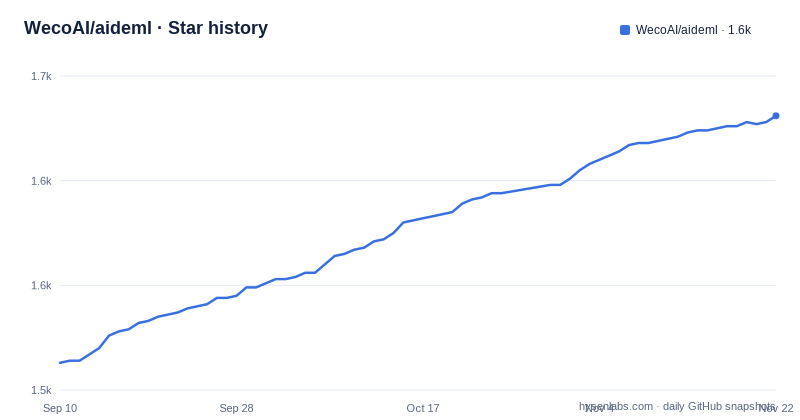
- WecoAI/aideml1,631 ★ · +118
| Repository | 2026-09-10 | 2026-11-22 |
|---|---|---|
| WecoAI/aideml | 1.5k | 1.6k |
118 Stars in the last 73 days, measured from the daily GitHub snapshot. Compare with other projects
Editorial analysis
PyPI is at 0.2.2 while the branch moved ten months past it
`setup.py` declares `version="0.2.2"`, and the three published tags are v0.1.4 on 2024-04-29, v0.2.0 on 2025-01-23 and v0.2.2 on 2025-11-05. The default branch, on the other hand, was last pushed on 2026-09-03. So the newest installable artifact is roughly ten months behind the source, which is the gap to check first if you want current behaviour. The project is not archived, the licence is MIT, and the primary language is Python with `python_requires=">=3.10"`. One console script is declared, `aide = aide.run:run`, and that binary is the entry point for every example. Two smaller details sit in the same metadata. The `url` field points at `https://github.com/Wecoai/aideml`, with a lower case c, while the repository is `WecoAI/aideml`. And both the Makefile and the documentation name the built container `aide`, not `aideml`, so the Docker image name and the Python package name do not match.
The default install reaches the second half of requirements.txt
`requirements.txt` is split by a comment into two halves. The first is about twenty pins such as `numpy==1.26.2`, `pandas==2.1.4`, `scikit-learn==1.5.0`, `openai>=1.69.0` and `anthropic>=0.20.0`. The second is headed as packages the agent might need, and it is not optional:
# agent requirements (packages that the agent might need)
torch
torchvision
torchaudio
torchtext
lightgbm
gensim
tensorpack
librosa
fastai
gym
optuna
transformers
datasets==2.1.0
bayespy==0.5.1
It continues through kornia, opencv-python, pyocr, pdf2image, ipykernel, pytorch-lightning, scikit-optimize, hyperopt and pyarrow. Because `setup.py` sets `install_requires=requirements`, the one line in the quick start installs that entire list, and `requirements.txt` itself is copied into the Docker build stage before anything else. The TensorFlow block sits a few lines further down and is switched off by comment markers, tensorflow, tensorflow_hub, tf-keras and keras-cv among it. A few names are also listed twice, `scipy`, `scikit-learn`, `biopython` and `tqdm` each appear in both halves.
The requirement list is split into lines with the comment markers still in them
The link between those two files is three lines of `setup.py`:
with open("requirements.txt", "r") as f:
    requirements = f.read().splitlines()
That result goes straight into `install_requires=requirements`. `splitlines()` keeps blank lines and keeps the leading hash, so the two comment strings from `requirements.txt` are handed to the packaging step alongside the package pins, with no filter in between. The same file also declares `package_data` for the `aide` package, and the first entry in that list is `"../requirements.txt"`, a path pointing one directory above the package it belongs to. The rest of the list holds `utils/config.yaml`, a `utils/viz_templates/*` glob and three overlapping globs for `example_tasks`: the bitcoin task, the house prices task, and a bare `example_tasks/*` that already covers both. There is no `pyproject.toml` at the root, so this file is the whole build configuration.
The fully local recipe names two models and never mentions the evaluator
The quick start exports an OpenAI key. The local model section changes the endpoint instead:
export OPENAI_BASE_URL="http://localhost:11434/v1"
aide agent.code.model="qwen2.5" agent.feedback.model="qwen2.5" data_dir=… goal=… eval=…
Under the first, Ollama only, example there is a one line note that the evaluator defaults to gpt-4o. The next block is headed as fully local, covering both the code model and the evaluator with no external calls, and it is the command above: it adds `agent.feedback.model` to the same `agent.code.model` and leaves the base URL pointing at Ollama. Whether the evaluator is the same setting as the feedback model is not stated anywhere, and no `agent.evaluator` key appears in the flag table either. The table itself lists three keys, `agent.code.model` defaulting to `gpt-4-turbo`, `agent.steps` defaulting to 20 and `agent.search.num_drafts` defaulting to 5, while the advanced example switches the model to `claude-4-sonnet` and raises the steps to 50.
The Python example builds an Experiment and ends on a bare name
The in-process example constructs one object and then stops:
import aide
import logging

def main():
    logging.basicConfig(level=logging.INFO, format='%(asctime)s - %(name)s - %(levelname)s - %(message)s')
    aide_logger = logging.getLogger("aide")
    aide_logger.setLevel(logging.INFO)
    print("Starting experiment...")
    exp = aide.Experiment(
        data_dir="example_tasks/bitcoin_price",  # replace this with your own directory
        goal="Build a time series forecasting model for bitcoin close price.",  # replace with your own goal description
        eval="RMSLE"  # replace with your own evaluation metric
    )

    best_solution
The final line names `best_solution` without assigning to it, and nothing is called on `exp` before the function ends. The name does line up with what the command line writes: every run leaves `logs/<id>/best_solution.py` with the best code found and `logs/<id>/tree_plot.html` for the tree. What the example omits is the call that turns the Experiment into that file, so the snippet shows construction but not execution. The inline comments do at least mark all three arguments as placeholders, pointing at a time series task under `example_tasks/bitcoin_price` and the metric `RMSLE`.
Two development install paths, only one of them written out
Under the development install heading the command shown is `git clone https://github.com/`, and the listing of the README ends on that line, with no repository path after it. The Web UI section above it is the one that gets written out in full: clone `https://github.com/WecoAI/aideml.git`, change into the `aideml` directory, run `pip install -e .` which is annotated as the step that adds streamlit, then `cd aide/webui` and `streamlit run app.py`. The sidebar there takes the API key, the data upload, the goal and the metric, and the page shows live logs, the tree and the best code. A third path exists in the build file rather than the documentation. The Makefile `install` target creates a `.venv` with `python3.10`, upgrades pip inside it, then runs `pip install -r requirements.txt` followed by `pip install -e .`. Between them these give a reader two ways in and a third only visible in the Makefile.
The image runs as uid 1000 and installs unzip for nothing in the repository
The Dockerfile is two stages on `python:3.10-slim`. The builder installs build-essential and gcc, creates a virtualenv at `/opt/venv` and installs with `pip install --no-cache-dir -r requirements.txt` then `-e .`. The runtime stage installs exactly one apt package, `unzip`, creates a user named `aide` with `-m -u 1000`, copies both `/opt/venv` and `/app` out of the builder, puts `/opt/venv/bin` on the path, creates `logs` and `workspaces`, chowns all of `/app` to that user, switches to it and sets `ENTRYPOINT ["aide"]`. Nothing in the repository calls unzip. The build stage copies only `requirements.txt`, `setup.py`, `README.md` and `aide`, so `.streamlit/`, `tests/` and `sample_results/` are absent from the image and the web interface in the documentation cannot come from this container. The documented run mounts three paths over the image: logs and workspaces bind to their `/app` counterparts, and the host copy of `aide/example_tasks` is mounted at `/app/data`, which means ownership of the task data comes from the host while the process runs as uid 1000.
make clean removes the run history along with the virtualenv
The Makefile declares five phony targets, `docker`, `docker-build`, `docker-run`, `install` and `clean`, with `IMAGE_NAME = aide`, `PYTHON = python3.10`, `VENV_NAME = .venv` and `LOGS_DIR` and `WORKSPACE_BASE` defaulting to directories under the current path. `docker` is nothing more than `docker-build` followed by `docker-run`, and `docker-run` creates both directories with `mkdir -p` before mounting them and passing `OPENAI_API_KEY` through from the environment. The last target is the blunt one:
clean:
	@echo "Cleaning up..."
	rm -rf $(VENV_NAME)
	rm -rf workspaces/* logs/*
	docker rmi $(IMAGE_NAME) || true
Those two `rm -rf` lines take out the `logs` directory where every `best_solution.py` and `tree_plot.html` lands, along with the workspaces the agent writes into, in the same target that deletes the virtualenv and the image. No target runs the test suite, regenerates the HTML visualiser or touches `sample_results/`, even though all three are sitting in the root listing.
Editorial conclusion
Use aideml if you want to read and modify the AIDE tree search loop, and install it inside a container or a throwaway virtualenv rather than into a working environment, because the default install brings in a large ML stack and a dozen pins you did not choose. Before trusting a result, check which models actually ran: the flag table defaults the code model to gpt-4-turbo, and the note under the Ollama example says the evaluator defaults to gpt-4o, which means a supposedly local run can still be spending hosted tokens. Pin from source rather than from PyPI if you need the September 2026 state of the branch, and read the output directory before running any clean target.
Frequently asked questions
What does pip install -U aideml actually pull in?
requirements.txt holds about twenty pins in its first block and a second block of packages the agent might need, which installs unconditionally: torch, torchvision, torchaudio, lightgbm, gensim, tensorpack, librosa, fastai, gym, optuna, transformers, datasets==2.1.0 and bayespy==0.5.1, among others. The TensorFlow block is commented out.
What are the default flags for the aide command?
agent.code.model defaults to gpt-4-turbo, agent.steps to 20 and agent.search.num_drafts to 5. The advanced example switches the model to claude-4-sonnet and raises the step count to 50.
Can aideml run without calling an OpenAI endpoint?
The Ollama example sets OPENAI_BASE_URL to http://localhost:11434/v1 and agent.code.model to qwen2.5, with a note that the evaluator defaults to gpt-4o. The block described as fully local adds agent.feedback.model set to the same qwen2.5 and changes nothing else.
Where does aideml write the results of a run?
Every run leaves logs/<id>/best_solution.py holding the best code found, next to logs/<id>/tree_plot.html, which opens in a browser so the whole solution tree and the code attached to each node can be inspected.
What licence is aideml under, and how current is the published package?
MIT. The newest tag is v0.2.2, published 2025-11-05, and setup.py carries the same 0.2.2 string, while the default branch was last pushed on 2026-09-03.
Does the aideml Docker image run as root?
No. The Dockerfile creates a user called aide with uid 1000, chowns /app to it and switches to it before the entrypoint, which is the aide command itself. The runtime stage installs one apt package, unzip, and nothing in the repository calls it.
Official sources
Add this badge to your README
If you maintain this project, the badge below links readers to this analysis and shows its maintenance status from the daily GitHub snapshot. Paste the markdown into your README; add ?metric=license or ?metric=stars to the image URL for a different field.

[](https://hysenlabs.com/projects/wecoai-aideml)Star history chart for your README
[](https://hysenlabs.com/projects/wecoai-aideml)Was this useful?