xiaohongshu-ops: an OpenClaw skill that drives Xiaohongshu through CDP browser automation and keeps its findings in markdown
Turns OpenClaw into a Xiaohongshu (RED) operations assistant that helps you analyze, pick topics, create content, review results and replicate successful posts, and can even fully manage your account.
At a glance
- What is it?
- xiaohongshu-ops is a skill, not a service: SKILL.md, a persona file, reference SOPs and a local knowledge base that let OpenClaw analyze, post and reply on Xiaohongshu. The last push was on 19 March 2026.
- Who is it for?
- Use xiaohongshu-ops if you already run OpenClaw or a compatible agent and want analysis notes and drafts for a Xiaohongshu account in markdown files you control. Skip it if you need a licensed, versioned tool, because the repository states no license and has one pre-release tag.
- Can I use it commercially?
- Not without permission. GitHub finds no licence file in the repository, and without a licence all rights are reserved by default: you may read the code but not reuse it. Check the README, or ask the authors, before using it.
- Is it still maintained?
- Activity is slowing. The repository last received commits 7 months ago.
- What is it written in?
- GitHub does not report a main language for this repository.
Answers come from the project's GitHub data, last synced on November 7, 2026, and from our analysis. They are not legal advice.
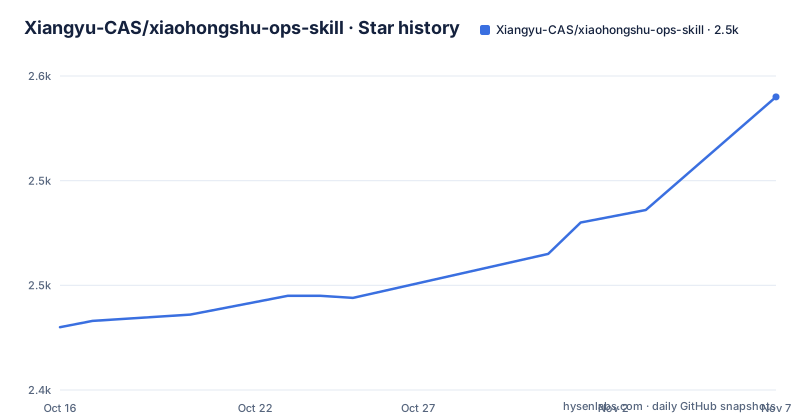
Star history
- Xiangyu-CAS/xiaohongshu-ops-skill2,540 ★ · +110
| Repository | 2026-10-16 | 2026-11-07 |
|---|---|---|
| Xiangyu-CAS/xiaohongshu-ops-skill | 2.4k | 2.5k |
110 Stars in the last 22 days, measured from the daily GitHub snapshot. Compare with other projects
Editorial analysis
A skill folder, not an application: SKILL.md carries the logic
There is nothing to compile in this repository. The behaviour lives in `SKILL.md`, described as the main logic and execution rules of the skill: SOPs, flows and boundaries. Next to it sit `persona.md` for tone and taboo wording, an `examples/` directory, a `references/` directory of procedures and a `knowledge-base/` directory. The top level also holds `Openclaw一键安装.md`, `testcase.md` and an `assets/` folder.
The agent reads these files and acts on them. That makes the quality of the output depend on the model behind OpenClaw, and the repository gives no language or runtime version because there is no code to version. The primary language is not detected, and the license field is empty.
Scan once with a phone, then CDP keeps the session
The README says the skill works through browser automation over CDP, the Chrome DevTools Protocol. The first run needs a QR-code login on Xiaohongshu, and later runs skip the verification.
That design means the skill acts as you inside a real browser session instead of calling an official API. The README does not say which browser it expects, where the session is stored, or what happens when Xiaohongshu asks for verification again. Anyone using this on a main account should treat a stalled login prompt as a normal failure case and not as a bug to ignore.
Four analysis modes added on 19 March, each backed by its own SOP file
The 19 March entry says the focus moved to AI-assisted creation and analysis, adding home feed analysis, account analysis, topic ideation and a knowledge base. Each has a procedure file under `references/`: `xhs-home-feed-analysis.md`, `xhs-account-analysis.md`, `xhs-topic-ideation.md` and `xhs-knowledge-base.md`.
The README shows a sample feed analysis in which high-engagement notes cluster around AI tools and post-mortems of failed attempts, with titles built as an emotion word plus a concrete object. The sample account analysis reports pinned AI posts at 3191 and 1911 likes against 1 to 10 for older posts. The README labels these as trimmed results from one test, so read them as an example of output shape, not as a measured benchmark.
Where the knowledge base writes, and what git never sees
Every analysis can be saved as markdown. The sample run wrote four files: a pattern file under `knowledge-base/patterns/`, an account file under `knowledge-base/accounts/`, a topic file under `knowledge-base/topics/` and an action log under `knowledge-base/actions/`, each date-stamped 2026-03-19.
Only `knowledge-base/README.md` is tracked. The README says the detailed analysis results and action records are saved locally by default and ignored through `.gitignore`. Two consequences follow. A fresh clone starts with an empty knowledge base. And if you move machines without copying the folder, the history that feeds later topic suggestions is gone.
Publishing and reply automation hand a language model your account
Beyond analysis, the skill posts notes by generating a cover, uploading it and filling in the title and body. It also works through notification comments and replies to them one by one, with `persona.md` setting the reply tone. A separate feature downloads the images and text of a target note, and another takes a viral note URL, analyzes why it worked and publishes a similar one.
The README documents no approval step, rate limit or dry-run flag for any of these. `examples/reply-examples.md` contains reply samples with off-target answers and their corrections side by side, which shows the author expects drift. Review output before it goes out, because the skill publishes under your name.
Cover images need a Gemini key, and replication is one prompt away
The 27 February entry says cover images come from nano banana and are published through the image-and-text flow. It requires `gemini_api_key`, and the README adds that this can be had for free. Without a key, the cover step has no documented fallback.
The 28 February entry added note replication: give it a link of the form `https://www.xiaohongshu.com/explore/XXXXXXX`, and it breaks down the success factors and generates a similar note with images. The sample output lists a source brief that names the original's core idea. Copying a structure from someone else's post raises originality questions that the README does not address, so that call is yours.
Install through the agent or ClawHub, with a pre-release tag as the only version
Two install routes are given. Method one is to tell openclaw or codex to install the skill from `https://github.com/Xiangyu-CAS/xiaohongshu-ops-skill`. Method two uses ClawHub:
clawhub install xiaohongshu-opsThe only release is the tag `stable`, named v0.1 and dated 12 March 2026. The last push was on 19 March 2026, which is more than six months before now, so the project cannot be described as actively maintained. The repository is not archived. No homepage is set, and no license is stated, which matters if you want to reuse or redistribute the files.
Editorial conclusion
Use xiaohongshu-ops if you already run OpenClaw or a compatible agent and want analysis notes and drafts for a Xiaohongshu account in markdown files you control. Skip it if you need a licensed, versioned tool, because the repository states no license and has one pre-release tag. Before pointing it at a real account, read SKILL.md and references/xhs-publish-flows.md, then try a read-only analysis prompt first.
Frequently asked questions
What is the xiaohongshu-ops skill?
It is an OpenClaw skill for operating a Xiaohongshu (RED) account. It covers analysis, topic picking, content creation, review and replicating successful posts, and can publish and reply to comments.
How do I install xiaohongshu-ops?
Either ask openclaw or codex to install the skill from its GitHub URL, or run `clawhub install xiaohongshu-ops`. The first use needs a QR-code login to Xiaohongshu.
Does xiaohongshu-ops need an API key?
Cover image generation with nano banana needs `gemini_api_key`. The README does not list any other key for the analysis or publishing features.
Official sources
Add this badge to your README
If you maintain this project, the badge below links readers to this analysis and shows its maintenance status from the daily GitHub snapshot. Paste the markdown into your README; add ?metric=license or ?metric=stars to the image URL for a different field.

[](https://hysenlabs.com/projects/xiangyu-cas-xiaohongshu-ops-skill)Star history chart for your README
[](https://hysenlabs.com/projects/xiangyu-cas-xiaohongshu-ops-skill)Was this useful?