HALO is an air quality monitor that shows its working
An open-source, ESP32-powered air quality monitor with an RGB ring, touchscreen, and comprehensive environmental sensors. Firmware installer: https://yashmulgaonkar.github.io/halo/
At a glance
- What is it?
- HALO is an open source indoor air quality node built on an ESP32-S3 board, with a set of sensors that cover particulates, carbon dioxide and a family of gases, an eleven LED ring that can flash when the air turns bad, and a touchscreen. It runs on ESPHome over WiFi with no cloud service in the middle, and the hardware files and the firmware are both in the repository.
- Who is it for?
- HALO suits a maker who wants their own air quality data instead of a subscription, and it suits somebody who wants a sensor that is visible in a room rather than a box on a shelf, since the ring and the display make the reading part of the space.
- Can I use it commercially?
- Check first. The repository uses a licence we do not classify automatically, so read its LICENSE file before any commercial use.
- Is it still maintained?
- Yes. The repository last received commits 4 days ago.
- What is it written in?
- Mainly Python, according to GitHub's language statistics.
Answers come from the project's GitHub data, last synced on November 7, 2026, and from our analysis. They are not legal advice.
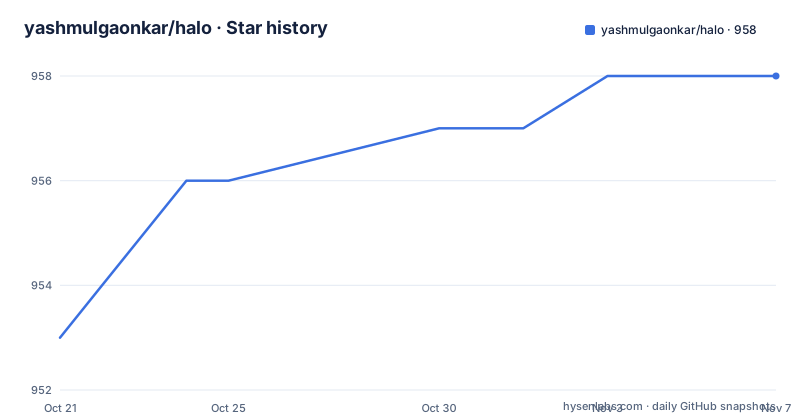
Star history
- yashmulgaonkar/halo958 ★ · +5
| Repository | 2026-10-21 | 2026-11-07 |
|---|---|---|
| yashmulgaonkar/halo | 953 | 958 |
5 Stars in the last 17 days, measured from the daily GitHub snapshot. Compare with other projects
Editorial analysis
A sensor node you build, not a product you buy
HALO is described as an open source, ESP32 powered air quality monitor with an RGB ring, a touchscreen and a set of environmental sensors, and the phrase that matters is in the last section of the readme, that the software and the CAD files have been shared so other people can build on them. That makes this a hardware project with a firmware repository rather than a consumer device, and it changes how you read everything else. The firmware installer is published on the project's own pages, the build instructions live in the repository wiki, and the community is a Discord server rather than a support desk. The design centre is the LILYGO T-Display-Long-S3, an ESP32-S3 board with a dual core LX7 microcontroller and a 3.4 inch LCD touchscreen, and the readme is upfront that the device operates on WiFi via ESPHome so that there is no cloud subscription and no hidden fee. The stated motivation is to have a sensor with personality, which is a softer claim than it sounds, since a device with a display and a ring in the room changes how people interact with the reading.
The sensor list is the bill of materials
The hardware section names four sensing parts and what each one adds, and the division of labour is clean. The SCD-41 measures carbon dioxide, temperature and humidity. The SEN54, or the SEN55, covers the particulate side with PM1, PM2.5, PM4 and PM10, and also measures volatile organic compounds. The BME280 handles temperature, pressure and humidity, described as the precision part. And the MIC4514 is the gas sniffer, covering carbon monoxide, ethanol, hydrogen, nitrogen dioxide, ammonia and methane. The readme's framing is that HALO measures everything, and the list supports it. The one thing to notice is the overlap, since three of the four parts report temperature and humidity, which is normal for a node built from accessible modules and is exactly the kind of redundancy you want when the numbers are feeding a display and a notification.
The LED ring is a data channel
The lighting is described as party mode, an eleven LED halo for air quality notifications or for impromptu raves, and the extras section gives it a job, with the ring able to flash when the air quality is bad. That is the feature that makes HALO different from a dashboard you have to open, because a colour on a wall tells you something without a phone in your hand. The hardware detail is specific, since the ring is built from side-fire SK68XX-EC3210F parts, the Adafruit number 4892, running as NEO_GRB with NEO_KHZ800, which is the WS2812 compatible protocol, on GPIO 47. A Bluetooth tracker is also built in, so the device can be used to automate a home or to find keys, and the radio side is described as BLE 5 with BT Mesh alongside the WiFi.
The setup path runs through a captive portal and ends in Home Assistant
The install sequence in the readme is short and the failure modes are the ones you would expect. You power the device with a decent USB-C supply, and the readme warns that a device that reboots repeatedly is usually being starved by a cheap charger. Then you find the access point the device creates, the network named HALO's AP, connect to it from a phone or a computer, and the dashboard appears, and if it does not, the fallback is to type the address directly:
http://192.168.4.1From there you give the device your WiFi name and password. The Home Assistant path is the same mechanism seen from the other side, adding HALO with ESPHome, accepting the prompts the way you would adopt a device, and assigning it a home area. The readme's own jokes about the wizard are funny once and informative twice, because the flow is a standard ESPHome captive portal, and if you have used ESPHome before you will recognise every step of it.
Calibration and the optional packages are separate documents
Two documents inside the firmware directory carry the detail that a photo cannot. The calibration guide covers CO2 automatic self calibration, the SEN55 heat offsets, a fan cleaning procedure and the NowCast algorithm, which is the weighting the device applies to short term particulate readings. The packages guide covers the optional modular pieces, a BLE stub, offline AQI history, weather and WireGuard. Both are worth reading before the first run, because a sensor node that has not been calibrated produces numbers that look wrong, and a device with no history of its own depends entirely on whatever it is connected to. The self-calibration trick the readme mentions is the other half of that story, taking the device outside so it can calibrate itself against clean air, which is a procedure you can do with any CO2 sensor and which changes the first hours of readings considerably.
The tree shows several hardware variants
The top level of the repository is a set of hardware directories rather than a software project, and that is the clearest signal of how the project is organised. There is a `TFT_LCD/` directory holding the display variant, and the paths quoted in the documentation point into it, with the T-Display-Long version 1 and the ESPHome firmware beneath it. Then there is `No_Screen/`, an `E-Paper/` variant, a `HomeAssistant/` directory, a `components/` directory and a `static/` directory for the web assets. So the same firmware idea is being built in more than one form factor, and a person who wants the simplest possible build should start by finding out which of those directories matches the hardware they have. The project also tracks an image of the first version, and the assets directory carries the branding and the visual material that goes with the device.
Licences, releases and where to ask for help
The licensing is the one detail to read carefully, because the repository carries a file named for the Creative Commons Attribution-NonCommercial-ShareAlike 4.0 International licence alongside the main LICENSE.md, and the GitHub metadata records the licence as one it cannot classify. The likely arrangement is that the software is under one set of terms and the CAD and design files under another, with the non-commercial clause applying to the hardware side, which would make sense for an open hardware project that shares the files for personal builds. The releases are numbered by date, with 26.7.25.2 from 2026-07-30 and two from 2026-07-24, and the last push to the repository was on 2026-09-04, so the project is maintained but not at a daily pace. Support is a Discord community, and the readme's framing of it as a hotline is a good description of what a small hardware project can offer. The build instructions are in the wiki, and the author also asks for sponsorship through a coffee page, which is the usual arrangement for a project that has spent real money on boards.
Editorial conclusion
HALO suits a maker who wants their own air quality data instead of a subscription, and it suits somebody who wants a sensor that is visible in a room rather than a box on a shelf, since the ring and the display make the reading part of the space. It is a poor fit if you want a finished product, since you are building the hardware yourself and the documentation is split across a wiki, a calibration guide and a packages guide, and it is a poor fit for commercial redistribution, because the CAD files carry a Creative Commons Attribution-NonCommercial-ShareAlike licence. Before you start, check three things: which sensor board you are buying, since the T-Display-Long-S3 is the design centre of the whole thing, whether you have an ESPHome setup already, since that is what the firmware is, and which licence applies to the part you are using, since the code and the hardware files are not under the same terms.
Frequently asked questions
What is HALO?
An open source, ESP32 powered air quality monitor with an eleven LED RGB ring, a 3.4 inch touchscreen and a set of environmental sensors, running on ESPHome over WiFi with no cloud subscription. The software and the CAD files are both shared in the repository.
Which sensors does HALO use?
An SCD-41 for carbon dioxide, temperature and humidity, a SEN54 or SEN55 for particulates from PM1 to PM10 and for volatile organic compounds, a BME280 for temperature, pressure and humidity, and a MIC4514 for carbon monoxide, ethanol, hydrogen, nitrogen dioxide, ammonia and methane. The LED ring is an eleven part side-fire SK68XX-EC3210F on GPIO 47.
How do I set up HALO?
Power it with a USB-C supply that can feed it, connect to the access point it creates, the network named HALO's AP, and open http://192.168.4.1 if the dashboard does not appear, then give the device your WiFi name and password. In Home Assistant you add it with ESPHome, accept the prompts, and assign a home area.
Does HALO need calibration?
Yes, and the documentation is specific about it. The calibration guide covers carbon dioxide automatic self calibration, the SEN55 heat offsets, a fan cleaning procedure and the NowCast weighting, and the readme notes that taking the device outside lets it calibrate itself against clean air.
What licence does HALO use?
The repository carries a main LICENSE.md and a separate Creative Commons Attribution-NonCommercial-ShareAlike 4.0 International file, and the licence field is recorded as one GitHub cannot classify, so the terms of the code and of the shared CAD files are worth reading separately, particularly if you intend to build or sell one. The releases are dated, with 26.7.25.2 from 2026-07-30, and the last push to the repository was on 2026-09-04.
Official sources
Add this badge to your README
If you maintain this project, the badge below links readers to this analysis and shows its maintenance status from the daily GitHub snapshot. Paste the markdown into your README; add ?metric=license or ?metric=stars to the image URL for a different field.

[](https://hysenlabs.com/projects/yashmulgaonkar-halo)Star history chart for your README
[](https://hysenlabs.com/projects/yashmulgaonkar-halo)Was this useful?