ydiff renders version control diffs side by side, in colour, in your terminal
View colored, incremental diff in workspace or from stdin, side by side and auto paged.
At a glance
- What is it?
- ydiff is a terminal tool that takes the diff output of Git, Mercurial, Perforce or Subversion, colours it, lays it out side by side or unified, and feeds it to a pager. It is a single Python file with no external dependencies, so it can be dropped into a $PATH directory or installed from PyPI.
- Who is it for?
- ydiff suits developers who read diffs in a terminal all day and want the two-column layout, colour and paging without wiring three tools together. It is the wrong tool if your review happens in a browser, or if you need a diff of a binary or a full tree walk rather than the output your version control system already produces.
- Can I use it commercially?
- Check first. The repository uses a licence we do not classify automatically, so read its LICENSE file before any commercial use.
- Is it still maintained?
- Yes. The repository last received commits 39 days ago.
- What is it written in?
- Mainly Python, according to GitHub's language statistics.
Answers come from the project's GitHub data, last synced on November 7, 2026, and from our analysis. They are not legal advice.
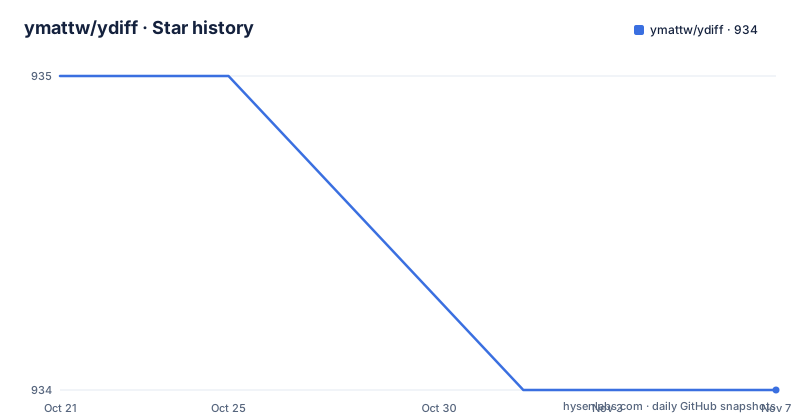
Star history
- ymattw/ydiff934 ★ · -1
| Repository | 2026-10-21 | 2026-11-07 |
|---|---|---|
| ymattw/ydiff | 935 | 934 |
-1 Stars in the last 17 days, measured from the daily GitHub snapshot. Compare with other projects
Editorial analysis
It wraps the diff your version control tool already prints
ydiff does not compute diffs. It takes the output of the tool underneath it and repaints it. The README describes reading diffs from a local modification in a Git, Mercurial, Perforce or Subversion workspace, and names the underlying output it works with, such as git diff and svn diff.
That division of labour is the whole design. The revision control system knows how to compute the diff, and ydiff knows how to display one. So there is no second diff algorithm to disagree with the first, and no risk of the display disagreeing with the repository about what changed.
The display is where the work is. Output is coloured, laid out side by side in the manner of diff -y or shown in unified mode, and fed to a pager automatically. The tool also has a log mode that reads a change log with its patches, and it accepts a diff on standard input, which is what makes the pipe examples work.
The dependency story is unusually clean. The README states that ydiff only requires Python 3.4 or newer without external dependencies, plus less as a pager. One file, standard library only.
The people this is for are developers reviewing changes in a terminal. If your workflow is a web pull request, none of this applies.
Side-by-side is the default, and the flag that enables it is deprecated
The option list in the usage help is the fastest way to understand the tool, and it contains a design decision worth noticing. The side-by-side flag is marked deprecated, and the help text records that side-by-side mode is already the default.
-s, --side-by-side    enable side-by-side mode (default True; DEPRECATED)
-u, --unified         show diff in unified mode (disables side-by-side mode)
So the flag was kept for compatibility with scripts and muscle memory, but the direction of travel is the other way. The same pattern shows up with the wrapping option, where --wrap is marked deprecated because wrapping long lines is on by default, and --no-wrap is the option you actually need.
That is a small thing, but it says something about how the tool is maintained. Behaviour that used to be opt-in has become the default, and the old switch is kept so that existing invocations do not break.
There is one more piece of plumbing that matters in scripts. The option parser stops at the first unknown option and passes the rest down to the revision control tool underneath, so you can pass native flags through without ydiff needing to know about them.
Width detection, wrapping and tab expansion decide whether the columns line up
A side-by-side diff is only readable if the columns are the right width and the whitespace is predictable. ydiff handles this with three options.
The width option takes a number, and zero means auto detection with a fallback to 80 when detection is not possible. The wrapping option, now on by default, wraps long lines in side-by-side mode, and --no-wrap turns that off while keeping the automatic width.
The tab width option converts tab characters to a fixed number of spaces, defaulting to 8.
-w N, --width=N       set text width for side-by-side mode, 0 (default) for
                      auto detection and fallback to 80 when not possible
-t N, --tab-width=N   convert tab chars to this many spaces (default: 8)
The tab setting is the one people miss. A file indented with tabs renders differently depending on the tab stop, so two columns that should line up will not if the two files use different indentation. Setting the tab width explicitly is how you get a comparison that is honest about the whitespace.
The fallback to 80 columns is also worth knowing about, because it is what you get in a pipe or in a terminal that does not report its size, and it is the reason the same diff can look cramped in one place and fine in another.
Colour, themes and the pager are all configurable
Colour is handled by the --color option, whose values are auto, the default, always and never. Auto means it decides based on the environment, which is the setting that behaves well in both a terminal and a pipe.
The theme option picks between dark, default and light. The README ships screenshots of the combinations, which is the practical way to choose: the same theme does not read well on both a dark and a light terminal background, and the default theme is shown in both variants.
The pager side of the tool has three options. The pager application defaults to less, the pager options string is passed through as given, and the pager can be changed to another program when less or more is not what you want.
-p PAGER, --pager=PAGER
                      pager application to feed output to, default is 'less'
-o OPT, --pager-options=OPT
                      options to supply to pager application
There is also an environment variable, YDIFF_OPTIONS, whose contents are placed at the beginning of the argument list as default options. That is the hook for making a preference, such as unified mode or a fixed width, apply everywhere without editing your shell history.
Custom themes live in a configuration directory under the user's home, which the README starts to describe in its customised themes section.
Stdin makes it a pipe target for anything that emits a diff
The examples show the range. A commit range from git log, a single commit from git show, a Subversion revision diff, a plain diff between two files, a recursive diff between two directories, and even a pull request patch fetched over HTTP.
git log -p -2 | ydiff       # view git log with changes of last 2 commits
git show 15bfa | ydiff      # view a given git commit, side by side
svn diff -r1234 | ydiff     # view svn diff comparing to given revision
diff -u file1 file2 | ydiff # view diff between two files (note the '-u')
diff -ur dir1 dir2 | ydiff  # view diff between two dirs
Two of those examples carry notes that matter. The diff -u form notes that the -u is needed, because the input has to be in unified format to be parsed. And the redirect example says that redirecting output to another patch file is safe even without -u.
svn diff -r PREV | ydiff > my.patchSo the tool is not only a viewer. Piping through it and capturing the result is a way to normalise a patch into the coloured, unified form, which is handy when a build step needs a canonical patch file.
The workspace mode covers the other direction. Run with no arguments inside a workspace and it diffs the local modifications; with -l it reads the log with changes; with file and directory arguments it restricts the view to those paths; and options that belong to the underlying tool can be passed straight through.
Install it as one file, from PyPI, or from a package manager
Because there are no dependencies, the quickest install is to fetch the script and make it executable. The README says to save ydiff.py as ydiff in whatever directory is on your $PATH, for example $HOME/bin.
curl -L https://raw.github.com/ymattw/ydiff/master/ydiff.py > ~/bin/ydiff
chmod +x ~/bin/ydiff
From PyPI the command is a pip install, and the README notes that tagged revisions are packaged and uploaded to PyPI in a timely way, while packages hosted elsewhere are not managed by the author.
pip install --upgrade ydiffThere are also distribution packages for the major platforms.
brew install ydiffdnf install ydiffpkg install ydiffThe Homebrew formula, the Fedora package and the FreeBSD package are separate from the PyPI publication, which is why the README warns that they are not managed by the author. In practice that means a version you get from a system package manager can lag behind the tagged release.
The console entry point declared in setup.py is ydiff = ydiff:_main, and the package ships the module as a single file with py_modules set to ydiff.
No GitHub releases, a custom licence file, and a Makefile that eats its own dog food
The repository has no GitHub releases, and the release history lives in CHANGES.rst, which setup.py appends to the long description when building the package. The last push to the repository was on 2026-09-30.
The licence deserves a note rather than a summary. The repository metadata reports a custom licence that GitHub cannot classify, while setup.py declares license as BSD-3 and the classifiers list the BSD licence. Since the LICENSE file is what governs, that is the file to read before you redistribute the tool or embed it in a product.
The Makefile shows how the project tests itself. The dogfood target runs the tool on its own repository, once in unified mode on the working tree and once piping git diff into it, which is a nice self-check that the renderer handles real diffs. Linting runs pycodestyle with a few codes ignored, coverage runs the test suite, and reg runs a regression shell script.
dogfood:
	./ydiff.py -u
	git diff | ./ydiff.py -s
There is also a profile target that loops over a thousand generated inputs, and a minimum-Python test that runs the whole suite in a python:3.4-alpine container with less installed, matching the stated Python 3.4 floor.
The absence of GitHub releases is the practical thing to note. Installation through pip gives you a tagged version, but there is no release page to point a colleague at, so the changelog file is the reference.
Editorial conclusion
ydiff suits developers who read diffs in a terminal all day and want the two-column layout, colour and paging without wiring three tools together. It is the wrong tool if your review happens in a browser, or if you need a diff of a binary or a full tree walk rather than the output your version control system already produces. Verify first that your pager and terminal combination behaves, since the layout depends on detecting the terminal width and the README notes a fallback to 80 columns when detection is not possible.
Frequently asked questions
What does ydiff do and what does it need to run?
ydiff is a terminal tool that views colored, incremental diffs in a version-controlled workspace or from stdin, in side-by-side or unified mode, and it pages the output automatically. The README states it requires only Python 3.4 or newer without external dependencies, plus less as a pager.
How do I install ydiff?
Download ydiff.py, save it as ydiff in a directory on your $PATH and make it executable, or run pip install --upgrade ydiff from PyPI. There are also packages for macOS with brew install ydiff, for Fedora with dnf install ydiff, and for FreeBSD with pkg install ydiff, though those are not managed by the author.
Which version control systems does ydiff support?
The README describes reading diffs from a local modification in a Git, Mercurial, Perforce or Subversion workspace, and reading logs with changes in a Git, Mercurial or Subversion workspace. Unknown options are passed down to the revision control tool underneath.
How do I make ydiff use unified mode instead of side by side?
Pass -u or --unified, which disables side-by-side mode. The -s or --side-by-side flag is still accepted but is marked deprecated, since side-by-side is the default.
Can ydiff colour its output when writing to a file?
The colour option takes auto, always or never, with auto as the default, and the README notes that redirecting output to another patch file is safe even without -u. The pager defaults to less and its options can be set with -o.
Official sources
Add this badge to your README
If you maintain this project, the badge below links readers to this analysis and shows its maintenance status from the daily GitHub snapshot. Paste the markdown into your README; add ?metric=license or ?metric=stars to the image URL for a different field.

[](https://hysenlabs.com/projects/ymattw-ydiff)Star history chart for your README
[](https://hysenlabs.com/projects/ymattw-ydiff)Was this useful?