personalized-podcast is an agent skill where your coding agent writes the script and Fish Audio supplies the voices
Turn any content into a personalized AI podcast. NotebookLM-style, except you control the script, voices, and hosts. Listen in Apple Podcasts, Spotify, or any podcast app.
At a glance
- What is it?
- A four-file skill that turns pasted text, local files, or a URL into a two-host podcast episode and an MP3, with PROMPT.md and config.yaml holding the show format. Entirely agent-driven and cheap to run, but the speech step calls a hosted TTS API and the optional RSS feed publishes to GitHub Pages.
- Who is it for?
- Reach for personalized-podcast if you already read long material on a screen and want it as audio, and you are content to drive it through slash commands rather than a GUI. The appeal is that there is no model of your own to choose and no subscription beyond a free TTS tier.
- Can I use it commercially?
- Not without permission. GitHub finds no licence file in the repository, and without a licence all rights are reserved by default: you may read the code but not reuse it. Check the README, or ask the authors, before using it.
- Is it still maintained?
- Activity is slowing. The repository last received commits 7 months ago.
- What is it written in?
- Mainly Python, according to GitHub's language statistics.
Answers come from the project's GitHub data, last synced on November 13, 2026, and from our analysis. They are not legal advice.
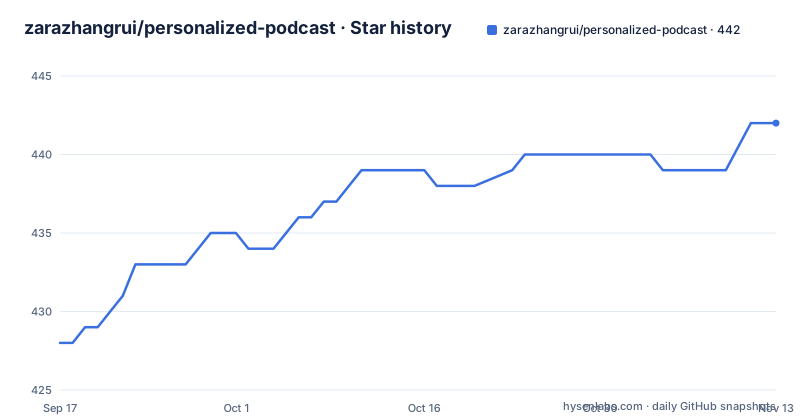
Star history
- zarazhangrui/personalized-podcast442 ★ · +14
| Repository | 2026-09-17 | 2026-11-13 |
|---|---|---|
| zarazhangrui/personalized-podcast | 428 | 442 |
14 Stars in the last 57 days, measured from the daily GitHub snapshot. Compare with other projects
Editorial analysis
The script is written by your coding agent, with no second model call
The pipeline has four stages and the first one is unusual: there is no dedicated script model. Your coding agent reads the content and writes the two-host conversation script itself. The documentation states this explicitly, that script generation needs no separate LLM API call, and the flow diagram shows Claude reading the content and producing the dialogue before anything else happens.
The consequence is that the show's writing quality is bounded by whichever agent you are running. There is no model picker for the script step and no temperature to tune, because there is no script API to tune. Someone using Claude Code and someone using Gemini CLI or Copilot CLI, all three of which are named as supported, get the same instructions and different prose. That is a feature if you want the agent you already use, and a limitation if you expected a consistent show across machines.
Audio then comes from Fish Audio, one API call per line, with a different voice per host, and the segments are stitched with natural pacing. Two hosts ship by default. Alex, speaker A, is the curious one who introduces topics, asks questions, and gets excited; Sam, speaker B, is the analytical one who adds depth, offers opinions, and drops the witty lines. The stated target is two friends talking over coffee rather than news anchors or a lecture, which is a writing instruction more than an audio setting.
Nothing runs locally except the stitching, which needs pydub and ffmpeg
The About section makes a strong claim, that the entire pipeline runs locally through your coding agent, with no separate backend, no hosted service, and no subscription. That is accurate about orchestration and worth qualifying about audio. Text-to-speech is Fish Audio, described as having 2M+ voices and a free tier, and it is a hosted API: on first run the skill asks you for a free Fish Audio API key, and Fish Audio receives the script text to synthesise it. The audio processing itself, stitching segments with natural pauses and fade effects, does run on your machine using pydub and ffmpeg, which is why ffmpeg is a stated requirement with a `brew install ffmpeg` note for macOS.
So the local claim holds for the parts you would expect it to: the agent reads your files, writes the script, and assembles the MP3 on disk, and the MP3 opens and plays immediately without any upload. It does not hold for the speech synthesis step. If the material is sensitive, that distinction is the one to hold onto, because the script text leaves the machine at the point where the API key is used.
The other stated requirements are modest and worth listing plainly: a coding agent that supports skills, Python 3.10 or newer, ffmpeg, and a Fish Audio account. There is no database, no queue, and no configuration service. Output is a file you own.
The install command clones a repository name that differs from this one
Installation is a single command:
gh repo clone zarazhangrui/personalized-podcast-skill ~/.claude/skills/personalized-podcastThe source repository named in that line ends in `-skill`, while this repository is `personalized-podcast` without the suffix. The same suffixed name appears in the link given for PROMPT.md. The destination path is the conventional skills directory, `~/.claude/skills/personalized-podcast`, which is the part that matters for loading. If the clone fails, this mismatch is the first thing to check rather than assuming a broken `gh` install, and it is the reason to confirm the repository name before the first command.
After the clone, usage is a slash command rather than a program you invoke:
/podcast read ~/Downloads/newsletter.txt
/podcast https://some-article-url.com
You can paste content inline, point at files, or hand over a URL. On the first run the agent sets up the Python environment, installs dependencies, asks for the Fish Audio key, and generates the first episode with pre-configured default voices, so there is no configuration step to perform before trying it.
PROMPT.md holds the show format, and config.yaml holds the personality
Customisation splits across two files with two different jobs. PROMPT.md is described as the big lever: it controls how the hosts behave, the show structure, and the writing style, so editing it produces a different format rather than a tweaked one. Five formats are sketched as starting points. Debate has two hosts on opposing sides, one bullish and one skeptical, challenging each other. Eavesdrop has two hosts discuss a person drawn from transcripts or personal content as if that person were not in the room. Interview has one host question the other as an expert. Solo narrator uses one voice in a thoughtful monologue. News roundup reads a list of items aloud one by one and discusses each.
Everything else lives in `~/.personalized-podcast/config.yaml`. Two keys there are called out by name: `show_name` and `tone`, which is where the show becomes serious, funny, academic, casual, or confrontational. Episode length, the hosts' personalities, and the prompt can be changed there as well. Voices are chosen outside the project entirely: browse the Fish Audio discovery page, find voices you like, and copy their reference IDs into the config.
The consequence of putting the format in a prompt file rather than in code is that a show is a text artefact. It can be copied, forked, and version-controlled like a template, which is a better fit for people who iterate on writing than for people who want a feature-complete generator.
The optional RSS feed publishes to GitHub Pages, which collides with the self-reflection format
Delivery is the feature that turns this from a file generator into something you subscribe to. You ask the agent to set up an RSS feed for the podcast, and it creates a GitHub Pages feed you can subscribe to in Apple Podcasts, Overcast, Pocket Casts, Snipd, Spotify, or any app that reads RSS. Under the hood that is `publish.py`, which pushes episodes to GitHub Pages, with `templates/feed_template.xml` supplying the feed, and the feed auto-deploys on every push.
Auto-deploy on every push is the detail to sit with. The pipeline treats publishing as automatic, which is convenient for a newsletter roundup and wrong for the other headline use case. The second reason the project exists is self-reflection: feed it your resume, meeting transcripts, journal entries, or even browser history, then have the hosts discuss their impressions of you. That is the more interesting idea of the two and the one that asks for privacy. The same repository that can host an episode about your career trajectory is one push away from publishing it to a public URL, and nothing in the flow distinguishes the two cases.
Nothing prevents you from keeping them separate. Generate locally, listen to the MP3, and skip the feed entirely. If you do set up RSS, treating it as a public channel and keeping personal material out of that feed is the safer default than relying on the skill to make that call for you.
The tree is small and carries no LICENSE file
The whole skill is a handful of files. At the top level there is `.gitignore`, `PROMPT.md`, `README.md`, `SKILL.md`, and four directories: `config/`, `examples/`, `scripts/`, and `templates/`. Inside `scripts/` the division of labour is clear: `speak.py` handles Fish Audio text-to-speech and audio stitching, `publish.py` pushes episodes to GitHub Pages and is optional, `bootstrap.py` does one-time repository setup and is also optional, and `utils.py` handles config, logging, and `.env` loading. A sample configuration ships as `examples/sample_config.yaml`.
What that listing does not include is a licence file. There is no LICENSE at the top level, and the repository declares no licence, so the terms for copying, modifying, or redistributing this skill are unstated. For a personal tool that only generates audio on your own machine, that gap rarely matters. It starts to matter the moment someone wants to fork the show format, share the prompt file with a team, or publish the scripts, and at that point there is nothing to point at.
The maintenance picture is similarly thin. The repository has no tagged releases, so there is no version history to pin and no changelog to read before upgrading. The last push to the default branch was 8 April 2026, roughly six months ago, which means if the Fish Audio API or the underlying agent skill format has moved since then, nothing in the repository records that this code was checked against it. Verify the Fish Audio key still works before relying on the skill for a recurring feed.
Editorial conclusion
Reach for personalized-podcast if you already read long material on a screen and want it as audio, and you are content to drive it through slash commands rather than a GUI. The appeal is that there is no model of your own to choose and no subscription beyond a free TTS tier. Two things to settle first. Privacy, because the self-reflection format ingests your resume, meeting transcripts, journal, and browser history, while the optional RSS feed pushes episodes to a public GitHub Pages site; keep those two features apart unless you intend to publish. And licensing, because the repository tree contains no LICENSE file and no licence is declared, so what you may redistribute is unstated. Check the install target as a third item, since the documented clone command names a differently spelled repository. Then confirm Fish Audio and ffmpeg are set up before your first run.
Frequently asked questions
What does personalized-podcast actually produce?
A two-host podcast episode. Your coding agent writes the dialogue, Fish Audio synthesises each line with a different voice per host, the segments are stitched with pydub and ffmpeg, and you get an MP3 that plays immediately. An optional RSS feed delivers episodes to podcast apps.
What do I need to run personalized-podcast?
A coding agent that supports skills, such as Claude Code, Gemini CLI, or Copilot CLI; Python 3.10 or newer; ffmpeg; and a Fish Audio account, which has a free tier. On first run the agent sets up the environment and asks for the API key.
Does personalized-podcast call a separate LLM to write the script?
No. Script generation needs no separate LLM API call: your coding agent reads the content and writes the two-host conversation script directly. Only text-to-speech goes to an external service, Fish Audio.
How do I change the hosts or their voices in personalized-podcast?
PROMPT.md controls host behaviour, show structure, and writing style. The show's `show_name` and `tone` live in `~/.personalized-podcast/config.yaml`. For voices, browse the Fish Audio discovery page and copy the reference IDs you want into your config.
How are personalized-podcast episodes delivered to my podcast app?
Ask the agent to set up an RSS feed for the podcast. It creates a GitHub Pages feed you can subscribe to in Apple Podcasts, Overcast, Pocket Casts, Snipd, Spotify, or any app that supports RSS.
Where is the personalized-podcast RSS feed hosted?
On GitHub Pages, pushed by `publish.py` using the `templates/feed_template.xml` template, and it auto-deploys on every push. That automatic publishing is worth keeping separate from the self-reflection format, which ingests personal files.
Official sources
Add this badge to your README
If you maintain this project, the badge below links readers to this analysis and shows its maintenance status from the daily GitHub snapshot. Paste the markdown into your README; add ?metric=license or ?metric=stars to the image URL for a different field.

[](https://hysenlabs.com/projects/zarazhangrui-personalized-podcast)Star history chart for your README
[](https://hysenlabs.com/projects/zarazhangrui-personalized-podcast)Was this useful?