CyberSecurityRSS: Choosing and Validating OPML Feed Collections
CyberSecurityRSS: A collection of cybersecurity rss to make you better!
At a glance
- What is it?
- CyberSecurityRSS is a curated collection of cybersecurity RSS and Atom feeds packaged as two OPML profiles for focused or broad monitoring. Its Python automation validates feeds, removes duplicates, synchronizes the profiles, and records feed health state.
- Who is it for?
- Adopt CyberSecurityRSS when you want a broad cybersecurity source catalog or a smaller daily reading list and are prepared to maintain the resulting subscriptions. Do not treat the OPML files as a finished threat-intelligence system, because the repository does not provide feed ranking, incident correlation, or content analysis by itself.
- Can I use it commercially?
- Not without permission. GitHub finds no licence file in the repository, and without a licence all rights are reserved by default: you may read the code but not reuse it. Check the README, or ask the authors, before using it.
- Is it still maintained?
- Yes. The repository last received commits 62 days ago.
- What is it written in?
- Mainly Python, according to GitHub's language statistics.
Answers come from the project's GitHub data, last synced on November 7, 2026, and from our analysis. They are not legal advice.
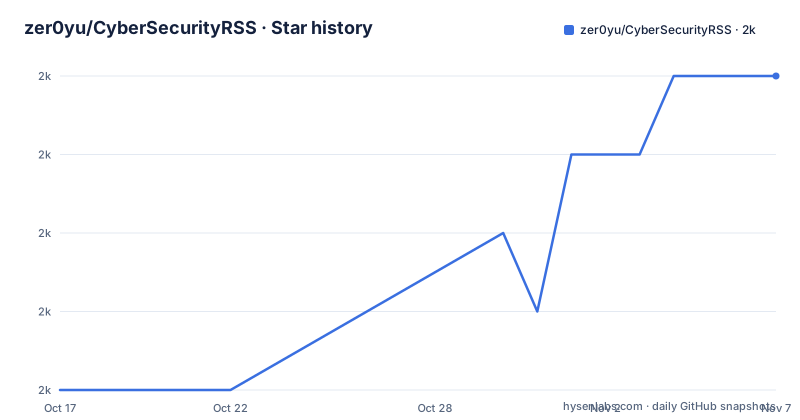
Star history
- zer0yu/CyberSecurityRSS1,981 ★ · +4
| Repository | 2026-10-17 | 2026-11-07 |
|---|---|---|
| zer0yu/CyberSecurityRSS | 2k | 2k |
4 Stars in the last 21 days, measured from the daily GitHub snapshot. Compare with other projects
Editorial analysis
Why CyberSecurityRSS Splits Security Reading into Two OPML Profiles
CyberSecurityRSS addresses a specific subscription problem: building a cybersecurity reading list without assembling hundreds of feeds one at a time. It is aimed at practitioners who follow vulnerability research, red-team material, reverse engineering, web security, threat news, and related AI coverage. The repository presents itself as a personal security knowledge base rather than as a scanner, feed reader, or automated intelligence platform.
The repository offers two subscription profiles with different scope. `tiny.opml` is the focused daily list and is documented as containing 494 feeds across nine categories. `CyberSecurityRSS.opml` is the broad catalog, documented as containing approximately 1,014 feeds across 12 categories. That distinction matters because importing the full profile into an unattended reader can produce far more material than a person or small team can review. The tiny profile gives a more manageable starting point, while the full file is appropriate when coverage takes priority over reading volume.
The collection is delivered as OPML, the subscription format commonly imported by RSS readers. The README names Reeder, Feedly, yarr, Feeder, Zr, Anyant, and Leaf as possible readers. It does not provide an application interface of its own, so adoption depends on another program for fetching, organizing, and displaying new entries. The repository also includes `others.md` for useful sites that do not necessarily expose RSS, but those entries are separate from the importable feed lists.
This is a curation and maintenance project. Its practical value depends on the quality and continued availability of the listed publishers. The repository does not claim that every item is independently verified, nor does it describe a scoring system that decides which article is most important. It organizes source subscriptions and automates collection hygiene.
Inside the tiny.opml and CyberSecurityRSS.opml Data Flow
The repository's central mechanism is OPML synchronization. The README describes two operating modes in GitHub Actions. For pull requests targeting `master`, the workflow runs in `check` mode and fails if OPML drift is detected. For pushes to `master`, it runs in `apply` mode and can update the files automatically.
During an apply run, the automation validates RSS and Atom URLs in both OPML files. It removes dead feed entries, deduplicates subscriptions by `xmlUrl`, and copies valid feeds from `tiny.opml` into `CyberSecurityRSS.opml`. Categories missing from the full file fall back to `Misc`. The health information is stored in `.github/opml-health-state.json`, and feeds are removed only after consecutive hard failures. This last rule is a deliberate guard against treating one temporary network or publisher failure as permanent removal.
The two files therefore have a defined relationship rather than being unrelated lists. The tiny profile acts as a focused selection, while the full profile receives its valid tiny entries during synchronization. The repository also describes automation as dead-feed cleanup and tiny-to-full sync. That makes the OPML files maintained data assets, not static examples.
The Python scripts and tests expose part of the implementation. The repository includes `scripts/opml_sync.py`, `scripts/add_feed_to_tiny.py`, and a `tests/` directory. The README does not specify the underlying HTTP client, XML parser, concurrency model, or exact definition of a hard failure, so those implementation details should not be inferred. The documented behavior is sufficient to understand the maintenance contract, but not sufficient to predict every runtime edge case.
Importing tiny.opml for a First Daily Security Reading Session
There is no project-specific installation command because CyberSecurityRSS is a collection of OPML files and repository utilities, not a packaged Python application. The README says to choose a feed set, import the corresponding OPML file into an RSS reader, and begin tracking updates. For a first real use, start with `tiny.opml` if the goal is low-noise daily reading.
If a reader only accepts XML extensions, the README documents this compatibility conversion:
cp tiny.opml tiny.xmlImport `tiny.opml`, or the renamed `tiny.xml`, using the reader's normal subscription-import function. The README does not specify one universal reader command or a single supported import menu, because the destination applications have different interfaces. After import, the reader should display new entries from the selected publishers and retain the feed categories carried in the OPML structure.
For a broader catalog, import the other file instead:
cp CyberSecurityRSS.opml CyberSecurityRSS.xmlThat creates a renamed copy for readers that restrict file extensions. The repository does not document a browser interface, local web server, or API for this collection. If you want an automated daily digest, the README recommends using `tiny.opml` as the default input to the separate `zer0yu/sec-daily-digest` project in OpenClaw or Claude Code. The follow-up workflow is scheduled and handled by that other repository, so its installation and execution details are not part of CyberSecurityRSS.
Running CyberSecurityRSS Checks Without Opening a Pull Request
Contributors can inspect the OPML state locally with the documented unit tests and synchronization script. The test command discovers tests under `tests` and prints verbose test names. The synchronization command uses `check` mode, the two repository files, the `Misc` fallback category, a 10-second timeout, and three retries. In check mode, the local command is intended to detect drift rather than apply an update.
Use the following commands in the repository root:
python3 -m unittest discover -s tests -v

python3 scripts/opml_sync.py \
  --mode check \
  --tiny tiny.opml \
  --full CyberSecurityRSS.opml \
  --fallback-category Misc \
  --timeout 10 \
  --retries 3
The README does not describe the exact expected test count or output format. A successful run should complete the unit-test discovery and report no detected OPML drift according to the script's own interface. If validation finds differences, the repository documentation directs contributors to resolve or review them before opening a pull request.
This local check is useful because GitHub Actions treats OPML drift as a pull-request failure. It does not prove that every feed will remain reachable after the check, because publisher availability can change after validation. It also does not tell you whether a feed's articles are useful. URL health and editorial value are separate concerns.
Adding a New Feed Through add_feed_to_tiny.py
`scripts/add_feed_to_tiny.py` provides an interactive path for adding a discovered feed to `tiny.opml`. The default behavior runs `git pull --ff-only` first, prints the current top-level categories, and lets the user select an existing category or type a new one. The helper then fetches feed metadata, including the title and site link, before appending the subscription.
The documented interactive command is:
uv run python scripts/add_feed_to_tiny.pyFor a non-interactive addition, the helper accepts an explicit URL and category:
uv run python scripts/add_feed_to_tiny.py \
  --url "https://example.com/feed.xml" \
  --category "ThreatIntel"
The example.com URL is a placeholder in the README, not a feed known to be part of this repository. A contributor must replace it with the actual feed URL and choose a category appropriate to the source. To edit without the startup pull, the README documents `--no-git-pull`:
uv run python scripts/add_feed_to_tiny.py --no-git-pullThe repository does not document rollback for an incorrect addition. Because the helper edits `tiny.opml`, contributors should inspect the diff and run the local validation command before submitting a pull request. That workflow is more specific than simply pasting an XML outline into the file, but it still depends on the contributor judging whether the new source belongs in the focused profile.
Where CyberSecurityRSS Stops: Feeds Do Not Equal Prioritized Intelligence
The main limitation is the gap between a maintained subscription catalog and an actionable intelligence workflow. OPML tells a reader where to fetch content. It does not classify incidents, correlate vulnerabilities, verify claims, deduplicate articles across publishers, or prioritize a breaking exploit. The README's separate digest workflow explicitly calls for another Skills project and a prompt that asks for high-signal grouping and explanations, which indicates that content processing is outside this repository.
The full profile can also create a volume problem. Approximately 1,014 feeds across 12 categories is useful for broad monitoring, but it is not evidence that every source deserves equal attention. The tiny profile reduces that pressure, yet the repository does not document per-feed weighting, refresh intervals, retention policies, or reader-specific filtering. Those choices remain with the importing application and its user.
Feed removal also depends on external behavior. The health-state file and consecutive-failure rule reduce the risk of deleting a feed after one failed request, but publishers can disappear, block automated requests, change URLs, or return malformed feeds. The documentation does not promise zero false removals or describe a manual restoration procedure. For teams that need contractual availability or historical retention, this repository is only the source-list layer.
A real alternative is to maintain a small, private OPML list directly in the chosen reader. That approach offers fewer feeds and no repository synchronization, but it gives the team direct control over every category and source. CyberSecurityRSS is the better fit when broad initial coverage and automated cleanup matter more than owning every subscription decision.
Maintenance Signals, Release State, and License Boundaries
The repository is not archived, and its last push was on 2026-09-07. That indicates recent repository activity, although the README does not promise a release schedule. No GitHub releases are listed. The maintenance story is therefore tied to commits and GitHub Actions rather than versioned packages or published artifacts.
The Python utilities have an operational cost. A contributor must install or make available `python3` and, for the feed helper, `uv`. The README does not state Python version requirements, dependencies, or whether the scripts require network access beyond feed validation. Each validation run can also be affected by the documented 10-second timeout and three retries, so a large or temporarily unavailable set of feeds may make checks take time.
The repository license is listed as unknown. As a result, the README does not provide clear reuse terms for the OPML catalog, scripts, or documentation. This article does not interpret copyright or redistribution rules. An organization considering internal import or redistribution should verify the repository's license file or obtain clarification before treating the collection as reusable organizational content.
The final maintenance distinction is simple: automation reduces manual feed hygiene, but it does not eliminate editorial review. Feed health, category placement, and the continued usefulness of each source still require attention.
Editorial conclusion
Adopt CyberSecurityRSS when you want a broad cybersecurity source catalog or a smaller daily reading list and are prepared to maintain the resulting subscriptions. Do not treat the OPML files as a finished threat-intelligence system, because the repository does not provide feed ranking, incident correlation, or content analysis by itself. Verify first that your reader accepts the OPML structure, that the selected profile matches your reading budget, and that the repository license is acceptable to your organization. For the stated automation and catalog scope, importing tiny.opml into a compatible reader is the most direct adoption path.
Frequently asked questions
Which CyberSecurityRSS file should I import for daily reading?
The README identifies `tiny.opml` as the focused daily profile, with 494 feeds across nine categories. Use `CyberSecurityRSS.opml` when broader coverage across 12 categories is more important than a smaller reading list.
Does CyberSecurityRSS validate and synchronize OPML feeds automatically?
According to the repository documentation, GitHub Actions validates RSS and Atom URLs, removes dead entries, deduplicates by `xmlUrl`, and synchronizes valid tiny-profile feeds into the full profile. Pull requests to `master` use `check` mode and fail on OPML drift, while pushes use `apply` mode.
Can I add a new RSS feed to tiny.opml with CyberSecurityRSS?
The repository includes `scripts/add_feed_to_tiny.py`, which can run interactively or accept a URL and category. The documented non-interactive form uses `uv run python scripts/add_feed_to_tiny.py --url "https://example.com/feed.xml" --category "ThreatIntel"`, with the example URL replaced by the actual feed.
Official sources
Add this badge to your README
If you maintain this project, the badge below links readers to this analysis and shows its maintenance status from the daily GitHub snapshot. Paste the markdown into your README; add ?metric=license or ?metric=stars to the image URL for a different field.

[](https://hysenlabs.com/projects/zer0yu-cybersecurityrss)Star history chart for your README
[](https://hysenlabs.com/projects/zer0yu-cybersecurityrss)Was this useful?