ResShift for Efficient Diffusion Image Restoration
ResShift: Efficient Diffusion Model for Image Super-resolution by Residual Shifting (NeurIPS@2023 Spotlight, TPAMI@2024)
At a glance
- What is it?
- ResShift is a diffusion-based restoration project that transfers between low- and high-resolution images by shifting their residual. It is aimed at researchers and engineers working with PyTorch, super-resolution, deblurring, inpainting, and face restoration.
- Who is it for?
- Researchers should consider ResShift when their workload needs diffusion restoration and can work with its PyTorch, xformers, checkpoint, and licence requirements. Operators seeking a packaged CLI, a conventional open source licence, or a zero-setup service should first inspect `LICENSE`, `environment.yml`, and the available configuration and inference files.
- Can I use it commercially?
- Check first. The repository uses a licence we do not classify automatically, so read its LICENSE file before any commercial use.
- Is it still maintained?
- Yes. The repository last received commits 123 days ago.
- What is it written in?
- Mainly Python, according to GitHub's language statistics.
Answers come from the project's GitHub data, last synced on November 7, 2026, and from our analysis. They are not legal advice.
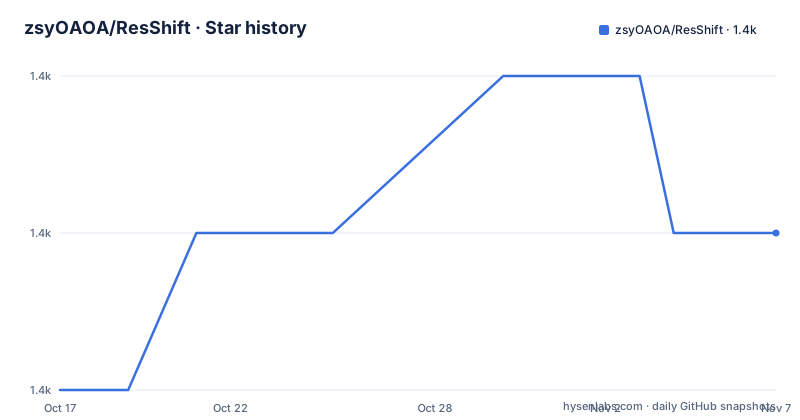
Star history
- zsyOAOA/ResShift1,435 ★ · +1
| Repository | 2026-10-17 | 2026-11-07 |
|---|---|---|
| zsyOAOA/ResShift | 1.4k | 1.4k |
1 Stars in the last 21 days, measured from the daily GitHub snapshot. Compare with other projects
Editorial analysis
Residual Shifting for Low- and High-Resolution Images
ResShift addresses a specific bottleneck in diffusion-based image super-resolution: the large number of sampling steps required for acceptable restoration quality. The README says that conventional diffusion super-resolution can require hundreds or thousands of steps, while acceleration methods can reduce image quality and produce over-blurry results. ResShift's proposed route is to construct a Markov chain that moves between a low-resolution image and a high-resolution image by shifting the residual between them.
That design targets engineers and researchers working on real-world image super-resolution rather than users looking for a general image editor. The README also lists image deblurring, image inpainting, and blind face restoration as application areas. These are related restoration problems, but the README does not document one universal command for all of them. It shows test data and results for several tasks, while the repository layout contains separate areas such as `configs/`, `scripts/`, `models/`, `ldm/`, `datapipe/`, and task-related test data.
The approach is therefore best understood as a model and training framework for restoration research. It may suit a team that already has a PyTorch development environment, understands diffusion checkpoints, and needs to configure an experiment. It is less suitable for a small application that wants a documented install-and-call workflow from a package index or a hosted endpoint. The repository does not present such a packaging guarantee.
ResShift Noise Schedule and Restoration Flow
The core mechanism described in the README has two parts: residual shifting and a noise schedule. The residual is the difference between the high-resolution target and the corresponding low-resolution image. By shifting that residual as the Markov chain transfers between the two resolutions, ResShift aims to make each transition more efficient than a process that treats the full image as the diffusion state.
The second part is the noise schedule. The README states that this schedule controls both the shifting speed and the noise strength during diffusion. This matters because fewer sampling steps are only useful if the remaining transitions preserve enough information for the requested restoration task. The project reports results with 15 sampling steps, but the README does not give hardware details, image dimensions, runtimes, memory use, or output measurements for a reproducible local run. Those figures should not be treated as an independently verified performance guarantee.
The repository structure suggests that the implementation is organized around learned models and diffusion machinery rather than a small standalone script. `ldm/` likely contains latent diffusion components based on its name, `models/` contains model-related code, `sampler.py` is present at the top level, and `inference_resshift.py` provides a named inference entry point. These filenames indicate an implementation structure, but the listed files do not show their command-line interfaces or exact data flow. The README does not document how to select a checkpoint, select a task, or invoke the inference script.
ResShift Environment Setup and First Check
The README gives two environment creation routes. The first creates a named Conda environment with Python 3.10, installs the repository requirements, and then makes the environment available for later commands. This is the shortest documented setup path:
conda create -n resshift python=3.10
conda activate resshift
pip install -r requirements.txt
The second route uses the checked-in `environment.yml`, which is the route to use when the Conda file is the preferred source for the complete environment specification:
conda env create -f environment.yml
conda activate resshift
The README separately lists Python 3.10, PyTorch 2.1.2, and xformers 0.0.23 as requirements. The repository's `requirements.txt` names `torch==2.1.1`, `xformers==0.0.23`, `gradio==3.50`, and the other packages needed by the code. That difference should be treated as a configuration check before installation. The README does not explain whether PyTorch 2.1.1 or 2.1.2 is intended for a particular platform or CUDA build.
After activation, the first useful verification would be to inspect the documented entry files and configuration files before attempting a model run. The README does not provide a complete inference command, model download command, or required environment variable, so an article cannot responsibly invent one. It points to a Colab notebook, a Replicate demo, and a Gradio demo, but those are alternative access paths, not local CLI instructions.
Task Coverage Beyond Standard Super-Resolution
ResShift is broader than its title may suggest. The application list includes real-world image super-resolution, image deblurring, image inpainting, and blind face restoration. The update history says that the journal extension added training and testing code for deblurring, and that an update in 2023 added configurations for the x2 super-resolution task. A bicubic model using MATLAB resize was also added according to the README update log.
This coverage makes the repository useful for experimenting with restoration models that share diffusion infrastructure. However, the README does not identify which checkpoint is correct for each task, how task-specific data should be organized, or whether every listed application has a complete end-to-end command. The test data directories show examples for inpainting and face restoration, including low-quality inputs and result directories, but filenames alone do not establish a supported configuration format.
The distinction matters when choosing between a general-purpose diffusion pipeline and ResShift. A user with one known input image and a preference for a browser interface may have less setup work through the listed demos than through the repository itself. A user building a controlled research pipeline may prefer the Python code and task-specific files, but must first confirm that the required training, testing, and inference assets are present. The README does not document rollback, checkpoint migration, or a supported production deployment procedure.
ResShift Constraints Compared with Conventional Super-Resolution
The closest practical alternative is a conventional non-diffusion super-resolution model or an established image-processing method such as bicubic interpolation. The difference is architectural. ResShift uses a diffusion model and a Markov chain that shifts the residual between low- and high-resolution images. A conventional method generally applies a learned restoration mapping or interpolation procedure without the same iterative diffusion sampling process.
That difference can matter when a workload has strict latency, resource, or reproducibility requirements. The README does not document ResShift's runtime, GPU memory demand, supported hardware, or operating systems, so those constraints cannot be compared numerically. It does state that ResShift is intended to reduce diffusion steps and reports experiments at 15 sampling steps. A bicubic approach, by contrast, requires no diffusion sampling loop, although its image quality and detail behavior are different.
Another limitation is the gap between a research repository and a supported product. The README provides installation instructions, conference and journal links, demo links, and a Gradio demo, but it does not publish a stable command-line contract, release cadence, semantic versioning policy, or compatibility matrix. The most recent listed release is v2.0, mainly used for storing ResShift checkpoints, dated 2023-07-08. The repository was not archived, and its last push was on 2026-07-08, but those facts do not establish that every task, checkpoint, or dependency path is actively maintained.
ResShift Licensing and Maintenance Boundaries
The repository metadata classifies the licence as Other and points to the `LICENSE` file. The README does not reproduce that licence's terms, so it is not possible to state whether commercial use, redistribution, modification, or model-output use is permitted. This is a concrete adoption check rather than a legal conclusion. Review `LICENSE` together with any terms attached to checkpoints or hosted demos before incorporating ResShift into a product or service.
The maintenance picture is mixed. The repository is not archived, and its last push was on 2026-07-08. The README's update history records changes through 2024-09-13, while the listed recent release is v2.0 from 2023-07-08 and is described mainly as a checkpoint-storage release. Consequently, the repository may receive updates without having a frequent packaged release. Version pinning is especially relevant because the README's stated PyTorch version differs from the pinned version in `requirements.txt`.
Upgrade cost cannot be quantified from the repository files. There is no documented migration guide for old checkpoints, no stated backward-compatibility policy, and no release process for task-specific code. Users should treat the checked-in requirements, configuration files, checkpoint format, and licence file as the compatibility boundary until the project documents a clearer upgrade path.
Editorial conclusion
Researchers should consider ResShift when their workload needs diffusion restoration and can work with its PyTorch, xformers, checkpoint, and licence requirements. Operators seeking a packaged CLI, a conventional open source licence, or a zero-setup service should first inspect `LICENSE`, `environment.yml`, and the available configuration and inference files. For adoption, verify checkpoint compatibility, expected output quality on the intended restoration task, and whether the repository's training or testing entry points fit the deployment environment. ResShift is a research-oriented restoration codebase, not a ready-made image API.
Frequently asked questions
How do I install ResShift for image super-resolution?
Create and activate the `resshift` Conda environment, then install the repository requirements with `pip install -r requirements.txt`. The README also provides `conda env create -f environment.yml` as an alternative setup route.
Does ResShift support image deblurring, inpainting, and face restoration?
Yes. The README lists real-world image super-resolution, image deblurring, image inpainting, and blind face restoration as applications. It does not provide a single documented command that switches between every task.
How many diffusion sampling steps does ResShift use?
The README reports experiments using 15 sampling steps and says that residual shifting reduces the number of diffusion steps. It does not provide a local runtime benchmark or a complete quality-versus-step comparison.
Official sources
Add this badge to your README
If you maintain this project, the badge below links readers to this analysis and shows its maintenance status from the daily GitHub snapshot. Paste the markdown into your README; add ?metric=license or ?metric=stars to the image URL for a different field.

[](https://hysenlabs.com/projects/zsyoaoa-resshift)Star history chart for your README
[](https://hysenlabs.com/projects/zsyoaoa-resshift)Was this useful?