DreamX-Creator: a 7B joint audio-video generator with a separate 2K refiner
Democratizing Native Audio-Video Generation at 2K Resolution
At a glance
- What is it?
- DreamX-Creator 1.0 generates synchronized video and audio from a first frame plus a text prompt, then optionally refines the result to 2K with a second model. The repository is two self-contained pipelines that you run in sequence, and the weights live outside git.
- Who is it for?
- Adopt DreamX-Creator if you have a single GPU with enough memory for a 7B DiT plus its VAE and text encoder, and you want audio and video produced by one generator rather than by two models stitched together.
- Can I use it commercially?
- Yes. Apache-2.0 is a permissive licence: you can use, modify and sell software built on it, as long as you keep its copyright and licence notices.
- Is it still maintained?
- Yes. The repository last received commits 81 days ago.
- What is it written in?
- Mainly Python, according to GitHub's language statistics.
Answers come from the project's GitHub data, last synced on November 22, 2026, and from our analysis. They are not legal advice.
Star history
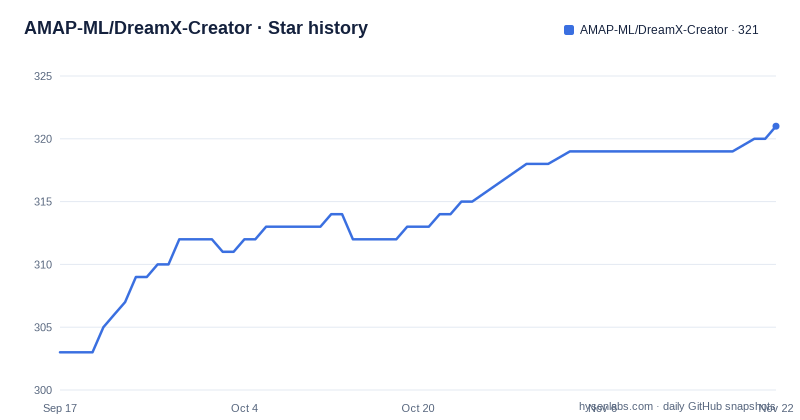
- AMAP-ML/DreamX-Creator321 ★ · +18
| Repository | 2026-09-17 | 2026-11-22 |
|---|---|---|
| AMAP-ML/DreamX-Creator | 303 | 321 |
18 Stars in the last 66 days, measured from the daily GitHub snapshot. Compare with other projects
Editorial analysis
What DreamX-Creator is solving, and for whom
Most text-to-video systems produce pictures. If you want sound that lines up with what is on screen, the usual route is to generate video first and run a separate audio model afterwards, then hope the two agree. DreamX-Creator takes the other route: the README describes it as a research framework for native joint audio-video generation, where one base generator models "modality-specialized video and audio streams" together. The input is a first frame plus a text prompt. The output is a video with audio that the same model produced.
The intended reader is a researcher or an engineer who can hold a 7B model and its dependencies on one GPU. The repository structure says as much: audio_video_generation/ is described as a "7B native joint audio-video generator (single GPU)". This is not a service, not a hosted API, and not a library with a stable Python surface. It is a release of weights plus the inference code that runs them, and the project's own roadmap treats faster distilled models as an unchecked box. If you need low latency today, that box matters.
The second half of the system is the refiner. video_refiner/ holds an "Autoregressive 1-step 2K refiner (SR-DiT 5B)" that takes a generated or external video and super-resolves it while leaving the audio unchanged. So the full path is two models in sequence: a 7B generator and a 5B refiner, each with its own environment.
How the two streams interact: gated cross-modal attention and progressive joint training
The mechanism the README names is Gated Cross-Modal Attention. The joint generator holds separate video and audio DiT branches, and the cross-modal weights sit in a single file, checkpoints/creator/cross_attn_weights.safetensors, described in the checkpoint layout as "gated A2V/V2A cross-modal attention". The naming is the informative part: A2V and V2A mean audio-to-video and video-to-audio, so the interaction is bidirectional rather than a one-way conditioning of audio on video. The gate is what lets the model decide how much of the other modality to admit at a given point.
Training is described as Progressive Joint Training, and the wider system adds Audio-Video Reinforcement Learning with Modality-Aware Multimodal Feedback. The README claims those stages improve visual and audio quality, semantic consistency, and fine-grained synchronization. None of that is verifiable from the repository alone: there are no evaluation scripts or reported numbers in the checkout, so treat the quality claims as the authors' description of their training recipe rather than as something you can reproduce from the code you clone.
The 2K stage is deliberately separate. Autoregressive 1-Step 2K Refinement is described as upgrading the video "while preserving content, motion, and audio-aligned timing". One step, not a diffusion loop, which is why the refiner is a 5B model rather than something larger. The checkpoint directory also lists latent_upsampler_flash.pt as the default upsampler, a causal 2D alternative, and lightvae_nu_scheme3.pt as an optional distilled fast decoder that is off by default.
Installing DreamX-Creator and running the default case
There is no top-level install. The README states that each subdirectory is self-contained with its own requirements.txt and README, so you install twice, once per stage. Weights are not in the git repository at all; checkpoints/README.md holds the expected layout and the download instructions, and the weights are distributed on HuggingFace and ModelScope under GD-ML/DreamX-Creator.
The expected layout is worth reading before you download, because the shared Wan2.2 dependencies sit alongside the DreamX weights:
checkpoints/
├── creator/                     # 7B joint generator, LoRA merged
├── audio_vae/                   # CreatorDACVAE audio VAE
├── refiner/                     # 2K refiner
└── wan2.2_ti2v_5b/              # shared Wan2.2-TI2V-5B dependencies
The README notes that the wan2.2_ti2v_5b/ directory can also be fetched directly from Wan-AI/Wan2.2-TI2V-5B, and that only three entries from it are needed: Wan2.2_VAE.pth, models_t5_umt5-xxl-enc-bf16.pth, and the google/umt5-xxl/ tokenizer. That is a useful escape hatch if the DreamX bundle is slow to pull.
For the joint generator, the quickstart is two commands plus a script:
cd audio_video_generation
pip install -r requirements.txt
./inference.sh
The README says inference.sh runs the default Verse-Bench case, case1. Expect a first-frame-plus-prompt run, not an interactive session. Input overrides, CPU-offload options, output details, and multi-GPU sequence-parallel inference are documented in audio_video_generation/README.md rather than in the top-level file, so that is where you look when the default case is not what you want.
For the refiner, the shape is the same but the input is passed through an environment variable:
cd ../video_refiner
pip install -r requirements.txt
INPUT=/path/to/video.mp4 bash run_inference.sh
The audio is unchanged by this stage by design. video_refiner/README.md is where the inference knobs live, including KV cache, window attention, and speed/quality trade-offs.
Where DreamX-Creator will not fit
The single biggest constraint is that the joint generator is a 7B model and the refiner adds a 5B model on top. The README's own parenthetical, "single GPU", is a statement about what the authors support, not a promise about your card. CPU offload is mentioned as an option in audio_video_generation/README.md, which tells you the default path assumes the model fits in device memory and that offload is the fallback when it does not. Offloading a 7B DiT will cost you time on every run.
The second constraint is that the release is incomplete by the project's own roadmap. The Plan section lists distilled, faster models with fewer sampling steps as an unchecked item, so the current code is the full-step path. If your workload is interactive, you are running the slow configuration and the fast one does not exist yet.
The third is integration. There is no documented Python API, no server, and no package on an index. The entry points are inference.sh and run_inference.sh, configured through environment variables such as INPUT and through files under the subdirectories. If your product needs to call this from a service, you will be writing the wrapper yourself, and you will be doing it against scripts whose flags the top-level README does not enumerate.
Finally, the quality claims are not accompanied by evaluation code in this repository. The technical report is cited on arXiv, and that is where the numbers live. If you need to compare DreamX-Creator against another model on your own data, you are building that harness.
How this differs from running a video model and an audio model separately
The obvious alternative is the pipeline everyone already has: generate video with a model such as Wan2.2, generate or retrieve audio with a separate system, and align them afterwards. The difference is architectural, not cosmetic. In a two-model pipeline, nothing in the video generator knows what the audio will be, and nothing in the audio model knows what the video contains. Synchronization is a post-processing problem, and the failure mode is drift: the audio is plausible but does not correspond to the events on screen.
DreamX-Creator's answer is the gated A2V/V2A cross-attention described above, trained jointly. Whether that produces better synchronization than a well-tuned two-stage pipeline is exactly the question the repository does not answer with code. What it does change is the interface: you get one call that takes a first frame and a prompt and returns both streams, instead of two calls and an alignment step.
The refiner is a different kind of comparison. It is not a general super-resolution model; it is an autoregressive 1-step 2K refiner paired with the generator, and the README is explicit that it preserves audio-aligned timing. If you already have a video upscaler you like, the reason to use this one is that it was built for the timing constraints of the generator's output. The repository acknowledges the lineage: the Acknowledgement section thanks the Wan, MOVA, and VideoX-Fun teams, and the shared dependencies under wan2.2_ti2v_5b/ come from Wan2.2-TI2V-5B.
Maintenance, licence, and what an upgrade costs you
The repository is not archived, and the last push was on 2026-09-03. The News section dates the weight and inference-code release to Sep 3, 2026, and the initial repository setup to Sep 1, 2026, so the code you clone is roughly two weeks old at the time of writing. The repository has no published GitHub releases, which means no tagged versions and no changelog to read before upgrading: you track the main branch or you pin a commit yourself.
Upgrade cost is dominated by the weights, not the code. The checkpoints are not in git, so a code pull is cheap, but any change to the checkpoint layout in checkpoints/README.md means re-downloading multi-gigabyte files and re-checking the directory tree. The three optional refiner files (latent_upsampler_2d_causal.pt and lightvae_nu_scheme3.pt, the latter off by default) are the kind of thing that can shift between releases without a version number to warn you.
The licence is Apache-2.0, stated in the README and present as a LICENSE file in the repository root. Apache-2.0 is permissive and includes an explicit patent grant, which matters for a model release. Two things it does not settle: the licence of the upstream Wan2.2-TI2V-5B weights you download separately, and the terms attached to the DreamX weights on HuggingFace or ModelScope, which are separate from the code licence. Check both before you ship anything. This is not legal advice.
Editorial conclusion
Adopt DreamX-Creator if you have a single GPU with enough memory for a 7B DiT plus its VAE and text encoder, and you want audio and video produced by one generator rather than by two models stitched together. Do not adopt it if you need a hosted endpoint, a Python API, or a stable interface: the repository ships shell scripts, the weights are downloaded by hand from HuggingFace or ModelScope, and the README states that distilled faster models are still on the plan list rather than released. Before committing, verify the checkpoints/README.md download instructions against your disk budget, check which inference knobs video_refiner/README.md exposes for your hardware, and confirm that the Apache-2.0 LICENSE file in the repository root is the licence you are relying on.
Frequently asked questions
What hardware does DreamX-Creator need to run the joint audio-video generator?
The repository describes audio_video_generation/ as a 7B native joint audio-video generator for a single GPU, and audio_video_generation/README.md documents CPU-offload options for when the model does not fit in device memory. The top-level README does not state a minimum VRAM figure.
Where do I download the DreamX-Creator model weights?
Weights are distributed on HuggingFace and ModelScope under GD-ML/DreamX-Creator and must be placed under checkpoints/ following the layout in checkpoints/README.md. The shared wan2.2_ti2v_5b/ dependencies can alternatively be downloaded from Wan-AI/Wan2.2-TI2V-5B.
Does the DreamX-Creator 2K refiner change the audio?
No. The README describes the video_refiner/ stage as super-resolving a generated or external video with the audio unchanged, and says the refinement preserves audio-aligned timing.
Official sources
Add this badge to your README
If you maintain this project, the badge below links readers to this analysis and shows its maintenance status from the daily GitHub snapshot. Paste the markdown into your README; add ?metric=license or ?metric=stars to the image URL for a different field.

[](https://hysenlabs.com/projects/amap-ml-dreamx-creator)Star history chart for your README
[](https://hysenlabs.com/projects/amap-ml-dreamx-creator)Was this useful?