whichllm: Benchmark-Aware Local LLM Selection for a Specific Machine
Find the local LLM that actually runs and performs best on your hardware. Ranked by real, recency-aware benchmarks, not parameter count. One command, run it instantly.
At a glance
- What is it?
- whichllm is a Python CLI that detects your GPU, CPU and RAM, works out which open models fit and how fast each will generate, and ranks candidates by merged benchmark scores rather than parameter count. The interesting part is the ranking logic; the interesting risk is how much of that ranking rests on estimated speed and VRAM.
- Who is it for?
- Adopt whichllm if you already run local models through llama.cpp, LM Studio or similar and want a ranked shortlist instead of a spreadsheet of parameter counts. Skip it if you need a guaranteed fit or an exact tokens-per-second figure before downloading tens of gigabytes, because the tool's own documentation labels its speed numbers as estimates.
- Can I use it commercially?
- Yes. MIT is a permissive licence: you can use, modify and sell software built on it, as long as you keep its copyright and licence notices.
- Is it still maintained?
- Yes. The repository last received commits 2 days ago.
- What is it written in?
- Mainly Python, according to GitHub's language statistics.
Answers come from the project's GitHub data, last synced on November 13, 2026, and from our analysis. They are not legal advice.
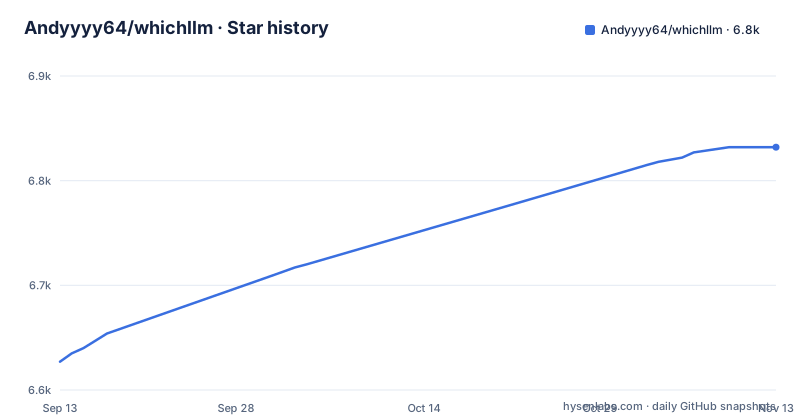
Star history
- Andyyyy64/whichllm6,832 ★ · +205
| Repository | 2026-09-13 | 2026-11-13 |
|---|---|---|
| Andyyyy64/whichllm | 6.6k | 6.8k |
205 Stars in the last 61 days, measured from the daily GitHub snapshot. Compare with other projects
Editorial analysis
The gap whichllm targets: fit is solved, choice is not
Most local-model tooling answers one question: will this quantized file load? That question is largely mechanical. You add weight bytes, a KV cache, some runtime overhead, and compare against VRAM. whichllm's description states the premise directly: models are ranked by real, recency-aware benchmarks, not parameter count. The tool is aimed at people who already have a working inference stack and are tired of picking a model by parameter count. Its own worked example makes the case: on an RTX 4090 it ranks a 27B model first over a 32B model, and the README explains that the 32B fits the card fine but loses because the 27B scores higher on real benchmarks and is a newer generation. A size-only tool would have returned the 32B. That divergence between what fits and what is worth running is the product.
How the ranking is assembled, and what the confidence tags mean
The score is not computed from the model card. According to the README, quality comes from Artificial Analysis and LiveBench, put on one scale and averaged; task profiles use task benchmarks such as SciCode and LiveCodeBench, and the frozen Open LLM Leaderboard and Chatbot Arena only score models nothing current covers. Each match records how it was found (the exact repo, its base model, a same-family interpolation, or the uploader's own claim), and weaker matches count for less. There is also a recency rule. Older generations are demoted, and whichllm never recommends pretrain-only base checkpoints.
VRAM and speed are modeled, not measured
The README describes the fit math as weights plus a KV cache computed layer by layer from the model's config.json, plus runtime buffers. Speed is described as bound by memory bandwidth: the GPU reads its share of the weights at VRAM speed and the CPU reads the rest at RAM speed, both calibrated against llama.cpp runs. The MoE split is the part worth understanding. In the README's sample output for an 8 GB RTX 4060, the top pick is Qwen3.6-35B-A3B at Q6_K at 16 tok/s: a mixture-of-experts model that uses about 3B parameters per token, with most experts left in system RAM. That is a genuinely different ranking from a dense-only heuristic. The caveat is that all of this is estimation. The README says the table marks how confident each estimate is, and the default table shows estimated generation speed. It predicts, then prints the prediction.
Running it: one command, then a set of flags that change the answer
The README's quick start is a single no-install invocation: uvx whichllm@latest. Installation for regular use is uv tool install whichllm, with uv tool upgrade whichllm to update. Homebrew and pip paths also exist: brew install andyyyy64/whichllm/whichllm and pip install whichllm. The default behavior is deliberately permissive. The conservative invocation it recommends is uvx whichllm@latest --gpu-only --speed usable --vram-headroom 1GB, which restricts results to models that fit fully in VRAM, drops slow estimates, and reserves headroom for runtime overhead. Hardware can be overridden with --gpu "RTX 4090", multi-GPU with --gpu "2x RTX 4090", and a card variant with --vram 16. Other documented options include --profile, --context-length, --markdown for pasteable output, --json for scripts, and the run and bench commands.
Where it will mislead you
The default mode is the main hazard. Because it includes partial offload and near-edge fits when they seem usable, the top of the default list can be a model that technically loads and runs slowly. The README does hold every placement to 8 tok/s, scaling down the quality of anything slower, and --speed usable hides anything under 8 tok/s. The second limitation is the evidence pipeline. Scores are merged from external leaderboards, so a model released recently enough to have no direct benchmark entry will be represented by a variant, base or interpolated score, discounted accordingly. A brand-new architecture with no comparable lineage may rank poorly for lack of evidence rather than lack of quality. The third is scope: the README describes auto-detection across NVIDIA, AMD, Intel, Apple Silicon and CPU-only, and the manual override flags are there for when detection fails or returns a wrong VRAM figure.
How it differs from llama.cpp's own tooling and from LM Studio
The closest comparison the README itself draws is LM Studio, but the relationship is complementary rather than competitive. LM Studio is a runtime with a GUI that tells you whether a specific model fits once you have chosen it. whichllm never loads a model to answer that question; it ranks candidates before you choose, and the README's troubleshooting path routes you back to LM Studio to confirm the fit. Against llama.cpp, the difference is sharper. llama.cpp ships llama-bench and a quantization toolchain, so you can measure tokens per second on your own hardware for a model you have already downloaded. whichllm inverts that order: it estimates speed across many models you have not downloaded, then ranks them. One measures one model precisely; the other estimates many models roughly. If you already know which model you want, llama-bench is the correct tool, though whichllm bench also runs the estimate-versus-measurement comparison on your machine. If you are choosing among twenty, the estimate is the point.
Licence, releases and the cost of staying current
whichllm is MIT licensed, which permits commercial use, modification and redistribution provided the copyright notice and permission notice are retained. That is the permissive end of the spectrum, and it is a plain statement of the licence terms rather than legal advice; check the LICENSE file in the repository for the binding text. Upgrade cost is low by design. Because the tool is distributed through uvx, uv tool and pip, updating is a single command, and the README lists uv tool upgrade whichllm for existing installs. The data side is where maintenance actually lives. The ranking quality depends on the maintainer keeping the benchmark data current; the README's regression tests rank against a frozen copy of the index of 1,430 models. The recent releases are v0.5.22 and v0.5.23 on 2026-10-28 and v0.6.0 on 2026-11-02, with the most recent release on the same day as the last push. That is active.
Editorial conclusion
Adopt whichllm if you already run local models through llama.cpp, LM Studio or similar and want a ranked shortlist instead of a spreadsheet of parameter counts. Skip it if you need a guaranteed fit or an exact tokens-per-second figure before downloading tens of gigabytes, because the tool's own documentation labels its speed numbers as estimates. Verify first by running the conservative invocation the README gives, uvx whichllm@latest --gpu-only --speed usable --vram-headroom 1GB, and then cross-check the top pick against the model's own card in LM Studio before committing to the download.
Frequently asked questions
Which local LLM does whichllm pick for a 24GB VRAM GPU?
On a 24 GB RTX 4090, the README says whichllm picks Qwen3.8-27B, although Qwen3-32B also fits there at Q4_K_M; the 27B is the newer generation and scores higher on current benchmarks. The --gpu flag simulates that card, and adding --gpu-only with --speed usable and --vram-headroom 1GB trims the table to full-GPU fits with overhead in reserve.
Which LLM does whichllm pick for CPU-only hardware?
Run whichllm on the CPU-only machine to get its ranking. CPU-only boxes are among the 29 hardware archetypes its regression tests rank, and its speed estimates are checked against 255 LocalScore results on 138 CPUs.
How do you install whichllm?
One-shot runs need no install at all: uvx whichllm@latest downloads and runs the CLI. For a permanent install there are three documented routes, uv tool install whichllm (upgraded later with uv tool upgrade whichllm), brew install andyyyy64/whichllm/whichllm, and pip install whichllm. Python 3.11 or newer is required either way.
How do you use whichllm to rank models?
Run whichllm on its own to rank models for the detected hardware. The common flags are --gpu for simulating a named card, --gpu-only for full-GPU rows only, --speed usable for hiding rows under 8 tok/s, --vram for a card variant, and --json or --markdown for output you can pipe or paste. Task profiles filter by general, coding, vision, or math use.
Official sources
Where developers are discussing it
Posts on Hacker News, dev.to and Lobsters that link to this repository, found by our scan of those communities. 0 in the last 30 days; newest first.
- Choosing a Local LLM Through Fate (2026 Edition)dev.to · Oct 12, 2026 · 2 points · 0 comments
Add this badge to your README
If you maintain this project, the badge below links readers to this analysis and shows its maintenance status from the daily GitHub snapshot. Paste the markdown into your README; add ?metric=license or ?metric=stars to the image URL for a different field.

[](https://hysenlabs.com/projects/andyyyy64-whichllm)Star history chart for your README
[](https://hysenlabs.com/projects/andyyyy64-whichllm)Was this useful?