Bitfocus Companion: a controller bridge whose real surface is 700 connections
Bitfocus Companion enables the Elgato Stream Deck and other controllers to be a professional shotbox surface for an increasing amount of different presentation switchers, video playback software and broadcast equipment.
At a glance
- What is it?
- Bitfocus Companion is a TypeScript application that turns an Elgato Stream Deck or any other controller into a switcher for broadcast and event software, one button press becoming one protocol message. Its substance sits in the connection modules, while the README itself is a page of links and the security posture lives in a handful of environment variables.
- Who is it for?
- Bitfocus Companion fits a show caller who already owns a Stream Deck and wants physical buttons for a switcher, a playback machine or a lighting desk, and the case for it rests on the connections list at bitfocus.io/connections rather than on anything in the README.
- Can I use it commercially?
- Check first. The repository uses a licence we do not classify automatically, so read its LICENSE file before any commercial use.
- Is it still maintained?
- Yes. The repository last received commits 1 day ago.
- What is it written in?
- Mainly TypeScript, according to GitHub's language statistics.
Answers come from the project's GitHub data, last synced on November 7, 2026, and from our analysis. They are not legal advice.
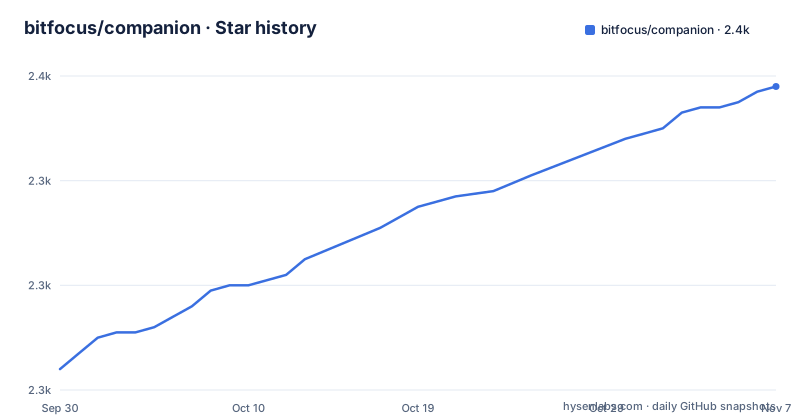
Star history
- bitfocus/companion2,358 ★ · +54
| Repository | 2026-09-30 | 2026-11-07 |
|---|---|---|
| bitfocus/companion | 2.3k | 2.4k |
54 Stars in the last 38 days, measured from the daily GitHub snapshot. Compare with other projects
Editorial analysis
What the bridge actually carries: one button press, one protocol message
Companion is not a remote control for a single program. It is a translation layer between a physical control surface and the many vendor protocols used in live production, and the repository topics name that range directly: artnet, atem, dmx, elgato, eventmaster, obs, osc, qlab, ross, streamdeck and vmix. The Stream Deck is simply the best known surface, and the description says as much by leading with it while covering presentation switchers, video playback software and broadcast equipment in the same sentence. The README points at a connections page on the project's own site, described as 700 plus entries, which is the number that actually tells you whether the tool is useful to you, since it enumerates the concrete device models and programs each module can drive. The architecture follows from that split. The monorepo in package.json declares seven workspaces, companion for the application itself, config-tool, shared-lib, webui, launcher, launcher-ui and docs, so the protocol handling, the browser interface, the desktop shell and the generated documentation are separate packages rather than one application. Buttons are bound to connection actions at run time, which is why the same build serves a streaming setup and a theatre lighting desk without a rebuild.
The README is a link page, and the install guide sits under a beta path
The first thing to know about adopting this project is that the README will not tell you how to install it. What it contains is a set of destinations: user documentation, developer documentation, a Slack invite, the project website, a bleeding edge download page, a donations page, and a line directing bug reports to the GitHub issue tracker. There is no install command anywhere in it, and the user documentation link points at an Installation page whose path runs through a beta segment, so the installation guide the project considers current is filed under a name that invites a second look before you rely on it. The identity of the build comes from the workspace manifest instead:
  "name": "@companion-app/workspace",
  "version": "5.1.0",
  "license": "MIT",
  "packageManager": "[email protected]",
That single object tells you four things worth knowing before anything else: it is a Yarn 4 monorepo with a committed lockfile and a .yarn directory, the sources are ES modules, and the version on the main branch is 5.1.0. The same manifest holds the developer entry points, including separate dev targets for the application, the web interface and the documentation site, and a test script on vitest with an end to end target that runs Playwright against a configuration in the e2e directory. So a contributor's first hour is spent in a package manager the project pins exactly, not in a global install.
Two distribution paths: an Electron desktop build and a container image
The build scripts name their own targets. There is one dist entry point and a platform argument, with named wrappers for mac-x64, mac-arm64, win-x64, linux-x64 and linux-arm7, which covers both Apple Silicon and Intel Macs, Windows, two Linux architectures including one 32-bit ARM target, and nothing else. The launcher and launcher-ui workspaces are why there is a desktop application at all. The container takes a different route through the same source, and the difference is visible in one line of the Dockerfile, where the distribution step is run with an environment variable set to zero before yarn dist. That switches the Electron part of the build off, which is what makes a headless image possible. The runtime image is debian:trixie-slim rather than a Node image, and it receives the finished dist directory from the builder stage along with docker-entrypoint.sh, then installs the runtime libraries the connections actually need, including libusb for the hardware surfaces and the udev runtime. Two files at the top level, Dockerfile and Dockerfile.prebuild, suggest the image has a fast path for reproducing a build, and the .devcontainer directory gives contributors a matching local environment. The Node runtime itself is added to PATH from a node-runtimes directory rather than from the system, and a fetch-runtimes script exists to populate it.
A non-root container, and the ping capability Debian removed
The runtime image is deliberately not privileged. It creates an unprivileged user, and the comment above that line says why in as many words: do not run as root. What is interesting is the one place where the project gives that back, and does so in a documented, narrow way. Debian's current release no longer ships the ping binary with the raw socket file capability and instead relies on a kernel sysctl for group access, so a ping launched by the unprivileged service account fails on hosts that leave that sysctl at its restrictive default. The build re-adds the capability to that single binary, and the comment ties the change to the generic-ping connection and to issue 4365:
# Debian trixie's ping no longer ships the cap_net_raw file capability (it relies on the
# net.ipv4.ping_group_range sysctl instead). Re-add it so the generic-ping module works as the
# non-root companion user on hosts that leave that sysctl at its restrictive default. #4365
RUN setcap cap_net_raw+ep /usr/bin/ping
One capability on one binary is a defensible trade, and the alternative would have been running the whole service as root. It is still worth knowing that a network trigger in this software can reach a ping on the host, and that the packaged image assumes the sysctl stays restrictive. The rest of the runtime is unpacking rather than granting: corepack is archived into a tarball in the builder stage and extracted in the image, with a comment explaining that COPY would not preserve the symlinks it needs, and the health check tooling is curl alongside procps, jq and iputils-ping. The builder stage itself sets a hundred second HTTP timeout for the package manager, which is a plain statement that this dependency tree is slow to fetch.
Dangerous features that ship off in production and on in dev
The most useful page in the repository is the example environment file, because it names the project's own security boundary instead of leaving it implicit. It groups three settings under a heading calling them dangerous features, with a comment that they allow code to run on this computer, that they are disabled by default in production, and that they are turned on in dev mode for convenience. The first is a switch for the internal Run shell command action, which means a button on a control surface can be bound to a command line on the machine running the show. The second controls loading of modules that are otherwise held back for safety, and the comment is specific about the shape of the risk: importing custom modules from a remote client is what gets held back, while importing from this computer is always permitted. The third configures Express trust proxy so the real client address survives a reverse proxy, accepting loopback or a separated list of proxy addresses. That is the one to get right rather than merely switch on, because a trust proxy setting that names the wrong range makes the service believe requests came from somewhere they did not. The same file also lets a browser interface be pointed at an instance running elsewhere, and it says that setting takes precedence over the local application port. A deployment where the web interface and the bridge run as separate processes is therefore a documented configuration, which is also why the proxy setting exists at all. One caution for anyone copying the file: the example value given for the trusted proxies key reads loopb, while the comment above it says the accepted value is loopback, so check the spelling before you rely on the sample.
Ports, the config directory, and surface modules fetched from a CDN
The dev environment is where the shape of a deployment becomes visible. Two ports move the application and the web interface off their defaults, and the file warns in the same breath that this is partial, saying it does not support adjusting the satellite or some other fixed ports, which tells you other ports in the product are compiled in rather than configured:
COMPANION_APP_PORT=8001
COMPANION_UI_PORT=5174
A separate key points the interface at a different config directory, which is how you keep two instances from fighting over the same state, and another forces an installation name so a development build is distinguishable from a live one on a show network. The entry with the widest consequences is the one that skips downloading the built-in surface modules on startup. The comment says they come from an external CDN and are only needed to talk to physical surfaces, and the reason the key exists is that a developer working offline or behind a restrictive network policy otherwise cannot start. So a control surface application expects outbound network access at first launch, which matters in a venue with a locked down network, and the key is the documented way to run without it at the cost of having no hardware surfaces. None of these keys are documented in the README, and the configuration reference the project publishes is generated from the source rather than maintained by hand, which is the more reliable of the two but is not something the README points you to.
Weekly releases, a main branch already on 5.1.0, and a licence to read
The release record is easy to read and gives a clear upgrade rhythm. Version 5.0.4 was published on 2026-08-23, 5.0.5 on 2026-09-03 and 5.0.6 on 2026-09-18, three patch releases in under a month, and the last push to the repository was on 2026-09-28. The pattern is incremental rather than sweeping, which is comfortable for a show system, since a patch release that renames a connection action is the kind of change that breaks a saved show file. Note the gap between the released version and the branch: the manifest on the main branch reads 5.1.0, so the source you would build from is already a minor version ahead of the newest tagged release. Licensing is the item that needs a decision rather than a note. The repository's licence is recorded as a custom one that GitHub cannot classify, held in LICENSE.md, while the workspace manifest declares MIT for the package. Both statements are in the repository and they are not obviously the same claim, and there is a dedicated build script for assembling licences into the shipped application, which suggests the distinction is deliberate. Read LICENSE.md before redistributing a build, and if your organisation needs a standard identifier, that file is the one to check. The rest of the repository is unusually complete for a project of this size: a changelog, a security policy, a code of conduct, contributing and developer guides, a devcontainer, an editor config, linting through eslint and prettier with husky hooks, and even a typos configuration, all of which point at a project that expects external contributions rather than tolerates them.
Editorial conclusion
Bitfocus Companion fits a show caller who already owns a Stream Deck and wants physical buttons for a switcher, a playback machine or a lighting desk, and the case for it rests on the connections list at bitfocus.io/connections rather than on anything in the README. It is the wrong tool if you need a documented install command, because the README has none, or if you want a build whose declared licence matches its repository, since the top-level LICENSE.md is a custom one GitHub cannot classify while package.json declares MIT. The part to read before deploying is .env.example: the internal Run shell command action, the restricted module import path and the Express trust proxy setting are all disabled in production and switched on in dev mode, so a development instance is a materially different security object from a shipped one. Verify first that the connection you need exists for your exact model, that the release you install matches the version your show script assumes, and that COMPANION_ENABLE_SHELL_COMMAND_SUPPORT stays unset on anything reachable from a network.
Frequently asked questions
How do I install Bitfocus Companion?
The README contains no install command. It points at the user documentation, whose Installation page sits under a beta path on companion.free, and at user.bitfocus.io/download for bleeding edge builds. A container image can be built from the repository's Dockerfile instead, which builds the same source with Electron switched off.
Which devices and programs does it actually drive?
The README links a connections page at bitfocus.io/connections, described as holding more than 700 entries. The repository topics name the protocol families involved, including artnet, atem, dmx, elgato, eventmaster, obs, osc, qlab, ross, streamdeck and vmix.
What are the dangerous features in the example environment file?
Three settings, disabled by default in production and enabled in dev mode: COMPANION_ENABLE_SHELL_COMMAND_SUPPORT for the internal Run shell command action, COMPANION_ENABLE_RESTRICTED_MODULES for loading modules held back for safety such as importing custom modules from remote clients, and COMPANION_TRUSTED_PROXIES for the Express trust proxy setting. The comment states plainly that they allow code to run on the computer.
Does it run on Linux, and does the container need any privileges?
The distribution scripts cover linux-x64 and linux-arm7, and the Dockerfile builds a debian:trixie-slim runtime image that deliberately avoids running as root. The one exception is a setcap call that re-adds the raw socket capability to the ping binary, so that the generic-ping connection keeps working on hosts that leave net.ipv4.ping_group_range restrictive.
Why would a developer need to skip the built-in surface modules?
They are downloaded from an external CDN on startup, and they are only needed to talk to physical surfaces. Setting COMPANION_SKIP_BUILTIN_SURFACE_MODULES=1 avoids that download, which the file says is what allows the dev server to run offline or behind a restrictive network policy.
Official sources
Add this badge to your README
If you maintain this project, the badge below links readers to this analysis and shows its maintenance status from the daily GitHub snapshot. Paste the markdown into your README; add ?metric=license or ?metric=stars to the image URL for a different field.

[](https://hysenlabs.com/projects/bitfocus-companion)Star history chart for your README
[](https://hysenlabs.com/projects/bitfocus-companion)Was this useful?