bytedance/Dolphin: a two-stage document image parser
The official repo for “Dolphin: Document Image Parsing via Heterogeneous Anchor Prompting”, ACL, 2025.
At a glance
- What is it?
- Dolphin-v2 classifies a page as digital-born or photographed, then picks a parsing strategy for each. It is a 3B-parameter model with a Python inference stack, and it is not a drop-in OCR replacement.
- Who is it for?
- Adopt Dolphin if you need structured JSON plus Markdown from mixed digital and photographed pages and can run a 3B model on your own hardware. Do not adopt it if you only need plain text extraction from clean digital PDFs, where a lighter OCR pipeline is simpler.
- Can I use it commercially?
- Check first. The repository uses a licence we do not classify automatically, so read its LICENSE file before any commercial use.
- Is it still maintained?
- Activity is slowing. The repository last received commits 7 months ago.
- What is it written in?
- Mainly Python, according to GitHub's language statistics.
Answers come from the project's GitHub data, last synced on November 15, 2026, and from our analysis. They are not legal advice.
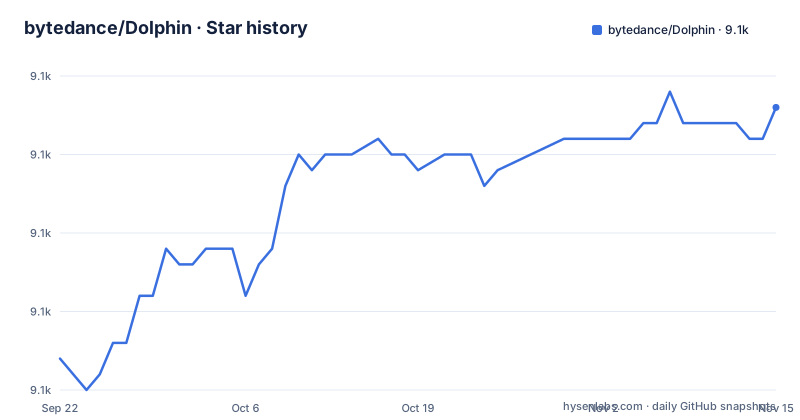
Star history
- bytedance/Dolphin9,068 ★ · +16
| Repository | 2026-09-22 | 2026-11-15 |
|---|---|---|
| bytedance/Dolphin | 9.1k | 9.1k |
16 Stars in the last 54 days, measured from the daily GitHub snapshot. Compare with other projects
Editorial analysis
The document parsing problem Dolphin targets
Most OCR pipelines assume one kind of input. A scanned photograph of a page and a digitally generated PDF have different failure modes, and a parser tuned for one tends to degrade on the other. Dolphin-v2 is built around that split. The README describes it as handling any document type, whether digital-born or photographed, through a document-type-aware two-stage architecture. The elements it must separate are text paragraphs, figures, formulas, tables and code blocks, which the README lists as the complexly intertwined parts of a page. The target user is an engineer who needs page structure, not just characters: reading order, table structure and formula markup all matter. That is a heavier requirement than text extraction.
How the two-stage architecture and anchor prompting work
Stage 1 does document type classification, sorting the input into digital or photographed, and then performs layout analysis with reading order prediction. Stage 2 branches. Photographed documents go through holistic parsing, while digital documents use parallel element-wise parsing. The README calls this a hybrid parsing strategy and attributes the efficiency claim to the parallel mechanism. The practical consequence is that the digital path can decode elements concurrently, which is why the page-level demo exposes a batch size flag. Dolphin-v2 also adds attribute field extraction and dedicated formula and code parsing, and the changelog notes 21-element detection. The three demo scripts map onto this architecture: demo_page.py for whole pages, demo_layout.py for layout, and demo_element.py for individual elements.
Installing Dolphin and running a first page parse
The README gives three installation steps. Clone the repository, install the pinned dependencies, then download the Dolphin-v2 weights. The dependency file is strict about versions, including torch==2.6.0 and transformers==4.51.0, so a pre-existing environment with different pins is likely to conflict.
git clone https://github.com/ByteDance/Dolphin.git
cd Dolphin
pip install -r requirements.txt
The model download uses Git LFS or the Hugging Face CLI. Both are shown in the README, and both write into a local directory that the inference scripts then receive as a path.
git lfs install
git clone https://huggingface.co/ByteDance/Dolphin-v2 ./hf_model
With the weights in ./hf_model, page-level parsing runs through demo_page.py. The README shows a single image, a single PDF, a directory of inputs, and a batch size override. The command below processes one image and writes output under ./results.
python demo_page.py --model_path ./hf_model --save_dir ./results \
    --input_path ./demo/page_imgs/page_1.png
The README states that page-level parsing produces structured JSON and Markdown. Expect those two artifacts in the save directory rather than a plain text dump. For throughput on digital documents, the README shows the same script run with a custom batch size for parallel element decoding. Element-level parsing is a separate entry point, demo_element.py, and the README notes that it requires specifying the element type.
Where Dolphin is the wrong tool
The model is 3B parameters. The README's own performance table shows the trade-off: Dolphin and Dolphin-1.5 are 0.3B, while Dolphin-v2 is 3B and scores higher on OmniDocBench v1.5. If your inputs are clean digital PDFs and you only need text and reading order, the 0.3B Dolphin-1.5 may be sufficient; the changelog says it moved to a v1.5 branch. If your inputs are photographed pages at high volume, the holistic parsing path cannot be parallelized the way the digital path can, so the batch size flag will not help much. The dependency list is also a constraint: torch, deepspeed, triton and torchcodec are all pinned, and deepspeed in particular is not a lightweight install. Anyone expecting a pip install and go should read requirements.txt first. Finally, the changelog shows older models being moved to branches as new ones ship, so match the branch to the checkpoint you use.
Alternatives and how their approach differs
The closest comparison inside the project's own material is Dolphin-1.5, which the changelog describes as maintaining the lightweight 0.3B architecture while improving parsing. That is not a different project, but it is a genuinely different operating point: roughly a tenth of the parameters, lower scores on the OmniDocBench v1.5 table, and a smaller hardware footprint. The README also links the Fox dataset, and the Fox-Page Benchmark released in July 2025 is described as a manually refined subset of it, which gives an external evaluation target if you want to compare against something other than the project's own table. For serving, the changelog records vLLM support added in June 2025 and TensorRT-LLM support added days later, both under deployment directories. Those are inference accelerators rather than alternative parsers: they change how the same weights are served, not what the model does. If your requirement is a small, fast pipeline on digital PDFs, the 0.3B line is the real alternative here.
Maintenance, licence and upgrade cost
The last push to the default branch was on 2026-03-25. The repository is not archived, but the commit cadence visible in the changelog is release-driven rather than continuous: model releases in May, June, July, October and December 2025, then a gap. The LICENSE file exists at the top level, but the repository metadata reports NOASSERTION while the README badge links to the MIT licence text. That mismatch is worth resolving before you ship, since the two are not the same claim. Upgrading between model generations is not a drop-in operation. The changelog shows Dolphin 1.0 moved to a v1.0 branch and Dolphin-1.5 moved to a v1.5 branch when v2 shipped, so pinning a model version means pinning a branch as well. The pinned requirements.txt compounds this: moving from 1.5 to v2 may pull a different dependency set.
Editorial conclusion
Adopt Dolphin if you need structured JSON plus Markdown from mixed digital and photographed pages and can run a 3B model on your own hardware. Do not adopt it if you only need plain text extraction from clean digital PDFs, where a lighter OCR pipeline is simpler. Before committing, check the LICENSE file, since the repository is marked NOASSERTION while the README badge points to MIT, and confirm which branch matches the model version you intend to download.
Frequently asked questions
How do I install bytedance/Dolphin and download the model?
Clone the repository, run pip install -r requirements.txt, then download the weights from the Hugging Face model card for ByteDance/Dolphin-v2 using either git lfs or the huggingface-cli command shown in the README.
Can bytedance/Dolphin parse multi-page PDF files?
Yes. The changelog records multi-page PDF document parsing capability added on 2025-06-13, and the page-level demo accepts a .pdf path as --input_path.
What is the difference between Dolphin-v2 and Dolphin-1.5?
Dolphin-v2 is a 3B-parameter model with 21-element detection, attribute field extraction and dedicated formula and code parsing, while Dolphin-1.5 keeps the 0.3B architecture. The README's OmniDocBench v1.5 table shows Dolphin-v2 scoring higher overall, and Dolphin-1.5 now lives on a separate branch.
Does bytedance/Dolphin support faster inference with vLLM or TensorRT-LLM?
The changelog records vLLM support added on 2025-06-27 and TensorRT-LLM support added on 2025-06-30, each with a ReadMe under the deployment directory.
Official sources
Add this badge to your README
If you maintain this project, the badge below links readers to this analysis and shows its maintenance status from the daily GitHub snapshot. Paste the markdown into your README; add ?metric=license or ?metric=stars to the image URL for a different field.

[](https://hysenlabs.com/projects/bytedance-dolphin)Star history chart for your README
[](https://hysenlabs.com/projects/bytedance-dolphin)Was this useful?