deepl-python: the official Python client for the DeepL API
Official Python library for the DeepL language translation API.
At a glance
- What is it?
- deepl-python is DeepL's own Python binding for its translation API, wrapping requests over a DeepLClient with typed results, glossaries and a command line entry point. It is an API client, not a translation engine you run locally.
- Who is it for?
- deepl-python fits Python services that need server side translation with account level billing, a stable typed client and no infrastructure to run, and its MIT licence lets you ship it inside a commercial product. It is the wrong tool for offline or on premise translation, for anything that must avoid sending text to a third party, or for a batch job that would be cheaper on a self hosted model.
- Can I use it commercially?
- Yes. MIT is a permissive licence: you can use, modify and sell software built on it, as long as you keep its copyright and licence notices.
- Is it still maintained?
- Yes. The repository last received commits 1 day ago.
- What is it written in?
- Mainly Python, according to GitHub's language statistics.
Answers come from the project's GitHub data, last synced on November 7, 2026, and from our analysis. They are not legal advice.
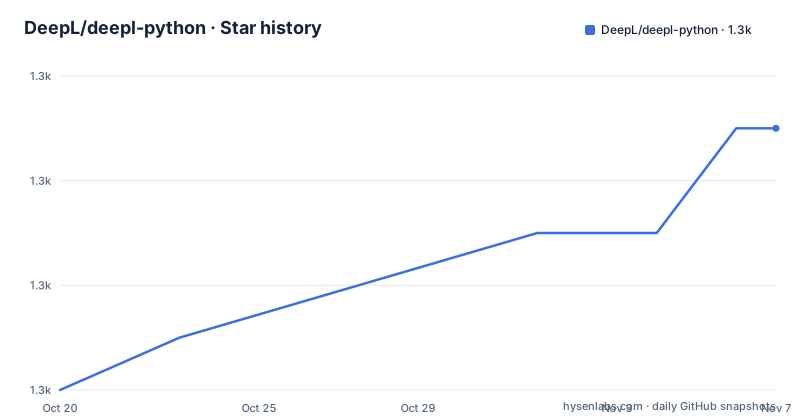
Star history
- DeepL/deepl-python1,341 ★ · +5
| Repository | 2026-10-20 | 2026-11-07 |
|---|---|---|
| DeepL/deepl-python | 1.3k | 1.3k |
5 Stars in the last 18 days, measured from the daily GitHub snapshot. Compare with other projects
Editorial analysis
A thin, typed wrapper over an HTTP API
deepl-python is the official Python library for the DeepL API, and the README is explicit about what the library is and is not. The API is described as a language AI API that lets other computer programs send texts and documents to DeepL servers and receive translations. The library exists so Python applications can talk to that API conveniently, and the README states the intention to support all API functions, while warning that support for new features may lag behind the API itself.
The mechanism is a single client object. You construct a DeepLClient with your API authentication key and call methods on it. The README says the requests module performs the HTTP requests, with a minimum version of 2.32.4. pyproject.toml pins requests at 2.32.5 or later and requires Python 3.9 up to but not including 4.
That is the whole architecture, and the thinness is the point. Nothing runs on your machine: translation happens on DeepL servers, the library serialises requests and parses responses, and the cost lands on your DeepL account. A DeepL API Free account allows up to 500,000 characters per month at no charge, according to the README.
Installing from PyPI and the Ubuntu cachecontrol wrinkle
Installation from PyPI is a single pip command:
pip install --upgrade deeplIf you intend to modify the source rather than just consume it, the README points to poetry for the dependency install:
poetry installThere is one platform specific snag worth knowing about before you debug it yourself. The README says that on Ubuntu 22.04 an error might occur, ModuleNotFoundError: No module named 'cachecontrol', and gives the workaround sudo apt install python3-cachecontrol, referring to a bug report for the details. The fix is a system package rather than a pip install, which is the sort of detail that only shows up on a particular distribution version.
On versions, the library is tested with Python 3.9 to 3.13. The README also states that support for older Python versions that have reached official end-of-life is dropped periodically, and points to a version list and support timelines. In other words, the supported range is a moving target you should check before pinning a Python version in your own build.
Your first translation and where the key belongs
The README's first example constructs the client and translates a single string. The auth_key value in the snippet is a placeholder you replace with the key from your DeepL account:
import deepl

auth_key = "f63c02c5-f056-..."  # Replace with your key
deepl_client = deepl.DeepLClient(auth_key)

result = deepl_client.translate_text("Hello, world!", target_lang="FR")
print(result.text)  # "Bonjour, le monde !"
The README then tells you what not to do. It labels the example as for demonstration purposes only, and says that in production the authentication key should not be hard-coded but fetched from a configuration file or environment variable. It also warns earlier in the page not to expose the key, for example when sharing source code. This is the single most important operational detail in the whole library, because a key in a git history is a bill you did not intend.
The DeepLClient constructor also accepts additional options, which the README refers to in its configuration section. The client is the single place where connection level settings are applied, so it is the natural place to keep anything that is not per request.
TextResult tells you what you were charged
translate_text() returns a TextResult, or a list of TextResult objects when you pass a list of strings. The properties on that result are the part of the API that goes beyond a string in and a string out. The README lists four: text is the translated text, detected_source_lang is the detected source language code, billed_characters is the number of characters billed for the translation, and model_type_used indicates the translation model used but stays None unless the model_type option is specified.
The billing field is why you would keep the result object rather than reaching for result.text and discarding the rest. The README's multi text example prints billed_characters per item, showing 7 for the Japanese string and 12 for the Spanish one, which is the character count of the source text. That makes per request cost accounting possible without a second API call.
Language handling follows ISO 639-1 with case-insensitive codes such as 'DE', 'FR' and 'JA'. Some target languages also take an ISO 3166-1 regional variant, for example 'EN-US' or 'PT-BR', and a target without a variant falls back to its default, so 'EN' becomes 'EN-US' and 'PT' becomes 'PT-PT'. The full list of supported languages is in the API documentation, which matters because the available set depends on your account.
Formality, sentence splitting and glossary options
Beyond the language pair, translate_text() takes a set of optional arguments that shape the output, and each one has a defined default. split_sentences controls how input text is broken into sentences, defaulting to 'on', which splits on both newlines and punctuation. 'off' skips splitting entirely, which the README recommends for applications where each input contains only one sentence. 'nonewlines' splits on punctuation but not newlines.
preserve_formatting defaults to False, and setting it to True prevents automatic correction of formatting. formality chooses between 'less' and 'more' register, and the README states it is only available for some target languages, which is why the language list is the reference to consult. The example output shows the difference concretely: 'Wie geht es dir?' for less and 'Wie geht es Ihnen?' for more.
Two arguments cover glossaries. glossary takes either a string holding the glossary ID or a GlossaryInfo object as returned by get_glossary(). glossary_ids takes a list of up to 5. There is also an upgrading_to_multilingual_glossaries.md file in the repository root, which suggests the glossary model changed recently and that existing integrations need to read it.
The per request argument list is the API's contract, and it grows as the API grows. The README's opening warning that new API features may reach the library only later is worth keeping in mind here.
A CLI entry point, keyring support and the examples directory
The package installs more than an importable module. pyproject.toml declares a script entry point, deepl = deepl.__main__:main, so installing the package puts a deepl command on your path. The README does not document that command in detail, so what it does and what flags it takes is something you would have to discover from the source in the deepl/ directory.
Credentials have an optional storage path too. pyproject.toml lists keyring as an optional dependency at 25.7.0 or later and defines a keyring extra that pulls it in. That gives an alternative to keeping the key in an environment variable, though which approach you pick is a decision about where the secret lives rather than about the library.
The repository carries an examples/ directory with four subdirectories: basic_usage, json, mustache, and voice. The names suggest the intended usage patterns, a plain call, a JSON payload, a template driven integration, and the audio side of the API. The deepl/ package holds the library, tests/ holds the suite, and there is a license_checker.sh script and a renovate.json5 dependency update configuration.
A development dependency set is also declared: pytest, coverage, black at a line length of 79, flake8, mypy, and pydantic. Coverage is configured to fail under 70 percent, which is a low enough bar that it mostly guards against an untested module rather than measuring real confidence.
Version churn, security handling and the MIT licence
The repository is not archived and the last push was on 2026-10-15, so the project is being worked on. The recent releases listed are v1.31.0 on 2026-08-12, v1.30.0 on 2026-04-09, and v1.29.0 on 2026-03-30, while pyproject.toml already carries version 1.32.0. In other words, a released version and the version in the working tree differ, which is normal for a project using semantic release tooling, and the repository includes.releaserc.mjs and.bumpversion.toml for that purpose.
Release discipline comes with maintenance signals in the tree: a SECURITY.md, a CODE_OF_CONDUCT.md, a CONTRIBUTING.md, a CHANGELOG.md, and both GitLab and GitHub CI configuration in.gitlab-ci.yml and.github/. The licence is MIT, as declared in pyproject.toml and held in the LICENSE file, so commercial use is fine as long as the copyright and permission notice is kept.
The licence points to a reasonable comparison. Calling the REST API directly with requests, or through an HTTP client in any other language, is the alternative to using this library, and for a single translate_text call the difference is a handful of lines of request building and response parsing. What you give up by not using the client is the typed result object with billed_characters and detected_source_lang, the option handling, the retry and configuration behaviour, the glossary helpers, and the CLI. If you only need one endpoint occasionally, the direct call is defensible. If translation is a core part of your product, the client is doing real work.
Editorial conclusion
deepl-python fits Python services that need server side translation with account level billing, a stable typed client and no infrastructure to run, and its MIT licence lets you ship it inside a commercial product. It is the wrong tool for offline or on premise translation, for anything that must avoid sending text to a third party, or for a batch job that would be cheaper on a self hosted model. Verify first that the requests version in your environment meets the minimum, that your DeepL account plan and language codes cover the targets you need, and that the keyring extra is what you want for credential storage.
Frequently asked questions
How do I install deepl-python?
Run pip install --upgrade deepl to install it from PyPI. If you want to modify the source, the README says to install the dependencies with poetry install.
Which Python versions does deepl support?
The library is tested with Python versions 3.9 to 3.13, and pyproject.toml requires python at >=3.9,<4. The README also says support for older versions that have reached official end-of-life is dropped periodically.
How much text can I translate for free with the DeepL API?
The README states that a DeepL API Free account can consume up to 500,000 characters per month for free. Billed character counts for each request are reported back in the billed_characters property of the TextResult.
How do I keep the DeepL authentication key out of my source code?
The README says the key should not be hard-coded in production code but fetched from a configuration file or environment variable, and warns against exposing it, for example when sharing source code. The package also offers an optional keyring extra for credential storage.
What is the difference between target_lang and target_lang with a regional variant?
Language codes are case-insensitive ISO 639-1 strings, and some targets also take an ISO 3166-1 variant such as 'EN-US' or 'PT-BR'. Without a variant the API uses the default, so 'EN' translates into 'EN-US' and 'PT' into 'PT-PT'.
Official sources
Add this badge to your README
If you maintain this project, the badge below links readers to this analysis and shows its maintenance status from the daily GitHub snapshot. Paste the markdown into your README; add ?metric=license or ?metric=stars to the image URL for a different field.

[](https://hysenlabs.com/projects/deepl-deepl-python)Star history chart for your README
[](https://hysenlabs.com/projects/deepl-deepl-python)Was this useful?