Hide My Applist: an Xposed module that answers app list queries on your behalf, under a no-modification license
An Xposed module to intercept applist detections
At a glance
- What is it?
- Hide My Applist hides installed apps from other apps on a rooted Android device and ships a way to check whether the hiding worked. Its README is short, and its license since v3.4 forbids modification and redistribution.
- Who is it for?
- Install Hide My Applist only if you already run an Xposed environment on a rooted device and want to hide specific root-adjacent apps from detection or block app list harvesting. Skip it if you need to patch the code, bundle it with another project, or run a fork, because the license since v3.4 forbids all three.
- Can I use it commercially?
- Not without permission. GitHub finds no licence file in the repository, and without a licence all rights are reserved by default: you may read the code but not reuse it. Check the README, or ask the authors, before using it.
- Is it still maintained?
- Yes. The repository last received commits 98 days ago.
- What is it written in?
- Mainly Kotlin, according to GitHub's language statistics.
Answers come from the project's GitHub data, last synced on November 7, 2026, and from our analysis. They are not legal advice.
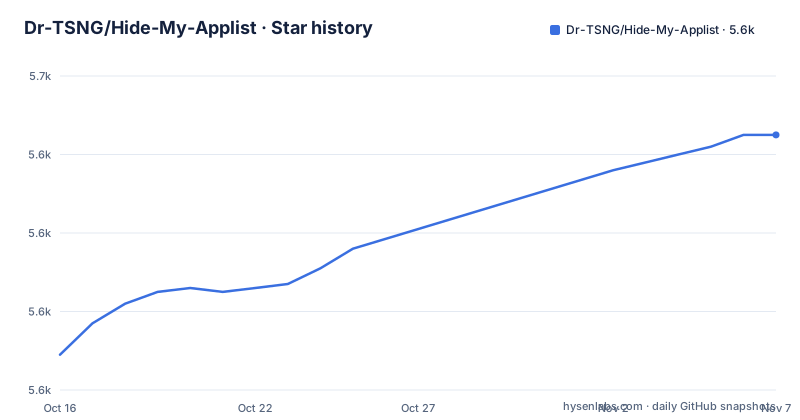
Star history
- Dr-TSNG/Hide-My-Applist5,645 ★ · +56
| Repository | 2026-10-16 | 2026-11-07 |
|---|---|---|
| Dr-TSNG/Hide-My-Applist | 5.6k | 5.6k |
56 Stars in the last 22 days, measured from the daily GitHub snapshot. Compare with other projects
Editorial analysis
Detecting Fake Location or Storage Isolation amounts to detecting root
The README opens with an argument about why the module exists. Checking whether specific apps are installed is bad practice, in the author's words, but not every app that needs root offers random package name support. When apps related to root, such as Fake Location and Storage Isolation, can be seen by other software, that is tantamount to detecting that the device is rooted.
That is the first job Hide My Applist takes on. It works as an Xposed module that hides chosen apps so another app's package query does not find them. The README names only those two example apps and does not publish a list of which apps or which detection methods it covers, so the module's reach is something you find out by testing.
The framing also tells you who the audience is. This is aimed at a device that already has root and an Xposed-style environment, not at an ordinary locked-down phone, and the README does not describe any path for a device without one.
Some apps read your app list as fingerprinting data
The second reason in the README is separate from root. Some apps use various loopholes to acquire the list of apps on your device, in order to use it as fingerprinting data or for other nefarious purposes, in the README's phrasing.
For that case, the module can reject app list requests instead of hiding individual apps. The distinction matters in practice. Hiding a handful of apps protects the root tooling you picked. Rejecting the request protects the whole list, including apps unrelated to root that still say something about you.
The README gives no description of the interception points, no table of supported Android versions, and no account of which loopholes are closed. Both modes are stated in one sentence: this module can work as an Xposed module to hide apps or reject app list requests. Anything beyond that sentence, such as per-app rules or whitelists, is not in the README, so read the app's interface after installing it.
A built-in way to test whether the list is hidden
The same sentence adds that the module provides some methods to test whether you have hidden your app list properly. That is a useful admission, because a hiding tool can fail silently. If a detector finds Fake Location anyway, the hiding rule did not take effect, and you want to learn that before an app does.
The README does not say what those test methods are, how many there are, or whether they run inside the module's own app or against other apps. It also does not claim they catch every loophole. Treat a pass as a result for the methods the module knows, not as proof that no app can enumerate your packages.
The README gives no troubleshooting steps for a module that is installed but not active in the framework. The Telegram group linked in its badges is the only support channel it points to.
Kotlin on Gradle, split into app, common and xposed
The repository is written in Kotlin and built with Gradle's Kotlin DSL: build.gradle.kts, settings.gradle.kts, gradle.properties and the usual gradlew and gradlew.bat wrappers. The top-level directories are app, common and xposed. The names suggest a split between the user-facing application, shared code and the module hook code, but the README does not describe the layout, so that reading is an inference from folder names.
The repository also holds crowdin.yml, which connects it to the Crowdin project named in the README for translations. README_zh_CN.md is a Simplified Chinese version of the README. The README invites translation contributions through Crowdin and nothing else.
There are no build instructions in the README. If you want to compile the module yourself, nothing the project publishes tells you how, and the license in the next section constrains what you may then do with the result.
Since v3.4 the license forbids modification, redistribution and succession claims
The README carries a copyright notice dated 2025 for the HMA developers. Starting from version v3.4, the software is no longer under the AGPL-3.0 License, and the owner reserves certain rights instead. Four conditions follow.
First, no modifications of any kind, including changing, adding or removing code or functionality. Second, no redistribution in any form, which includes renaming, selling, or including it in another project. Third, no extracting code snippets, functions or released binaries into other projects without proper credit. Fourth, forks created before the license change may not claim to be an official or unofficial successor, which covers using the project's name, branding or reputation to imply a connection.
The consequence is concrete. You cannot patch the module for a new Android release and share the build. You cannot bundle the APK into a custom ROM image if that counts as redistribution. GitHub shows the license as unknown, and the badge row links to the GPL-3.0 page on choosealicense.com. Those two signals contradict the notice, so follow the notice and the license of the release you actually download.
Release history: v3.8.3 on August 1, 2026, and no changelog in the repository
The newest release is v3.8.3, published on August 1, 2026, the same day as the latest push to master. Before it came V3.6.1 on October 18, 2025 and V3.5 on June 28, 2025. The README states no policy for how often releases appear or which Android versions each one targets.
The Update Log section is a single link to the repository's releases page. There is no CHANGELOG file among the top-level entries, so what changed between v3.6.1 and v3.8.3 is only on that page. Read the release notes there before upgrading across several versions, particularly because the license has applied since v3.4 and every release listed falls after it.
The README has badges for Crowdin, GitHub Actions, the latest release, a Telegram group and the license. Their targets are links, and the README does not expand on any of them, so the GitHub Actions page and the Telegram group are the places to see build status and ask questions.
What the README leaves out: install steps, requirements and detection coverage
The README is about three hundred words of project description and legal text. It does not say how to install the module, which framework it needs beyond being an Xposed module, what Android versions it supports, or which apps count as detectable. People searching for how to install, activate or set it up will not find those answers in the repository text, and the releases page is where the project points for anything past the description.
The module also cannot fix an app that identifies you by means other than the app list. Its stated scope is hiding apps and rejecting app list requests, and nothing else is claimed.
A word on use. The README presents the module as protection against root detection and fingerprinting, and it describes testing as a built-in feature. It does not make claims about specific banking, gaming or streaming apps, so do not assume it will pass any particular app's checks.
Editorial conclusion
Install Hide My Applist only if you already run an Xposed environment on a rooted device and want to hide specific root-adjacent apps from detection or block app list harvesting. Skip it if you need to patch the code, bundle it with another project, or run a fork, because the license since v3.4 forbids all three. The first thing to verify is the license text for the release you download, since the GPL-3.0 badge in the README and the copyright notice in the same file disagree.
Frequently asked questions
What is Hide My Applist?
An Xposed module that hides apps or rejects app list requests, and provides methods to test whether you have hidden your app list properly. The repository is written in Kotlin.
How to install Hide My Applist?
The README has no install steps. It links to the repository's releases page, which is where the released builds and the update log are.
How to use the Hide My Applist Xposed module?
The README only says the module can hide apps or reject app list requests and has methods to test the result. It gives no step-by-step usage guide.
Official sources
Add this badge to your README
If you maintain this project, the badge below links readers to this analysis and shows its maintenance status from the daily GitHub snapshot. Paste the markdown into your README; add ?metric=license or ?metric=stars to the image URL for a different field.

[](https://hysenlabs.com/projects/dr-tsng-hide-my-applist)Star history chart for your README
[](https://hysenlabs.com/projects/dr-tsng-hide-my-applist)Was this useful?