Watusi for WhatsApp: how the iOS tweak installs and what it changes
Your all-in-one tweak for WhatsApp Messenger!
At a glance
- What is it?
- Watusi for WhatsApp is an iOS tweak that modifies the WhatsApp and WhatsApp Business apps through jailbreak or sideloading, distributed as pre-built IPA files rather than source code. Three install paths exist with different iOS version requirements and different trade-offs on push notification reliability.
- Who is it for?
- Use Watusi if you are on a jailbroken iPhone or comfortable with AltStore and want WhatsApp features the official app does not provide. Skip it if re-signing every seven days is not workable and you do not want to pay for a signing certificate, or if running a modified binary conflicts with your employer's mobile device policy.
- Can I use it commercially?
- Not without permission. GitHub finds no licence file in the repository, and without a licence all rights are reserved by default: you may read the code but not reuse it. Check the README, or ask the authors, before using it.
- Is it still maintained?
- Yes. The repository last received commits 5 days ago.
- What is it written in?
- GitHub does not report a main language for this repository.
Answers come from the project's GitHub data, last synced on November 7, 2026, and from our analysis. They are not legal advice.
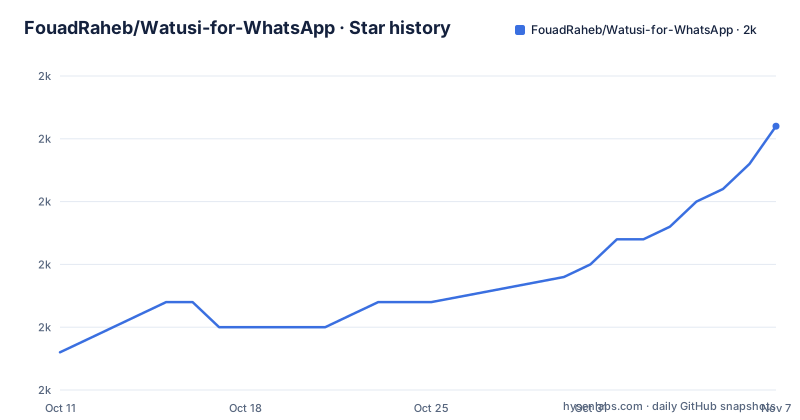
Star history
- FouadRaheb/Watusi-for-WhatsApp2,016 ★ · +18
| Repository | 2026-10-11 | 2026-11-07 |
|---|---|---|
| FouadRaheb/Watusi-for-WhatsApp | 2k | 2k |
18 Stars in the last 27 days, measured from the daily GitHub snapshot. Compare with other projects
Editorial analysis
What Watusi modifies and which install path fits your device
Watusi for WhatsApp is an iOS tweak that extends WhatsApp Messenger and WhatsApp Business with features not in the App Store builds. Distribution runs through three channels depending on whether the device is jailbroken. fouadraheb.com/watusi is the project homepage, and changelogs are published at apt.fouadraheb.com/package/com.fouadraheb.watusi3/changelogs.
No compiled plugin code lives in the repository. Four top-level entries make up the project on GitHub: .gitignore, README.md, an altstore/ directory containing AltStore source metadata, and an images/ folder. All functional content is distributed as pre-built IPA files hosted at fouadraheb.com and through third-party services.
Jailbreak installs use a Cydia, Zebra or Sileo package repository. Sideloading via AltStore works on any device without a jailbreak but requires a computer and re-signing every seven days with a free Apple ID. TrollStore bypasses re-signing entirely but is restricted to specific iOS version ranges. Each path uses a different IPA variant, and using the wrong one for the install method causes crashes.
Jailbreak path: add apt.fouadraheb.com to your package manager
Adding https://apt.fouadraheb.com to Cydia, Zebra or Sileo puts Watusi in the package list. No IPA file is involved: the package manager handles download, installation and later updates from the repository itself. That is a meaningful difference from the AltStore and TrollStore paths, where each update requires downloading a new IPA and reinstalling.
Device jailbreakability for specific iOS versions is covered at appledb.dev/device-selection/, which the README links to directly. Watusi's README does not enumerate a supported iOS range for the jailbreak path; that depends on which jailbreak tools are available for a given firmware. As Apple releases updates, jailbreak coverage changes independently of Watusi.
Unlike sideloading, a jailbreak gives the tweak direct system access to inject into WhatsApp's process rather than relying on the restricted entitlements of a developer-signed build. That access is what allows features that sideloaded builds cannot replicate. For a device already jailbroken on a compatible firmware, repository-based install is the lowest-maintenance option over time.
AltStore sideloading: a computer, an Apple ID and the 7-day ceiling
AltStore sideloading requires a Mac or Windows computer, an internet connection and an Apple ID (email and password). On iOS 16, Developer Mode may need to be enabled first, found under Settings, then Privacy and Security, then Developer Mode. Two-factor authentication works with AltStore; app-specific passwords do not.
Getting AltStore onto the phone starts with AltServer on the computer: after downloading AltServer from altstore.io, connecting the iPhone, and right-clicking the AltServer icon, the Install AltStore menu entry installs AltStore to the selected device. Apple ID credentials are entered at that point. With AltStore installed, an IPA copied to the phone is imported through My Apps by tapping the plus button in the top right corner.
A free Apple ID code-signs the app for seven days. AltStore refreshes the signature if the computer running AltServer is reachable when the window nears expiry. If the computer is unavailable and the certificate expires, WhatsApp stops opening until re-signed. A paying signing certificate, described in the README as keeping the app valid for one year instead of seven days, removes that constraint at the cost of a third-party subscription.
The IPA table: six variants separated by signing context
Six IPA files cover two applications (WhatsApp and WhatsApp Business) and two bundle identifiers each (original and duplicate). Original bundles (net.whatsapp.WhatsApp and net.whatsapp.WhatsAppSMB) replace the App Store installation. Duplicate bundles (com.fouadraheb.watusi and com.fouadraheb.watusiSMB) install alongside the original so both run on the same device. Before sideloading, confirming no existing WhatsApp shares the target bundle identifier avoids a conflict at install time.
Sideload IPAs (labeled SL) have the Plugins folder removed and include crash fixes for devices without full developer entitlements. TrollStore IPAs (labeled TS) are fake-signed with original entitlements and carry no crash fixes. Using a TrollStore IPA through AltStore produces a broken install, and the README warns in uppercase that the TS files will crash if not used in TrollStore or with a proper signing certificate.
Three tweaks, Stalky, OnlineNotify and ContactSync, are off at install time across all variants. Enabling any of them requires a manual toggle inside Watusi Settings after installation.
TrollStore: tight iOS version limits and a second table for notification failures
Installing through TrollStore overwrites the App Store WhatsApp, so the App Store version must be present and activated first. After that, the TrollStore IPA is downloaded, opened in TrollStore and installed over the original. TrollStore's own setup is a separate prerequisite; the README links to its GitHub repository at github.com/opa334/TrollStore and to ios.cfw.guide for guidance.
Two device groups have different iOS version requirements: iPhone X and devices with A11 chips need iOS 14 through 16.6.1, while iPhone 11 and newer need iOS 14 through 16.6 beta 1. Any device outside those ranges cannot use this path. Push notifications and iCloud features work correctly through TrollStore, which is the main advantage over AltStore sideloading.
A second table in the TrollStore section lists NoPlugins variants for WhatsApp and WhatsApp Business. These are for users who encounter notification failures after installation, a problem the README traces to extensions injecting into WhatsApp service processes. A blog post at blog.fouadraheb.com covers the underlying mechanism. One detail the README does not address: the main TrollStore table includes Duplicate bundle variants, but the NoPlugins table does not. No explanation for that omission appears in the repository.
Signing certificates via Flekstore as a year-long alternative
A signing certificate bypasses the seven-day re-signing window by keeping the app valid for one year. Flekstore at flekstore.com supports adding the source at https://source.fouadraheb.com so Watusi can be downloaded directly to the device. KravaSign at kravasign.com/fouadraheb is listed as a second option.
For users with AltStore Beta, adding the same source (https://source.fouadraheb.com) to AltStore enables direct in-app download without manually copying an IPA file. That removes the step of finding and transferring the file but still uses a seven-day signing window unless a certificate is in use.
Certificate-based sideloading avoids the daily need for a computer running AltServer, which is the main practical reason to pay for one. Pricing, terms and security properties of Flekstore and KravaSign are outside what the README documents. Evaluating a signing service is a separate decision from choosing whether to use Watusi at all.
Stalky, OnlineNotify and ContactSync: what the names say and what the README omits
All three tweaks are off at install time and require a manual enable in Watusi Settings. Beyond their names and the toggle location, the README provides no description of what each does, what data each accesses or what the other party to a conversation can detect. Changelogs at apt.fouadraheb.com/package/com.fouadraheb.watusi3/changelogs are the only documented source of feature-level detail.
Shipping these three disabled is a practical design choice. Features that surface information about other users (online status, contact activity, notification timing) carry implications that differ from purely local modifications such as theme changes or layout tweaks. An active choice to enable them separates a user from someone who installed a defaults-on version. What each accesses in practice requires reading the changelogs or examining the installed app.
Other Watusi features are not enumerated in the README. Installing and reading the changelogs is the only way to see the full list. Anyone comparing Watusi to stock WhatsApp before installing should treat the README as a navigation document rather than a feature index.
No source code in the repository and no public build process
Beyond .gitignore, README.md and images/, the only functional directory is altstore/, which holds the JSON metadata that AltStore reads when a user adds https://source.fouadraheb.com as a source. No Theos project files, build scripts or plugin source appear anywhere in the repository. Watusi exists on GitHub primarily as a distribution point and a setup guide, not as an inspectable codebase.
For a user deciding whether to install, this means the behavior of the binary cannot be audited from the repository. Reading changelogs at apt.fouadraheb.com is one verification step; examining the binary with analysis tools is another. Neither is covered in the README.
Versioning is tracked through the IPA filenames and the changelogs at the Cydia repository URL. The repository has no GitHub releases. A user who wants to confirm they have the current build needs to compare the version in the README's IPA table against what is available through their chosen install source before downloading.
Editorial conclusion
Use Watusi if you are on a jailbroken iPhone or comfortable with AltStore and want WhatsApp features the official app does not provide. Skip it if re-signing every seven days is not workable and you do not want to pay for a signing certificate, or if running a modified binary conflicts with your employer's mobile device policy. Before installing, verify your iOS version against the TrollStore compatibility table in the README if push notifications matter to you, and check the changelogs at apt.fouadraheb.com/package/com.fouadraheb.watusi3/changelogs against the WhatsApp version in the App Store before updating either app.
Frequently asked questions
How do I install Watusi for WhatsApp without jailbreak?
Two non-jailbreak paths are described in the README. AltStore sideloading requires a Mac or Windows computer, an Apple ID and AltServer software; the signing certificate is valid for seven days with a free Apple ID. A signing certificate service such as Flekstore with the source at https://source.fouadraheb.com keeps the app valid for one year.
What is Watusi for WhatsApp?
Watusi for WhatsApp is an iOS tweak by FouadRaheb that modifies WhatsApp and WhatsApp Business with additional features. It installs through a jailbreak repository, AltStore sideloading or TrollStore, and ships with Stalky, OnlineNotify and ContactSync disabled by default.
Does Watusi for WhatsApp support iOS 17?
The README does not list iOS 17 compatibility. TrollStore compatibility has specific iOS version limits set out in the README's TrollStore section. Jailbreak compatibility for any iOS version depends on available jailbreak tools and is covered at appledb.dev/device-selection/.
Is Watusi for WhatsApp safe to install?
No source code is in the repository, so the compiled binary cannot be audited from GitHub. The README documents installation steps and IPA variants, and the changelogs at apt.fouadraheb.com/package/com.fouadraheb.watusi3/changelogs cover what each version changes.
What is the difference between the sideload and TrollStore IPA files?
Sideload IPAs have the Plugins folder removed and include crash fixes for installs without full developer entitlements. TrollStore IPAs are fake-signed with original entitlements and include no crash fixes; the README warns they will crash if used outside TrollStore.
Official sources
Add this badge to your README
If you maintain this project, the badge below links readers to this analysis and shows its maintenance status from the daily GitHub snapshot. Paste the markdown into your README; add ?metric=license or ?metric=stars to the image URL for a different field.

[](https://hysenlabs.com/projects/fouadraheb-watusi-for-whatsapp)Star history chart for your README
[](https://hysenlabs.com/projects/fouadraheb-watusi-for-whatsapp)Was this useful?