yanky.nvim, a yank ring for Neovim that ships no keymaps at all
Improved Yank and Put functionalities for Neovim
At a glance
- What is it?
- yanky.nvim gives Neovim an Emacs style kill ring, a yank history picker, highlighting for yanked and put text, cursor position preservation and a text object, and it refuses to bind any key by default. The configuration surface is small and explicit, with a ring of 100 entries stored in ShaDa or SQLite, and a family of Plug mappings that cover indented and shifted puts.
- Who is it for?
- yanky.nvim fits a Neovim user who pastes a lot and misses the Emacs kill ring, and who is willing to spend some time wiring the Plug mappings. It does not fit a user who wants a plugin that just works, since the readme is emphatic that there are no default mappings and the plugin has no effect until you add them, and it does not fit a configuration that already remaps p and P for something else.
- Can I use it commercially?
- Yes. WTFPL is a permissive licence: you can use, modify and sell software built on it, as long as you keep its copyright and licence notices.
- Is it still maintained?
- Yes. The repository last received commits 5 days ago.
- What is it written in?
- Mainly Lua, according to GitHub's language statistics.
Answers come from the project's GitHub data, last synced on November 7, 2026, and from our analysis. They are not legal advice.
Star history
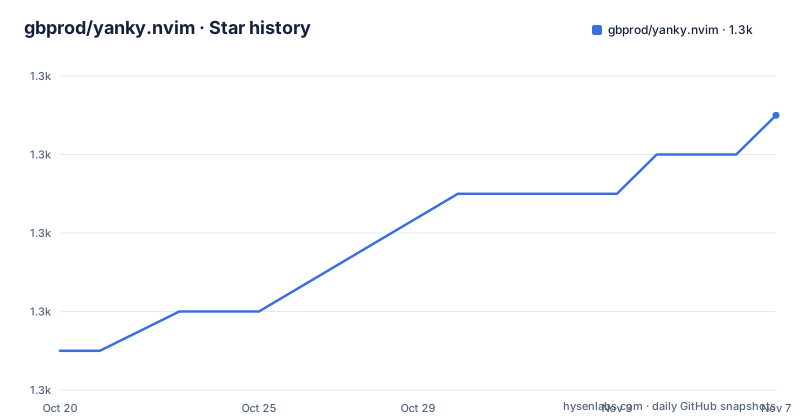
- gbprod/yanky.nvim1,295 ★ · +6
| Repository | 2026-10-20 | 2026-11-07 |
|---|---|---|
| gbprod/yanky.nvim | 1.3k | 1.3k |
6 Stars in the last 18 days, measured from the daily GitHub snapshot. Compare with other projects
Editorial analysis
The plugin that refuses to touch your keys
yanky.nvim aims to improve yank and put functionality for Neovim, and the feature list is compact: a yank ring, a yank history picker, highlighting of put and yanked text, preservation of cursor position on yank, a special put and a text object.
The decision that shapes how you install it is stated in bold in the mappings section. This plugin contains no default mappings and will have no effect until you add your own maps to it.
That is unusual, and in a good way for a plugin that touches the most contested keys in an editor. p, P, gp and gP are the keys people most often remap, and a plugin that grabs them silently is a plugin that produces a bug report about somebody else's plugin. Shipping only Plug mappings, with names such as (YankyPutAfter) and (YankyGPutBefore), means the plugin defines what it does and you decide where it happens.
The readme also gives you the minimum set, saying you should at least set the keymaps for yank ring usage, and then adds a second block for a tpope/vim-unimpaired like usage. Both are provided as ready-to-paste Lua, which is the right amount of help: the plugin does not choose your keys, but it does tell you which ones are worth choosing.
The requirements are modest. The plugin needs Neovim greater than 0.9.0, and it is written in Lua, with the badge in the readme making the point that this is a Lua project.
The ring: a hundred entries, cycled with Ctrl-P and Ctrl-N
The yank ring is the feature the plugin is named for, and it is the Emacs kill ring brought to Neovim. Yanky maintains a history of yanks that you can choose between when pasting, and the behaviour after a paste is the interesting part.
With the ring mappings in place, after performing a paste you can cycle through the history by hitting ctrl-n and ctrl-p. Any modifications done after pasting will cancel the possibility to cycle, which is the correct behaviour: once you have typed something in the buffer, the history entries no longer describe the text you were pasting, so cycling them back would be a lie. And the swap operations only affect the current paste, the history itself is left unchanged.
That last detail is the design decision that separates a good ring from a broken one. Cycling is a way of choosing among the last few things you copied, not a way of rewriting your clipboard. If cycling mutated the history, a second paste of the same text would paste something else, which is exactly the sort of surprise that makes people distrust a plugin.
The ring size is configurable, with history_length defaulting to 100, which is a number that tells you something about the intended use. A hundred entries is far more than Vim's numbered registers keep, and it is the difference between a clipboard and a work history.
Where the ring lives: shada, sqlite or memory
The storage mode is one of three values: shada, sqlite or memory. The default is shada, and the readme explains that this saves persistently using the Neovim ShaDa feature, so the history is persisted between sessions.
ShaDa is Neovim's own data store, the mechanism that holds your marks, your command history and your registers between sessions. Using it means the ring needs no extra infrastructure at all, no file to manage and no format to understand, and the history simply appears the next time you start the editor. For most users that is the right answer.
The sqlite option exists for people who want the ring in a database. It requires a separate dependency, the sqlite.lua plugin by kkharji, and it adds a storage_path option, which defaults to a databases directory under the Neovim data directory. The lazy.nvim setup block in the readme shows both halves: the dependency entry and ring = { storage = "sqlite" } in the options.
The third option, memory, keeps the ring in memory only, which is what you want if you do not want your copied text written to disk at all. Given that a yank ring is a history of things you copied, and that people copy things they would rather not leave lying around in a state file, that option has a privacy argument as well as a testing one.
Two related defaults are worth knowing. sync_with_numbered_registers is true, so the ring and the numbered registers stay in agreement, and ignore_registers lists the registers the ring should not track, with the black hole register in it by default.
A family of puts for indented and shifted text
The mapping list is longer than it looks, and it is arranged by intent rather than by convenience.
The base four are the ones a Vim user already knows, with Yanky versions of them: put after the cursor, put before the cursor, and the g variants that leave the cursor after the pasted text. Then there is a set of eight that put and indent, in the style of vim-unimpaired. The square bracket pair puts a linewise register indented after or before the current line, in both the capital and lower case forms, and the angle bracket pair puts before or after and shifts the result right or left, so >p puts and indents right and <p puts and indents left, with the capital variants putting before the cursor.
Finally there is the filter pair, =p and =P, which put the text after or before applying a filter. That is the one that is hard to do by hand, because Vim's filter operator does not compose with the register put in a way that is easy to remember, and having a mapping for it removes the need to remember anything.
The set is coherent, and each mapping corresponds to a concrete editing intention that is otherwise awkward. That is what a plugin in this position should offer: not a new way to paste, but the many existing ways to paste, made reachable.
Highlighting, the picker, the clipboard and the text object
The rest of the configuration covers the presentation layer, and each section is small and disableable.
Highlighting has two switches, on_put and on_yank, both true by default, and a timer of 500 milliseconds, which is how long the highlight stays before it fades. The purpose is to show you where the text just came from or went to, which is most valuable the first few times you paste, and less so once the behaviour is automatic, which is why it is a timer and not a permanent mark.
preserve_cursor_position has an enabled flag, true by default, and covers the promise to preserve cursor position on yank, that when you yank a selection the cursor does not jump to the start of the selection as it does in stock Vim.
The picker section is for the yank history picker. Its select action is nil by default, meaning the default put action is used, and the telescope options control whether the default mappings are used and whether you supply your own. That the plugin integrates with Telescope for the history picker is worth noting, since a picker is the natural interface for a ring of a hundred entries.
system_clipboard has sync_with_ring true by default and an optional clipboard_register, so the ring and the system clipboard stay in agreement, with a register you can nominate if you want the synchronisation to go somewhere other than the default.
And the textobj section, a text object for yanked regions, is disabled by default, which is the right default for a feature that changes how motions behave.
The test suite is a headless Neovim run
The repository layout is small and conventional for a Neovim plugin. There is a lua/ directory for the plugin code, a plugin/ directory for the file Neovim sources at startup, a spec/ directory for the tests, a doc/ directory for the help pages, a Makefile, a .luacheckrc for the Lua linter, a stylua.toml for the formatter, a CODE_OF_CONDUCT.md and a LICENCE file.
The Makefile has a single target, and it is the whole test story:
test:
	@nvim --headless -u spec/init.lua -c "PlenaryBustedDirectory spec/ { minimal_init = 'spec//init.lua' }"
That runs Neovim in headless mode with a spec-specific init file and asks PlenaryBustedDirectory to run the spec directory, passing a minimal init. In practice that means the tests exercise the plugin inside a real Neovim instance rather than in a mock, which for a plugin that intercepts yanks, puts and register writes is the only kind of test that means anything.
The two tool configurations are also worth noting. stylua.toml fixes the formatting of the Lua sources, and .luacheckrc configures the linter, so a pull request that arrives with consistent formatting is a pull request that arrives already passing the project's own checks.
On releases, the tag history is v1.0.1 and v1.0.2 in October 2023 and v2.0.0 in November 2023, with the most recent push to the branch on 2026-10-06. So the commits have continued for nearly three years after the last tag, and anyone who installs a tagged release gets the 2023 code rather than the current one.
Where yanky.nvim is the wrong tool
The first limit is the effort, and it is not small. The plugin has no effect until you write the mappings, and the mapping list is long enough that copying it is the sensible approach. For a user who wants a yank ring without an afternoon of configuration, the readme's position is a non-starter, and there are simpler options in the ecosystem for people who only want the history picker.
The second is the interaction with the rest of the configuration. The plugin wants p and P, which are among the most contested keys in Neovim, and it wants to keep the ring in agreement with the numbered registers, which is a second source of truth for the same clipboard state. A configuration that already remaps those keys, or that relies on the numbered registers in a particular way, will feel the plugin's presence in ways that are hard to debug.
The third is the version story. The last tagged release is v2.0.0 from 2023-11-03, while the branch has been receiving pushes up to 2026-10-06. Installing from a package manager that prefers tags gives you 2023 code, and installing from the branch gives you a moving target. Neither is wrong, but the plugin's readme does not explain the difference, so a user has to notice it.
The fourth is the sqlite option, which adds a dependency on another plugin for a feature that most users will never turn on, and the memory option, which is the one to prefer if you are the kind of person who does not want a list of everything you copied written to a state file.
The fifth is the licence, which is the WTFPL. It is a do-as-you-wish public licence, short and permissive in the sense that it imposes almost nothing, and it is unusual for a Neovim plugin, where MIT is the norm. Nothing stops you using it, and nothing obliges anyone to maintain it either.
Editorial conclusion
yanky.nvim fits a Neovim user who pastes a lot and misses the Emacs kill ring, and who is willing to spend some time wiring the Plug mappings. It does not fit a user who wants a plugin that just works, since the readme is emphatic that there are no default mappings and the plugin has no effect until you add them, and it does not fit a configuration that already remaps p and P for something else. Before adopting it, decide whether you want the ring to mirror the numbered registers, because sync_with_numbered_registers is on by default and the two views of your clipboard will otherwise diverge, and check whether you are installing a release or the branch, because the latest tagged version is v2.0.0 from 2023 while the branch has been pushed as recently as 2026-10-06. The licence is WTFPL.
Frequently asked questions
Does yanky.nvim come with default keybindings?
No. The readme states that the plugin contains no default mappings and will have no effect until you add your own. It provides Plug mappings such as (YankyPutAfter) and (YankyGPutBefore), and the readme gives ready-made Lua blocks for the yank ring keys and for a vim-unimpaired like set.
How is the yank history stored in yanky.nvim?
Three storage modes: shada, which is the default and persists the ring between sessions using Neovim's own ShaDa store, sqlite, which requires the kkharji/sqlite.lua plugin and a storage_path, and memory, which keeps the ring in memory only.
How do I cycle through previously yanked text?
Map ctrl-p and ctrl-n to (YankyPreviousEntry) and (YankyNextEntry). After a paste you can then cycle through the history, and any modification made after pasting cancels the possibility to cycle, since the history entries no longer describe the pasted text.
Which versions of Neovim does yanky.nvim support?
It requires Neovim greater than 0.9.0. The plugin is written in Lua, is tested with a headless Neovim run through Plenary, and is formatted with stylua and linted with luacheck.
Under which licence is yanky.nvim released?
The WTFPL, with the licence text in the LICENCE file at the repository root. The latest tagged release is v2.0.0 from 2023-11-03, while the branch itself has been pushed as recently as 2026-10-06.
Official sources
Add this badge to your README
If you maintain this project, the badge below links readers to this analysis and shows its maintenance status from the daily GitHub snapshot. Paste the markdown into your README; add ?metric=license or ?metric=stars to the image URL for a different field.

[](https://hysenlabs.com/projects/gbprod-yanky-nvim)Star history chart for your README
[](https://hysenlabs.com/projects/gbprod-yanky-nvim)Was this useful?