homarr-labs/dashboard-icons: A CDN-Hosted Icon Set for Self-Hosted Dashboards
Your definitive source for dashboard icons.
At a glance
- What is it?
- The repository ships over 3,400 icons in SVG, PNG and WEBP with light and dark variants, addressable by URL pattern rather than by package install. It solves the naming and format problem for dashboard apps, but it is a static asset collection with a submission pipeline, not a library you version and pin.
- Who is it for?
- Adopt it if you run Homarr, Homepage, Dashy or a similar dashboard and want consistent iconography without curating your own assets, and if referencing icons by CDN URL fits your setup. Do not adopt it if you need guaranteed long-term asset stability, offline operation, or a licence grant covering the trademarks in the artwork, since the README states that all product names and trademarks are the property of their respective owners.
- Can I use it commercially?
- Yes. Apache-2.0 is a permissive licence: you can use, modify and sell software built on it, as long as you keep its copyright and licence notices.
- Is it still maintained?
- Yes. The repository last received commits 7 days ago.
- What is it written in?
- Mainly TypeScript, according to GitHub's language statistics.
Answers come from the project's GitHub data, last synced on November 13, 2026, and from our analysis. They are not legal advice.
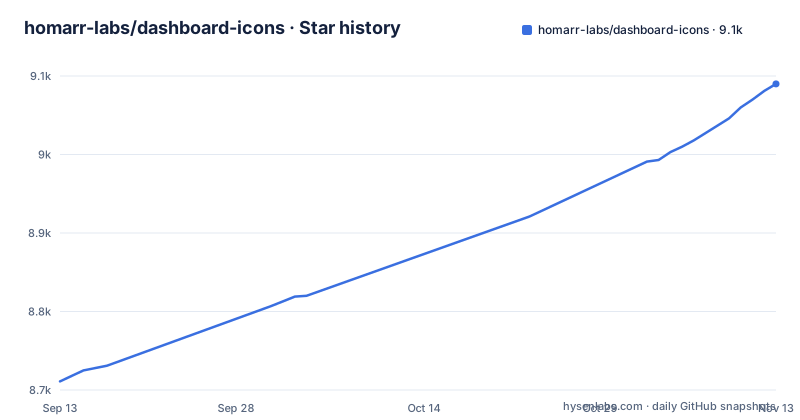
Star history
- homarr-labs/dashboard-icons9,090 ★ · +379
| Repository | 2026-09-13 | 2026-11-13 |
|---|---|---|
| homarr-labs/dashboard-icons | 8.7k | 9.1k |
379 Stars in the last 61 days, measured from the daily GitHub snapshot. Compare with other projects
Editorial analysis
The Naming Problem dashboard-icons Actually Solves
Anyone who has assembled a self-hosted dashboard has hit the same wall. You have twenty services running, each with its own logo buried somewhere on a vendor site or a press kit, in whatever format that vendor chose. The file names disagree with each other. Half are white-on-transparent and vanish against a light theme. You end up with a folder of assets that no one else can maintain. This repository addresses that specific mess. It is a curated collection of over 3,400 icons for services, applications and tools, according to the README, aimed at dashboards and app directories. The audience is narrow and identifiable: people running Homarr, Homepage, Dashy or similar tools who want the visual layer handled centrally. The value is not the artwork itself, which belongs to the respective vendors. It is the naming discipline and the format matrix applied uniformly across all of it.
Kebab-Case Names, Three Formats, Two Variants
The repository's real interface is a naming convention. Names are kebab-case, lowercase with hyphens, so a service called Nextcloud Calendar becomes nextcloud-calendar. That rule is mechanical, which means you can predict a URL before you check whether the file exists. Each icon is published in SVG as the original source, plus PNG and WEBP rendered at 512px height. The README describes the raster formats as auto-generated, so the SVG is the canonical artifact and the others follow from it. Variants use suffixes: -light for icons intended for dark backgrounds, -dark for icons intended for light backgrounds. Note the inversion, because it trips people up. The suffix describes the icon's own colouring, not the theme you are placing it on. The README's own examples are github-light.svg and github-dark.svg. If a vendor rebrands, the file at that path changes.
Two Base URLs and the Trade-Off Between Them
Icons are addressed with a pattern: base URL, then format, then icon name and extension. Two base URLs are documented. The recommended one is jsDelivr at https://cdn.jsdelivr.net/gh/homarr-labs/dashboard-icons, and the alternative is GitHub direct at https://raw.githubusercontent.com/homarr-labs/dashboard-icons/main. The distinction matters more than it looks. The jsDelivr path is a CDN with caching and a separate availability profile; the raw GitHub path resolves against the main branch, so it tracks whatever is currently committed. Choosing raw GitHub means your dashboard's icon URLs are coupled to the branch state rather than to a cached edge copy. Command-line retrieval is documented with curl and wget examples against the jsDelivr URL, which is the pattern you would use if you wanted to vendor the assets locally instead of hotlinking them.
Getting an Icon Into Your Dashboard
There are three documented paths. The first is the browser: go to dashboardicons.com, search, open the icon detail, pick a format, then download it or copy the direct link. The second is the URL pattern itself, pasted into whatever field your dashboard uses for a custom icon. The third is shell retrieval, documented as curl -O with the same jsDelivr URL, or the wget equivalent, if you want the file on disk. Beyond those, the repository exposes an MCP server so that clients such as Cursor can search the collection and retrieve CDN URLs programmatically; the README points to web/docs/MCP.md for that. There is no documented npm package, no import path, and no config file that the repository asks you to write. That is the whole integration surface, and its smallness is deliberate.
The Submission Flow Bypasses GitHub on Purpose
Contribution is where this project's design choices are most opinionated. The README states plainly that the preferred route is the submission form at dashboardicons.com, and it carries a note saying that GitHub issues are no longer used for icon submissions. Admins review submissions, and approved submissions go live once a maintainer publishes them. So the review queue lives in a web application, not in the repository's issue tracker. If you want to help triage, the README asks you to make contact through the project's Discord or by email at [email protected], and it describes an admin role on the site. For a consumer of the icons, the practical consequence is that a missing icon is a request against a form rather than a pull request against a directory, and the turnaround depends on admin review.
Where a Static Asset Collection Stops Being Enough
The honest limitation is that this is a pile of files with a naming scheme, not a versioned dependency. If you hotlink from jsDelivr, an icon can change appearance under you when a contributor updates the source SVG. The repository has no published GitHub releases, so there is no release train to pin to. Offline or air-gapped deployments get nothing from the CDN pattern and must vendor the files themselves, at which point you own the update problem the project was solving. There is also a licensing layer that the README is careful about: the disclaimer states that all product names, trademarks, and registered trademarks are the property of their respective owners. If your use is commercial or promotional rather than identificational, that caveat is the thing to read before anything else. I am not in a position to give legal advice on it, and neither is the README.
How It Differs From Self Icons and Simple Icons
The README itself points at neighbouring catalogs rather than positioning against them: its MCP server also searches the selfh.st, LobeHub and Simple Icons catalogs, with their licenses. The difference in approach is curation: dashboard-icons aims at a uniform visual language across services, with light and dark variants and a predictable kebab-case name, which is why a row of them looks like a set rather than a collage. If an icon you need is missing here, the MCP server's cross-catalog search and the submission form at dashboardicons.com/submit are the documented routes.
Maintenance Cost and the Apache-2.0 Question
For a consumer, maintenance cost is close to zero as long as you hotlink: there is nothing to upgrade, no dependency to bump, no build step. The cost moves to the maintainers, who review submissions through the website form and regenerate the PNG and WEBP derivatives from the SVG sources. The repository itself is Apache-2.0. That licence covers the repository's own contents, and it does not extend to the trademarks depicted in the artwork, which the disclaimer addresses separately. If you are redistributing the icons as part of a product rather than using them to label services in your own dashboard, the licence file and the disclaimer are the two documents to read in that order. Nothing here is legal advice, and the README does not attempt to resolve the tension between an open licence on the files and the brand guidelines on what the files depict.
Editorial conclusion
Adopt it if you run Homarr, Homepage, Dashy or a similar dashboard and want consistent iconography without curating your own assets, and if referencing icons by CDN URL fits your setup. Do not adopt it if you need guaranteed long-term asset stability, offline operation, or a licence grant covering the trademarks in the artwork, since the README states that all product names and trademarks are the property of their respective owners. Verify first that the exact icon names you need resolve under the kebab-case convention, and that your dashboard accepts a remote URL rather than requiring a local file.
Frequently asked questions
what is dashboard icons
A collection of more than 3,400 curated icons for services, applications and tools, built for dashboards and application directories. Icons are published as static files in three raster and vector formats with light and dark variants, follow a kebab-case naming convention, and can be fetched from a content delivery network or taken directly from the code host.
how to request an icon
Through the submission form at dashboardicons.com/submit. The readme says GitHub issues are no longer used for icon submissions; admins review submissions, and approved ones go live once a maintainer publishes them.
dashboard icons alternative
The readme does not compare itself with alternatives, but its MCP server also searches the selfh.st, LobeHub and Simple Icons catalogs, with their licenses.
Can I use dashboard-icons in a dashboard application?
Yes, and the readme names three dashboard applications it integrates with, describing the icons as working with popular ones generally. The icons are plain files behind a naming convention, so nothing requires a library, though an assistant integration is offered for searching the catalogue and getting addresses programmatically.
Official sources
Add this badge to your README
If you maintain this project, the badge below links readers to this analysis and shows its maintenance status from the daily GitHub snapshot. Paste the markdown into your README; add ?metric=license or ?metric=stars to the image URL for a different field.

[](https://hysenlabs.com/projects/homarr-labs-dashboard-icons)Star history chart for your README
[](https://hysenlabs.com/projects/homarr-labs-dashboard-icons)Was this useful?