CISO Assistant: A GRC Platform That Maps 200+ Frameworks Without Locking You In
CISO Assistant is a one-stop-shop GRC platform for Risk Management, AppSec, Compliance & Audit, TPRM, BIA, Privacy, and Reporting. It supports 200+ global frameworks with automatic control mapping, including ISO 27001, NIST CSF, SOC 2, CIS, PCI DSS, NIS2, DORA, GDPR, HIPAA, CMMC, and more.
At a glance
- What is it?
- CISO Assistant is an open-source GRC platform that decouples compliance from security controls and ships with over 200 frameworks. This review covers its architecture, setup, limitations, and who should adopt it.
- Who is it for?
- Adopt CISO Assistant if you need a self-hostable, API-first GRC platform that centralizes risk, compliance, and audit workflows without paying per-seat licensing, and if you can tolerate the complexity of a large Python codebase and the need to verify framework mappings yourself. Do not adopt it if you want a turnkey SaaS with vendor support, and have your legal team read LICENSE.md and LICENSE-AGPL.txt, since GitHub reports the license as NOASSERTION.
- Can I use it commercially?
- Check first. The repository uses a licence we do not classify automatically, so read its LICENSE file before any commercial use.
- Is it still maintained?
- Yes. The repository received new commits within the last day.
- What is it written in?
- Mainly Python, according to GitHub's language statistics.
Answers come from the project's GitHub data, last synced on November 15, 2026, and from our analysis. They are not legal advice.
Star history
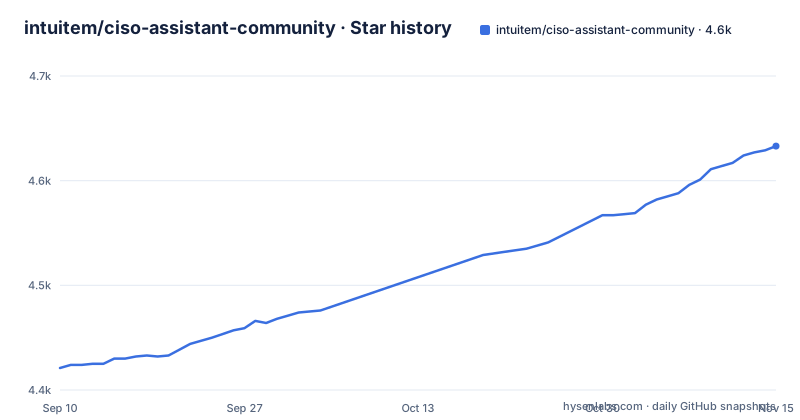
- intuitem/ciso-assistant-community4,633 ★ · +212
| Repository | 2026-09-10 | 2026-11-15 |
|---|---|---|
| intuitem/ciso-assistant-community | 4.4k | 4.6k |
212 Stars in the last 66 days, measured from the daily GitHub snapshot. Compare with other projects
Editorial analysis
What CISO Assistant Actually Solves
CISO Assistant targets a specific pain: GRC tool fragmentation. Security teams often juggle separate tools for risk registers, compliance audits, third-party risk, and business impact analysis, which leads to duplicated data and inconsistent control definitions. The project's stated design principle is to decouple compliance from cybersecurity controls, meaning a single control can be reused across multiple frameworks instead of being recreated for each audit. This is aimed at practitioners who need a central hub that links concepts like threats, risks, and controls, rather than a static document store. The README claims support for over 200 frameworks, including ISO 27001, NIST CSF, SOC 2, CIS, PCI DSS, NIS2, DORA, GDPR, HIPAA, and CMMC. That breadth is the main draw for organizations that must comply with multiple regimes simultaneously. The platform is not a niche tool; it is positioned as a one-stop-shop, which is both its strength and its risk, as we will see.
The Architecture: API-First and Control-Centric
The underlying mechanism is an API-first design, which the README emphasizes as enabling both UI interaction and external automation. This means every action you perform in the web interface can be replicated through REST calls, which is critical for teams that want to integrate GRC into CI/CD pipelines or feed data from vulnerability scanners. The core data model revolves around objects that are smartly linked: risks, controls, frameworks, and audits are not siloed but connected, allowing automatic mapping between frameworks. For example, a control that satisfies an ISO 27001 requirement can also be mapped to a NIST CSF function, and that mapping is automatic rather than manual. The README mentions an open format for custom frameworks, with a simple syntax, so you are not forced to use only the built-in libraries. The platform also includes built-in workflows for risk assessment and remediation tracking. The technical stack is Python, and the project uses a Docker-based deployment, which we will cover next.
Getting It Running: Docker Scripts and Config Builder
The quick start is straightforward but assumes Docker familiarity. You clone the repository with a single branch: `git clone --single-branch -b main https://github.com/intuitem/ciso-assistant-community.git`. Then you run a starter script: `./docker-compose.sh` on Linux or macOS, or `./docker-compose.ps1` on Windows with Docker Desktop and WSL2. The script uses prebuilt images that support most standard hardware architectures, but the README warns that if you see platform mismatch errors, you can use `docker-compose-build.sh` to build for your specific architecture. For more customization, there is a config builder in the `config/` directory and official documentation. A critical warning is that you should not use the `main` branch code directly for production because it is the merge upstream and can have breaking changes. The README advises using tags or prebuilt images for stable versions. This is a common pattern for active open-source projects, but it means you must be disciplined about version pinning. The docker-compose file can be adjusted for extra parameters like mailer settings, so you have some flexibility without deep code changes.
The Feature Set: Beyond Basic Compliance Tracking
The README lists 73 features in total, and they go beyond simple checklist management. Compliance features include audit and campaigns management, automatic mapping, a mapping explorer, custom frameworks, policies management, document management, and evidence management. Risk management covers risk assessments and registers, an EBIOS RM module (a French risk method), risk acceptance workflows, Business Impact Analysis, cyber risk quantification, and vulnerability management with enrichment. There is also third-party risk management and action plan tracking for remediation. This is not a lightweight tool; it tries to cover the full GRC lifecycle. The inclusion of EBIOS RM and cyber risk quantification suggests a depth for risk practitioners, not just compliance officers. However, the README only gives feature names without detail on how quantification is calculated or how enrichment sources work. Check the accuracy of the framework mappings and the risk models yourself before trusting the outputs.
A Genuine Limitation: The License Is Unclear
The license field reads NOASSERTION, meaning GitHub did not detect a single standard license, but the repository root carries LICENSE.md, LICENSE-AGPL.txt and a Contributor License Agreement.md, and the feature list includes Open Source. Have your legal team read those files to see which terms apply to the code you run. The README also points to a SaaS free trial at intuitem.com, which suggests a commercial entity behind the project, but that does not resolve the licensing ambiguity. Another limitation is the warning against using the main branch in production. This is not unusual, but combined with the license issue, it means you need to do extra diligence before deployment. Additionally, the platform's breadth means a steep learning curve, so expect to rely on the external documentation linked from the README.
Alternatives: Comparing Approaches
A direct alternative is Eramba, an open-source GRC tool that also supports multiple frameworks but takes a different architectural approach. CISO Assistant is Python-based and API-first. Another alternative is the commercial platform Vanta or Drata, which are SaaS-only and focus heavily on continuous compliance automation, but they are not self-hostable and have a per-seat cost. The difference in approach is that Vanta integrates directly with your cloud providers and code repositories to collect evidence automatically, whereas CISO Assistant requires you to input or import data through its API or UI. If you need automated evidence collection from AWS or GitHub, CISO Assistant may not have that out of the box. If you need full control over your data and the ability to customize frameworks, CISO Assistant's open format and API-first design offer more flexibility than a closed SaaS.
Maintenance and Upgrade Cost
The project is actively maintained, with releases v4.2.1 and v4.2.0 on November 1, 2026, and v4.1.5 on October 24, 2026, indicating a rapid release cadence. This is a double-edged sword. Frequent releases mean bug fixes and new features, but they also mean you must keep up with upgrades to avoid falling behind on security patches or framework updates. The README warns that main branch can have breaking changes, so you should track release tags. The repository root carries an update-ciso-assistant.sh script; still verify database migrations before upgrading. The project has CI badges for API tests and functional tests, which suggests a test suite. The cost of maintenance is not trivial: you need to monitor releases, test upgrades in a staging environment, and potentially deal with breaking changes. The documentation and Discord community are available, but that is not the same as vendor support unless you use the commercial SaaS.
Final Verdict: Who Should Adopt
CISO Assistant is a serious contender for organizations that want to consolidate GRC activities without paying for a commercial platform. Its API-first design and support for 200+ frameworks make it attractive for mid-sized security teams that need to map controls across ISO 27001 and SOC 2, for example. The automatic mapping feature could save significant manual effort. However, GitHub reports the license as NOASSERTION while the repository carries LICENSE.md and LICENSE-AGPL.txt, so legal review is needed, and the lack of detail on framework accuracy means you must validate mappings yourself. If you are a small team with Docker skills and a tolerance for open-source ambiguity, this could be a powerful tool. If you need guaranteed support, a clear license, or out-of-the-box integrations with cloud providers, look elsewhere. Before adopting, clone the repository, run the docker-compose script on a test server, import a sample framework, and check whether the mapping explorer shows the relationships you expect. Also, check the FOSSA status link in the README for dependency licensing, and contact the maintainers about the license. Only then can you decide if the octopus arms are a blessing or a tangle.
Editorial conclusion
Adopt CISO Assistant if you need a self-hostable, API-first GRC platform that centralizes risk, compliance, and audit workflows without paying per-seat licensing, and if you can tolerate the complexity of a large Python codebase and the need to verify framework mappings yourself. Do not adopt it if you want a turnkey SaaS with vendor support, and have your legal team read LICENSE.md and LICENSE-AGPL.txt, since GitHub reports the license as NOASSERTION. Before production use, verify that your required frameworks are accurately mapped in the current release, check the release tags for stability (avoid main branch), and test the docker-compose deployment on your target architecture, especially if you use ARM or other non-standard hardware. The project's active release cadence (v4.2.1 on November 1, 2026) suggests ongoing maintenance, but you should still confirm the license and support model before committing.
Frequently asked questions
What is CISO Assistant?
It is an open source GRC platform from Intuitem covering risk management, AppSec, compliance and audit, third party risk, Business Impact Analysis, privacy, and reporting. It ships more than 200 frameworks including ISO 27001, NIST CSF, SOC 2, CIS, PCI DSS, NIS2, DORA, GDPR, HIPAA, and CMMC, with automatic control mapping between them.
Is CISO Assistant free?
The community edition is the open source repository, and the vendor also runs a paid cloud product with a free trial. Self hosting uses Docker Compose with prebuilt images, and a Kubernetes Helm chart sits in charts/ for orchestrated installs.
How does ciso-assistant-community handle Docker Compose startup on Windows?
Run ./docker-compose.ps1 instead of the shell script. It requires Docker Desktop with WSL2 and feeds Docker Desktop on your behalf. Both starter scripts use prebuilt images for most standard hardware architectures; docker-compose-build.sh builds for your specific CPU when the image does not match your platform.
Does ciso-assistant-community turn on Django debug mode by default?
In the shipped docker-compose.yml the backend service sets DJANGO_DEBUG=True while the huey worker sets DJANGO_DEBUG=False, so the web container is the one to change before any public deployment. The same file pins CISO_ASSISTANT_URL to https://localhost:8443 and ALLOWED_HOSTS to backend,localhost.
What should I change in ciso-assistant-community before going to production?
Do not deploy the main branch, which the README calls the merge upstream where breaking changes can land, so use a release tag or the prebuilt images instead. Then review DJANGO_DEBUG and CISO_ASSISTANT_URL, and read LICENSE-AGPL.txt alongside LICENSE.md to see which terms apply to the code you run.
Official sources
Add this badge to your README
If you maintain this project, the badge below links readers to this analysis and shows its maintenance status from the daily GitHub snapshot. Paste the markdown into your README; add ?metric=license or ?metric=stars to the image URL for a different field.

[](https://hysenlabs.com/projects/intuitem-ciso-assistant-community)Star history chart for your README
[](https://hysenlabs.com/projects/intuitem-ciso-assistant-community)Was this useful?