iojw/socialscan: concurrent username and email availability checks
Python library for accurately querying username and email usage on online platforms
At a glance
- What is it?
- socialscan is a Python library and command-line tool that queries platform registration services for username and email availability. It is aimed at Python developers and OSINT users who need structured results, concurrent bulk queries, or both, but its fixed platform list and dependency on current service behavior create boundaries.
- Who is it for?
- Adopt socialscan when you need its registration-oriented checks, asyncio library API, or bulk CLI workflow and can accept its fixed platform list and external-network dependency. Do not treat it as a complete identity investigation system or as a guarantee that a result remains valid outside the queried service.
- Can I use it commercially?
- Yes, with conditions. MPL-2.0 is a weak copyleft licence: you can use it inside commercial and closed-source software, but if you distribute changes to its own files, you must publish those changes under the same licence.
- Is it still maintained?
- Yes. The repository last received commits 3 days ago.
- What is it written in?
- Mainly Python, according to GitHub's language statistics.
Answers come from the project's GitHub data, last synced on October 23, 2026, and from our analysis. They are not legal advice.
Star history
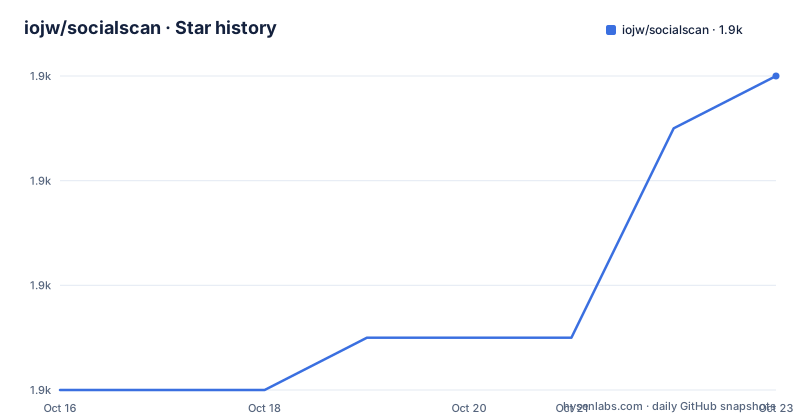
- iojw/socialscan1,862 ★ · +6
| Repository | 2026-10-16 | 2026-10-23 |
|---|---|---|
| iojw/socialscan | 1.9k | 1.9k |
6 Stars in the last 7 days, measured from the daily GitHub snapshot. Compare with other projects
Editorial analysis
Why socialscan checks registration endpoints
socialscan addresses a specific problem in username and email availability checking. A profile page does not always tell you whether an identifier is available. A reserved word may have no usable profile page, while a deleted or banned account may remain unavailable even when its public profile disappears. A checker that relies only on HTTP status codes or visible error text can therefore report the wrong result.
The project's documented approach is to query each platform's registration server directly. It retrieves the CSRF tokens, headers, and cookies required by that service, then interprets the response for the requested identifier. This method is intended to distinguish available, taken, and invalid values without depending on a public profile URL. The README specifically presents this as a response to false positives and false negatives in tools that inspect profile pages.
The intended users are Python developers and OSINT practitioners who need to check usernames or email addresses across several services. The CLI is suitable for a one-time command or a list of queries, while the library API fits applications that already have Python code and need results in their own workflow. The library is not a general account-discovery system. It reports how each supported platform responds to an availability query, so its scope remains bounded by the platforms and registration endpoints included in the package.
The asyncio query and result flow
socialscan uses `asyncio` with `aiohttp` to conduct queries concurrently. The README says this allows bulk searches involving hundreds of usernames and email addresses without treating requests as a serial sequence. The library exposes an asynchronous method named `execute_queries` and a synchronous wrapper named `sync_execute_queries`. The wrapper accepts a list of queries and optional lists of platforms and proxies, and returns a list of results in the same order as the input queries.
Each result carries the query, platform, message, and status fields. The documented Python example prints `result.query`, `result.platform`, `result.message`, `result.success`, `result.valid`, and `result.available`. This gives an application more information than a simple found or not-found value. For example, a response can distinguish a valid identifier that is already registered from an available identifier, while `success` records whether the query itself completed according to the result object.
The CLI supports presenting results by query or by platform, limiting output to available identifiers, showing profile URLs, and writing JSON to a file. The `--cache-tokens` option is intended for platforms requiring more than one HTTP request, including Snapchat, GitHub, Instagram, Last.fm, and Tumblr. Token caching reduces the number of requests, but it also means that some results depend on cached session material. The README does not document cache invalidation, retry behavior, or a rollback procedure, so those areas require direct inspection before depending on them in a sensitive pipeline.
Platform coverage and its limits
The README lists a defined set of supported services. Instagram, Twitter, GitHub, Tumblr, Last.fm, Snapchat, GitLab, Reddit, and Yahoo support username checks. Instagram, Twitter, GitHub, Tumblr, Last.fm, Pinterest, and Firefox support email checks. Snapchat, GitLab, Reddit, and Yahoo are listed only for usernames, while Pinterest and Firefox are listed only for emails.
This coverage is useful because the CLI can query multiple services with one interface, and the library allows a caller to select particular platforms. It is also an obvious limitation. The tool does not cover every online platform, and support differs by query type. Selecting Instagram does not mean that both username and email behavior is identical, because the service may require different registration handling.
The platform list is also tied to the implementation. A service can change its registration flow, token requirements, response wording, or anti-automation behavior. The README does not describe a portable plugin API for adding services. It does mention submitting an issue when a site should be added, but that is a maintenance request rather than a documented extension interface. For a deployment that depends on a particular provider, verify the provider-specific query code and tests in `socialscan/` before assuming that the README's support table still matches current behavior.
Installing socialscan and checking a first query
The README documents installation from PyPI with Python 3.6 or later. The package requires `aiohttp>=3.5.0`, `tqdm>=4.31.0`, and `colorama`, with an additional `dataclasses` dependency for Python versions below 3.7. The project also provides a source installation path.
Install the released package with:
> pip install socialscanThat command installs the command-line entry point named `socialscan`. To install the repository instead, the README gives these commands:
> git clone https://github.com/iojw/socialscan.git
> cd socialscan
> pip install.
After installation, pass one or more usernames or email addresses to the CLI. Its documented positional argument accepts a list of usernames or email addresses to check.
The command's documented output includes a message and status information for each query and platform. The CLI can also read one query per line from a file with `--input`, which is the documented path for bulk work. A file such as `input.txt` can contain:
username1
[email protected]
username3
The README does not document an authentication setup, API key, configuration file, or local service that must be started before the first command. Access to each queried platform still depends on its public registration flow and the network connection available to the client.
Using the synchronous Python wrapper
Applications can call `sync_execute_queries` without managing an event loop. The following is the README's example, including its imports, platform selection, result iteration, and fields:
from socialscan.util import Platforms, sync_execute_queries

queries = ["username1", "[email protected]", "[email protected]"]
platforms = [Platforms.GITHUB, Platforms.LASTFM]
results = sync_execute_queries(queries, platforms)
for result in results:
    print(f"{result.query} on {result.platform}: {result.message} (Success: {result.success}, Valid: {result.valid}, Available: {result.available})")
This approach is more useful than scraping terminal output when another Python component needs the result objects. The returned order is documented as matching the query order, which simplifies mapping results back to caller records. The method also accepts optional proxies, but the README does not explain proxy authentication, rotation, error handling, or behavior when a proxy fails.
For bulk CLI input, the documented file format is plain text with one username or email address per line. The `--json json.txt` option writes output in JSON format to the named file. That format is useful for downstream processing, but the README does not show a complete JSON file example or define a schema version. Consumers should inspect the generated file for the exact field names rather than assuming that every result attribute is serialized.
Trade-offs against profile-page checkers
socialscan differs from profile-based username checkers in where it asks the question. A profile-oriented tool requests a public page and infers availability from status codes, page contents, or error messages. socialscan instead uses registration-oriented requests and the tokens, cookies, headers, and CSRF values that those endpoints require.
That difference matters for reserved usernames and deleted or banned accounts, where a missing profile does not necessarily mean that registration would accept the identifier. It also allows the same library to check email addresses, because the approach does not require a public profile page for every query. The trade-off is dependence on undocumented or changing service behavior. Registration endpoints can alter their response format, add checks, or block automated clients. A profile checker may be simpler and more resilient to some changes, but it can also produce the false results socialscan is designed to address.
The README names KnowEm, Namechk, and Sherlock as similar tools, but it does not provide a feature-by-feature comparison. The concrete difference described here is the query mechanism. Neither mechanism should be treated as evidence about an account's current ownership, identity, or safety beyond the specific availability response returned by the queried platform.
Maintenance, packaging, and licensing signals
The repository is not archived, and the last push was on 2026-08-03. The recent release history is older: the listed releases are `v2.0.1` on 2024-01-21, `v2.0.0` on 2023-01-02, and `v1.4.2` on 2021-07-17. This shows recent repository activity, but it does not by itself confirm that every listed platform still behaves as documented or that a new release has been published.
The package metadata declares Python support from 3.6 and classifiers for Python 3.6, 3.7, and 3.8. `pyproject.toml` uses `setuptools` and `wheel` as its build requirements, while `setup.py` defines the console entry point `socialscan=socialscan.__main__:main`. Those files make the project suitable for conventional Python packaging, but the README's Python 3.6+ statement is historical compatibility information, not a guarantee that all current environments remain supported.
There is a licensing inconsistency that should be resolved before redistribution. The README identifies the project as MPL 2.0, the repository includes an `LICENSE` file, and `setup.py` contains an MIT license classifier despite the stated MPL-2.0 repository license. The actual obligations depend on the license text and the distribution context, so review `LICENSE` and package metadata before shipping a modified or bundled version.
Editorial conclusion
Adopt socialscan when you need its registration-oriented checks, asyncio library API, or bulk CLI workflow and can accept its fixed platform list and external-network dependency. Do not treat it as a complete identity investigation system or as a guarantee that a result remains valid outside the queried service. Verify first that the selected platforms still use the response behavior expected by the installed release, then inspect the MPL-2.0 licensing metadata because the README and setup.py describe it differently.
Frequently asked questions
What does socialscan do with a username or email address?
It queries supported online platforms and reports whether the identifier is available, taken, or invalid. The project supports both usernames and email addresses, although the supported platforms differ by identifier type.
How do I install socialscan?
The README documents `pip install socialscan` for the released package and a source installation using `git clone`, `cd socialscan`, and `pip install .`. The package metadata requires Python 3.6 or later.
Can socialscan check many usernames at once?
Yes. The CLI accepts queries on the command line or through `--input input.txt`, while the library's `sync_execute_queries` accepts a list of queries and optional platforms and proxies. The documentation states that queries are executed concurrently.
Which platforms does socialscan support for email checks?
The README lists Instagram, Twitter, GitHub, Tumblr, Last.fm, Pinterest, and Firefox for email queries. Snapchat, GitLab, Reddit, and Yahoo are listed for username queries rather than email queries.
Does socialscan expose Python results instead of CLI text?
Yes. The documented library example imports `Platforms` and `sync_execute_queries`, then reads each result's query, platform, message, success, valid, and available fields. The returned results are documented to remain in the same order as the input queries.
Official sources
Add this badge to your README
If you maintain this project, the badge below links readers to this analysis and shows its maintenance status from the daily GitHub snapshot. Paste the markdown into your README; add ?metric=license or ?metric=stars to the image URL for a different field.

[](https://hysenlabs.com/projects/iojw-socialscan)Star history chart for your README
[](https://hysenlabs.com/projects/iojw-socialscan)Was this useful?