isair/jarvis: a local voice assistant that keeps a rolling context and redacts before it writes
A 100% private AI voice assistant that lives on your computer (works offline). Talk naturally as if Jarvis is a third person in the room, and get conversational responses. It remembers everything, knows location and time, can check the web, control Chrome, track nutrition, and more with support for unlimited MCPs / tools without context rot.
At a glance
- What is it?
- Jarvis is a Python desktop voice assistant that runs its models locally, keeps a short rolling context so it can answer follow-up questions, and writes memories to disk only after sensitive spans are redacted. It offers voice and text chat, runs locally by default, and its licence file is not machine-classifiable.
- Who is it for?
- Adopt Jarvis if you work primarily on macOS, already run Ollama or another OpenAI-compatible server locally, and want a dictation hotkey plus a wake-word assistant that keeps conversational context without sending audio or transcripts off the machine. The current project describes both voice and text chat and supports macOS, Windows and Linux.
- Can I use it commercially?
- Check first. The repository uses a licence we do not classify automatically, so read its LICENSE file before any commercial use.
- Is it still maintained?
- Yes. The repository received new commits within the last day.
- What is it written in?
- Mainly Python, according to GitHub's language statistics.
Answers come from the project's GitHub data, last synced on November 15, 2026, and from our analysis. They are not legal advice.
Star history
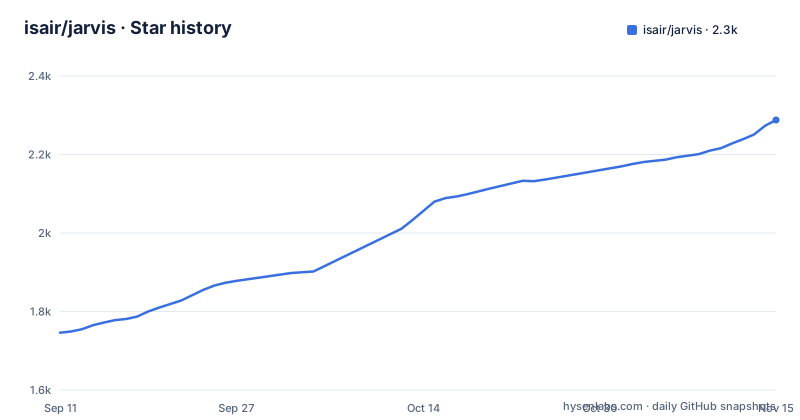
- isair/jarvis2,288 ★ · +542
| Repository | 2026-09-11 | 2026-11-15 |
|---|---|---|
| isair/jarvis | 1.7k | 2.3k |
542 Stars in the last 65 days, measured from the daily GitHub snapshot. Compare with other projects
Editorial analysis
The problem Jarvis targets: assistants that forget the sentence before yours
Most desktop voice assistants treat each utterance as a fresh command. You say a wake word, you get an answer, and the next question starts from nothing. Jarvis is built around the opposite assumption. The README describes it as "a third person in the room": you can say its name anywhere in a sentence, and it keeps what the README calls a short temporary rolling context of the ongoing discussion. The example given is a group conversation about a picnic where someone asks "Jarvis, what do you think?" and Jarvis resolves that into a weather question using the preceding turns. The target user is someone who talks through problems out loud, wants a dictation hotkey that works in any app, and is unwilling to send audio or transcripts to a hosted service. The project describes local AI as the default and says sensitive information is redacted before model context and saved diary entries. Its privacy notes also state that model downloads, web tools, enabled integrations and external model endpoints can make network requests; redaction is not a substitute for reviewing configuration and data before use.
What the pipeline actually does, from wake word to memory write
The example transcripts in the README expose the stages. Speech is transcribed and printed as a Heard line. A separate intent step labelled "Intent (wake word)" decides whether the utterance was directed at Jarvis and rewrites it into a clean instruction, so "Give me a random topic to discuss Jarvis" becomes "give me a random topic to discuss". Tool calls are then selected and shown one per line, for example getWeather, searchMemory, webSearch, or fetchMeals. Only after that does the response get generated. Two details are worth noting because they are design decisions rather than incidental output. First, the rolling context is explicitly short and temporary, which is what allows the assistant to answer "what do you think" without carrying an unbounded transcript. Second, the README claims support for unlimited MCPs and tools "without context rot", and the mechanism it names is smart tool selection: rather than injecting every tool description into the prompt, Jarvis picks a subset per turn. The README also shows echo detection, where Jarvis transcribes its own speech, marks the line as an echo, and returns to wake word mode instead of responding to itself. That is a real failure mode in always-listening systems, and the README treats it as a handled case.
Install paths and the provider switch you have to make
The README offers prebuilt binaries per platform. On Windows you download Jarvis-Windows-x64.zip, extract it, and run Jarvis.exe. On macOS you download Jarvis-macOS-arm64.zip, move it to Applications, right-click, and choose Open. On Linux you download Jarvis-Linux-x64.tar.gz, run tar -xzf on it, and execute ./Jarvis/Jarvis. The only stated prerequisite is a model server: Ollama by default, or any OpenAI-compatible server you already run, with LM Studio, Jan, llama.cpp, vLLM, oMLX and LocalAI named as examples. Provider selection lives under the Configuration section of the README, keyed as LLM Provider. A setup wizard runs on first launch and walks through an initial check, model selection, Whisper configuration, and dictation setup, based on the screenshot filenames in docs/img. The README says Jarvis starts listening automatically once running. One practical consequence of the architecture: because the model server is external, the assistant's latency and memory ceiling are set by whatever you point it at, not by Jarvis itself.
The limitations the maintainers list, and what they imply
The current README describes Jarvis as a local-first assistant with both voice and text chat, rather than voice-only. It provides source installation paths for macOS, Windows and Linux. Check the current troubleshooting and platform documentation for the exact release and features you intend to use, including dictation compatibility. A local default does not mean every configuration is offline: model downloads, web tools, enabled integrations and external model endpoints can make network requests. For stricter isolation, follow the project's network settings guidance and enforce network restrictions separately.
Where the licence question sits, and what the release history suggests about upkeep
The repository metadata reports the licence as NOASSERTION, which means GitHub could not classify the licence file into a known SPDX identifier. That is not the same as having no licence, and it is not the same as a permissive one. It means you cannot tell from the metadata alone what you are allowed to do with the code, so read the licence file in the repository root before you build anything on top of it. I am not giving legal advice here, only flagging that the identifier is unresolved. On maintenance, the repository shows three releases in the v2.2 line: v2.2.0 on 2026-07-26, v2.2.1 on 2026-08-03, and v2.2.2 on 2026-08-05, with the last push to main on 2026-08-25. That is a tight patch cadence across a single minor version, which fits the maintainers' own description of building in the open. The README also points to an EVALS.md file for tracked accuracy, which is the right place to look if you want numbers, because the README itself does not state accuracy figures.
How this differs from a cloud dictation tool like WisprFlow
The README makes the comparison itself, describing dictation as "like WisprFlow, but free, offline, and private". The difference is not just price. WisprFlow is a hosted transcription service, so audio leaves your machine and the model improves on aggregate data. Jarvis runs Whisper locally through the setup wizard, so the transcription model is a file on your disk and the audio does not travel. That trade has costs the README does not spell out. Local Whisper inference competes for the same GPU or CPU as the language model, and the quality ceiling is whatever model you chose to download rather than a vendor-updated endpoint. The same split applies to the assistant as a whole: a cloud assistant can route to a larger model per request, while Jarvis is bounded by the OpenAI-compatible server you configure. For a user whose main objection is data leaving the machine, that is the point. For a user who wants the best transcription available regardless of where it runs, this is a downgrade they are choosing deliberately.
Who should install this, and what to check before doing so
Jarvis fits a macOS user who already runs Ollama or another local OpenAI-compatible server, wants a wake-word assistant that can follow a conversation across turns, and wants an offline dictation hotkey as a second benefit. The current project also offers text chat and Linux installation; check the current release documentation for platform-specific dictation limitations and mobile availability. Three things to verify before you commit: the licence file in the repository root, since the metadata says NOASSERTION; the EVALS.md file, since that is where the project puts its accuracy tracking rather than in the README; and your own model server's throughput, because Jarvis adds wake-word detection, intent classification, tool selection and response generation on top of transcription, and every one of those stages depends on the provider you configure under LLM Provider. If your local server cannot serve those calls at conversational latency, the rolling context will not feel like a third person in the room.
Editorial conclusion
Adopt Jarvis if you work primarily on macOS, already run Ollama or another OpenAI-compatible server locally, and want a dictation hotkey plus a wake-word assistant that keeps conversational context without sending audio or transcripts off the machine. The current project describes both voice and text chat and supports macOS, Windows and Linux. Check the current platform limitations for your setup; it does not advertise a mobile client. Before installing, check the licence file in the repository root, because the GitHub API reports NOASSERTION rather than a named licence, and confirm your macOS version if dictation matters to you: the README lists dictation as unavailable on macOS 26 and later because of a pynput incompatibility.
Frequently asked questions
What is the Jarvis voice assistant in the isair repository?
It is a private, local-first voice assistant that runs on your own hardware, with no subscription. While you listen it keeps a short rolling transcript of nearby speech so it can join a conversation already in progress, you say "Jarvis" anywhere in a sentence to address it, and a companion chat window shares the same conversation and memory with silent replies.
How do I install the Jarvis app on Windows or macOS?
From the GitHub releases page, by extracting an archive rather than running an installer. macOS uses `Jarvis-macOS-arm64.zip` or `Jarvis-macOS-x64.zip`, moved to Applications and opened with a right-click then Open; Windows uses `Jarvis-Windows-x64.zip` followed by `Jarvis.exe`; Linux uses `Jarvis-Linux-x64.tar.gz` followed by `./Jarvis/Jarvis`.
Which local models does Jarvis use?
The setup wizard connects either Ollama or an OpenAI-compatible server such as LM Studio, oMLX or llama.cpp, and offers `qwen3.5:0.8b`, `gemma4:e2b`, `gemma4:e4b` and `qwen3.8:27b` as starting points by hardware tier. A memory budget is displayed and can be edited for models served through an OpenAI-compatible endpoint, and a separate fast model handles voice intent and tool routing.
Does Jarvis work without an internet connection?
Local conversation does, because speech recognition, the language models and speech synthesis run on hardware you control and no cloud AI account is required. Web search, weather and connected tools use the network when you ask for them, and memory stays on your computer with sensitive information redacted before it reaches model context or the saved diary.
What are the known limitations of Jarvis?
Dictation into other apps is unavailable on macOS 26 and later because of a pynput incompatibility, tracked as issue 172. A spoken "stop" can be mistaken for an echo while the assistant is speaking, tracked as issue 24, there is no mobile app per issue 17, and first-run downloads of Whisper and the language models can take a long time.
Official sources
Add this badge to your README
If you maintain this project, the badge below links readers to this analysis and shows its maintenance status from the daily GitHub snapshot. Paste the markdown into your README; add ?metric=license or ?metric=stars to the image URL for a different field.

[](https://hysenlabs.com/projects/isair-jarvis)Star history chart for your README
[](https://hysenlabs.com/projects/isair-jarvis)Was this useful?