manim-slides: giving a talk with animation code
Tool for live presentations using manim
At a glance
- What is it?
- manim-slides turns a Manim animation into a presentation you can actually give. You write your scene as usual, call a slide break where you would have waited for the audience, and the tool replays the rendered animations as slides, in a browser, in PowerPoint or offline through RevealJS.
- Who is it for?
- manim-slides suits an academic or educator who writes mathematical animations and wants the same code to serve as a talk, since the only change to an existing scene is the base class and a call where the pause would go. It is a poor fit if you want to author slides in a slide editor, and a poor fit if you are not already using Manim, since the animation is the content.
- Can I use it commercially?
- Yes. MIT is a permissive licence: you can use, modify and sell software built on it, as long as you keep its copyright and licence notices.
- Is it still maintained?
- Yes. The repository last received commits 5 days ago.
- What is it written in?
- Mainly Python, according to GitHub's language statistics.
Answers come from the project's GitHub data, last synced on November 7, 2026, and from our analysis. They are not legal advice.
Star history
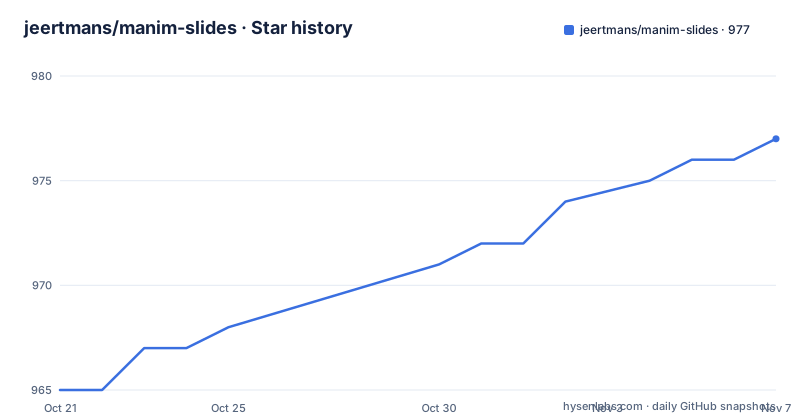
- jeertmans/manim-slides977 ★ · +12
| Repository | 2026-10-21 | 2026-11-07 |
|---|---|---|
| jeertmans/manim-slides | 965 | 977 |
12 Stars in the last 17 days, measured from the daily GitHub snapshot. Compare with other projects
Editorial analysis
Two engines, one tool, detected automatically
The project is a tool for live presentations using either Manim, the community edition, or ManimGL, and the readme makes a point of the fact that it will automatically detect which one you are using.
That detection is more than a convenience, because the two are different projects with different histories and different rendering paths. Manim is the community edition and ManimGL is the original 3Blue1Brown engine. A tool that works with both has to cope with the difference in how scenes are constructed, which is why the readme mentions a base class for each.
The project extends the work of an earlier tool of the same kind, a presentation helper built on Manim, and the readme says it does so with a lot more features. So the lineage is the same shape as the comparison table later in the readme, and the two related projects are worth knowing about if you are evaluating alternatives.
What the tool is not is a slide editor. There is no graphical interface for arranging slides, no drag and drop, no theme picker. The presentation is a Python file, and the slides are points in the animation. That is a deliberate narrowing, and it is why the tool fits a mathematical animation workflow better than a conference talk workflow.
The workflow is two steps and one changed base class
The usage section is short, and its simplicity is the argument.
Step one is to render animations using the slide base class instead of the ordinary scene class, and to add a call to the next slide function every time you want a new slide. The three-dimensional variant has its own class.
from manim_slides import SlideStep two is to run the tool on the rendered animations and display them like a PowerPoint presentation.
So the difference between an animation and a presentation is two things: a different base class, and a marker where the audience would have waited. The example in the readme shows it, with a growing circle, then a call that waits for the user to press continue, then a call that starts a loop, and then a non-looping slide again.
The loop flag is the feature that makes it a presentation tool rather than a video player. A slide marked as looping replays its animations over and over until the user presses continue, which is exactly what you want for a slide whose animation is decorative and whose content is the thing you are saying while it runs.
The rendering step is a wrapper around the ordinary render command, and the readme notes that it makes sure to use the library that was installed in the same Python environment, which is a small but real detail when you have several environments on a machine.
manim-slides render example.py BasicExampleand with the --GL flag to render with ManimGL.
manim-slides render --GL example.py BasicExampleThen the presentation itself takes the names of the scenes you want to play.
manim-slides BasicExampleThe comparison table is the most useful page
There is a comparison section in the readme, and it is the part of the documentation that answers the question a person is actually asking, which is why not the other tool.
The table puts four projects side by side: this one, the earlier presentation helper, a graphical editor for Manim scenes, and Jupyter notebooks. The rows are the ones that decide a choice. How you use it, command line, command line, web browser, or notebook. What you have to do to your existing scenes, minimal modification in both of the command line tools, the requirement to use sections and configure through a graphical interface, or relying on a notebook conversion tool to create the slides.
Then the feature rows, and this is where the differences are sharp. Support for the three-dimensional engine is listed for this tool only. Web browser presentations are listed for this tool and the graphical editor. And offline presentations are listed for this tool with three options, a desktop widget toolkit, RevealJS in any web browser, or PowerPoint, and for the earlier helper with one option involving computer vision, and as unsupported for the other two.
The offline row is the decisive one for most people. A talk you give in a room with unreliable wifi needs to work without a network, and offering three output formats for that is more than the alternatives do.
The cost is the same in every row: your scenes have to change, because a slide break has to be somewhere. The editor tool solves that with a graphical interface, which is a reasonable trade for people who do not want to write Python to make a slide, and a bad one for people who do.
Optional extras, and a type checker that fights the widget bindings
The packaging is where a project with many ways to run reveals its priorities, and this one has a lot of them.
The build uses a modern Python packaging stack, with a build backend and a plugin that reads the readme for the package description. The optional extras cover the magic command integration, the two animation engines, two different widget toolkit bindings, a Sphinx directive for embedding slides in documentation, and a combined extra.
The dependency groups are organised by purpose rather than lumped together: a documentation group that pulls in the documentation extras along with a Sphinx theme and a stack of Sphinx extensions, a tests group, a tests group that does not need a widget toolkit at all, and a type checking group.
That last group contains the most interesting comment in the manifest. Only one widget binding is installed there, unlike the tests group which installs both, and the reason is given: the type checker cannot resolve the classes of the abstraction layer to a single concrete type when both bindings are present, because that layer re-exports whichever binding happens to be available at run time.
That is a real constraint of a project that supports two incompatible GUI toolkits behind one interface, and the maintainer has documented it rather than worked around it silently.
The supported Python versions run from 3.10 to 3.14, and the release history shows that support arriving in practice, with a release in February 2026 titled as support for Python 3.13 and 3.14.
A peer reviewed paper, which is unusual
There is a citation section, and it asks for a specific journal article.
The paper is from 2023, in the Journal of Open Source Education, and the project carries a DOI badge for it. The article title describes the package as a Python package for presenting Manim content anywhere, and the authors field names the author of the project.
A DOI badge and a journal citation are unusual for a tool like this, and they are worth understanding. The Journal of Open Source Education publishes software papers. For an academic audience, which is the audience here, that is a stronger signal than a documentation site.
The project also has a citation file in the repository, a paper directory, a separate changelog, and a markdown lint configuration for the documentation. The readme links to a frequently asked questions page on the documentation site, and there is an interactive tutorial that is itself a slides presentation, which is a neat piece of dogfooding: the tool's own documentation is made with the tool.
There is also a docker directory, which suggests the project can be run in a container for the browser-based output, and a static directory holding the logos and the example animation used in the readme.
The release notes tell you what is moving
The release history is short but the titles are informative, which is a good sign for a project with a clear direction.
Version 5.6.0 added static images, vertical slides and support for a new major version of RevealJS, in April 2026. Version 5.5.4, in February 2026, was support for the two newest Python releases. Version 5.5.3, in January 2026, fixed path related issues.
Those three titles describe the shape of the project. It is a tool whose output formats matter, because vertical slides and a new major version of the browser presentation library are both about how a talk is delivered, not about the animation code. The Python version support tells you it tracks the language closely, and the path fixes tell you it is used on machines with different layouts, which is what happens when a tool becomes part of somebody's teaching setup.
The licence is MIT, the default branch is main, and the last push was on 2026-10-19 with the repository not archived. The project was also part of Hacktoberfest, and it takes contributions through a contributing guide with separate sections for reporting an issue and seeking help.
For an evaluator, the practical summary is that this is a focused tool with a narrow job, a peer reviewed paper, a documented comparison with its alternatives, and a dependency structure that shows the author has thought carefully about the two widget toolkits and the two animation engines it has to bridge.
Editorial conclusion
manim-slides suits an academic or educator who writes mathematical animations and wants the same code to serve as a talk, since the only change to an existing scene is the base class and a call where the pause would go. It is a poor fit if you want to author slides in a slide editor, and a poor fit if you are not already using Manim, since the animation is the content. Before you plan a talk around it, read the comparison table, because the offline and browser output paths are the feature that separates it from the tools it is measured against, and check the version list if you depend on a particular Python release.
Frequently asked questions
What is manim-slides?
A Python tool for giving live presentations built from Manim animations. It works with either the Manim community edition or ManimGL, detecting automatically which one is installed, and it extends an earlier tool of the same kind with more features.
How do I turn a Manim scene into a presentation?
Subclass the slide base class instead of the ordinary scene class, and call the next slide function each time you want a pause between animations. Then render the scene and run the tool on the rendered animations, giving it the names of the scenes to play. Passing the loop flag makes a slide repeat its animations until you press continue.
What output formats does manim-slides support?
The readme's comparison table lists web browser presentations and offline presentations using a desktop widget toolkit, RevealJS in any web browser, or PowerPoint, and it is the only tool in that table with support for the three-dimensional ManimGL engine.
Is manim-slides suitable for a talk with a poor network connection?
That is one of the cases it is built for. Offline presentations are supported through three output formats, while the alternatives in the comparison table either need a computer vision library, a web browser, or a notebook conversion step.
Official sources
Add this badge to your README
If you maintain this project, the badge below links readers to this analysis and shows its maintenance status from the daily GitHub snapshot. Paste the markdown into your README; add ?metric=license or ?metric=stars to the image URL for a different field.

[](https://hysenlabs.com/projects/jeertmans-manim-slides)Star history chart for your README
[](https://hysenlabs.com/projects/jeertmans-manim-slides)Was this useful?