ComfyUI-Florence2 for image analysis and document questions
Inference Microsoft Florence2 VLM
At a glance
- What is it?
- ComfyUI-Florence2 adds Microsoft's Florence2 vision models to ComfyUI for captioning, object detection, segmentation, OCR, and document question answering. It suits ComfyUI users who want prompt-driven image analysis, but model downloads, document image quality, and the absence of GitHub releases require careful evaluation.
- Who is it for?
- Adopt ComfyUI-Florence2 if your ComfyUI workflow needs prompt-based captioning, detection, segmentation, OCR, or document questions, and verify transformers 4.38.0 or newer plus compatibility with the intended Hugging Face model first. It is a poor fit when a fixed local deployment must use release-pinned artifacts, when model downloads are unavailable, or when document images are too unclear for reliable extraction.
- Can I use it commercially?
- Yes. MIT is a permissive licence: you can use, modify and sell software built on it, as long as you keep its copyright and licence notices.
- Is it still maintained?
- Activity is slowing. The repository last received commits 6 months ago.
- What is it written in?
- Mainly Python, according to GitHub's language statistics.
Answers come from the project's GitHub data, last synced on November 7, 2026, and from our analysis. They are not legal advice.
Star history
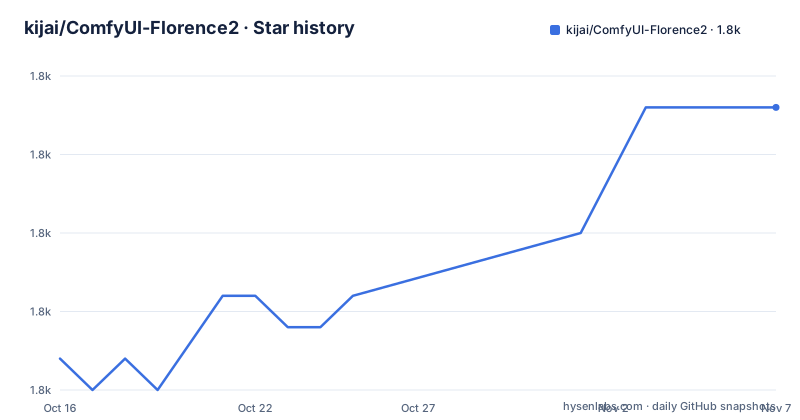
- kijai/ComfyUI-Florence21,764 ★ · +8
| Repository | 2026-10-16 | 2026-11-07 |
|---|---|---|
| kijai/ComfyUI-Florence2 | 1.8k | 1.8k |
8 Stars in the last 22 days, measured from the daily GitHub snapshot. Compare with other projects
Editorial analysis
Why ComfyUI-Florence2 exists in a ComfyUI graph
ComfyUI-Florence2 is a custom-node integration for Microsoft's Florence2 vision foundation model. Its target users are ComfyUI operators who want image understanding inside a node graph rather than through a separate vision application. According to the README, Florence2 accepts text prompts for captioning, object detection, and segmentation. The repository also describes OCR as part of the integration's scope.
The project does present a different problem from a conventional object detector or OCR package. Instead of requiring a fixed task-specific program for each operation, the upstream model uses a sequence-to-sequence architecture and prompt-based task selection. That is the underlying model's design, while ComfyUI-Florence2 places it behind nodes that can participate in ComfyUI workflows.
This fork emphasizes Document Visual Question Answering, or DocVQA. A document image can be paired with a question, and the node returns an answer based on visual and textual content in that image. The README identifies scanned documents, forms, receipts, and other text-heavy images as suitable subjects. This is useful when the required result is a field from a page rather than a full transcription or bounding-box annotation.
The project is therefore not a general ComfyUI sampler, checkpoint loader, or workflow manager. Its scope is narrower: loading Florence2 models and exposing model-driven image tasks as ComfyUI nodes. The repository layout reinforces that design with `nodes.py`, a `model/` directory, `__init__.py`, and ComfyUI packaging metadata.
Model loading and prompt-driven inference in ComfyUI
The documented model-loading path is `DownloadAndLoadFlorence2Model`. The README states that most Florence2 models can be downloaded automatically into `ComfyUI/models/LLM`. This arrangement keeps model assets under ComfyUI's model tree while allowing a workflow to obtain files associated with Florence2 rather than requiring every file to be placed manually.
Florence2 itself uses a sequence-to-sequence architecture. Based on the documentation, a simple text prompt selects or guides a vision task such as captioning, detection, or segmentation. The repository description also names OCR. That design means the text supplied to the model is operational input, not merely a label attached after inference.
For DocVQA, the documented flow is more concrete. Load an image into ComfyUI, connect it to the Florence2 DocVQA node, provide a question, and receive an answer. Example questions in the README include asking for the total amount on a receipt, the date on a form, or the sender of a letter. The answer is produced from the connected document image and the question rather than from ComfyUI's sampling machinery.
The available documentation does not expose the node class names, tensor schemas, prompt templates, batching behavior, or exact output types beyond the DocVQA answer. Those implementation details cannot be inferred safely from `nodes.py` alone. An engineer building a complete graph should inspect the installed node definitions in ComfyUI to confirm connector types and node-specific inputs.
Installing ComfyUI-Florence2 and its Python dependencies
The README directs users to clone the repository into the ComfyUI `custom_nodes` folder. It does not provide a concrete clone command, so the exact repository operation must come from the user's normal ComfyUI installation workflow. After placing the files there, install the contents of `requirements.txt` in the Python environment used by ComfyUI.
For a standard Python environment, run:
pip install -r requirements.txtThe README requires `transformers` version 4.38.0 minimum. The displayed `requirements.txt` lists `tokenizers`, `matplotlib`, and `pillow>=10.2.0`, while `pyproject.toml` declares `tokenizers` and `matplotlib`. The explicit version requirement therefore deserves a direct check in the selected environment before loading a node.
For the documented portable Windows layout, run this command from `ComfyUI_windows_portable`:
python_embeded\python.exe -m pip install -r ComfyUI\custom_nodes\ComfyUI-Florence2\requirements.txtThat command targets ComfyUI's embedded interpreter, which is important because installing into a different system Python can leave the running ComfyUI process without required packages. The `python_embeded` spelling is reproduced from the README rather than corrected.
After ComfyUI recognizes the custom node, create a workflow that loads a document image and connects it to the Florence2 DocVQA node. Enter a question such as `What is the date mentioned in this form?`, then run the workflow. The documented result is an answer derived from the image. If the node does not appear, first confirm that the repository sits directly in the intended `custom_nodes` directory and that dependencies were installed with ComfyUI's Python interpreter. The README does not document a separate registration command.
Official Florence2 checkpoints and named fine-tunes
The README distinguishes four official model links: `microsoft/Florence-2-base`, `microsoft/Florence-2-base-ft`, `microsoft/Florence-2-large`, and `microsoft/Florence-2-large-ft`. It also lists `HuggingFaceM4/Florence-2-DocVQA` as an official model entry. These names map to the Hugging Face model identifiers used when selecting a checkpoint.
The project separately names fine-tunes that its documentation marks as tested. They include `MiaoshouAI/Florence-2-base-PromptGen-v1.5`, `MiaoshouAI/Florence-2-large-PromptGen-v1.5`, `thwri/CogFlorence-2.2-Large`, `HuggingFaceM4/Florence-2-DocVQA`, `gokaygokay/Florence-2-SD3-Captioner`, `gokaygokay/Florence-2-Flux-Large`, and `NikshepShetty/Florence-2-pixelpros`.
That distinction matters. "Supports most Florence2 models" is broader than the list labeled as tested. A third-party fine-tune can have a Florence2-compatible architecture while differing in prompt behavior, expected tasks, or output formatting. The documentation does not define a compatibility matrix or explain which prompt syntax applies to every listed fine-tune.
The loader's documented destination for automatic downloads is `ComfyUI/models/LLM`. Users should therefore verify both the selected model identifier and available storage before assuming a model is ready. The README does not document checksums, revision pinning, offline loading instructions, or a method for comparing outputs across the listed fine-tunes.
DocVQA accuracy boundaries and operational trade-offs
The clearest limitation comes directly from the README: DocVQA accuracy depends on input-image quality and question complexity. A skewed scan, low-resolution form, obscured receipt text, or dense page can make the visual evidence incomplete. The project does not claim that the node restores missing text or corrects unreadable source material.
The workflow also depends on obtaining Florence2 weights through an automatic loader. The documentation does not describe an offline package containing every supported model. Environments that prohibit network access, lack access to the relevant Hugging Face repository, or impose strict storage limits need to account for that dependency before selecting the integration.
Prompt wording is another boundary. Florence2 handles multiple tasks through text prompts, but the repository does not publish a complete prompt catalog for detection, segmentation, captioning, OCR, or every listed fine-tune. The three DocVQA questions in the README are examples, not a grammar specification. Users who need deterministic field extraction should inspect the installed node inputs and model documentation before building a larger workflow.
Finally, this is not a general-purpose OCR comparison tool based on the available documentation. It can answer questions about document content through Florence2 and DocVQA, but the README does not document confidence scores, character-level error rates, bounding-box export for OCR, audit trails, or validation against ground-truth transcriptions. Those omissions limit its suitability as the sole system for regulated document processing without a separate verification process.
Release history, maintenance signals, and MIT licensing
The repository is not archived. Its last push was on 2026-05-06. That is a maintenance fact, not evidence that every listed model or dependency will remain compatible indefinitely. The repository has no GitHub releases, so there is no documented release stream for tracking a published version or migration notes.
The package metadata identifies the project as `comfyui-florence2`, version `1.1.0`, with the description covering image vision tasks, object detection, captioning, segmentation, and OCR. The repository license is MIT. Source-code reuse and modification are therefore governed by that license, but the MIT file for this custom-node project does not establish the licensing terms of downloaded Hugging Face model weights.
Upgrade planning must account for two separate dependency surfaces: Python requirements maintained in this repository and model repositories hosted outside it. The README's minimum of `transformers` 4.38.0 is an installation floor, not a statement that every later release is supported. Because there are no GitHub releases, users should compare `requirements.txt`, `pyproject.toml`, and the node code after an update rather than assuming a versioned upgrade procedure exists.
The lack of releases also changes troubleshooting. There is no documented rollback target in the README, and no release note explaining changes between `1.1.0` and earlier states. A ComfyUI operator relying on this integration should preserve a known-working copy of the custom node before replacing it.
Editorial conclusion
Adopt ComfyUI-Florence2 if your ComfyUI workflow needs prompt-based captioning, detection, segmentation, OCR, or document questions, and verify transformers 4.38.0 or newer plus compatibility with the intended Hugging Face model first. It is a poor fit when a fixed local deployment must use release-pinned artifacts, when model downloads are unavailable, or when document images are too unclear for reliable extraction. Under the MIT license, users can modify and redistribute the code subject to that license, although model files retain their own terms.
Frequently asked questions
Where should I install ComfyUI-Florence2?
The README says to clone the repository into the ComfyUI `custom_nodes` folder. Install `requirements.txt` using the same Python environment that runs ComfyUI.
What is the minimum transformers version for ComfyUI-Florence2?
The README specifies `transformers` version 4.38.0 minimum. It is a required compatibility floor for using this integration.
How do I use Florence2 DocVQA in ComfyUI?
Load a document image, connect it to the Florence2 DocVQA node, enter a question, and run the workflow. The node returns an answer based on the document image and question.
Official sources
Add this badge to your README
If you maintain this project, the badge below links readers to this analysis and shows its maintenance status from the daily GitHub snapshot. Paste the markdown into your README; add ?metric=license or ?metric=stars to the image URL for a different field.

[](https://hysenlabs.com/projects/kijai-comfyui-florence2)Star history chart for your README
[](https://hysenlabs.com/projects/kijai-comfyui-florence2)Was this useful?