sc-datav: a Three.js dashboard with a 3D province outline
A Three.js data-visualization dashboard with precise geographic outlines rendered as 3D maps.
At a glance
- What is it?
- A React and TypeScript visualization screen built on react-three-fiber, with a Sichuan outline rendered from GeoJSON, ECharts panels, and a Leva tuning panel.
- Who is it for?
- This is a demonstration project with the structure of a real application, and both halves of that are worth taking separately. The dependency list is coherent: react-three-fiber and drei for the 3D scene, ECharts for the side panels, D3-geo and topojson for the geography, GSAP for timing, styled-components for the chrome, Leva for live parameter adjustment, and an autofit library for the wall display sizing that dominates these deployments.
- Can I use it commercially?
- Yes. Apache-2.0 is a permissive licence: you can use, modify and sell software built on it, as long as you keep its copyright and licence notices.
- Is it still maintained?
- Activity is slowing. The repository last received commits 7 months ago.
- What is it written in?
- Mainly TypeScript, according to GitHub's language statistics.
Answers come from the project's GitHub data, last synced on October 24, 2026, and from our analysis. They are not legal advice.
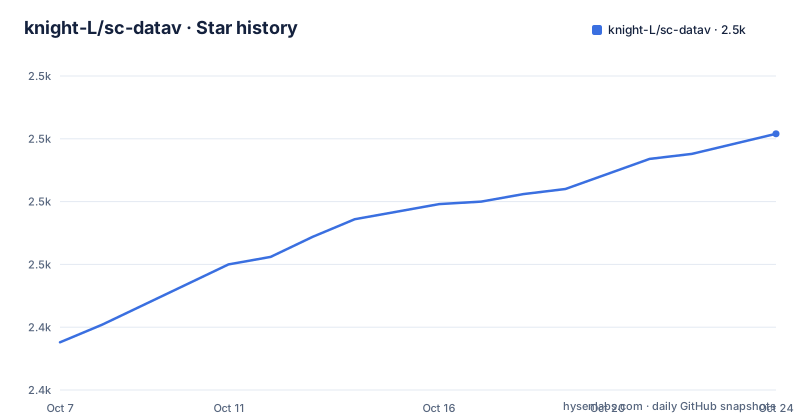
Star history
- knight-L/sc-datav2,502 ★ · +83
| Repository | 2026-10-07 | 2026-10-24 |
|---|---|---|
| knight-L/sc-datav | 2.4k | 2.5k |
83 Stars in the last 17 days, measured from the daily GitHub snapshot. Compare with other projects
Editorial analysis
A wall display, not a web page
The project describes itself as a data visualization screen built on Three.js, React 19 and ECharts, with 3D map rendering, outline flight-line animation, a side sweep light effect and linked multiple charts. The word it uses, big screen, is the key term and it comes from a specific Chinese design tradition: the fixed-resolution display installed on a wall in an operations centre, sales floor or monitoring room.
That context explains choices that would otherwise look odd. The application supports multiple screen sizes with adaptive layout, it uses an autofit library rather than CSS media queries, and it ships a virtual scrolling component. A wall display is viewed from across a room, so text density is low and animation carries more of the meaning than a dashboard full of numbers would. There is also a Leva debug panel for adjusting parameters in real time, which is a development tool left enabled rather than stripped from a demo.
The repository has no tagged releases at all. The version in `package.json` is `0.0.0` and marked private. So there is no upgrade path to plan around and no changelog to read; the code is the documentation.
The geography is one province, loaded from JSON
The map is a precise geographic outline of Sichuan province. That specificity is the point: the project is about rendering a real boundary accurately rather than decorating a globe.
The directory listing shows where the data lives. Under `src/assets/` there are two JSON files, one holding Sichuan geographic data and one holding the outline data. Under `src/pages/SCDataV/`, which is the screen page itself, `scMap.tsx` is the map component, `flyLine.tsx` is the flight-line animation, and `chart1.tsx` through `chart3.tsx` are the three chart components alongside `content.tsx` for layout and `index.tsx` as the page entry.
Producing that outline data is apparently fiddly enough to warrant its own tool. The README links a separate repository, sat-hunter, described as a download tool for map outline textures. So if you want to reuse this project for another region, the geography pipeline is a piece of work you inherit, not a config value you set.
The outline flight-line and the side sweep light effect are the two visual signatures of this genre: curved arcs drawn between points on the map, and a scanning light that travels along the province boundary. Both are animation rather than data, and both are where the GSAP dependency is doing its work.
The dependency list is the real spec
There is no design document, but `package.json` is more informative than one would be. The project declares itself an ES module package and carries four scripts: `dev` runs vite, `build` runs `tsc -b` followed by `vite build`, `lint` runs eslint, and `preview` runs vite preview. The build type-checks first, so a type error fails the build rather than shipping.
The 3D layer is `@react-three/fiber` at version 9, `@react-three/drei` at 10, `@react-three/postprocessing` at 3, and `three` at 0.183. The React 19 version applies to both `react` and `react-dom`, with `react-router` at 7 handling the demo routes.
Data visualisation is `echarts` at version 6. The geography pipeline is `d3-geo` plus `topojson-client`, which is the standard pairing for converting TopoJSON boundaries into projected paths that Three.js can extrude. `zustand` at 5 is the state management library.
Three entries exist for reasons that only make sense in this deployment context. `gsap` at 3.13 handles the animation timing. `styled-components` at 6 provides the styling, which is consistent with React Three Fiber's own styling model. `autofit.js` at 3.2.8 handles fitting a fixed design resolution to whatever display the screen is physically mounted on, which is the single most common requirement for a large-screen dashboard in a building you do not control.
There is also `keli-heatmap.js` at version 2, a heatmap library, which suggests the same author builds several kinds of visualization screens.
Running it, and the Vite Rolldown detail
The requirements are Node.js 18 or later and pnpm 8 or later, and the project uses pnpm with a `pnpm-lock.yaml` at the root.
pnpm installThree scripts cover the whole loop:
pnpm devpnpm buildpnpm previewThe README calls out one choice that would otherwise be invisible: Vite is specified in its Rolldown version. Rolldown is the Rust-based successor to Rollup, and using the bundler through it changes build performance characteristics noticeably on a large dependency graph like this one. It also means the build is not yet the default path for everyone, so a Vite version mismatch is the first thing to check if the install or build behaves unexpectedly.
TypeScript is configured across three files, `tsconfig.json`, `tsconfig.app.json` and `tsconfig.node.json`, which is the standard Vite template layout separating browser code, application code and build tooling. ESLint 9 with the flat config format in `eslint.config.js` is configured with the react-hooks and react-refresh plugins.
There is no `public/` asset for the map itself beyond the demo screenshots, so the geography is bundled from `src/assets/` rather than fetched at runtime.
Four demos and what they are for
The README links four preview routes at demo0 through demo3, each with a matching screenshot in `public/`. Four variants of the same screen is the standard way these projects are published, since the interesting question for a prospective user is not what the dashboard shows but how many different looks you can get out of the components.
Because the routing is handled by `react-router` with hash-style URLs, the previews work on a static host with no server-side routing configuration. That matters if you plan to deploy the result to GitHub Pages or an object-storage bucket behind a CDN, which is the normal way these screens are actually served.
The contributor side is minimal: a badge inviting pull requests, and no contribution guide, issue templates or code of conduct in the tree. The tree is short and conventional, with `.github/`, `.gitignore`, `LICENSE`, `eslint.config.js`, `index.html`, `package.json`, `pnpm-lock.yaml`, `public/`, `src/`, the three TypeScript configs and `vite.config.ts`.
The project is Apache 2.0 licensed, has 2,337 stars and 472 forks, and reports zero open issues. That last number is worth reading carefully. A project with 472 forks and no issue tracker activity is more likely to be used as a reference than maintained as a community.
How this compares with the alternatives
The choice here is between writing the scene yourself, using a charting library on a flat background, or adopting an existing dashboard framework.
A charting library on a 2D background is the cheapest option and will look conventional. Most of what makes a large-screen screen impressive is the map treatment, and that is precisely what no charting library provides.
Dashboard frameworks do exist for this style of interface, mostly from Chinese vendors, and they trade openness for convenience. You get components designed for the form factor and a configuration layer, at the cost of a runtime dependency, a licence question and an inability to change how anything is drawn. This project takes the opposite position and is readable end to end.
Writing the scene yourself means dealing with the parts of Three.js that are genuinely fiddly: extruding a GeoJSON boundary into geometry, lighting it so the shape reads, animating arcs between projected coordinates, and keeping the whole thing at 60 frames per second on hardware you did not choose. The `scMap.tsx` and `flyLine.tsx` components are where that work is done, and they are the files to read first.
This repository is not archived, the last push was on 2026-03-13, and the topics are simply `3dmap`, `react` and `threejs`, which says plainly that it is a demonstration rather than a maintained framework.
Editorial conclusion
This is a demonstration project with the structure of a real application, and both halves of that are worth taking separately. The dependency list is coherent: react-three-fiber and drei for the 3D scene, ECharts for the side panels, D3-geo and topojson for the geography, GSAP for timing, styled-components for the chrome, Leva for live parameter adjustment, and an autofit library for the wall display sizing that dominates these deployments. What it does not offer is generality. The map is one province, the data is in `src/assets/`, and there is no tagged release, so the fastest way to learn from it is to read the components and swap the geography rather than to try to configure the map. A companion repository for producing the outline texture is referenced for that reason.
Frequently asked questions
What tech stack does sc-datav use?
React 19 with TypeScript, react-three-fiber and drei on top of Three.js for the 3D scene, ECharts for the side charts, D3-geo with topojson-client for the geography, GSAP for animation, styled-components for styling, Leva for live parameter tuning, zustand for state, and autofit.js for scaling the layout to the target display.
How do I run sc-datav locally?
You need Node.js 18 or later and pnpm 8 or later. Run `pnpm install`, then `pnpm dev` for the development server, `pnpm build` for a type-checked production build, and `pnpm preview` to check the result. The build script runs `tsc -b` before `vite build`, so type errors fail the build.
Can I use this project for a region other than Sichuan?
Not by configuration. The geography comes from two JSON files under `src/assets/`, one for geographic data and one for the outline, and the project links a separate repository, sat-hunter, as a tool for downloading map outline textures. Changing regions means replacing that data, and the components in `src/pages/SCDataV/` are where you would do it.
What is the outline flight-line animation and the side sweep effect?
They are the two signature visual effects of this style of large screen dashboard. The flight-line component draws animated arcs between points on the 3D map, and the side sweep light travels along the province boundary. Both are animation rather than data, and both are implemented with GSAP in the components under `src/pages/SCDataV/`.
Does sc-datav have any releases or documentation?
No tagged releases exist and the version in `package.json` is `0.0.0`, marked private. The README covers setup, features, the technology stack and the directory structure, with four preview demos linked. There is no contribution guide or issue template, and the project reports zero open issues against 2,337 stars.
Official sources
Add this badge to your README
If you maintain this project, the badge below links readers to this analysis and shows its maintenance status from the daily GitHub snapshot. Paste the markdown into your README; add ?metric=license or ?metric=stars to the image URL for a different field.

[](https://hysenlabs.com/projects/knight-l-sc-datav)Star history chart for your README
[](https://hysenlabs.com/projects/knight-l-sc-datav)Was this useful?