myplanet is a cache in front of a Planet server, and it ships on Google Play
🌕 myPlanet android app reads data from 🌎 for offline use as well as it collect usage data and sends them back to the Planet.
At a glance
- What is it?
- The Open Learning Exchange's offline-first Android client for its Planet learning management system, licensed AGPL-3.0, published as a stream of 0.74.x patch builds, and explicit in the repository description that usage data travels back to the server.
- Who is it for?
- myplanet is worth considering if you run a Planet instance and need learners to keep working through a flaky connection, since download-and-sync plus six interface languages is the whole point of the design. It is not a standalone learning app, and anything that needs a server still needs one.
- Can I use it commercially?
- Yes, with strict conditions. AGPL-3.0 is a network copyleft licence: if people use a modified version over a network, for example as a hosted service, you must offer them its source code under the same licence.
- Is it still maintained?
- Yes. The repository last received commits 19 days ago.
- What is it written in?
- Mainly Kotlin, according to GitHub's language statistics.
Answers come from the project's GitHub data, last synced on October 4, 2026, and from our analysis. They are not legal advice.
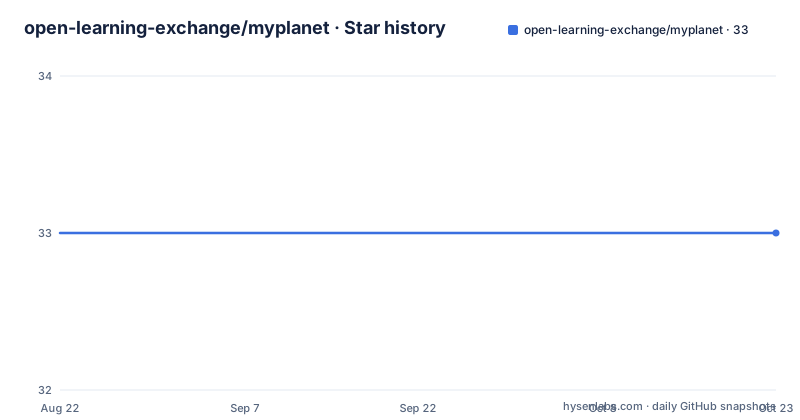
Star history
- open-learning-exchange/myplanet33 ★ · +0
| Repository | 2026-08-22 | 2026-10-04 |
|---|---|---|
| open-learning-exchange/myplanet | 33 | 33 |
0 Stars in the last 43 days, measured from the daily GitHub snapshot. Compare with other projects
Editorial analysis
The app is a local mirror of a server you also need
myPlanet is not a standalone learning product. It is the mobile companion to Planet, the Open Learning Exchange's learning management system, and it is built to sit in front of a Planet server in the same way a browser sits in front of one. It integrates with Planet's community and nation instances, which are the two deployment shapes the project names. What reaches the phone is user-created educational material in the form of books, videos and courses, plus interactive learning games, and learners download selected collections to store locally rather than pulling everything. The value of the arrangement is continuity in areas with limited or no internet access, and the cost is that the interesting half of the system, assessment and content management, still lives server-side. Offline is a mode here, not a replacement for the platform.
Five feature lines and what each one depends on
The feature list has five entries, and they are not equally dependent on connectivity. Offline access is the download-then-read path: educational materials stored on the device and reachable without a connection. Content synchronization is the write side of the same path, syncing with the Planet server to pick up the latest educational content. The AI chatbot is described as providing assistance to help users navigate the app, find resources and get answers to questions, which puts it inside the same client rather than beside it. Teams and enterprises covers collaborating with other users, completing tasks and courses, and downloading resources to work on together, so that mode spans both offline and online. Multilingual support is the odd one out in that it needs nothing from the server at all: the app ships in English, Arabic, Spanish, French, Nepali and Somali.
The About section claims more than the feature list does
There is a gap between the five bullets and the prose that follows them. Beyond access, the README describes the app as carrying tools for content management, learner evaluation and course creation, with users able to manage their learning progress, track performance and take part in interactive activities, plus support for frequent assessments and feedback metrics. Those are authoring and grading capabilities, not download features, and they sit in a mobile client for a learning management system rather than in a separate web console. What the document does not say is which of those capabilities require a live Planet connection and which work from local state, and that distinction decides whether the app is usable at all in the low-connectivity environments the project is built for. Treat the list as a claim to verify against the app rather than as a specification.
A plain clone silently skips the shared agent skills
The development section is short and the one instruction in it is a clone flag. Developer documentation lives in `CLAUDE.md`, which covers architecture, build and conventions. The repository uses git submodules for shared agent skills under `.agents/skills/`, and a plain clone skips those, so the documented approach is:
git clone --recurse-submodules https://github.com/open-learning-exchange/myplanet.git
# or, on an existing clone:
git submodule update --init --recursive
This is the kind of detail that turns into a confusing first afternoon if you miss it, because nothing fails loudly: the working tree simply has an empty directory where a tooling dependency should be. The `.gitmodules` file at the root and the `.agents/` directory are the visible signs of it. The rest of the root is a standard Gradle project, with `app/`, `build.gradle.kts`, `settings.gradle`, `gradle.properties`, the `gradlew` and `gradlew.bat` wrappers and a `gradle/` directory, plus a `docs/` folder.
Three patch releases published thirteen minutes apart
The release history is the most unusual thing in the metadata. Three tags landed on the same evening: `v0.74.14` at 22:25:37 UTC, `v0.74.15` at 22:31:00 UTC and `v0.74.16` at 22:38:16 UTC on 30 September 2026. That is a build-and-publish loop running several times an hour rather than a weekly or monthly release train, and all three carry an empty release name, so the tag itself is the only description of what changed. The version series is still pre-1.0 at 0.74.x, which means the public API of the app is not promised to be stable. Meanwhile the default branch is `master` rather than `main`, and its last push was recorded on 28 September 2026, two days before those tags. For an operator, the practical consequence is that pinning a build means pinning a specific tag rather than tracking a branch.
549 open issues against 33 stars
The counters are 33 stars, 32 forks and 549 open issues, and the third number is the one to read first. An issue backlog an order of magnitude above the star count is what a widely deployed app maintained by a small group looks like, particularly one that is distributed to learners through an organisation rather than adopted by developers. Licence is AGPL-3.0, which matters for anyone who intends to modify and redistribute the client, and the app does have a Google Play listing, which is the distribution path most end users will actually take. The root also carries `.coderabbit.yaml`, a `.openhands/` directory, `AGENTS.md`, `CLAUDE.md` and `.agents/`, so the tooling configuration around the code is now a visible part of the project surface.
Usage data travels back to the server, and the description says so
One line of the repository's own description is worth reading before deploying this anywhere. It says the Android app reads data from Planet for offline use, and that it also collects usage data and sends it back to the Planet. That is the entire data story in one sentence: content flows down, telemetry flows up. The README body does not return to the subject, and there is no section on what is collected, how long it is kept or how to opt out, so the description is the only place in the repository where the return path is stated at all. For a project whose selling point is working in places with limited connectivity, and whose users are often schools and NGOs, that asymmetry is the detail to check with whoever runs the server before rolling the app out.
Editorial conclusion
myplanet is worth considering if you run a Planet instance and need learners to keep working through a flaky connection, since download-and-sync plus six interface languages is the whole point of the design. It is not a standalone learning app, and anything that needs a server still needs one. Clone with `--recurse-submodules` before you build, because a plain clone silently skips the shared agent skills, and read the data collection sentence in the repository description before deploying it to learners.
Frequently asked questions
What is myplanet?
An offline-first Android app from the Open Learning Exchange that complements Planet, their learning management system. It syncs user-created books, videos and courses from community and nation Planet instances so learners can keep working without a connection.
Which languages does the myplanet app support?
English, Arabic, Spanish, French, Nepali and Somali. Language support is client-side and does not depend on the Planet server being reachable.
How do I clone myplanet for development?
Use git clone --recurse-submodules, because the repository uses git submodules for shared agent skills under .agents/skills/ that a plain clone skips. On an existing clone run git submodule update --init --recursive.
How often does myplanet publish releases?
Often enough that three tags, v0.74.14, v0.74.15 and v0.74.16, were published within thirteen minutes of each other on 30 September 2026. The series is still pre-1.0 at 0.74.x, so pin a specific tag rather than tracking a branch.
What data does the myplanet app send back to Planet?
Usage data. The repository description states that the app reads data from Planet for offline use as well as collecting usage data and sending it back to the Planet.
Under what licence is myplanet released?
AGPL-3.0. The app also has a Google Play listing, and the default branch is master rather than main.
Official sources
Add this badge to your README
If you maintain this project, the badge below links readers to this analysis and shows its maintenance status from the daily GitHub snapshot. Paste the markdown into your README; add ?metric=license or ?metric=stars to the image URL for a different field.

[](https://hysenlabs.com/projects/open-learning-exchange-myplanet)Star history chart for your README
[](https://hysenlabs.com/projects/open-learning-exchange-myplanet)