sleek keeps every task in a plain todo.txt file
todo.txt manager for Linux, Windows and Mac, free and open-source (FOSS)
At a glance
- What is it?
- sleek is a free desktop todo manager that stores tasks as plain text on Windows, macOS and Linux, adding tag filtering, grouping, full text search and a file watcher over the todo.txt syntax. Its own build rests on a Node 26 toolchain and a peggy grammar step that the README never explains.
- Who is it for?
- Adopt sleek when your tasks already live in a todo.txt file and you want a graphical view of it on Windows, macOS and Linux. Leave it alone if you need accounts, shared lists or a phone client, because the README names only 3 desktop platforms and no sync of any kind.
- Can I use it commercially?
- Yes. MIT is a permissive licence: you can use, modify and sell software built on it, as long as you keep its copyright and licence notices.
- Is it still maintained?
- Yes. The repository last received commits 9 days ago.
- What is it written in?
- Mainly TypeScript, according to GitHub's language statistics.
Answers come from the project's GitHub data, last synced on November 7, 2026, and from our analysis. They are not legal advice.
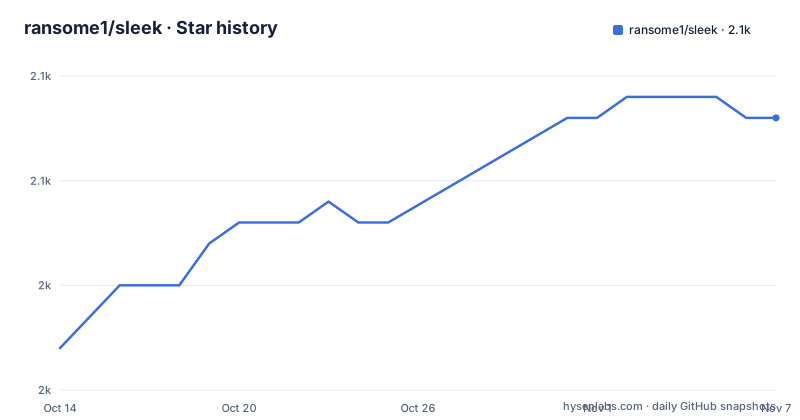
Star history
- ransome1/sleek2,053 ★ · +11
| Repository | 2026-10-14 | 2026-11-07 |
|---|---|---|
| ransome1/sleek | 2k | 2.1k |
11 Stars in the last 24 days, measured from the daily GitHub snapshot. Compare with other projects
Editorial analysis
One plain text file holds the whole task list
todo.txt is a plain text convention in which every task is one line, and sleek is built as a graphical front end for exactly that. Nothing in the project description introduces a database, an account or a sync service, so the file stays the whole state of your tasks and can be opened in any editor on the machine holding it. That makes the tool a fit for people who already keep a todo.txt file and want a window on it, and for people who want to start one without planning a migration later.
The primary language is TypeScript and the program ships as an Electron desktop application, with the main entry point at `./out/main/index.js` and the package declared as an ES module. Windows, macOS and Linux, 3 desktop platforms in all, are named in the package description itself, not only in the prose. The package version is 2.0.29, and the author field credits Robin Ahle, so this is a single maintainer project with a personal contact address rather than a foundation effort.
Tag filtering, grouping and search sit on top of it
Retrieval is where sleek puts its weight. Creating todos is called straightforward, and the effort sits in tag based filtering combined with grouping you can configure, plus full text search across the file. The repository topics add the vocabulary the prose never spells out: contexts, priorities, due-date, alarms, threshold, repeating-todos and filters all appear as subject labels. Because those are topic tags rather than documented syntax, no key format is stated for any of them here, and a user who needs an exact tag string has to read the app or the todo.txt syntax docs instead.
Context handling is the clearest example. A topic named contexts promises that tasks can be split by context, yet nothing in the written material says how a context is written on a line or whether it is parsed from a key. dark-mode and multiple-languages sit in the same list, which tells you appearance and translation work exists inside the application without saying how many translations ship or how complete they are. Read the topics as evidence of features in progress, not as a specification.
A watcher reloads edits made in another program
Interoperation with other todo.txt apps is handled by a watcher rather than by an import step. sleek continuously scans todo.txt files for changes, so a file edited in a terminal or in another editor reloads inside the running window without anyone reopening it. The file-watcher topic matches that sentence exactly, which makes this the one behaviour where the prose and the repository metadata agree word for word.
What the sentence leaves open is everything you would need to trust it in production. No scan interval is given, no list of watched directories, and no rule for two programs writing the same file within one cycle. None of those three are documented anywhere in what the project publishes, so treat the reload as prompt but unmeasured, and keep the file on a local disk rather than a network share while you find out how the watcher behaves on your setup.
Six routes to a packaged build, none of them from source
The README offers 6 routes to a finished binary, and not one of them asks you to clone the repository. On a Snap system the store command is:
sudo snap install sleekFlatpak users install the application id that matches the desktopName field in package.json, then launch it:
flatpak install flathub com.github.ransome1.sleek
flatpak run com.github.ransome1.sleek
On macOS the cask route is:
brew install --cask sleek-appArch users are sent to the AUR, and the README asks for Yay to be set up first:
yay -S sleekFor anyone who prefers a plain download, binaries for all three desktop systems are offered on SourceForge and on GitHub. Two store listings cover the same ground, the Mac App Store and the Microsoft Store. First use after installing is ordinary todo.txt work: open your file, mark tasks complete, and let the tag filter narrow the list.
package.json sets a Node 26 floor the README never states
The visible part of package.json is where the real build requirements live, and they are stricter than anything in the prose. The runtime floor and module type are declared like this:
"main": "./out/main/index.js",
"type": "module",
"engines": {
  "node": ">=26"
},
A contributor therefore needs Node 26 or newer before touching src, even though every route described in the README hands you a packaged build instead. The build script also runs a grammar generator before electron-vite, which is the detail that matters to anyone planning parser work:
"build": "npm run peggy && electron-vite build",
"test": "vitest",
"test:e2e": "npm run build && playwright test",
"lint": "npx eslint ./src",
peggy appears nowhere in the prose, and the scripts listing shown in package.json stops part way through, so what grammar the step generates and where its output lands are not written down. Note the ordering in those entries: every end to end run calls the build first, which means Playwright exercises packaged output rather than raw sources. A macOS store build has its own target using electron-builder with --universal and --publish never, so a store copy is produced without a publish step in a local run.
Stripped down claims against twenty repository topics
The README calls sleek stripped down to only the most necessary features, and the repository topics then list 20 subjects: alarms, archiving, contexts, dark-mode, due-date, file-watcher, filters, foss, fulltext-search, gui, linux-app, macos-app, modern, multiple-languages, open-source, priorities, repeating-todos, threshold, todo-txt and windows-app. A topic label can cover a bug fix as readily as a feature, so the two are not in flat contradiction. The tension is real for anyone deciding what they are signing up for, because recurring tasks, due dates, alarms and a threshold setting each add state that a plain todo.txt line does not have to carry, and none of them is described in the prose.
That gap is widest for archiving. Writing finished tasks out to separate `done.txt` files gets one clause, with no rule given for file naming, rotation, or what happens when a `done.txt` file already exists. Reading the topics as a contract overstates what is documented; reading the single clause as a contract understates what ships. Ask the project before you build a workflow that assumes either behaviour.
Two TypeScript projects, vitest and playwright
The repository is arranged for a two sided program. 3 TypeScript project files sit at the top level, `tsconfig.json`, `tsconfig.node.json` and `tsconfig.web.json`, and the typecheck script runs tsc once per project rather than once overall. That split matches an Electron application where the main process and the window side compile separately, and it matches the two part script names already visible. Unit level work goes through vitest and the browser side through playwright, with `playwright.config.ts` and `vitest.config.ts` both committed. Linting is scoped to src, and formatting runs through prettier with a `.prettierignore` at the root.
The upkeep picture is easy to read. The package version is 2.0.29 and the last push was on 2026-09-15. Contributor information is kept in `CONTRIBUTING.md`, where the maintainer asks for help with React, TypeScript, Electron and vitest skills and links a public backlog, while `FUNDING.yml`, `PRIVACY.md` and `SECURITY.md` sit beside it at the root. It is released under the MIT licence, so redistribution inside another project carries the usual notice requirement.
Where a plain text file stops being enough
Text file storage is the constraint that decides whether sleek is the right program. No account, no shared list and no phone client appear anywhere in what the README says, and the only platforms named are 3: Windows, macOS and Linux. If your tasks must be entered from a phone or edited by two people at once, this format does not carry that, and adding a second database beside the text file defeats the reason to choose it.
The realistic alternative is a plain text editor or a command line tool working on the same todo.txt file. That route keeps the same portability and gives you clean diffs for your task list. What you give up is what sleek adds on top: tag filtering with configurable grouping, full text search, a watcher that reloads the window when the file changes underneath it, and archiving into separate `done.txt` files. On one desktop with one user, an editor plus search covers most of the work. Across three operating systems with a long list, the packaged builds, the translations and the search are the reason to accept an Electron application as a dependency. One more detail to weigh: the maintainer notes that shipping to the Apple and Microsoft app stores creates annual costs and points to GitHub Sponsors and liberapay, which means the store copies come from a one person project with a hosting bill attached.
Editorial conclusion
Adopt sleek when your tasks already live in a todo.txt file and you want a graphical view of it on Windows, macOS and Linux. Leave it alone if you need accounts, shared lists or a phone client, because the README names only 3 desktop platforms and no sync of any kind. Check first that the tags you rely on survive a round trip through the file, then decide whether a Node 26 checkout with a peggy build step suits you, since no source build path is written down anywhere. Expect to own the sync story yourself.
Frequently asked questions
How do I install sleek on Linux?
The README gives `sudo snap install sleek` for Snap, `flatpak install flathub com.github.ransome1.sleek` for Flatpak, and `yay -S sleek` for Arch users through the AUR once Yay is set up. Binaries for Windows, macOS and Linux are also offered on SourceForge and on GitHub.
Does sleek sync my todo.txt tasks between devices?
No account, server or sync mechanism appears anywhere in the written material. sleek works on a local todo.txt file and reloads it when the file changes on disk.
What Node version do I need to build sleek from source?
package.json sets the engine requirement to Node 26 or newer, and the build script runs a peggy step before electron-vite. The README gives no source build instructions, so those requirements are visible only in the repository files.
What happens to completed todos in sleek?
Completed todos can be hidden or archived into separate `done.txt` files. How those files are named, rotated or merged is not documented anywhere in the written material.
Is sleek available as a native Linux package or only through stores?
The README lists a Snap, a Flathub entry under the id com.github.ransome1.sleek, an AUR cask named sleek and a Homebrew cask named sleek-app. It also offers store listings for the Mac App Store and the Microsoft Store, plus direct downloads from SourceForge and GitHub.
Can I build sleek from the repository myself?
The written material does not include a source build walkthrough, but package.json sets the engine requirement to Node 26 or newer and the build script runs npm run peggy before electron-vite build. A contributor would need those two steps before electron-vite dev.
Official sources
Add this badge to your README
If you maintain this project, the badge below links readers to this analysis and shows its maintenance status from the daily GitHub snapshot. Paste the markdown into your README; add ?metric=license or ?metric=stars to the image URL for a different field.

[](https://hysenlabs.com/projects/ransome1-sleek)Star history chart for your README
[](https://hysenlabs.com/projects/ransome1-sleek)Was this useful?