dateparser: UK dates read the American way, and a timezone setting that stays naive
python parser for human readable dates
At a glance
- What is it?
- A BSD licensed Python library that turns human-readable date strings into datetimes across more than two hundred locales, shipped as four packages with type stubs and a fuzzing directory. Its two sharpest edges are documented but easy to miss: date order is not keyed to locale, so British input is silently misread, and setting a timezone does not make the result timezone-aware unless you also set a second flag.
- Who is it for?
- Reach for this when your input is genuinely free text in an unknown language, since that is what the autodetection and time span features are for, and pin the language whenever you can. Two traps to check before you trust the output.
- Can I use it commercially?
- Yes. BSD-3-Clause is a permissive licence: you can use, modify and sell software built on it, as long as you keep its copyright and licence notices.
- Is it still maintained?
- Yes. The repository last received commits 2 days ago.
- What is it written in?
- Mainly Python, according to GitHub's language statistics.
Answers come from the project's GitHub data, last synced on November 15, 2026, and from our analysis. They are not legal advice.
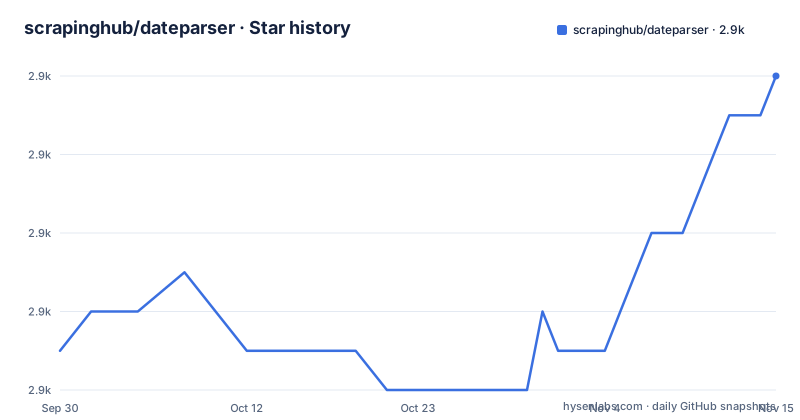
Star history
- scrapinghub/dateparser2,868 ★ · +7
| Repository | 2026-09-30 | 2026-11-15 |
|---|---|---|
| scrapinghub/dateparser | 2.9k | 2.9k |
7 Stars in the last 46 days, measured from the daily GitHub snapshot. Compare with other projects
Editorial analysis
Date order follows the detected language, not the locale
This is the failure mode worth knowing before anything else, because it returns a valid answer rather than an error:
>>> # parsing ambiguous date
>>> parse('02-03-2016')  # assumes english language, uses MDY date order
datetime.datetime(2016, 2, 3, 0, 0)
>>> parse('le 02-03-2016')  # detects french, uses DMY date order
datetime.datetime(2016, 3, 2, 0, 0)
The same three numeric fields produce 3 February in one call and 2 March in the next. The only difference is a French article in front of it.
The note attached to this is the important part. Ordering is not locale-based, and the page says plainly not to expect day-month-year order for UK or Australian English. So a British user writing 02-03-2016 means 2 March and receives 3 February, with no exception raised and nothing in the output to indicate a guess was made.
The asymmetry is what makes it a design decision rather than an oversight. Language detection is locale-aware enough to notice French and switch to day-month-year, but date order is not wired to the same signal. The one piece of information that would make UK input work is the one piece not keyed to region.
The escape hatch is explicit, and worth setting on any numeric input rather than waiting to be bitten:
>>> parse('18-12-15 06:00', settings={'DATE_ORDER': 'DMY'})
datetime.datetime(2015, 12, 18, 6, 0)
Setting a timezone still returns a naive datetime
The documented default is stated clearly: a timezone-aware datetime is returned if a timezone is present in the date string, and a naive object otherwise.
Now look at what happens when you supply the timezone yourself:
>>> parse('January 12, 2012 10:00 PM', settings={'TIMEZONE': 'US/Eastern'})
datetime.datetime(2012, 1, 12, 22, 0)
>>> parse('January 12, 2012 10:00 PM', settings={'TIMEZONE': 'US/Eastern', 'RETURN_AS_TIMEZONE_AWARE': True})
datetime.datetime(2012, 1, 12, 22, 0, tzinfo=<DstTzInfo 'US/Eastern'
The first call takes a timezone and still returns something with no tzinfo. The second adds a second setting and attaches one. So `TIMEZONE` supplies the offset used for the computation while `RETURN_AS_TIMEZONE_AWARE` decides whether the result carries the tzinfo, and only the pair gives you an aware object.
Two things follow. For any string without an explicit zone, the default return type is naive, which is the common case for scraped text. And two call sites that look equally configured return different types, which in an application surfaces as a comparison or subtraction bug rather than as a parse failure.
The tzinfo objects in these examples are named `StaticTzInfo` and `DstTzInfo`, which are pytz types, and pytz is a declared runtime dependency. So what gets attached is pytz's implementation rather than the standard library's zoneinfo, and the two do not attach identically. That is worth verifying against your own comparisons rather than assuming.
Two headline features are behind optional extras
The key features list names eight capabilities. Two of them are not in the base install.
The list includes language autodetection and support for non-Gregorian calendar systems. The package metadata puts both behind extras:
[project.optional-dependencies]
calendars = ["convertdate>=2.2.1", "hijridate"]
langdetect = ["langdetect>=1.0.0"]
So autodetection costs one optional package, and non-Gregorian calendars cost two, one of which is a Hijri calendar converter. A plain install gets neither, while the feature list reads as though it does.
The multilingual examples on the page work without either extra, and that is the point worth drawing out. Every one of them contains enough signal for the parser to work from the text alone: a month name, a weekday, a language-specific relative phrase. Autodetection is only needed for the case where you cannot tell, which is exactly the case where a wrong guess silently changes the meaning.
The base install is not minimal either. It declares `python-dateutil`, `pytz`, `regex` and `tzlocal`, so there is a third-party regex engine and a timezone library in the default dependency set regardless of which extras you choose.
One narrower gap is called out in prose rather than in the extras: for Finnish, the page says to pass an empty token-skip list to get relative dates parsed correctly.
A bare ten-digit string is read as a Unix timestamp
One example deserves to be read carefully, because the behaviour generalises:
>>> dateparser.parse('1484823450')  # timestamp
datetime.datetime(2017, 1, 19, 10, 57, 30)
A string of nothing but digits is treated as seconds since the epoch and converted. No format hint is required and nothing distinguishes it from an identifier.
The result is naive, with no tzinfo attached, even though a Unix timestamp is unambiguously UTC. That is consistent with the documented default rather than a bug, and it means the returned value carries no marker of which zone it came from.
The feature list confirms this is intended: timestamps are named alongside absolute and relative dates as a supported input class.
Put the input classes together and two of the three depend on state you do not control. Relative expressions resolve against the current clock, which is why the page carries a note that testing the relative examples returns different values depending on your environment's current date and time. Timestamps resolve against an assumption about unit and zone. Only genuinely absolute dates are deterministic. That is a fair trade for the coverage, but it belongs in your test design, since the same string is not guaranteed to produce the same datetime tomorrow.
The PyPI description is the README with the changelog welded on
The project carries both a pyproject file and a setup file, and the setup file exists for exactly one purpose:
readme = Path("README.rst").read_text(encoding="utf-8")
# Remove `.. raw:: html` blocks, which are not supported by PyPI.
readme = re.sub(r"(?m)^\.\. raw:: html\n(?:^[ \t].*\n|^[ \t]*\n)*?\n\n", "", readme)
history = re.sub(
    r":mod:|:class:|:func:", "", Path("HISTORY.rst").read_text(encoding="utf-8")
)

setup(
    long_description=readme + "\n\n" + history,
    long_description_content_type="text/x-rst",
)
No metadata, no arguments beyond the description. Everything else lives in the pyproject file, which declares the readme as dynamic precisely because this script computes it.
Two transformations happen. Raw HTML blocks are stripped from the README, and Sphinx role markers are stripped from the history file. Then the two are concatenated, so the description you see on the package index is the README followed by the entire changelog.
The reason is a genuine platform conflict, and the README explains its own side of it in a comment at the top: the raw HTML is there because centering images and paragraphs is not supported on GitHub, and it cites the markup issue. GitHub needs the HTML for layout; the package index cannot render it. A regex is the bridge.
The pattern is non-greedy and requires a blank line after the block, so a raw HTML block not followed by one would pass through into the published page. It works for the file as it stands, and it is load-bearing for anything that edits the header.
A release is triggered by deleting a marker from the changelog
Version bumping is automated, and three files are kept in step:
[tool.bumpversion]
commit = true
tag = true

[[tool.bumpversion.files]]
filename = 'HISTORY.rst'
search = "\\(unreleased\\)$"
replace =
The project file and the package's own init file are synchronised the same way. The changelog is different, because it is not versioned. Instead the bump script searches for the literal text `(unreleased)` at the end of a line and replaces it with nothing.
So the convention is that the changelog carries an `(unreleased)` heading while work accumulates, and cutting a release deletes that marker. The heading is not decoration; it is the release boundary, and the tooling finds it by exact string.
Two details make it work. The `$` anchor requires the marker to be the last thing on its line, so the heading has to be formatted a particular way. And `commit = true` with `tag = true` means the same command that rewrites the three files also commits and tags, so a version bump cannot be made without producing a release marker.
It is the only place in the repository where the changelog is tied mechanically to a release rather than maintained by hand, and it is the tidiest piece of release discipline in the project.
Three summaries of the project disagree with each other
The project describes itself three different ways.
The package metadata summary is a date parsing library designed to parse dates from HTML pages. The README heading is a Python parser for human readable dates. The repository description is the same as the README, in lower case.
So the summary most people read first, on the package index, frames the library around HTML pages, while the README frames it around human-readable dates in full generality. Those are different scopes: parsing a page you already have is a narrower job than parsing a phrase out of arbitrary text, and the README's own features for time span detection and for searching longer texts sit firmly in the wider one.
The maintainer entry compounds the impression of an older era. The author name is Scrapinghub and the contact address is at a different domain entirely, while the repository, the homepage and the source URL are all still under the older name.
Two smaller signs of the same thing. The online demo, the one place you can try the library without installing anything, is hosted on a pages address under a different account from the organisation, so it sits outside the project's own namespace. And two of the badges in the header link the same package page on the legacy package-index domain rather than the current one.
Editorial conclusion
Reach for this when your input is genuinely free text in an unknown language, since that is what the autodetection and time span features are for, and pin the language whenever you can. Two traps to check before you trust the output. Date order is decided by detected language rather than by locale, so any British or Australian date in numeric form needs the date order setting set explicitly or it will be silently wrong. And asking for a timezone does not give you a timezone-aware object unless you also ask for that, so audit your call sites for the pair of settings together. Finally, language autodetection and non-Gregorian calendars are optional extras rather than part of the base install.
Frequently asked questions
How do I parse a date string with dateparser in Python?
Call `dateparser.parse()`, which the page says wraps most of the module's functionality. For example `dateparser.parse('Fri, 12 Dec 2014 10:55:50')` returns a datetime. Pass `languages=` to skip detection, or `date_formats=` when you already know the pattern.
Does dateparser handle languages other than English?
Yes, it claims support for more than 200 language locales. The README shows Spanish, French, Russian, Thai, Turkish and Chinese inputs, and you can pin the language with the `languages` argument, in which case the given languages are used and detection is skipped.
How do I force day-month-year order in dateparser?
Pass `settings={'DATE_ORDER': 'DMY'}`. The page warns that ordering is not locale-based, so you should not expect day-month-year order for UK or Australian English, which read as month-day-year by default.
Why does dateparser return a naive datetime when I set a timezone?
The `TIMEZONE` setting supplies the offset but still returns a naive object, as its own example shows. You also need `RETURN_AS_TIMEZONE_AWARE` set to true in the same settings dictionary to get a result carrying a tzinfo.
Is language autodetection included in a plain dateparser install?
No. It sits in an optional extra named `langdetect`, which pulls in the langdetect package. Support for non-Gregorian calendars is likewise behind a `calendars` extra, which brings in convertdate and hijridate.
Official sources
Add this badge to your README
If you maintain this project, the badge below links readers to this analysis and shows its maintenance status from the daily GitHub snapshot. Paste the markdown into your README; add ?metric=license or ?metric=stars to the image URL for a different field.

[](https://hysenlabs.com/projects/scrapinghub-dateparser)Star history chart for your README
[](https://hysenlabs.com/projects/scrapinghub-dateparser)Was this useful?