go-fastdfs: a single binary with no dependencies, and a Dockerfile that still builds in GOPATH mode
go-fastdfs is a simple distributed file system (private cloud storage) with no central node, high performance, high reliability and low maintenance. Supports resumable uploads, chunked uploads, small-file merging, automatic synchronization and automatic repair. Similar to FastDFS.
At a glance
- What is it?
- go-fastdfs is a distributed file system served over plain HTTP, written in Go, distributed as one binary. Its download link points at a differently named repository, its Dockerfile turns off module mode and builds from a cloned GOPATH tree, and its base images live in a personal registry rather than a public one.
- Who is it for?
- go-fastdfs suits someone who needs shared storage over HTTP with no client to install and no dedicated node roles to operate. Run it under the control script rather than in a terminal, which is what the readme warns about.
- Can I use it commercially?
- Yes. Unlicense is a permissive licence: you can use, modify and sell software built on it, as long as you keep its copyright and licence notices.
- Is it still maintained?
- Yes. The repository last received commits 127 days ago.
- What is it written in?
- Mainly Go, according to GitHub's language statistics.
Answers come from the project's GitHub data, last synced on November 15, 2026, and from our analysis. They are not legal advice.
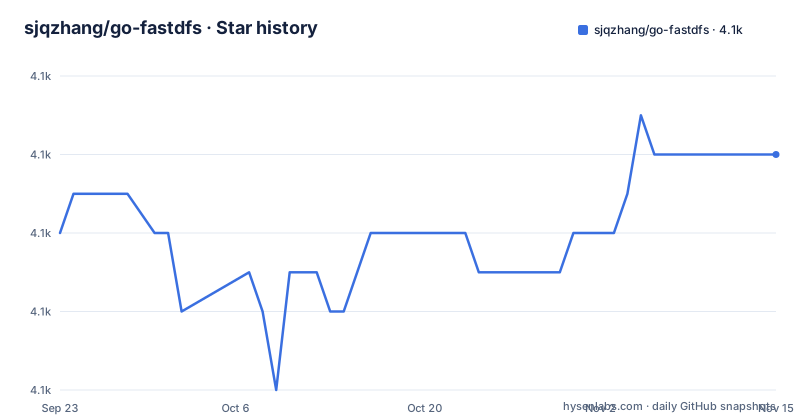
Star history
- sjqzhang/go-fastdfs4,142 ★ · +2
| Repository | 2026-09-23 | 2026-11-15 |
|---|---|---|
| sjqzhang/go-fastdfs | 4.1k | 4.1k |
2 Stars in the last 53 days, measured from the daily GitHub snapshot. Compare with other projects
Editorial analysis
The download link points at a repository with a different name
The quick start section is titled as a one minute experience and the first step says the server is already compiled, with a download link.
That link goes to a repository named `fastdfs`, not `go-fastdfs`.
So the prebuilt binaries live in a separate repository under the same owner, and the name of that repository is the name of the original project this one is similar to. That is a trap for anyone automating a fetch: the path they would guess from the project name is not the path that works.
The rest of the quick start is three steps. Run the server binary directly, with a note in the same line saying that for production you should use the project's control file for management because running it directly means closing the terminal stops it. Then upload with a single curl command against a group1 upload path. Then open a browser to the server address and upload through the web form.
That third step carries its own warning: do not use 127.0.0.1 to upload. The server records the address it believes it is reachable at, and a loopback address is not the one other clients can use.
One role instead of three, and every node reads and writes
The design argument in the readme is stated as a contrast with the project this one resembles.
The operational claim is that there is only one role, unlike fastdfs which has three: Tracker Server, Storage Server and Client. Configuration is generated automatically.
The other claim is the no-centre design, stated as every node being able to read and write at the same time, with each node equal to simplify operations.
That is the whole architectural pitch. There is no coordinator to lose, no separate metadata service to configure, and no client software because the protocol is plain HTTP. The readme lists wget and curl as sufficient clients.
The consistency argument is also in the readme: because the design is simple it is efficient, and because it is simple it is stable, which is the answer given to the question of whether such a simple file system can be used in production. The suggested response to remaining doubt is to run the bundled unit tests for functionality and the bundled stress tests for performance.
The repository tree contains a `benchmark.py` at the root, which is consistent with the second of those.
Small files get merged and duplicates upload instantly
Two features address the same underlying problem, which is inode exhaustion on a filesystem holding many small objects.
The first is automatic merging of small files, described as reducing inode usage. The second is instant upload, listed among the features alongside automatic deduplication of files.
Instant upload works on the hash. The readme also documents a token download mechanism, and gives the formula: the token is the md5 of the file's md5 combined with a timestamp. So the server can answer a request for a file it already holds without touching disk, and it can do so for a caller who proves it knows the content hash.
That design has an obvious consequence. Deduplication and instant upload both depend on the same content hash being computed identically on the server that uploaded and the server that requested, which means every node must be storing and indexing the same hash for the same content. That is consistent with the automatic synchronisation between machines listed as a feature, and it is why file merging and sync are the same subsystem rather than two features.
Automatic repair after failure and day-based directory organisation are the two other items in that group, and both are about keeping the shared state usable without a human.
The Dockerfile disables modules and builds from a cloned GOPATH tree
The container build has two stages, and both base images come from a registry under a personal account rather than from Docker Hub.
The builder stage installs git, clones the repository from GitHub, then moves directories around to construct a GOPATH layout: it moves the vendor directory into src, renames the project directory, places it under `src/github.com/sjqzhang/`, exports a GOPATH pointing at that tree, and sets `GO111MODULE` to off.
With modules off, a project that ships a `go.mod` is built as if it predates them. Then it compiles with `CGO_ENABLED=0 GOOS=linux` into a binary called `fileserver.
The final stage copies that single binary out and sets three environment variables for an install directory, a directory on the PATH and a data directory, then creates the conf, data, files and log subdirectories and moves the binary into place with the execute bit set.
Three details are worth flagging. The image clones from the network during the build rather than copying the checkout, so the image contents depend on what is on the default branch at build time. There is a build argument named VERSION that defaults to a value older than the current release. And the command at the end is given in exec form with a `${OPTS}` placeholder, which a shell would expand and the exec form does not.
The author maintains forks of tusd, seelog and a Google authenticator
The module file declares Go 1.17 and thirteen direct dependencies, and four of them are forks under the author's own path.
`sjqzhang/googleAuthenticator`, `sjqzhang/goutil`, `sjqzhang/seelog` and `sjqzhang/tusd`. The last of those is a fork of the tus resumable upload server, which is what the readme's tus protocol support rests on. There is also `eventials/go-tus`, a separate tus client library.
So the resumable upload feature has both halves written by other people, one of them forked by this project, plus an authenticator library forked to provide the Google authentication code support listed among the features.
The remaining direct dependencies are a web framework, beego at 1.12.3, a command line library, cobra, LevelDB as the key value store, a filesystem watcher for the watched-directory style behaviour, a process and system metrics library, an image resize library, a JSON iterator and a set implementation.
The readme names LevelDB as the reason for the high performance claim. That is the only storage engine mentioned anywhere, and there is no alternative offered.
The Makefile cross compiles for seven targets and picks a checksum tool
The build file is a cross compilation matrix expressed as lists. The Linux list is amd64, 386, arm and arm64. A separate variable adds loong64, which is the RISC-V-like architecture shipped in Chinese server processors, and it is deliberately kept out of the main list. Then darwin for amd64 and arm64.
Each target is built with three variables injected at link time: the version, taken from the first git tag; the Go version, from `go version`; the short commit hash; and the build timestamp.
The interesting part is the checksum step. The file tests whether an `md5` command exists and chooses between `md5` and `md5sum` accordingly, in two places, with a comment in Chinese explaining that the check exists because the two commands are spelled differently on different systems.
Each binary is then written next to a checksum file and the pair is packed into a tarball, and the delete step removes the loose files.
So the release artefacts are per-platform tarballs each carrying a checksum, which is the mechanism behind the separately hosted download repository the quick start links to.
Four chat groups, three of them full, and help only by issue
The end of the readme lists four QQ groups with their numbers. Three carry a note that the group is full. Only the fourth is presented as open.
That is an unusual thing to leave in a readme, and it is a snapshot rather than a status. It tells a reader that the community channels have filled up faster than they are opened, and that the number in the file may or may not be the current one.
The paragraph after the groups sets the support boundary: the group is for learning and discussion, and for anything about the program itself you should submit an issue, because email help, WeChat help and private QQ messages are not accepted.
So the support path is the issue tracker, and the groups are explicitly not it. Combined with the earlier instruction to run the bundled tests before deciding the project is not production-ready, the readme is consistent about where it wants questions asked.
The repository root backs that up with a `SECURITY.md` and a `CONTRIBUTING.md`, so there is a written route for reports other than questions.
Editorial conclusion
go-fastdfs suits someone who needs shared storage over HTTP with no client to install and no dedicated node roles to operate. Run it under the control script rather than in a terminal, which is what the readme warns about. Read the maintenance notes in the linked documentation before exposing it, because the download endpoint takes a token computed as an md5 of the file hash and a timestamp, and the release line is two years behind the last commit. And check the version argument in the Dockerfile if you build the image yourself, because it still names a much earlier release.
Frequently asked questions
how do I start a go-fastdfs server
Download a prebuilt binary from the releases of the separate fastdfs repository, then run the fileserver binary. The readme warns that running it directly means closing the terminal stops it, so for production use the control script included in this repository instead.
how do I upload a file to go-fastdfs with curl
Post a multipart form field named file to the group1 upload path on port 8080 of the server, for example `curl -F file=@http-index-fs http://10.1.xx.60:8080/group1/upload`. There is also a browser upload form on the same port, with the caveat that you should not use 127.0.0.1 as the address when uploading.
does go-fastdfs need a tracker server and a storage server
No. The readme states that go-fastdfs has only one role, unlike fastdfs which has three, Tracker Server, Storage Server and Client, and that its design has no centre, so every node can read and write at the same time and each node is equal. Configuration is generated automatically and the protocol is plain HTTP, so no dedicated client is needed.
Official sources
Add this badge to your README
If you maintain this project, the badge below links readers to this analysis and shows its maintenance status from the daily GitHub snapshot. Paste the markdown into your README; add ?metric=license or ?metric=stars to the image URL for a different field.

[](https://hysenlabs.com/projects/sjqzhang-go-fastdfs)Star history chart for your README
[](https://hysenlabs.com/projects/sjqzhang-go-fastdfs)Was this useful?