StemRoller: a desktop stem splitter whose production mode still runs from source
Isolate vocals, drums, bass, and other instrumental stems from any song
At a glance
- What is it?
- An application that searches a video service for a song and separates it into vocal and instrumental stems with a research demixing model, offered as a hosted site and a downloadable bundle. Its documented production start command launches the renderer and the desktop shell from source, its Linux path expects two global installations, and its licence offers a public domain dedication or an MIT variant with no attribution.
- Who is it for?
- StemRoller fits someone who wants to pull the vocal out of a track for their own listening or practice, and it is worth understanding two things first. The audio it splits is fetched by searching a video service, so the retrieval path is part of the tool and not just a convenience, and how you use the result is your responsibility.
- Can I use it commercially?
- Check first. The repository uses a licence we do not classify automatically, so read its LICENSE file before any commercial use.
- Is it still maintained?
- Yes. The repository last received commits 138 days ago.
- What is it written in?
- Mainly Svelte, according to GitHub's language statistics.
Answers come from the project's GitHub data, last synced on November 15, 2026, and from our analysis. They are not legal advice.
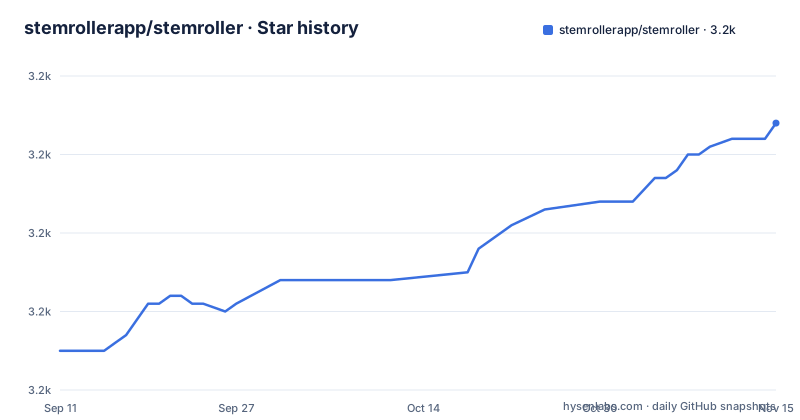
Star history
- stemrollerapp/stemroller3,194 ★ · +29
| Repository | 2026-09-11 | 2026-11-15 |
|---|---|---|
| stemrollerapp/stemroller | 3.2k | 3.2k |
29 Stars in the last 65 days, measured from the daily GitHub snapshot. Compare with other projects
Editorial analysis
One description, and a tree with a shell a renderer and three payloads
The repository description is a single sentence about isolating stems from a song, and the tree tells a longer story. There is a main process directory and a renderer directory, so the application is a desktop shell wrapping a web interface, and there is a static directory alongside a Svelte configuration and a Vite configuration, which is what you would expect from that shape. Then there are three directories named for extra files: one for all platforms and one each for the two desktop platforms. Their names suggest per-platform payload directories consumed by the packaging step, which is the usual way two desktop builds differ without two build pipelines, though the listing does not say how they are consumed. A fourth file at the root is a script whose job, by its name and by the README, is to fetch the external programs the application drives.
The Linux path expects two global installs and repairs itself with a dev package
The platform split is stated in the headings themselves:
npm run download-third-party-appsThe dependency section splits the platforms explicitly, and the Linux side is marked as not officially supported. On the two supported desktop platforms there is one command, and the README says the bundle includes everything needed to split stems. On Linux there is no bundle: you install the media tool globally with your package manager, and you install the demixer and the downloader globally with pip. That is a real difference in kind, because globally installed programs are whatever happens to be on your path, not versions the project chose. The README also names the failure you will hit, an error saying no appropriate backend could be found, and the fix, which is to install a sound library development package. A troubleshooting note that specific usually means the author hit it.
Run in production mode still runs from source
The README has a section headed run in production mode, and the command it gives builds the renderer and then runs the start script. That start script sets an environment variable whose name says it is running from source, then launches the renderer preview and the desktop shell as two concurrent named processes. So the documented production mode is the development serving path with production build settings: the interface is previewed by the dev server's preview command rather than loaded from disk, and the shell runs the unpackaged application. The only scripts that produce something distributable are the two platform build targets, which build the renderer and then hand off to a packaging tool with a configuration file. That is a naming trap rather than a bug, and it is the kind of thing worth knowing before you file a bug about a production start that opens a window instead of an installed application.
Two packaged builds, two concurrent processes, one packaging config
The scripts section is small and symmetrical. Development sets a mode variable and a source variable, then runs a combined target that starts the interface with the dev server and the shell with the desktop runtime, each tagged with a name and a colour in the terminal. The two platform build targets set a production mode variable, build the interface, and then invoke the packaging tool with a flag for the operating system and an external configuration file. The production start mirrors the development start almost line for line. The interface is built by a static site adapter and served in production by the dev server's preview command, which is why the packaged artefact and the served artefact can differ. Nothing in the visible configuration says whether the desktop applications are signed, which for a program that downloads and runs two external binaries is the detail a reviewer would look for.
The licence offers a public domain dedication or an MIT variant with no attribution
The licence section is one sentence and it is unusual. It says your choice of a public domain dedication or an MIT variant with no attribution, and points at the licence file for details. A project that lets you pick between placing work in the public domain and a permissive licence with the attribution clause removed has decided that reuse should be frictionless, which is a reasonable position for a tool people use on their own music. It also means the repository's own recorded licence field, which asserts nothing, is not the whole answer, and a reader who only consults the metadata will conclude there is no licence rather than that there are two choices. For anyone planning to redistribute stems produced with the tool, the distinction does not travel with the output: the licence covers the application, not the audio you put through it.
The audio comes from a video search, and that is the part to think about
The workflow is four steps and the first one is a search. You type the name or artist of a song into a search bar, the results come back with a split button attached to each, you press it, you wait several minutes, and an open button appears next to the song when the stems are ready. The README says the app integrates search results from a video service, and the Linux instructions name a downloader program alongside the demixer, so the retrieval is a deliberate part of the pipeline rather than a file picker with a bonus. That is the design decision a user should weigh: the tool is convenient because it fetches for you, and convenient because it is also the part that touches a third party's service and its terms. The README is upfront about the search and says nothing about what it does not do, so a user who only has local files has no path through this interface.
The bundled programs arrive through a script, and an archiver comes from npm
The development dependencies include two things that say how the builds work. One is a packaged archiver binary distributed through the package registry, so at least one archive step does not depend on a program already installed on the machine. The other set of clues is the script at the repository root and the two platform build targets, which together explain the README's claim that the bundle includes everything needed. A build that fetches two external programs at build time, then packages them beside the application, is a supply chain decision: the versions are not in the manifest, they are whatever the download script resolves, and the audit of what shipped inside a release has to happen on the artefact rather than on the lock file. Two releases are visible, three months apart, with the newest landing on the same day as the last commit.
Editorial conclusion
StemRoller fits someone who wants to pull the vocal out of a track for their own listening or practice, and it is worth understanding two things first. The audio it splits is fetched by searching a video service, so the retrieval path is part of the tool and not just a convenience, and how you use the result is your responsibility. Second, the binaries that do the work are external programs: bundled on the two supported desktop platforms by a download script, expected as global installs on Linux. The demixing itself takes several minutes per track, so this is a batch tool rather than an interactive one. And the licence is unusually permissive, offering either a public domain dedication or an MIT variant that requires no attribution, which is worth knowing if you plan to redistribute anything you produce with it.
Frequently asked questions
What is StemRoller and what does it do?
A desktop application that separates a song into vocal and instrumental stems. It searches a video service for the song you name, then demixes what it finds using a source separation model, which takes several minutes per track, and offers the resulting stems once the job finishes.
Is StemRoller free?
The README calls it the first free application of its kind. It is offered both as a hosted site and as a downloadable bundle on the releases page, and the source is published under a choice of a public domain dedication or an MIT variant that requires no attribution.
How do I set up StemRoller on Linux?
Linux is marked as not officially supported. There you install the media tool through your package manager and install the demixer and the downloader globally with pip, rather than getting them bundled. The documented failure is an error saying no appropriate backend was found, fixed by installing a sound library development package.
What does npm run start do in StemRoller?
It is documented as production mode, but the script it invokes sets a run-from-source variable and launches the interface preview and the desktop shell as two concurrent processes, rather than launching a packaged build. Only the two platform build targets produce distributable artefacts, through a packaging tool with an external configuration file.
What are the extra-files directories in StemRoller?
Three directories at the repository root are named for extra files: one for all platforms and one each for the two desktop platforms. Their names suggest per-platform payload directories for the packaging step, and the listing does not say how they are consumed.
Which programs does StemRoller drive?
Two external programs plus a desktop shell: a source separation model from a public research repository for the demixing, a video downloader for fetching the audio, and the media tool the README tells Linux users to install through their package manager. On the two supported desktop platforms a script fetches the external programs into the bundle.
Official sources
Add this badge to your README
If you maintain this project, the badge below links readers to this analysis and shows its maintenance status from the daily GitHub snapshot. Paste the markdown into your README; add ?metric=license or ?metric=stars to the image URL for a different field.

[](https://hysenlabs.com/projects/stemrollerapp-stemroller)Star history chart for your README
[](https://hysenlabs.com/projects/stemrollerapp-stemroller)Was this useful?