GhidrAssist's install steps spell the plugin three different ways
An LLM extension for Ghidra to enable AI assistance in RE.
At a glance
- What is it?
- A Ghidra extension whose agent can rename functions and run Ghidra commands, whose semantic graph is indexed with full-text search rather than embeddings, and whose reasoning effort setting is documented with two different numbers of levels.
- Who is it for?
- Read the Quickstart as a menu path rather than as a setup guide, because it names no Ghidra version, no Java version and no Gradle command even though the tree carries a Gradle build. Anyone trying it should settle first how much write access the function calling mode is allowed, since the only overwrite protection named anywhere on the page covers summaries and not the rename or command path.
- Can I use it commercially?
- Yes. MIT is a permissive licence: you can use, modify and sell software built on it, as long as you keep its copyright and licence notices.
- Is it still maintained?
- Yes. The repository last received commits 29 days ago.
- What is it written in?
- Mainly Java, according to GitHub's language statistics.
Answers come from the project's GitHub data, last synced on November 14, 2026, and from our analysis. They are not legal advice.
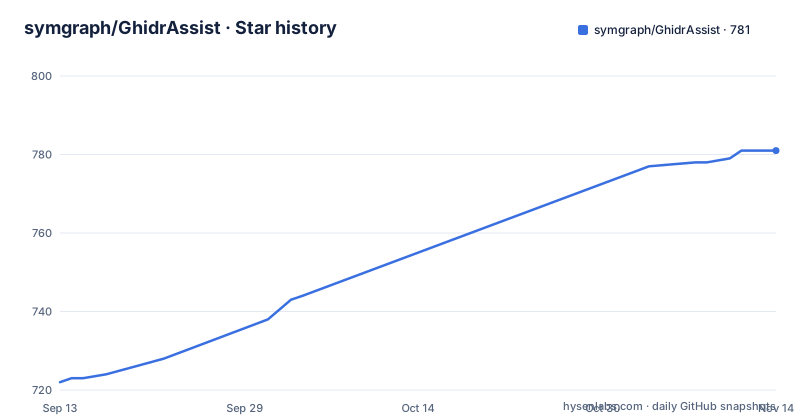
Star history
- symgraph/GhidrAssist781 ★ · +59
| Repository | 2026-09-13 | 2026-11-14 |
|---|---|---|
| symgraph/GhidrAssist | 722 | 781 |
59 Stars in the last 62 days, measured from the daily GitHub snapshot. Compare with other projects
Editorial analysis
Three spellings of one plugin, and a companion under another account
The same component carries three names inside a single page. The repository and the Windows menu entry are GhidrAssist, the CodeBrowser menu path in the Quickstart says Window, then GhidraAssistPlugin, and the model context protocol server it talks to is GhidrAssistMCP. The author is listed as Jason Tang, and that MCP companion is not published under the repository owner but under the personal account github.com/jtang613/GhidrAssistMCP. The release notes drift in the same way: the 2.0.0 entry announces a SymGraph service tab, while the feature list calls the same screen the Semantic Graph Tab. Behind that entry point sit six tabs, Explain, Query, Actions, Semantic Graph, RAG Management and MCP Servers, orchestrated by a TabController. Anyone scripting a menu path, an extension id or a package reference has to reconcile three vocabularies before touching anything.
The Quickstart names no Ghidra version, no JDK and no build step
Installation has two routes and no requirements. One is Ghidra, then File, then Install Extension, then enable GhidrAssist. The other opens with the words if necessary and then copy the binary release ZIP archive to the Ghidra_Install/Extensions/Ghidra directory, without saying when that is necessary or what the archive is called. Enabling also happens twice: once as a Ghidra extension, then again inside the CodeBrowser under File, Configure, Miscellaneous, after a binary has been loaded. The tree behind the page is a Java project, with build.gradle, .project, Module.manifest and extension.properties at the root, yet no Gradle invocation appears anywhere in the instructions and no Java or Ghidra version is stated. Two configuration steps are also left open ended: make the RLHF and RAG database paths appropriate for your environment, and point the API host at your preferred provider.
Semantic search over summaries is keyword search today
The Semantic Graph Tab advertises semantic search across summaries, list view of all indexed functions, graph view with N-hop depth exploration and one-click re-indexing with security analysis. What backs the search today is not a vector index. The knowledge system persists to SQLite with JGraphT graph algorithms, and its full-text search is FTS5 over summaries and security annotations. The roadmap lists embedding-based similarity search as a future item, which places it outside the current build. The distinction matters because the summaries themselves are model output: the SemanticExtractor writes them with batch processing, and the GraphRAGEngine then answers from them without calling a model. So the index is generated prose, queried by keyword, and re-generated whenever you press the re-index button.
Module is both a fixed tier and something Leiden infers
The graph declares a five level hierarchy, Statement, then Block, then Function, then Module, then Binary. The next feature turns out to define the Module tier by inference rather than by structure: automatic module discovery runs the Leiden algorithm to group related functions into logical modules, with a hierarchical community structure and summaries attached. The tree names a CommunityDetector as the Leiden implementation sitting beside the storage layer. In practice a module is a cluster the detector produced from call and reference relationships, not a boundary anyone declared in the binary, and the tab lets you walk away from it by N hops to a configurable depth. The two descriptions of Module in the same feature list are not in conflict, but they are not the same claim either.
Reasoning effort is documented as four levels and as three
The Quickstart says to set the Reasoning Effort level in the Analysis Options tab and offers four choices: None, Low, Medium, High. The feature list describes the same setting with three: Low for fast, Medium for balanced, High for thorough. Nothing on the page reconciles the extra None, and the setting persists per program, so different binaries can carry different levels. The model naming is loose in the same paragraph, promising GPT, Opus, Sonnet and compatible open-weight reasoning models depending on the model and provider, which mixes two vendors in one list. Provider support is spelled out as Anthropic, OpenAI, Azure, LiteLLM, LMStudio and Ollama, while the description sentence names Open-WebUI as a local option instead. The provider section is the last block of text here, and it stops partway through the LiteLLM link.
The agent renames symbols and runs Ghidra commands
Function calling is listed as letting the model navigate binaries and modify analysis on its own: rename functions and variables, navigate to addresses and cross-references, execute Ghidra commands. The ReAct mode is the same idea with a loop around it, where the model proposes investigation steps, tools execute with todo tracking, every iteration is preserved, and the run reports iterations, tool calls and duration. Three query modes sit above both, regular queries, MCP-enhanced queries and full agentic investigation, with a Conversational Tool Handler for multi-turn tool sessions and an MCPToolManager for the external servers. The Actions tab widens the same reach by proposing and applying bulk improvements: security vulnerability detection, code quality analysis, automated refactoring suggestions. Against that, the single protection the page names is user-edit protection from auto-overwrite, and it is scoped to the editable summaries in the explanation panel. No confirmation step, dry run or undo is described for the rename and command paths.
Two full-text engines over two different corpora
Custom context and knowledge graph search are separate systems. RAGEngine is Lucene powered and indexes the documents you add yourself, custom documentation, exploit notes, architecture references, then injects the matching text into a query. The graph side does not use Lucene: its full-text search is FTS5 inside the SQLite database, covering generated summaries and security annotations. Both layers sit on AnalysisDB, a SQLite database holding chat history, RLHF feedback and knowledge graphs, with a SchemaMigrationRunner applying versioned migrations. Alongside them the Query tab offers multi-turn chat with a persistent history, and direct queries that can carry context from the current function or location. The RLHF entry is the odd one out in scope: the feature collects feedback for model fine-tuning, and the roadmap promises model fine-tuning using that collected dataset, so feedback gathered during a session is production data for a future model, not just a local log.
Risk levels come from matched API names and string patterns
The security panel shows a risk level, an activity profile and the API usage behind them, with ratings classified as LOW, MEDIUM or HIGH. What feeds that rating is static extraction: network APIs covering POSIX sockets, WinSock, DNS, SSL/TLS, WinHTTP and WinINet, file I/O across POSIX, Windows and C library calls, crypto APIs including OpenSSL and Windows crypto, and string patterns for IP addresses, URLs, domains, file paths and registry keys. So the classification is a function of which of those names and patterns the extractor matched in the binary, and a low rating records that the matcher found little rather than that a reviewer cleared the sample. The same extraction feeds the security annotations that the graph index searches. The newest tag is 2.2.0 from 2026-05-29, its notes read Updates and fixes, the branch itself was pushed on 2026-09-20, and no upgrade instruction appears anywhere.
Editorial conclusion
Read the Quickstart as a menu path rather than as a setup guide, because it names no Ghidra version, no Java version and no Gradle command even though the tree carries a Gradle build. Anyone trying it should settle first how much write access the function calling mode is allowed, since the only overwrite protection named anywhere on the page covers summaries and not the rename or command path.
Frequently asked questions
How is GhidrAssist installed into Ghidra?
Through Ghidra's File, Install Extension menu, or by copying the release ZIP into Ghidra_Install/Extensions/Ghidra, which the Quickstart marks as conditional. The tree carries Module.manifest, extension.properties and build.gradle, but no Gradle command, Java version or Ghidra version is given.
Which model providers does GhidrAssist talk to?
Any OpenAI v1-compatible API. The page names Ollama, LM Studio and Open-WebUI for local models and OpenAI, Anthropic and Azure for cloud, and it offers a LiteLLM proxy as a multi-provider gateway. MCP tool servers connect over SSE transport.
Does querying the GhidrAssist semantic graph cost LLM calls?
Querying does not. GraphRAGEngine is described as an LLM-free query engine over pre-computed summaries, while SemanticExtractor is the LLM-powered part that writes those summaries during indexing with batch processing. The tab offers one-click re-indexing and security analysis.
Can GhidrAssist rename functions or run Ghidra commands on its own?
Yes, that is what the function calling and ReAct modes are for: renaming functions and variables, navigating to addresses and cross-references, and executing Ghidra commands. The only overwrite protection named on the page covers the editable summaries in the explanation panel.
Where does GhidrAssist keep chat history and feedback?
AnalysisDB, a SQLite database, holds chat history, RLHF feedback and knowledge graphs, and SchemaMigrationRunner applies versioned migrations. The Quickstart tells you to set the RLHF and RAG database paths for your own environment.
Official sources
Add this badge to your README
If you maintain this project, the badge below links readers to this analysis and shows its maintenance status from the daily GitHub snapshot. Paste the markdown into your README; add ?metric=license or ?metric=stars to the image URL for a different field.

[](https://hysenlabs.com/projects/symgraph-ghidrassist)Star history chart for your README
[](https://hysenlabs.com/projects/symgraph-ghidrassist)Was this useful?