IDAssist: an LLM assistant living inside IDA Pro
AI-Powered Reverse Engineering Plugin for IDA Pro
At a glance
- What is it?
- IDAssist is a PySide6 plugin for IDA Pro 9.0 and later that connects a decompiler session to an LLM provider, so functions can be explained, renamed, queried and turned into a knowledge graph without leaving the disassembler. It suits reverse engineers who want assistance rather than automation.
- Who is it for?
- IDAssist is a good fit for a reverse engineer who wants a second opinion inside the disassembler rather than a separate tool, and who is prepared to send proprietary binary data to an LLM provider, which is a decision that belongs to your organisation's policy and not to the plugin.
- Can I use it commercially?
- Yes. MIT is a permissive licence: you can use, modify and sell software built on it, as long as you keep its copyright and licence notices.
- Is it still maintained?
- Yes. The repository last received commits 48 days ago.
- What is it written in?
- Mainly Python, according to GitHub's language statistics.
Answers come from the project's GitHub data, last synced on November 7, 2026, and from our analysis. They are not legal advice.
Star history
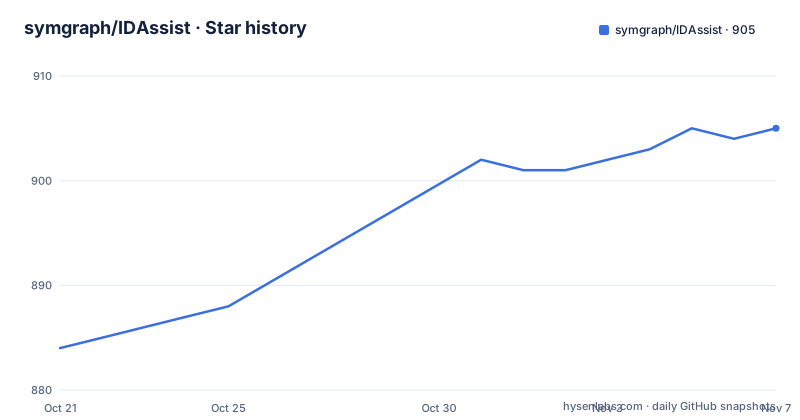
- symgraph/IDAssist905 ★ · +21
| Repository | 2026-10-21 | 2026-11-07 |
|---|---|---|
| symgraph/IDAssist | 884 | 905 |
21 Stars in the last 17 days, measured from the daily GitHub snapshot. Compare with other projects
Editorial analysis
A dockable panel rather than a separate tool
The integration point is what makes the plugin useful. IDAssist is an IDA Pro plugin that integrates LLM-powered analysis directly into IDA's interface, built with Python and PySide6, and it runs as a dockable panel inside IDA Pro 9.0 and later. The reason to put the model inside the disassembler rather than beside it is that the context a model needs is the decompiler output, the cross-references, the current function, and where the cursor is, and collecting that context is most of the work. The documentation describes four capabilities in the core features list. Function explanation generates natural-language explanations of decompiled functions with automatic security analysis including a risk level, an activity profile, security flags and API detection. Interactive query chat asks questions about the binary with persistent chat history, and the query tab has context macros that inject the relevant code into the question, with a macro for the current function, one for an address, one for a line and one for a range. Automated actions generate rename suggestions for functions, variables and types, presented in a table with confidence scores so you can apply selected changes back to the IDB. And a semantic knowledge graph captures the binary's functions, call relationships, data flows and security characteristics, with visual rendering, semantic search and community detection.
The provider table is the deployment decision
Which model you point it at is the first practical question, and the provider table lists eight types with their auth methods. Anthropic is available as a direct API key, as browser-based OAuth, or through the local claude CLI binary. Bedrock uses AWS credentials against the Converse API directly. OpenAI appears the same way as Anthropic, with an API key and a browser OAuth option. Ollama needs no auth at all because the models are self-hosted, and LiteLLM is a proxy URL for a multi-provider setup. The four that matter for a security team are the two cloud APIs, the two local options. A local Ollama instance keeps the decompiled code inside your own network, which is the only way this plugin is usable under most corporate data handling rules, at the cost of model quality. The recommended mode mentioned in the documentation is covered separately in the project documentation. The plugin also supports MCP integration for tool-augmented interactions, with both URL based servers using SSE or Streamable HTTP and stdio based servers started from a local CLI command, and it ships built-in internal tools so an external MCP server is not required for function calling.
Installing into IDA's own Python, not yours
There are two installation routes, and the recommended one handles the awkward part for you. The IDA Plugin Manager route is a single command:
hcli plugin install idassistThat automatically installs the plugin and its Python dependencies into IDA's environment. The manual route is a release zip extracted into the plugins directory, which is ~/.idapro/plugins on Linux and macOS and the Hex-Rays plugins directory under the app data folder on Windows, and then the dependencies are installed with IDA's bundled Python rather than your system Python, which is the detail most people get wrong. The requirements file lists what is needed, and the Windows and POSIX invocations are given explicitly with the path to the interpreter inside the IDA install directory. The documentation also mentions setting the IDAUSR environment variable to a custom directory containing a plugins subdirectory. Once installed, you open a binary, press control-shift-A or use the Edit, Plugins, IDAssist menu, add a provider in the Settings tab, and press Explain Function on any function. The plugin runs inside a disassembler, so the installation target is the tool's own interpreter rather than a virtual environment of your own.
Threading rules, because a disassembler is single threaded
The architecture section is worth reading because it explains why the plugin is built the way it is. IDAssist follows a model-view-controller pattern, with views as PySide6 tab widgets that emit signals on user interaction, controllers connecting view signals to service calls and managing state, services holding the business logic, the LLM providers, database access and graph analysis, and two specific service modules for tools, one for IDA specific tool definitions used for LLM function calling and one for semantic graph read and write tools. The key design principles are four, and the first is the one that matters most in an IDA plugin: all IDA API calls execute on the main thread through a dedicated helper. That is not a stylistic choice, since calling into IDA from another thread corrupts its internal state. LLM responses stream incrementally to the user interface, so a long answer appears as it is produced rather than after a pause. Persistence uses local SQLite databases, so no external database is required. And there is a singleton service registry with thread-safe initialisation, which is how the controllers reach the providers without passing a service object around. The requirements file shows the same constraint from the dependency side, with pysqlite3 for SQLite and an event loop library.
Reasoning effort, an autonomous agent mode, and feedback
Three capabilities go beyond asking a question and reading an answer. The Query tab supports an autonomous ReAct agent mode, Reasoning plus Acting, where the model plans an investigation strategy, executes tools to gather information, reflects on the findings and synthesises an answer, all automatically across multiple reasoning rounds. The extended thinking setting controls how much the model reasons before answering, with a table of four levels. None disables thinking and suits fast simple queries. Low is about two thousand tokens for straightforward analysis. Medium is about ten thousand tokens for moderate complexity. High is about twenty five thousand tokens for deep analysis and complex code. The cost of the higher settings is latency and tokens against whatever provider you use, and the benefit is a model that will follow a chain of references rather than summarising the one function you pointed it at. Then there is the feedback loop, where thumbs up and thumbs down on explanations and query responses are stored locally and can be used to improve prompt engineering and model selection. That is a local record, not a training pipeline, and it is the most useful thing on offer for a team trying to work out which prompt and which model actually helps.
Reference documents and the collaboration platform
Two features extend the plugin beyond the binary in front of you. RAG document search lets you upload reference documents in txt, md, rst and pdf formats and use them as context during queries, with hybrid text and vector search built on Whoosh indexing, and the requirement list shows Whoosh as a dependency alongside a vector store. That is how you answer a question about how a function is supposed to work when you have the manual but not the source. The SymGraph integration pushes and pulls function names, variable names, types and graph data to the SymGraph collaborative platform, with a multi-step wizard and conflict resolution for the pull direction. The collaborative part is the interesting bit, because a function naming convention agreed across a team is worth more than a good explanation of one function, and the conflict resolution wizard is the acknowledgement that pulling shared data back into your IDB can conflict with what you have already renamed. The settings tab handles multiple LLM and MCP providers, the SymGraph API credentials, the system prompt and the database paths, and the system prompt is the lever you pull when the explanations are not in the shape you want.
A plugin that has to keep up with IDA itself
The release history shows what the project has been dealing with. Version 2.3.0 is titled IDA 9.4 and Python 3.14 compatibility, which tells you that the plugin lives or dies by the host toolchain moving, and 2.2.0 fixed an OpenWebUI provider issue, which tells you that the provider surface is broad enough to generate its own bug class. Version 2.4.0 is a fixes release from 2026-09-14, and the last push was on 2026-09-20. The plugin targets IDA Pro 9.0 and later, and the install instructions use an IDA 9.0 path in their examples. The repository itself is compact, with the plugin entry point and a manifest for the plugin manager at the root, the src directory holding the view, controller and service layers, a docs directory, a tests directory and the requirements file. The author is Jason Tang. The licence is MIT, which is worth contrasting with the tooling it wraps, since IDA Pro itself is a commercial product and the plugin is an add-on to a commercial disassembler.
Editorial conclusion
IDAssist is a good fit for a reverse engineer who wants a second opinion inside the disassembler rather than a separate tool, and who is prepared to send proprietary binary data to an LLM provider, which is a decision that belongs to your organisation's policy and not to the plugin. It is the wrong tool if you cannot send code fragments to a model, since the whole feature set depends on it, and it is the wrong tool if you want reproducible analysis, since the output is generated and the plugin offers a feedback loop rather than a fixed analysis. It is also the wrong tool if you are on an IDA version below 9.0. Before adopting it, check which provider your data policy allows, since the plugin supports OpenAI, Anthropic, a local Ollama and a LiteLLM proxy, and a local provider changes the privacy question entirely. The plugin is MIT licensed, the last push was on 2026-09-20, and the current release is 2.4.0 from 2026-09-14.
Frequently asked questions
What does IDAssist do inside IDA Pro?
It explains decompiled functions in natural language with security analysis, answers questions about the binary through a chat tab with context macros for the function, address, line or range, proposes renames for functions, variables and types with confidence scores, and builds a searchable knowledge graph of the binary's functions, call relationships and data flows.
Which LLM providers can IDAssist use?
Eight types are listed, including Anthropic by API key, by browser OAuth or through the local claude CLI, AWS Bedrock with AWS credentials, OpenAI by API key or browser OAuth, Ollama for self-hosted models with no auth, and LiteLLM as a multi-provider proxy. MCP servers are also supported, both URL based and stdio based, and internal tools work without one.
How do I install IDAssist?
The recommended route is the IDA Plugin Manager with hcli plugin install idassist, which installs the plugin and its dependencies into IDA's environment. Manually, extract the release zip into ~/.idapro/plugins on Linux and macOS or the Hex-Rays plugins directory on Windows, then install the requirements with IDA's bundled Python rather than your system Python.
What does the ReAct agent mode in IDAssist do?
When enabled on the Query tab, the model plans an investigation strategy, executes tools to gather information, reflects on the findings and synthesises an answer, automatically across multiple reasoning rounds. The extended thinking setting controls the budget behind it, with four levels from disabled up to about 25K tokens for deep analysis.
How does IDAssist integrate with a team?
Through SymGraph, which pushes and pulls function names, variable names, types and graph data to a collaborative platform, with a multi-step wizard and conflict resolution on pull. Feedback on explanations and answers is also stored locally and can be used to improve prompt engineering and model selection.
Official sources
Add this badge to your README
If you maintain this project, the badge below links readers to this analysis and shows its maintenance status from the daily GitHub snapshot. Paste the markdown into your README; add ?metric=license or ?metric=stars to the image URL for a different field.

[](https://hysenlabs.com/projects/symgraph-idassist)Star history chart for your README
[](https://hysenlabs.com/projects/symgraph-idassist)Was this useful?