Plate puts a plugin layer, Radix primitives, and shadcn components on top of slate-react
Rich-text editor with AI and shadcn/ui
At a glance
- What is it?
- Plate is a TypeScript editor framework whose core is a plugin system for slate-react. Its README is mostly a set of links, so the repository layout tells an adopter more than the prose does.
- Who is it for?
- Plate earns a place when a team needs the slate-react document model plus a plugin layer, accessible primitives, and a starting component set without building all three. The trade is that the README will not get you running: the docs site and the repository scripts are the real reference, and the rapid v53 release cadence means you should pin versions on day one rather than track main.
- Can I use it commercially?
- Check first. The repository uses a licence we do not classify automatically, so read its LICENSE file before any commercial use.
- Is it still maintained?
- Yes. The repository received new commits within the last day.
- What is it written in?
- Mainly TypeScript, according to GitHub's language statistics.
Answers come from the project's GitHub data, last synced on November 15, 2026, and from our analysis. They are not legal advice.
Star history
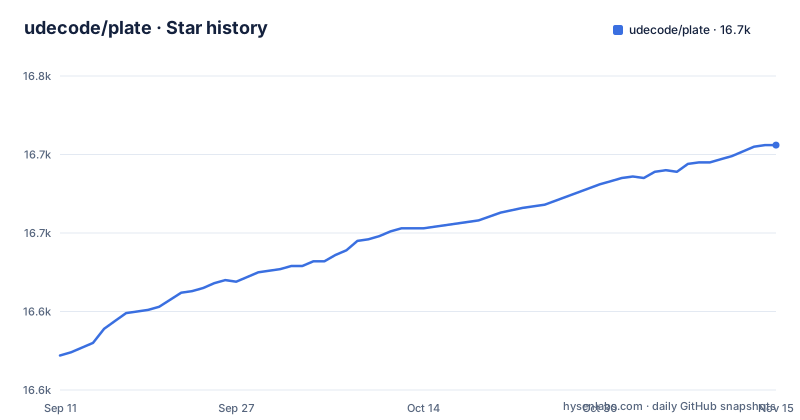
- udecode/plate16,706 ★ · +134
| Repository | 2026-09-11 | 2026-11-15 |
|---|---|---|
| udecode/plate | 16.6k | 16.7k |
134 Stars in the last 65 days, measured from the daily GitHub snapshot. Compare with other projects
Editorial analysis
Plate wraps slate-react with its own plugin system
Plate's core is not a new editing engine. It is a plugin system built specifically for slate-react and whose npm badge points to the platejs package. That distinction settles most integration questions. slate-react keeps ownership of the document model, normalization, and rendering, and Plate sits above it as a set of plugins rather than as a fork. The cost is that you then maintain both layers: slate's model and Plate's plugin graph operate on the same document, and a behaviour change can originate in either one.
Four layers: core, plugins, primitives, components
The architecture is described as four parts, in a block of the README that markdown comments hide from the rendered page. Core is the plugin system. Plugins are packages that add editor behaviours, hooks, serialization, and normalization. Primitives are headless hooks and components built on Radix UI, which the project positions as unstyled but accessible pieces for building a design system. Components are the visible layer, produced with Plate CLI and shadcn/ui and meant as a starting point for your own library.
No list of individual plugin packages or their versions appears in the README, so the dependency set for any given feature combination has to come from the docs site or from the packages directory in the repository.
The three templates bundle different amounts of the stack
Three starting points are offered, and they differ in how much of the stack they hand you.
The Notion-like template is the only one with a backend listed, and it also carries plugins and AI. It is reached through the pro.platejs.org documentation site rather than a public repository URL. The Plate playground template covers Plate, plugins, and AI, and lives at `github.com/udecode/plate-playground-template`, which makes it the most direct of the three for working through the AI surface. The Plate minimal template at `github.com/udecode/plate-template` supplies Plate alone, with no plugins, no AI, and no backend.
The distance between the minimal and Notion-like options is the entire plugin layer. Choosing the minimal template means getting the editor core and then assembling behaviours yourself, which is a reasonable way to discover which plugins you actually need and a slow road to a finished editor.
The repository is a pnpm workspace carrying two lockfiles
At the root, package.json declares workspaces for `apps/*` and `packages/*`, with the package itself marked private and MIT licensed. The tree also holds pnpm-workspace.yaml, pnpm-lock.yaml, bunfig.toml, turbo.json, oxlint.config.ts, oxfmt.config.ts and lefthook.yml, which points to a toolchain of pnpm plus Turborepo, with oxlint and oxfmt for linting and formatting and lefthook for hooks. Bun appears alongside pnpm as well: bunfig.toml sits at the root and several bench scripts run under bun.
What the README does not give you is an install command for consumers. There is no npm or pnpm snippet for the platejs package, no Node version constraint beyond the presence of .nvmrc, and no browser support statement. The documented script for fetching benchmark dependencies is specific to that subdirectory rather than to a general setup:
git clone https://github.com/udecode/plate.git
cd benchmarks/editor && npm install --no-fund --no-audit
So a reader who wants the library installed has to go to the docs site, while a reader working inside the repository can bootstrap the benchmark harness from the root package.json.
Benchmarks live in the repository with no published results
There is a wide block of bench scripts in package.json that cd into benchmarks/editor, running from bench:editor:install through bench:editor:startup and bench:editor:fuzz, plus tooling/scripts/bench-targets.mjs for listing, checking, and reporting target data. The coverage spans install cost, startup, health, inspection, fuzzing, and packaging gates, so the project is measuring something specific about editor performance.
None of those numbers appear in the README. There is no results table, no published baseline, and no statement of what the thresholds are, so the scripts reveal what gets measured and nothing about how the framework performs. Anyone citing a figure from this repository has to run the harness and record the output, and the fuzz and evidence:full scripts read as tooling for the project's own release process rather than for a reader comparing frameworks.
cd benchmarks/editor && npm run bench:evidence
npm run bench:targets:report
npm run bench:targets:check
The README is short and leaves install steps to the docs site
The README is mostly links: a template table, a pointer to platejs.org/docs, a contributing guide, a Discord invite, and a Chinese version at tooling/cn/README.md. The paragraph that would explain the architecture exists in the file but is commented out with markdown comment syntax, so a reader on the rendered page sees no description of the four layers and no live demo link.
The consequence is that the README cannot answer an adopter's first questions: which package to install, what peer dependency slate-react needs, how a plugin gets registered, or how to move between major versions. Releases are numbered v53.5.2, v53.5.1, and v53.5.0, with the most recent tagged on 2026-10-30 and the last push to the repository on 2026-11-02. That cadence makes version pinning matter more here than in a slower project. Licensing is also stated two ways: the root package.json records MIT, while the project's license field carries no assertion at all, so confirm which license file governs before shipping.
Building on slate-react directly is the alternative Plate displaces
The real alternative is to stay on slate-react and write the plugin layer yourself. Plate's argument is that this work already exists: normalization, serialization, and plugin behaviours arrive as packages rather than as code your team owns. When nobody on the team specializes in editors, that is a large saving, and the unstyled Radix-backed primitives are the piece most likely to outlive any decision to swap the editing core later.
The layering is not free. The document model belongs to slate, the behaviour graph belongs to Plate, and the accessible components belong to Radix. Tracking down a selection bug means establishing which of the three produced it. The README names no competing editor framework either, so there is no documented migration path out of Plate and no stated compatibility range against slate-react versions. For a prototype or an internal authoring tool the tradeoff is reasonable. For a long-lived public editor, check the plugin and Radix versions you would inherit before committing to the stack.
Editorial conclusion
Plate earns a place when a team needs the slate-react document model plus a plugin layer, accessible primitives, and a starting component set without building all three. The trade is that the README will not get you running: the docs site and the repository scripts are the real reference, and the rapid v53 release cadence means you should pin versions on day one rather than track main. Anyone who needs a documented upgrade path, published performance figures, or a settled license file should treat those as open questions, because none of the three appears in this repository today.
Frequently asked questions
What is Plate, the rich text editor framework?
Plate is a TypeScript editor framework whose core is a plugin system built for slate-react and published on npm under the platejs package. Around that sit separate layers for plugins, unstyled Radix UI primitives, and shadcn/ui components.
How do I use Plate to start an editor project?
The project points to three templates: a Notion-like one with plugins, AI, and a backend, a playground template with plugins and AI, and a minimal template that supplies the Plate core alone. No install command for the library appears in the README.
What are the parts of Plate?
Core, Plugins, Primitives, and Components. Primitives are headless hooks and components built on Radix UI, and Components are produced with Plate CLI and shadcn/ui as a starting point for your own component library.
What are the types of Plate templates?
Three: the Notion-like template linked from the pro documentation site, the playground template at github.com/udecode/plate-playground-template, and the minimal template at github.com/udecode/plate-template. They differ mainly in how many plugin and AI packages arrive with the editor core.
Official sources
Add this badge to your README
If you maintain this project, the badge below links readers to this analysis and shows its maintenance status from the daily GitHub snapshot. Paste the markdown into your README; add ?metric=license or ?metric=stars to the image URL for a different field.

[](https://hysenlabs.com/projects/udecode-plate)Star history chart for your README
[](https://hysenlabs.com/projects/udecode-plate)Was this useful?