LLMRouter's extra named all contains exactly the GPU extra
LLMRouter: An Open-Source Library for LLM Routing
At a glance
- What is it?
- LLMRouter is a research library for choosing which language model should answer a given query, published under a different name from the project. It ships sixteen-plus routing methods in five categories, a command line tool, a web interface, and a data generation pipeline over eleven benchmarks. The packaging has two things worth reading closely: an optional dependency group called all that contains the same three packages as the single-GPU group, and a version number that is announced in the readme rather than tagged anywhere.
- Who is it for?
- LLMRouter fits a research group or a platform team that wants to measure whether a learned router beats a fixed model on their own traffic and on their own tasks, and that is willing to write a plugin for the routing method it needs. Two things to check before you install it.
- Can I use it commercially?
- Yes. MIT is a permissive licence: you can use, modify and sell software built on it, as long as you keep its copyright and licence notices.
- Is it still maintained?
- Yes. The repository last received commits 5 days ago.
- What is it written in?
- Mainly Python, according to GitHub's language statistics.
Answers come from the project's GitHub data, last synced on November 24, 2026, and from our analysis. They are not legal advice.
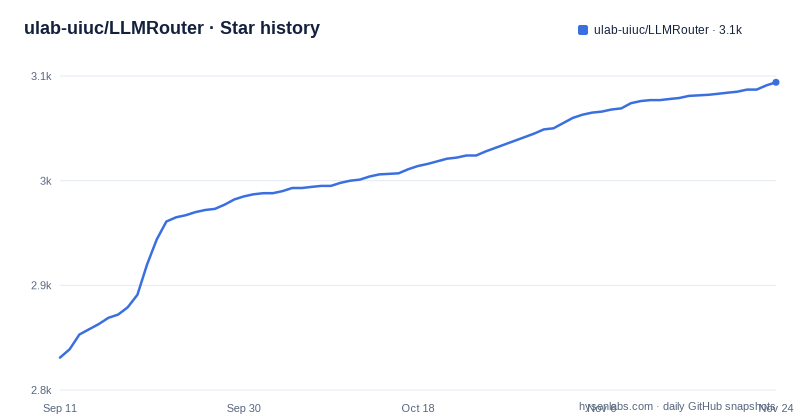
Star history
- ulab-uiuc/LLMRouter3,094 ★ · +263
| Repository | 2026-09-11 | 2026-11-24 |
|---|---|---|
| ulab-uiuc/LLMRouter | 2.8k | 3.1k |
263 Stars in the last 74 days, measured from the daily GitHub snapshot. Compare with other projects
Editorial analysis
The project is LLMRouter, the package is llmrouter-lib
There are three names for one thing and the file uses all three.
The repository, the paper and the headline all say the project's name in capitals. The distribution is a different name, with a library suffix, and the readme's own news section tells you to install that name with pip. The command line tool takes the third spelling: the manifest declares a script whose name is the project name without the capitals and without the suffix.
That is not unusual for a research project with a web presence, and it is handled correctly in the sense that the install instruction names the package you actually need. But it means searching for the project name does not find the package, and a lock file entry tells you nothing about which repository it came from.
The two project URLs in the manifest point at the repository for both the homepage field and the source field, while the repository's own recorded homepage is the generated documentation site. So there are two different notions of homepage in play, as there are in several of the packages where the documentation and the code live apart.
The authors are two named individuals with academic and personal addresses, and the licence is declared by pointing at the file in the tree rather than by naming a licence, which keeps the two from drifting apart.
The optional group named all contains the GPU group
There are two optional dependency groups, and one of them does not do what its name says.
The first is named for one specific router and carries a comment saying it needs a particular inference server and is GPU only. Its contents are three packages: the inference server at an exact version, the deep learning framework at an exact version, and a client library with a floor.
The second group is named for all optional dependencies, and the comment above it repeats that description. Its contents are those same three packages, in the same order, at the same versions.
So a user who reads the group name, installs everything optional, and expects the full feature set gets the GPU inference path and nothing else. Every other optional capability in the project is either unconditional or not packaged as an extra.
There is a second problem with those three pins. The base dependency list asks for the deep learning framework at two or newer with no ceiling, while the extra asks for exactly one older release. Installing the extra therefore overrides whatever the base requirement resolved to, which is fine as a deliberate pin and is not fine as a side effect of installing what the file calls everything optional.
A web interface toolkit is a hard dependency
The runtime dependency list is twenty-one packages with floors and no ceilings, and reading it as a group tells you what the library actually requires at import time.
The expected core is there: the deep learning framework, a transformer library, a tokenizer library, the array and dataframe pair, the machine learning toolkit, a YAML reader, a progress bar, a dataset library, a validation library, a numerical library, a serialisation format and a graph library.
Then the ones that explain the rest of the repository. A web interface toolkit is a hard dependency, not an extra, which means every user of the routing library installs a UI framework to use the library. A model gateway library is there, which is the piece that talks to whichever provider you routed to. A parameter-efficient fine-tuning library is there. And three web server packages plus a websocket client and an HTTP client are there for the production server mode the readme's news announces.
So the installation cost of the library and the installation cost of the server are the same. A team that only wants to route queries inside an existing service still installs the UI toolkit and the web server stack.
The version support is narrower than the floor suggests: the classifiers name two Python versions while the requirement asks for a higher floor than either, so an interpreter between them is allowed by the requirement and unclassified by the metadata.
Sixteen routers in five categories, each with its own readme
The routing methods are the substance of the project, and the documentation strategy for them is uniform: one directory and one readme per router.
The categories are five, not the four a reader might assume from the older descriptions. They are single-round routers, multi-round routers, multimodal routers, agentic routers and personalized routers, and the methods inside them span nearest-neighbour, support vector, perceptron, matrix factorisation, rating systems, graph-based, transformer-based, hybrid probabilistic and transformed-score approaches.
The table that lists them has four columns per method: whether it supports training, whether it supports inference, a one line description, and a link to that method's own readme. So whether a given method can be trained or only run is answered in the table, and everything else is one click away.
The two explicit commands mirror the same split. There is a command for preparing training data on your own dataset, and a separate one for training a router, which means the pipeline is staged rather than one invocation.
The data generation pipeline is described as generating training data from eleven benchmark datasets with automatic API calls and evaluation, and the benchmark work is a top-level directory of its own with a public dataset behind it.
Versions are announced in the readme and nothing is tagged
The release list for this repository is empty. There are no GitHub releases at all.
The version numbers exist anyway, in the news section of the readme. A January entry announces the second library version alongside a star count. A February entry announces the third. The manifest is now on a fourth, and a February entry also announces a separate router release, a May entry a profile framework release, and an August entry the main release.
So the project's release history is a bulleted list inside its own readme, interleaved with feature announcements and star milestones. That is a legitimate choice for a research project, and it has three consequences worth naming.
You cannot install a specific version by tag from the forge. You can install one from the package index, and then the readme is the only place that says which feature went into which number. And when the readme changes, the changelog changes with it, so a diff of the file is a diff of the release history as well as of the documentation.
The August entry is the one that behaves like a paper abstract: it reports a relative improvement over the strongest fixed-model baseline, which is a number from the project's own experiments and not something the repository can let you reproduce.
The Slack deployment guide lives on another domain
One of the news entries is about a server mode, and it ends with an instruction that points somewhere unexpected.
The entry describes an OpenAI-compatible server with an integration for a chat automation project, described as deployable as a production API server that works with Slack and Discord and other messaging platforms. The features listed are multimodal understanding, a retrieval-augmented routing memory, streaming, and all of the routing strategies.
Then it says that for deployment with social platforms like Slack, you should refer to a step by step setup guide. That guide is on a domain that has nothing to do with the project, the university, or the documentation site.
So the hardest part of that feature to get right, integrating an external messaging platform with an API server, is documented outside the project's own documentation. Anyone evaluating the project has to decide whether to trust a third-party page for the deployment path, and anyone maintaining it has to keep two sets of instructions in sync.
The rest of the support surface is conventional: a chat channel invite, a pull request page, and a documentation site. The badge row also links one specific issue number rather than the issues page, which is an unusual choice for a project that otherwise routes everything through its own site.
A finder metadata file at the root
The top level of the tree is a mix of things that belong to a package, things that belong to a paper, and things that belong to someone's desktop.
The package files are there: the manifest, a licence, a gitignore, a github directory, a configuration directory, and the package directory itself with its subpackages, one of which holds a directory per router.
The paper's furniture is there too, as separate top-level directories: the benchmark pipeline, the dataset directory, the notebooks, the examples, and the two sibling projects the news section describes, one of them a visual node interface and one of them the server integration.
And then there is a file that has no business in any of those: a desktop metadata file that the macOS file manager writes into every folder it visits. It is committed, at the root, where it will be regenerated on anyone's machine.
Two markdown files sit beside it that read like working notes rather than documentation, one summarising custom routers and one describing a prompt format change. Nothing in the navigation links to either.
None of this breaks anything, and all of it is what happens when a research group's working tree becomes the published package. It does mean the root listing mixes three different kinds of artefact, and that a reader has to guess which directories are installable and which are paper attachments.
Editorial conclusion
LLMRouter fits a research group or a platform team that wants to measure whether a learned router beats a fixed model on their own traffic and on their own tasks, and that is willing to write a plugin for the routing method it needs. Two things to check before you install it. Read the dependency list rather than the headline, because the install pulls a deep learning framework, a graph library, a web interface toolkit, a model gateway library and a fine-tuning library, and the group named for all optional dependencies contains only three packages while pinning the deep learning framework to an exact older version. And decide how you will track versions, because there are no releases and the version numbers live in the readme news, so the number in your lock file is the only record of what you got.
Frequently asked questions
what is llm router
The project describes itself as a routing system that optimises model inference by selecting the most suitable model for each query, based on task complexity, cost and performance. It ships over sixteen routing methods in five categories, a command line tool for training, inference and chat, and a pipeline that generates training data from eleven benchmark datasets.
What are the four types of routers?
The project lists five categories, not four: single-round, multi-round, multimodal, agentic and personalized. Each category contains several methods, and a table gives, per method, whether it supports training, whether it supports inference, a description and a link to that method's own readme.
What is the best LLM router?
The repository does not rank its own methods. It reports in its news section, from its own experiments, that learned routers outperform the strongest fixed-model baseline by a stated relative margin, and that lightweight and user-conditioned routers do well under tight cost budgets and personalized settings. Choosing between them is left to your own evaluation on your own traffic.
What does LLM stand for?
The repository does not expand the abbreviation. It uses it throughout for the models it routes between, and the surrounding documentation is about routing, evaluation and cost rather than about terminology.
What is an AI model router?
The term is not defined in the file. The closest description is the introduction's: a system that decides, per query, which model should answer it, weighing task complexity, cost and performance, with the routing decision itself made by one of sixteen-plus trained or heuristic methods.
Official sources
Add this badge to your README
If you maintain this project, the badge below links readers to this analysis and shows its maintenance status from the daily GitHub snapshot. Paste the markdown into your README; add ?metric=license or ?metric=stars to the image URL for a different field.

[](https://hysenlabs.com/projects/ulab-uiuc-llmrouter)Star history chart for your README
[](https://hysenlabs.com/projects/ulab-uiuc-llmrouter)Was this useful?