Hass-MCP hands an LLM the keys to your Home Assistant instance
Control and query Home Assistant from Claude and other LLMs — a Model Context Protocol (MCP) server.
At a glance
- What is it?
- A Model Context Protocol server that lets Claude and other assistants read and control Home Assistant entities, edit Lovelace dashboards over the WebSocket API, and run over either stdio or streamable HTTP. It ships as a Docker image or a uvx command, and the HTTP mode has no authentication layer of its own.
- Who is it for?
- Take Hass-MCP if you want an assistant to inspect and drive a Home Assistant instance and you are happy with stdio transport on your own machine. Do not put its HTTP mode on an open port without a reverse proxy in front, since every tool it exposes is a real control surface in your house.
- Can I use it commercially?
- Yes. MIT is a permissive licence: you can use, modify and sell software built on it, as long as you keep its copyright and licence notices.
- Is it still maintained?
- Yes. The repository last received commits 13 days ago.
- What is it written in?
- Mainly Python, according to GitHub's language statistics.
Answers come from the project's GitHub data, last synced on November 15, 2026, and from our analysis. They are not legal advice.
Star history
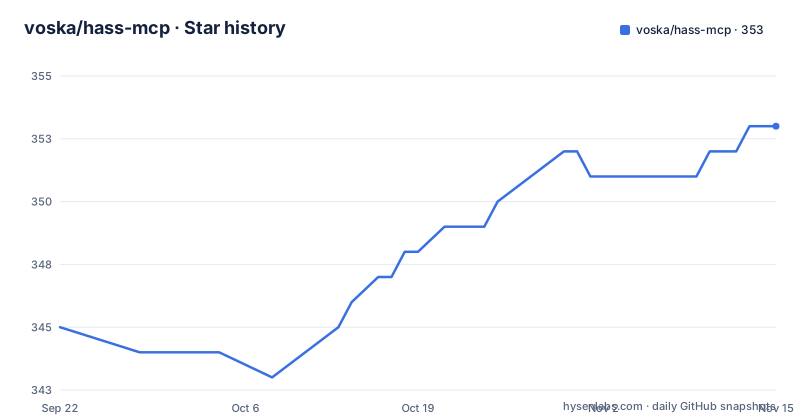
- voska/hass-mcp353 ★ · +8
| Repository | 2026-09-22 | 2026-11-15 |
|---|---|---|
| voska/hass-mcp | 345 | 353 |
8 Stars in the last 54 days, measured from the daily GitHub snapshot. Compare with other projects
Editorial analysis
HA_TOKEN and HA_URL are the only two values you have to supply
The prerequisite list is short: a Home Assistant instance, a long-lived access token, and either Docker or Python 3.13 with uv. Everything the server needs arrives through two environment variables, and the checked-in example file holds three lines.
HA_URL=http://homeassistant.local:8123
HA_TOKEN=YOUR_LONG_LIVED_ACCESS_TOKEN
PYTHONPATH=/path/to/hass-mcp
With Docker, the image pull is the first command.
docker pull voska/hass-mcp:latestAfter that the server is wired into the client rather than run by hand. In Claude Desktop you open Settings, go to Developer, edit the config, and paste an mcpServers block that launches the image with HA_URL and HA_TOKEN passed through as environment variables. Saving the file and restarting the client puts a Hass-MCP entry in the tools menu, which is the point at which the model can see the tools at all.
The token is the whole security model here. Whoever holds it can act on the instance through this server, so treat the value you paste into that config file as a credential with the scope you would give the assistant itself.
host.docker.internal, --network host or the machine IP, depending on where Home Assistant runs
The first connection failure in this setup is almost always a network one, and the README names the three cases. With Home Assistant on the same machine, the URL becomes http://host.docker.internal:8123, which is the Docker Desktop form on Mac and Windows. With Home Assistant on another machine, you point HA_URL at that machine's IP address or hostname and skip the Docker-specific name entirely.
The awkward case is Home Assistant itself running in Docker on the same host. Then the container has to be able to reach the Home Assistant container, and the README says you may need to add --network host to the Docker arguments, or alternatively use the IP address of your machine instead of host.docker.internal.
Note what those options share: every one of them widens reachability. host.docker.internal is a bridge-network escape hatch, --network host removes the network namespace entirely, and the machine IP works from anywhere on the LAN that can route to it. Choosing between them is a decision about who else on your network can reach the assistant's view of your house.
The same caution applies to the token, since a container that can reach Home Assistant and carries HA_TOKEN is a container holding a house key.
uvx runs the same server, and it wants Python 3.13
The container is a convenience, not a requirement. The alternative is uv, which runs the package straight from its entry point. requires-python is >=3.13 in pyproject.toml, so an older interpreter will not do, and the config block changes shape accordingly: the command becomes uvx and the args collapse to a single package name.
{
  "mcpServers": {
    "hass-mcp": {
      "command": "uvx",
      "args": ["hass-mcp"],
      "env": {
        "HA_URL": "http://homeassistant.local:8123",
        "HA_TOKEN": "YOUR_LONG_LIVED_TOKEN"
      }
    }
  }
}
Behind that entry point, app.run:main is the console script named hass-mcp, and the wheel ships a single package called app. Dependencies are deliberately few: mcp[cli] pinned to >=1.27,<2, plus httpx, truststore and websockets. Nothing here pulls in a Home Assistant library, because the server talks to the instance over its own HTTP and WebSocket surfaces rather than importing its code.
For a client that takes a command line instead of a config file, the same two variables are passed on the invocation.
claude mcp add hass-mcp -e HA_URL=http://homeassistant.local:8123 -e HA_TOKEN=YOUR_LONG_LIVED_TOKEN -- docker run -i --rm -e HA_URL -e HA_TOKEN voska/hass-mcpLovelace cards are edited over the WebSocket API, with backups and a dry run
Most MCP servers in this space stop at reading entity states. This one also edits dashboards, which is the feature that changes the risk profile. It reads and writes Lovelace cards and views over Home Assistant's WebSocket API rather than through REST, and the README says changes appear instantly in browsers that already have the dashboard open. A dry-run preview and automatic backups come with it, so a proposed layout can be inspected before it lands.
That mechanism explains the websockets>=13 dependency in pyproject.toml, and it is why the token needs write access to your Lovelace configuration, not just read access to entities.
The rest of the tool surface is the ordinary part: get states, control devices, search for entities, summarise what a domain contains, list and control automations, and guided conversation prompts for recurring jobs such as creating an automation. There is a troubleshooting angle too, aimed at automations and entities that misbehave.
Read the two together and the shape is clear. Dashboard editing is a deliberate widening of scope, backed by a preview and a backup because the authors expected a model to get it wrong.
Search by name, type or state, then get deliberately lean JSON back
Home Assistant exposes more entities than fit in a context window, so the server's stated design choice is lean JSON responses that minimise token usage, and search takes three routes into the data: by name, by type, or by state. Finding a light by name and reading its attributes costs a fraction of what dumping every entity costs.
That choice has a cost of its own. Responses trimmed for token count are responses where fields are omitted, so a client that wants a complete picture of an entity's attributes has to make follow-up calls, and the caller has to know that the trim happened. Nothing in the visible documentation specifies a verbose mode or a way to ask for an untruncated record.
Domain summaries sit on the same premise. A summary of what a domain contains is a way to learn the shape of a system before querying it entity by entity, and it is cheap enough to call first when a model has no idea what exists in the instance.
Automations are exposed for both listing and control, which means the same token that reads states can also fire them.
Streamable HTTP runs stateless at /mcp, and the CAUTION block is the real documentation
stdio works when one client launches the server. The streamable HTTP transport exists for the cases where it cannot: behind an MCP gateway, on Smithery, one server shared across several clients, or a network tool such as LibreChat or OpenWebUI. The server runs stateless in that mode, with no Mcp-Session-Id and plain JSON responses, which is what makes horizontal scaling possible.
Locally, the flag is --http and the port is 8000.
HA_URL=http://homeassistant.local:8123 \
HA_TOKEN=YOUR_LONG_LIVED_TOKEN \
uvx hass-mcp --http --port 8000
In a container the host binding has to change, because the port is published through the bridge.
docker run --rm -p 8000:8000 \
  -e HA_URL=http://homeassistant.local:8123 \
  -e HA_TOKEN=YOUR_LONG_LIVED_TOKEN \
  voska/hass-mcp:latest --http --host 0.0.0.0 --port 8000
The MCP endpoint is /mcp, and the server also honours the PORT environment variable that Smithery expects, alongside MCP_PORT.
What makes this section worth reading is its warning. HTTP mode exposes full Home Assistant control over the network: anything that can reach the port can turn off lights, unlock doors, trigger automations or restart Home Assistant. The README states that the MCP specification does not ship a built-in auth layer in this server, and lists three acceptable positions: a reverse proxy such as nginx, Caddy or Traefik doing basic-auth or bearer-token validation, a VPN or zero-trust network such as Tailscale, WireGuard or Cloudflare Access, or localhost binding only. Binding is 127.0.0.1 by default and should stay there.
A two-stage build that needs the git history present to derive a version
The Dockerfile is two stages. The builder copies the whole tree and runs uv build --wheel, with a comment explaining why the copy is unconditional: hatch-vcs derives the version from the git tags, so .git has to be inside the build context. Copy only the wheel into the runtime stage, install it system-wide, set PYTHONUNBUFFERED and start python -m app.
That single line is an operational fact for anyone building the image themselves. A tarball export or a shallow copy without tags produces a build that cannot resolve a version, and the failure appears at build time rather than at run time.
The rest of the tree is small and conventional: app/ for the code, tests/ with pytest, pytest-asyncio and respx for HTTP mocking, a committed uv.lock, a CHANGELOG.md and a LICENSE. asyncio_mode is set to auto, so async tests need no per-test marker.
Project state is worth stating plainly. The licence is MIT. Releases came at v0.4.1 on 2026-05-17, v0.5.0 on 2026-06-23 and v0.6.0 on 2026-08-06, and the last push to the repository was on 2026-08-06. One gap in the documentation: the README's Smithery and PaaS paragraph breaks off after saying the server reads PORT, so anything further about that deployment path is not written down here.
Editorial conclusion
Take Hass-MCP if you want an assistant to inspect and drive a Home Assistant instance and you are happy with stdio transport on your own machine. Do not put its HTTP mode on an open port without a reverse proxy in front, since every tool it exposes is a real control surface in your house. Verify three things first: that your token is a long-lived one scoped for this use, that host.docker.internal or --network host resolves to your Home Assistant from inside the container, and that the dashboard edits land where you expect before letting a model run them.
Frequently asked questions
What does Hass-MCP need from Home Assistant?
A running Home Assistant instance and a long-lived access token. The connection is configured with two environment variables, HA_URL for the instance address and HA_TOKEN for the token.
Can Hass-MCP edit my Home Assistant dashboards?
Yes. It reads and edits Lovelace cards and views over Home Assistant's WebSocket API, with changes appearing instantly in open browsers, plus a dry-run preview and automatic backups.
Is Hass-MCP safe to run in HTTP mode on a network?
Not without something in front of it. The README states that HTTP mode exposes full Home Assistant control, that the MCP specification ships no built-in auth layer in this server, and that it should sit behind a reverse proxy, a VPN, or stay bound to localhost.
Which AI clients can Hass-MCP connect to?
Claude Desktop through its config file, Cursor through its MCP settings, and Claude Code through the claude mcp add command, with uvx or Docker as the launch mechanism for each.
Official sources
Add this badge to your README
If you maintain this project, the badge below links readers to this analysis and shows its maintenance status from the daily GitHub snapshot. Paste the markdown into your README; add ?metric=license or ?metric=stars to the image URL for a different field.

[](https://hysenlabs.com/projects/voska-hass-mcp)Star history chart for your README
[](https://hysenlabs.com/projects/voska-hass-mcp)Was this useful?