GEOrank runs five data stores behind one compose file and pins every image by digest
Open-source GEO ranking and generative engine optimization platform.
At a glance
- What is it?
- GEOrank is an open source workbench for generative engine optimization: it takes a company or site URL, crawls it, extracts structured facts, diagnoses it against GEO rules, and carries the result through question answering, a thirty sixty ninety day plan, and keyword and structured data generation. The engineering underneath is the more instructive half, with PostgreSQL, Redis, Qdrant, Neo4j, and MinIO as separate services, a one-shot migration container that gates the API, and a release gate that runs as a script rather than a convention.
- Who is it for?
- GEOrank suits a team that wants to own its GEO tooling rather than rent a visibility dashboard, and the bring-your-own-key design plus the fully self hosted compose stack are the reasons, since your business data, keys, and client records stay in your environment. Three things to check before you deploy it.
- Can I use it commercially?
- Yes. Apache-2.0 is a permissive licence: you can use, modify and sell software built on it, as long as you keep its copyright and licence notices.
- Is it still maintained?
- Yes. The repository last received commits 4 days ago.
- What is it written in?
- Mainly Python, according to GitHub's language statistics.
Answers come from the project's GitHub data, last synced on November 15, 2026, and from our analysis. They are not legal advice.
Star history
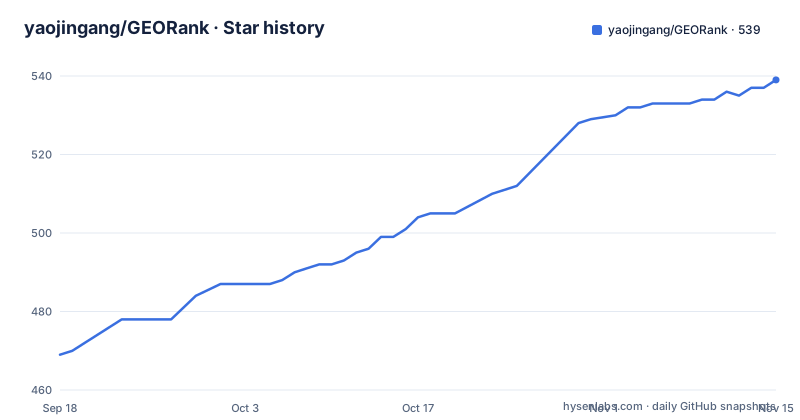
- yaojingang/GEORank539 ★ · +70
| Repository | 2026-09-18 | 2026-11-15 |
|---|---|---|
| yaojingang/GEORank | 469 | 539 |
70 Stars in the last 58 days, measured from the daily GitHub snapshot. Compare with other projects
Editorial analysis
Seven steps from a submitted URL to a knowledge base
The workflow is a fixed pipeline, and the sequence is the product.
Discovery indexes and manages GEO related companies, tools, experts, tutorials, and cases. Diagnosis checks site structure, Schema, Meta information, content readability, and citation signals. Question and answer produces structured answers about GEO, AI search, and brand visibility. Planning converts a diagnosis plus your business goals into an actionable plan. Expansion generates keywords, question words, scenario words, and commercial intent assets. The structured step produces JSON-LD, an llms.txt file, titles, and knowledge base drafts. Management covers the admin modules, the API, content, the custom homepage, and the analytics code.
The architecture diagram shows where those branches meet. A submitted URL is crawled and parsed, then feeds two paths: structured data extraction, which populates the company library and content assets and feeds the vector store and knowledge graph, and the GEO diagnosis rules, which produce the diagnosis report. Both the company library and the vector retrieval feed question answering, and question answering plus the diagnosis report both feed the action plan, which is the single place the two halves converge.
That convergence is what makes the tool more than a crawler. A diagnosis alone is a report; a diagnosis that becomes a plan and then a keyword set and a set of JSON-LD documents is a work queue.
The planning stage is specified in concrete terms, as a thirty, sixty, and ninety day optimisation plan derived from your goals, the site, your resources, and your constraints.
Five data stores, five credential blocks
The environment template is a good map of the system, because each service gets its own block and its own credentials.
PostgreSQL is the primary store, with host, port, database name, user, and a password placeholder that the compose file requires rather than defaults. Redis is a cache at its own host and port. Qdrant is the vector store, and it carries a collection name that is set to `companies` in the template, which tells you the retrieval index is keyed on the company records rather than on documents. Neo4j is the graph database, reached over a Bolt URI and with its own user and password. MinIO is the object store, with an endpoint on port 9000 and separate access and secret keys.
Three application level secrets sit above those, and the template is explicit that production needs three independent random values: a general secret key, a settings encryption key, and a JWT secret. That third group is what backs the admin side, where provider keys are stored encrypted.
A trusted hosts list is also set as a JSON array, defaulting to localhost, the loopback address, the compose service name, and two example production domains, with a note that production should keep only the real domain plus whatever the internal health check needs.
Every placeholder in the file is a literal `change-me` value, so an untouched template is obvious in a diff and in a running container.
Every compose image is pinned by digest, and TLS is left open
The container definitions are unusually strict about supply chain, and one section of the gateway setup is deliberately incomplete.
Both externally built images are pinned by digest rather than by tag alone. Traefik appears as a versioned tag with a full sha256 digest appended, and nginx appears the same way with an alpine tag and its digest. Tag plus digest means the compose file names a readable version and still resolves to one immutable image, so a retagged upstream release cannot change what you deploy.
The gateway's own privileges are constrained. Traefik reads its configuration from a directory mounted read only, talks to the frontend and API services over the shared Compose network using stable service names, is given no Docker socket, and has its dashboard disabled. ACME state goes into a named volume at `/var/lib/traefik/acme.json` so the certificate store is writable while the configuration directory stays read only.
The open slot is TLS. The template provides HTTP routing and reserves the 443 entry for the secure entrypoint, but the documentation says that before you enable HTTPS you have to configure a trusted certificate, a certificate resolver, and a TLS router, or terminate TLS at an external load balancer yourself. So the first production deployment is a deliberate piece of work rather than a flag.
One more constraint on the API surface: it is plain HTTP with server sent events and has no WebSocket endpoint, and requests under both `/api` and `/api/` are forwarded straight to the API service.
A one-shot migrate container gates everything else
Compose starts with a service that does nothing but migrate the database, and everything else waits for it.
That service is built from the backend directory, sets `restart: "no"` so it is never brought back after it finishes, and runs a single Python module as its command. It declares a dependency on Postgres with a health condition, so it cannot start against a database that is not accepting connections.
The ordering rule is stated plainly: the API and the async task services only start once the database has reached the Alembic head. That is the difference between a container that restarts until the schema is right and one that waits for the migration to be the schema owner. The compose file is annotated as making this service the only schema owner, which is the phrasing that matters for anyone who wonders whether two services might race.
The visible consequence is something that looks like a bug and is not. After a successful startup, `docker compose ps` shows the migrate service as `Exited (0)`, and that is the expected healthy state.
The Postgres password is declared with a required value syntax rather than a default, so Compose fails immediately with a message telling you to replace it if the environment file does not supply one. That is a deliberate fail fast on a secret nobody should ship as a default.
There is a separate compose file dedicated to the migration contract, which is how that ordering rule gets tested rather than merely documented.
The dev overlay binds to loopback, production publishes one port
Two compose files are always layered together, and what the second one adds is a development surface.
The documented local start copies the environment template and brings up both files:
cp .env.example .env
docker compose -f docker-compose.yml -f docker-compose.dev.yml up -d
Once Compose is up you reach the whole site through the HTTP port set in the environment file, which falls back to localhost if the template value is untouched. The dev overlay additionally publishes the static frontend and the API to local development ports.
The production posture is the opposite, and it is worth reading as a list. The frontend, the API, the database, the cache, the vector store, the graph database, and the object storage all join the internal Compose network and publish no host ports at all. The only host exposure is the gateway, on the HTTP and HTTPS ports, each configurable through its own environment variable.
The dev overlay is where loopback binding appears: it binds the static frontend and the API to `127.0.0.1` specifically, with the ports adjustable through separate variables, so that a local Next.js dev server and the containerised stack can coexist without either being reachable from the network.
And Node is only needed for one case. If you are not changing the Next.js source, a Docker only deployment needs none of it. If you are, the repo has three commands for that, an install, then one script per app for the frontend and the admin console.
Your model key, your cost, and the SSRF switch
No real API key ships with the public version, and the configuration makes that a feature rather than an omission.
The chat side takes a key, a base URL, and a model name, with a default model of `gpt-4o-mini` and both left blank in the template. The template comments show two shapes of configuration: an OpenAI format compatible third party endpoint, and a direct OpenAI connection. A pair of older variables for the OpenAI key and model is kept for backward compatibility, which tells you there was a migration here.
Embeddings are configured separately, with their own key, base URL, model, and a dimension count that defaults to the value for `text-embedding-3-small`. The comment on that block says a compatible embedding service must be configured separately, or the feature degrades to recommending similar items.
One switch deserves attention because the template annotates it with a reason. `ALLOW_PRIVATE_LLM_PROVIDER_URLS` defaults to false, and the comment says to keep it that way for SSRF protection, setting it true only for trusted self hosted models on private networks, and noting that enabling it also permits plain HTTP endpoints, so network access around the backend service should be restricted.
The admin console goes further and stores provider keys encrypted, with connectivity tests, polling and failover across a pool of providers, and quota controls. The stated boundary is that you supply the model service and own the cost, the privacy consequences, and the compliance obligations.
The public boundary is a script, not a promise
This project treats what may be published as a build step, which is rarer than it should be.
There is a command to run before any commit or release, and it is not advisory. It runs three test files and then a boundary check, and it fails the build if the repository contains something it should not. Two documents describe the scope: one for the public content boundary with inclusion rules, exclusions, and the release checklist, and one for the public data and built in homepage covering the expert fixtures, the canonical source for the homepage, and the update process.
The exclusion list is specific rather than general. The repository does not contain real API keys. It does not contain production databases, vector stores, graph data, or object storage files. It does not contain unauthorised expert profiles or the privately maintained expert content packs. It does not contain real tutorial content, user question and answer history, client plans, diagnosis records, keyword packs, or business data. And it does not contain the runtime version of a homepage a user uploaded in the admin console, because the repository ships only the built in default homepage for the open source edition.
Release engineering has its own gate, and a release candidate is expected to run two more commands, a frozen lockfile install and the full release check. That check chains the contract test, the SDK check, the public boundary check, an i18n hardcoded string check, a typecheck, and a build. The same document covers version strategy, CI, and container image pinning.
The reason for all of it is that this is a product people deploy for clients, and a leaked client record in a public repository is not recoverable.
Two frontends, and the one you get is the one being replaced
The monorepo carries a frontend and its replacement at the same time, and the README is direct about which is which.
The directory layout has `apps/web` for the Next.js frontend and `apps/admin` for the Next.js admin console, then shared packages: an API SDK generated from an OpenAPI document, an auth package for sessions and page guards, an i18n package for routing and dictionaries, and a UI package shared by both sides. Behind that sits `backend/` for the FastAPI, Celery, and SQLAlchemy stack, a `cli/` directory, `infra/` for gateway configuration, and `docs/`.
But the experience you actually get is described as the current static frontend on port 3009, shipped as prebuilt output from `dist/`, with the Next.js App Router work kept as the migration direction. The first item on the roadmap is completing the alignment between the two.
So a self hoster runs the static build by default and a developer runs Next.js from source, and the gap between those two experiences is the open work.
The toolchain around it is pnpm workspaces at a pinned package manager version, with Turborepo running build, lint, and typecheck across packages. Two details show the build is treated as a supply chain surface: only three packages are allowed to run install scripts, a file watcher, the compiler, and a native image library, and the SDK is refreshed from a running backend's own OpenAPI document rather than checked in by hand.
The licence is split in the same spirit. Code is Apache-2.0, while expert profiles, names, likenesses, brands, and the built in homepage content fall under a separate data licence.
Editorial conclusion
GEOrank suits a team that wants to own its GEO tooling rather than rent a visibility dashboard, and the bring-your-own-key design plus the fully self hosted compose stack are the reasons, since your business data, keys, and client records stay in your environment. Three things to check before you deploy it. Expect to supply TLS yourself, because the template ships HTTP routing and reserves the secure entry without filling it in. Leave the private provider URL switch off unless your model endpoint genuinely sits on your own network, since enabling it is an SSRF trade the config comments name explicitly. And read the exclusion list before planning around any of the content modules, because expert profiles, tutorial content, company records, and any user uploaded homepage all live outside the public repository by design. The disclaimer is worth reading too: the project states plainly that it does not sell rankings and does not guarantee any model will recommend a brand.
Frequently asked questions
What is GEOrank and what does the workflow do?
It is an open source workbench for generative engine optimization. The workflow runs in seven steps: discovery of companies, tools, experts, tutorials and cases; site diagnosis; structured question and answer; planning; keyword expansion; structured output such as JSON-LD and llms.txt; and management through the admin console, API, custom homepage and analytics.
Which databases does GEOrank need?
Five. PostgreSQL as the primary store, Redis as a cache, Qdrant for vectors with a collection named companies, Neo4j for the graph reached over Bolt, and MinIO for object storage. Each gets its own host, port and credential block in the environment template.
How do I run GEOrank locally with Docker?
Copy the environment template to .env, then run docker compose -f docker-compose.yml -f docker-compose.dev.yml up -d. You reach the site through the HTTP port set in .env. Node and pnpm are only needed if you intend to change the Next.js frontend or admin source.
Why does the GEOrank migrate container show as Exited?
That is the expected state. Compose runs a one-shot migrate service first, and the API and async task services only start once the database has reached the Alembic head. The migrate service is the sole schema owner and is configured never to restart.
Does GEOrank include an AI model key or a hosted service?
No. The public version ships no real API keys and you supply your own OpenAI format compatible chat and embedding endpoints, owning the cost, privacy and compliance consequences. Provider keys configured in the admin console are stored encrypted, with connectivity tests, polling and failover across a pool.
What does GEOrank deliberately leave out of the open source repository?
Real API keys, production database and vector and graph data, object storage files, unauthorised expert profiles and private expert content packs, real tutorial content, user question and answer history, client plans and diagnosis records, keyword packs, and any homepage a user uploaded. The public:check script enforces the boundary before a commit.
Official sources
Add this badge to your README
If you maintain this project, the badge below links readers to this analysis and shows its maintenance status from the daily GitHub snapshot. Paste the markdown into your README; add ?metric=license or ?metric=stars to the image URL for a different field.

[](https://hysenlabs.com/projects/yaojingang-georank)Star history chart for your README
[](https://hysenlabs.com/projects/yaojingang-georank)Was this useful?