HackGPT Enterprise: an AI penetration testing platform built on rolling Kali
HackGPT Enterprise is a production-ready, cloud-native AI-powered penetration testing platform designed for enterprise security teams. It combines advanced AI, machine learning, microservices architecture, and comprehensive security frameworks to deliver professional-grade cybersecurity assessments.
At a glance
- What is it?
- HackGPT Enterprise bundles a multi-provider AI engine, an exploitation service and a SOC correlation engine into one Python repository that runs as a CLI, an API server or a Docker stack. Its own files contradict the badge row on provider count, on ports and on reproducibility, and the redis healthcheck shipped in the compose file cannot authenticate to a password-protected server.
- Who is it for?
- Adopt HackGPT if you already hold an authorised engagement, a stack to run and keys for at least one provider. Leave it if you want a quick look at one host, or if findings must stay reproducible between runs and across a model change.
- Can I use it commercially?
- Check first. The repository uses a licence we do not classify automatically, so read its LICENSE file before any commercial use.
- Is it still maintained?
- Yes. The repository last received commits 1 day ago.
- What is it written in?
- Mainly Python, according to GitHub's language statistics.
Answers come from the project's GitHub data, last synced on October 22, 2026, and from our analysis. They are not legal advice.
Star history
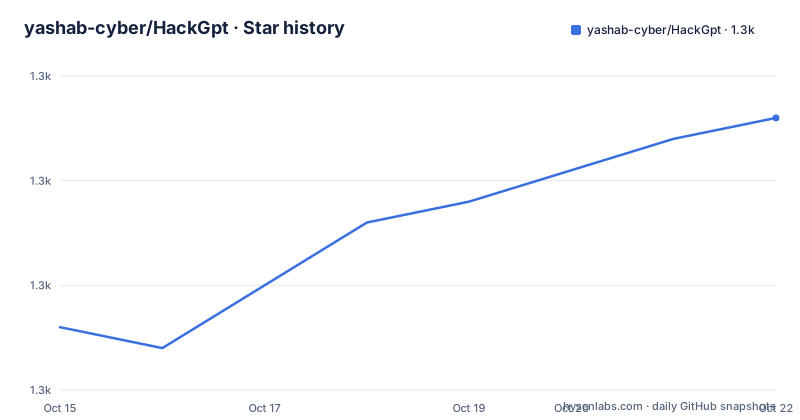
- yashab-cyber/HackGpt1,278 ★ · +10
| Repository | 2026-10-15 | 2026-10-22 |
|---|---|---|
| yashab-cyber/HackGpt | 1.3k | 1.3k |
10 Stars in the last 7 days, measured from the daily GitHub snapshot. Compare with other projects
Editorial analysis
Nine routing endpoints sit behind a seven provider badge
The AI engine is the part of HackGPT that changes fastest, and it is where the prose and the shipped configuration disagree. The badge row advertises 7 providers and 26 or more models. The feature list names them: OpenAI, Anthropic, Google, DeepSeek, GLM, Ollama for local models, and OpenRouter. Then `HACKGPT_PROVIDER` in `.env.example` repeats that set exactly, offering `openai, anthropic, google, deepseek, glm, local, openrouter` as the values that override auto-detection, with `HACKGPT_MODEL=gpt-5` as the default model.
The same file wires two further destinations that the badge never counts. `NINEBROUTER_BASE_URL` is annotated as the intelligent model and task dispatcher and defaults to `http://localhost:8000/v1`. `CUSTOM_ROUTER_BASE_URL` is annotated as a custom router, AI gateway or OpenAI-compatible reverse proxy, defaulting to `http://localhost:8080/v1`, with `HACKGPT_CUSTOM_ROUTE` sitting beside it. Count those two in and the shipped template points at 9 endpoints. Neither router has a name in the `HACKGPT_PROVIDER` list, so filling in `NINEBROUTER_API_KEY` leaves you without a documented provider value to pair it against.
A third count refuses to reconcile. The OpenRouter annotation reads access 100+ models via single API or custom base URL, while the badge says 26+ AI Models, and both describe the same engine. Elsewhere in that badge row MIT appears as the licence, while the licence field on the project page reads Other, a custom classification that points to a LICENSE file instead.
Installing, filling the secrets file and naming one target
Prerequisites are Linux on Ubuntu, Debian, RHEL or CentOS, macOS, or Windows through WSL2, with Python 3.8 or newer, and Docker recommended for the containerised path. Installation is 5 commands, and verification deliberately runs after your keys are in place rather than before:
# Clone the repository
git clone https://github.com/yashab-cyber/HackGPT.git
cd HackGPT

# Run enterprise installer (sets up all services)
chmod +x install.sh
./install.sh

# Configure environment
cp .env.example .env
# Edit .env with your API keys and settings
nano .env

# Verify installation
python3 test_installation.py
Secrets in that file arrive as filled-in placeholders rather than blanks, which is the detail that bites hardest. Copy `.env.example` across as instructed and nothing complains, because every value parses:
SECRET_KEY=your_secret_key_here_generate_with_uuid
JWT_SECRET_KEY=your_jwt_secret_key_here
JWT_ALGORITHM=HS256
JWT_EXPIRY=3600
ENCRYPTION_KEY=your_encryption_key_here_32_chars
That last placeholder does not match the length its own label names, so a length check on the encryption key fails against the shipped value, and `JWT_EXPIRY` starts at one hour.
5 run modes follow, and the last of them sets out the project's own boundaries better than any paragraph does:
# Run immediate assessment
python3 advance_hackgpt.py \
  --target example.com \
  --scope "Web application and API" \
  --auth-key "ENTERPRISE-2025-AUTH" \
  --assessment-type black-box \
  --compliance OWASP
Read that block as an engagement ticket. A target is named, a scope string narrows what may be touched, `--auth-key` carries an authorisation credential, `--assessment-type` records the method, and `--compliance OWASP` ties the output to a framework. 4 other modes exist: no flag for a standalone run, `--api` for the REST server, `--web` for the dashboard, and `docker-compose up -d` for the whole stack. None of them shows a run that leaves the target unspecified.
The redis healthcheck authenticates to nothing at all
The compose file starts Redis with a password and then tests it without one. The service runs on the `redis:7-alpine` image with the command `redis-server --appendonly yes --requirepass`, taking its secret from the REDIS_PASSWORD environment variable, and the parameter form carries a mandatory-value guard that stops the stack booting when that variable is empty. Its database neighbour uses the older `postgres:15-alpine` image. The healthcheck two stanzas down reads `test: ["CMD", "redis-cli", "--raw", "incr", "ping"]`. No password argument and no environment variable inside the test, so `redis-cli` is talking to a server that just demanded authentication from the line above.
The arguments are wrong in a second way. `incr` takes a key name, so this check increments a counter called `ping` rather than sending a PING command to the server. Even on an instance started without `--requirepass`, the call would report on a key rather than on liveness. Postgres beside it does the conventional thing, running `pg_isready -U hackgpt -d hackgpt` on an interval of 30s with a 10s timeout and five retries. One of the two stateful dependencies is checked properly.
That gap propagates, because the application service waits on the result. `hackgpt-app` declares `depends_on` with `condition: service_healthy` for both `hackgpt-database` and `hackgpt-redis`, turning a healthcheck that never passes into an application container that never leaves its wait state. You get no Redis error and no connection refusal in the API logs, just an app service sitting down while Postgres is reported healthy next to it.
Port 5000 in the Dockerfile survives every documented endpoint
Three sets of port numbers describe one application. The README puts the REST API at `http://localhost:8000` with a health endpoint at `/api/health`, and the web dashboard at `http://localhost:8080`. The stack comment beneath `docker-compose up -d` adds Prometheus on 9090, Grafana on 3000 and Kibana on 5601. The Dockerfile that builds the application service declares `EXPOSE 5000` and nothing else.
Since `hackgpt-app` is built from that Dockerfile, the two cannot both be right. Mapping the documented 8000 and 8080 onto the image finds neither exposed, so anyone writing a health probe against the published endpoints has to guess which number the container honours.
The entry point widens the gap rather than closing it. `ENTRYPOINT ["python3", "advance_hackgpt.py"]` starts the program with no mode flag, while the published modes `--api`, `--web` and the target-driven single run are each a separate entry path. No default mode is stated anywhere, so the container's behaviour rests on what `advance_hackgpt.py` does when handed no arguments, which the documentation never spells out. Two of the three services defined in the compose file publish ports outright, 5432 for Postgres and 6379 for Redis. The third inherits the ambiguity.
Rolling Kali base against a lockfile the requirements only promise
The image begins `FROM kalilinux/kali-rolling`, an untagged rolling distribution, and the badge calls the outcome production ready. `requirements.txt` concedes the gap in its own header comment: for fully reproducible builds you should generate a lockfile with pip-tools, pip-compile or `pip freeze`, and the upper bounds below guard only against breaking major bumps. No lockfile sits at the top level, and the build installs the ranges directly with `pip3 install -r requirements.txt --break-system-packages` into the Kali interpreter instead of a virtual environment.
Some ceilings are tighter than a rolling base can be expected to carry. `cryptography>=41.0.0,<42.0.0` is pinned below 42, and `flask>=3.0.0,<4.0.0`, `fastapi>=0.104.0,<1.0.0` and `requests>=2.31.0,<3.0.0` all close their majors. What the base image happened to hold on the day it last built is recorded nowhere. Meanwhile the prerequisites ask for a minimum of 4GB RAM and 20GB disk space, while the same requirements file installs `tensorflow`, `torch`, `transformers`, `scikit-learn`, `pandas`, `numpy`, `matplotlib`, `seaborn` and `plotly`. No figure anywhere in the project states what that set costs to fetch or to hold in memory.
One line is duplicated inside the file. `redis>=4.6.0,<5.0.0` appears under Database & Persistence and again under Async & Task Processing. Pip tolerates the repeat, so it costs nothing at install time, and it does expose a list assembled by appending groups rather than by maintaining one set of pins. Two further requirement files sit alongside, `requirements_enterprise.txt` and `requirements-dev.txt`, so the intended split was three files and the shipped one duplicates a pin within itself.
SOC correlation and exploitation share one repository and no edge
A second capability sits in the repository that has nothing to do with attacking a target, and it is the part a penetration testing reader did not come for. The SOC engine is described as a multi-format log parser and normaliser with IOC extraction and MITRE ATT&CK technique mapping. Sliding-window correlation groups and deduplicates events in real time and reconstructs a multi-stage attack timeline. Statistical anomaly detection covers Z-score volume profiling, off-hours execution and IP or host diversity tracking, and incident response playbooks are described as AI-driven response guidelines tailored per attack vector.
The connectors are named concretely: Splunk over HEC and searches, IBM QRadar over Ariel AQL, Elasticsearch, and customisable webhooks. Pairing an exploitation tool with a log correlation pipeline is unusual, and the layout shows how broad the project has grown. At the top level sit `exploitation/`, `security/`, `ai_engine/`, `reporting/`, `monitoring/`, `database/`, `redis/`, `performance/`, `cloud/`, `nginx/`, `public/`, `static/`, `templates/`, `website/`, `tests/`, `doc/`, `logs/` and `alpha/`, next to `advance_hackgpt.py`, `demo.py`, `usage_examples.sh`, `conftest.py` and `config.ini`.
The architecture diagram hangs 5 services off a single gateway: authentication, AI engine, exploitation, reporting and SOC analysis. It stops partway through the reporting branch, so the edges below them never appear, and no sentence joins an exploitation finding to a correlation window. Those two halves would plainly help each other, and the documentation ends before anyone asks.
Local models or hosted APIs decide where assessment data leaves
The alternative worth naming is the provider choice inside `.env`, because it changes what leaves your network and it is a genuine fork in the design. One path is hosted: OpenAI, Anthropic, Google, DeepSeek, GLM and OpenRouter each take an API key, and every prompt the engine builds travels to somebody else's endpoint. Generation controls on that path run to two lines:
HACKGPT_MODEL=gpt-5
HACKGPT_PROVIDER=
OPENAI_MAX_TOKENS=4096
OPENAI_TEMPERATURE=0.7
The other path runs the model on hardware you control:
LOCAL_LLM_ENDPOINT=http://localhost:11434
LOCAL_LLM_MODEL=llama3.3:70b
A 70b model is a heavy commitment next to a stated minimum of 4GB RAM, and neither the README nor the environment template documents how assessment data is handled on either path.
A second real difference runs against a conventional scanner. `requirements.txt` pulls in `python-nmap`, `scapy`, `impacket`, `paramiko`, `dnspython` and `netaddr`, tools whose output is identical on every run. A finding authored by a language model is not, especially when the same README promises runtime model switching with automatic provider fallback: change the model and the wording moves with it. If your findings may have to be defended later, deterministic scanner output is the property you give up.
Where this platform is the wrong size for the job
Four cases where it is the wrong choice, each drawn from its own files. If you want to look at one host, the floor is high: 5 deployment modes, Celery for distributed work, Consul for service discovery, Nginx, Kubernetes, Prometheus, Grafana and Kibana, all standing behind a job that `python3 advance_hackgpt.py` performs in a single process. If you need the same result next month, automatic provider fallback removes that guarantee by design.
The standalone path is also less standalone than it reads. The image installs `libldap2-dev`, `libsasl2-dev`, `libssl-dev` and `portaudio19-dev` at the system level, yet the prerequisites mention only Python 3.8+, pip and a virtual environment. Anyone taking the `source venv/bin/activate` route outside the container is left to discover the missing build dependencies alone.
Last, consider what you are actually buying. Audit logging, RBAC with LDAP and Active Directory, CVSS scoring and compliance mapping against OWASP, NIST, ISO27001, SOC2 and PCI-DSS are the features an enterprise team would point at, and the repository offers no way to confirm any of them function, because the only verification step named anywhere is `test_installation.py` and the architecture diagram stops mid-branch.
Editorial conclusion
Adopt HackGPT if you already hold an authorised engagement, a stack to run and keys for at least one provider. Leave it if you want a quick look at one host, or if findings must stay reproducible between runs and across a model change. Before committing, check three things: whether the redis healthcheck in docker-compose.yml passes on your machine, whether the port your clients call matches the 5000 the Dockerfile exposes, and what your evidence process does with a report whose wording shifts when the model does.
Frequently asked questions
How do I install HackGPT Enterprise?
Clone the repository, run `chmod +x install.sh` then `./install.sh`, copy `.env.example` to `.env` and finish with `python3 test_installation.py` to verify. The listed prerequisites are Linux, macOS or Windows WSL2, Python 3.8 or newer, and Docker for the containerised path.
Which AI providers does HackGPT support?
The feature list names seven: OpenAI, Anthropic, Google, DeepSeek, GLM, Ollama for local models and OpenRouter, and `HACKGPT_PROVIDER` accepts exactly those names. The `.env.example` template also carries NINEBROUTER_BASE_URL and CUSTOM_ROUTER_BASE_URL, two routing endpoints the provider list does not name.
Can HackGPT run without a hosted AI provider?
Yes, through Ollama, by setting `LOCAL_LLM_ENDPOINT=http://localhost:11434` and `LOCAL_LLM_MODEL=llama3.3:70b` in `.env`. A model at that size is a heavy local requirement next to the stated 4GB RAM minimum, and the README documents no data handling policy for either the local or the hosted path.
What ports does the HackGPT stack use?
The README puts the REST API on 8000 with a health endpoint at `/api/health`, the web dashboard on 8080, Prometheus on 9090, Grafana on 3000 and Kibana on 5601. The Dockerfile that builds the application image declares `EXPOSE 5000` instead, and the compose file publishes 5432 for Postgres and 6379 for Redis.
What does the auth-key flag do in HackGPT?
`--auth-key` carries an authorisation credential into a single assessment run, alongside `--target`, `--scope`, `--assessment-type` and `--compliance`, which the sample command sets to OWASP. The documentation shows no run mode that omits a named target and a declared scope.
Official sources
Add this badge to your README
If you maintain this project, the badge below links readers to this analysis and shows its maintenance status from the daily GitHub snapshot. Paste the markdown into your README; add ?metric=license or ?metric=stars to the image URL for a different field.

[](https://hysenlabs.com/projects/yashab-cyber-hackgpt)Star history chart for your README
[](https://hysenlabs.com/projects/yashab-cyber-hackgpt)