CXXGraph: a header-only C++17 graph library whose latest tag predates its hypergraph work
Header-Only C++ Library for Graph Representation and Algorithms
At a glance
- What is it?
- CXXGraph is an MPL-2.0 header-only C++ library for building graphs and running graph algorithms, pitched as a lighter alternative to the Boost Graph Library. This piece covers how you install and compile against it, what its example shows, and where the release history and the comparison table leave gaps.
- Who is it for?
- Use CXXGraph if you already build with C++17 on GCC 7.3.0 or later or MSVC and want a graph object plus ready-made algorithms without Boost. Skip it if you need a drawing library, an older C++ standard, or a tagged release that includes the hypergraph work.
- Can I use it commercially?
- Yes, with conditions. MPL-2.0 is a weak copyleft licence: you can use it inside commercial and closed-source software, but if you distribute changes to its own files, you must publish those changes under the same licence.
- Is it still maintained?
- Yes. The repository last received commits 65 days ago.
- What is it written in?
- Mainly C++, according to GitHub's language statistics.
Answers come from the project's GitHub data, last synced on November 14, 2026, and from our analysis. They are not legal advice.
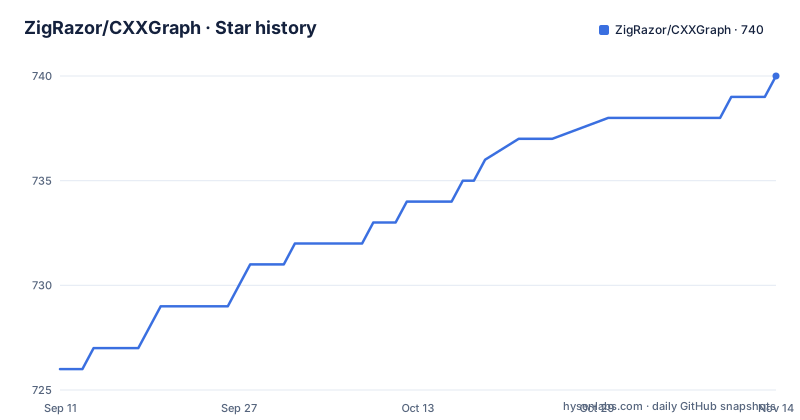
Star history
- ZigRazor/CXXGraph740 ★ · +14
| Repository | 2026-09-11 | 2026-11-14 |
|---|---|---|
| ZigRazor/CXXGraph | 726 | 740 |
14 Stars in the last 64 days, measured from the daily GitHub snapshot. Compare with other projects
Editorial analysis
Four install routes, none of them a package manager command
CXXGraph is header-only, so installing it means putting headers where your compiler can see them. The project gives four routes, one per packaging format. On Unix or Linux you unpack a tarball:
$ sudo tar xjf CXXGraph-{version}.tar.bz2On Fedora, CentOS or RedHat you install the RPM:
$ sudo rpm -ivh CXXGraph-{version}.noarch.rpmOn Debian or Ubuntu you install the DEB:
$ sudo dpkg -i CXXGraph_{version}.debIf you compiled it yourself with CMake, you finish with `$ sudo make install`. Every one of these needs root, and the first three need you to already hold a release artifact with a version number filled in for `{version}`. A Conan badge on the project page links to a Conan Center recipe, but no Conan command is given, so check that recipe yourself before relying on it.
Uninstalling the tarball means a glob delete under /usr/include
The tarball route writes straight into the system include directory, and the removal command reflects that:
$ sudo rm -f /usr/include/Graph.hpp /usr/include/CXXGraph*Two things follow. First, the pattern `/usr/include/CXXGraph*` removes anything in that directory whose name starts with CXXGraph, including files you may have placed there yourself. Second, the command names a top-level `Graph.hpp` in `/usr/include`, a generic filename that lives outside any project folder. If another package or your own code also puts a `Graph.hpp` there, the install can collide with it and the uninstall can delete it. The RPM and DEB routes avoid hand-written deletion, since removal goes through `$ sudo rpm -e CXXGraph-{version}` and `$ sudo apt-get remove CXXGraph`, so those are the safer choice on a machine you share.
The compile line needs two include paths, one under build/
Using the library starts with a single include, `CXXGraph/CXXGraph.hpp`, at the top of your source file. Compiling is where it gets fussier. The documented command passes two include directories:
# while the path points to /folder/

$ g++ <path_to/folder/example.cpp> -I <path_to/CXXGraph/include> \
  -I <path_to/CXXGraph/build/include> -std=c++17
The first path is the repository's `include/` folder. The second sits under `build/`, which is not one of the top-level entries in the repository (the listing shows `benchmark/`, `docs/`, `examples/`, `historical/`, `include/`, `packaging/`, `test/` and others, but no `build/`). So a fresh clone does not obviously contain that directory. If your compiler stops on a missing header, check that `build/include` exists in your checkout before debugging anything else. The output is an executable named `a.out`, which you run with `./a.out`.
Mixed directed and undirected edges in one Dijkstra example
CXXGraph revolves around a graph object that holds nodes and edges, and the algorithms operate on that object. The shipped example builds three integer nodes, named A, B and C with values 1, 2 and 3, using `CXXGraph::Node<int>`. It then creates two `DirectedWeightedEdge<int>` objects, A to B with weight 1 and B to C with weight 1, plus an `UndirectedWeightedEdge<int>` between A and C with weight 6. The goal stated for the file is the shortest path between nodeA and nodeC using Dijkstra's algorithm. Edges go into a `CXXGraph::T_EdgeSet<int>` as `std::make_shared` pointers, so edges are shared pointers rather than values. The practical consequence is that directedness and weight are properties of the edge type you pick, not flags on the graph, and one graph can mix them. The example text in the project page is cut off partway through the edge insertions, so open the examples folder for the full file and the printed result.
C++17 is the floor, and only GCC and MSVC are named
The stated prerequisites are short: a minimum of C++17, and either GCC 7.3.0 and later or an MSVC compiler that supports C++17. That is the whole compiler list. Clang is not named, and neither is any macOS toolchain, so if you build with Clang you are working without a stated guarantee and should run the project's own tests before trusting it. The C++17 requirement also rules out codebases pinned to C++11 or C++14. The unit tests have their own requirements: CMake 3.9 and later plus GoogleTest, and there is a separate benchmark setup using Google Benchmark with its own compile and run steps. Only the headers are needed to use the library, so these extras matter only if you want to verify the build or measure performance yourself.
The Boost Graph comparison is a table of self-assessed ratings
CXXGraph presents itself as an alternative to the Boost Graph Library and backs that with a five-row table. Setup time is listed as seconds for CXXGraph against minutes to hours for Boost, API readability as high against low, boilerplate as minimal against heavy, modern C++ style as yes against mixed or legacy, and learning curve as low against high. The page sums it up by saying CXXGraph focuses on developer experience first. None of these rows comes with a measurement, a sample project or a named version of Boost, so they read as the author's opinion. They are a reasonable reason to try the examples, and not a reason to rewrite working Boost code. If you are choosing between the two, build the same small task in both and judge the code you end up with. The project also publishes benchmark instructions and a Benchmark Results section, which is where measured claims would belong.
Releases stop at v4.1.0 in June 2024 while the repository kept moving
The repository is not archived, and its last push was on 2026-09-10. The tagged releases tell a different story: v4.1.0 on 2024-06-21, v4.0.0 on 2024-06-20 and v3.1.0 on 2024-01-09. The roadmap table lists a hypergraph feature, issue 122, as completed on Mar 16, 2026, which is well after the newest tag, and a Stable Release 5.0.0 with the date marked TBD. So if you install the tarball, RPM or DEB built from a release, you are getting code from before the hypergraph work. To get it, you have to build from the source branch, `master`, and accept that it sits between releases. The roadmap also dates Release 3.1.0 as Jan 9, 2023, while the release itself is tagged 2024-01-09, so treat the table's dates as approximate and trust the tag dates.
Representation and algorithms, not a way to draw graphs
A common question is how to plot graphs in C++ with a library like this. CXXGraph describes itself as a header-only library for graph representation and algorithms, and its example computes a shortest path. Nothing in the project description or the example names a drawing or plotting facility, so if your goal is a picture you will need to export your nodes and edges to a separate tool. The project does ship folders of examples for Dial, Dijkstra, Floyd-Warshall, network dynamics, partitioning and Prim, which gives a sense of the algorithm families covered. The license is MPL-2.0, which you should read before embedding it in a closed-source product. The project also carries a CITATION file and Zenodo and Figshare DOI badges, which is useful if you need to cite it in academic work.
Editorial conclusion
Use CXXGraph if you already build with C++17 on GCC 7.3.0 or later or MSVC and want a graph object plus ready-made algorithms without Boost. Skip it if you need a drawing library, an older C++ standard, or a tagged release that includes the hypergraph work. Before adopting it, check which commit you are actually building from and confirm that the build/include path in the compile command exists in your checkout.
Frequently asked questions
What is a graph in simple terms, as CXXGraph uses it?
In CXXGraph a graph is an object that contains nodes and edges. The library then runs a range of algorithms on that object, such as Dijkstra's shortest path.
What is a graph in C++ with CXXGraph?
It is a graph object holding Node and edge objects, such as DirectedWeightedEdge and UndirectedWeightedEdge. You use it by including CXXGraph/CXXGraph.hpp and compiling with C++17.
What is graph code in a CXXGraph example?
The example creates nodes A, B and C, adds directed and undirected weighted edges to a T_EdgeSet, and aims to find the shortest path between nodeA and nodeC with Dijkstra's algorithm.
How can I plot graphs in C++ with CXXGraph?
CXXGraph is described as a library for graph representation and algorithms, and its example computes a shortest path. No plotting feature is named, so drawing needs a separate tool.
Official sources
Add this badge to your README
If you maintain this project, the badge below links readers to this analysis and shows its maintenance status from the daily GitHub snapshot. Paste the markdown into your README; add ?metric=license or ?metric=stars to the image URL for a different field.

[](https://hysenlabs.com/projects/zigrazor-cxxgraph)Star history chart for your README
[](https://hysenlabs.com/projects/zigrazor-cxxgraph)Was this useful?