Calcit: A Rust-Based ClojureScript Dialect That Compiles to JavaScript ES Modules
Indentation-based ClojureScript dialect in Rust and compiling to JavaScript ES Modules
At a glance
- What is it?
- Calcit is an indentation-based dialect of ClojureScript, implemented in Rust, that compiles to JavaScript ES Modules. It targets terminal-driven development and AI agent workflows, but its niche syntax and module system require careful evaluation.
- Who is it for?
- Adopt Calcit if you are a ClojureScript developer who values indentation-based syntax, wants a Rust-powered runtime with FFI extensibility, and prefers a CLI-first, AI-agent-friendly workflow. Do not adopt it if you need a mature ecosystem, a stable editor experience, or a mainstream language with broad community support.
- Can I use it commercially?
- Not without permission. GitHub finds no licence file in the repository, and without a licence all rights are reserved by default: you may read the code but not reuse it. Check the README, or ask the authors, before using it.
- Is it still maintained?
- Yes. The repository received new commits within the last day.
- What is it written in?
- Mainly Rust, according to GitHub's language statistics.
Answers come from the project's GitHub data, last synced on October 22, 2026, and from our analysis. They are not legal advice.
Star history
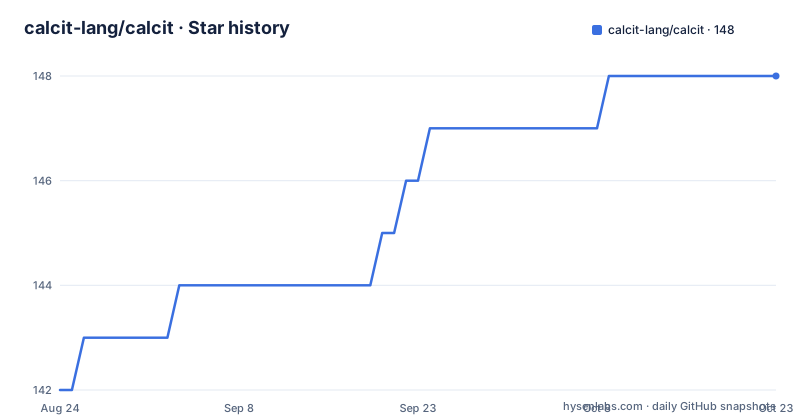
- calcit-lang/calcit148 ★ · +6
| Repository | 2026-08-24 | 2026-10-22 |
|---|---|---|
| calcit-lang/calcit | 142 | 148 |
6 Stars in the last 59 days, measured from the daily GitHub snapshot. Compare with other projects
Editorial analysis
What Calcit Solves and Who It Is For
Calcit is a programming language that reinterprets ClojureScript with an indentation-based syntax called Cirru, implemented in Rust, and compiled to JavaScript ES Modules. It addresses developers who like Clojure's functional style and persistent data structures but prefer a syntax that is friendlier to plain text editing and less dependent on parentheses. The README emphasizes a CLI-first workflow, designed to work well with AI agents in terminal environments. This suggests Calcit is for engineers who live in the terminal, use AI-assisted coding tools, and want a language that integrates with JavaScript ecosystems without abandoning Lisp-like semantics. It is not for developers seeking a fully mature, editor-centric development experience; the project explicitly states that Calcit Editor is no longer the recommended path.
The Core Mechanism: Rust Interpreter, JavaScript Codegen
Calcit's architecture has two layers. The interpreter runs on Rust, which means the language's core semantics, including persistent data structures and macro expansion, are executed natively. This interpreter is extensible via Rust FFI, allowing developers to write custom runtime functions in Rust. For deployment, Calcit compiles the same source to JavaScript ES Modules. The README shows that `calcit js` generates code into `js-out/`, and you import functions like `main_$x_` from the generated `.mjs` file. This dual approach means you get the performance and control of Rust during development and the portability of JavaScript in production. The compilation is not a simple transpilation; it aims for consistent semantics between the Rust interpreter and the JavaScript output, which is a significant engineering challenge. The presence of a WASM version for online experimentation indicates that the compiler itself can run in the browser, though this is not the primary workflow.
Getting Started: Commands and Configuration
Installation is via Rust's package manager. You run `cargo install calcit --bin calcit --bin caps`, which installs two binaries: `calcit` for running and compiling, and `caps` for dependency management. The quick start shows evaluating snippets directly: `calcit eval 'range 100'`. For a full project, you create a `calcit.cirru` file that acts as the canonical source snapshot, and you run `calcit` to execute it. The README specifies that by default Calcit reads `:init-fn` and `:reload-fn` from `:entries.default`, and you can override these with flags like `--init-fn='app.main/main!'`. Dependencies are declared in `deps.cirru` using a Cirru EDN-like syntax, specifying repositories on GitHub with a branch or tag. Running `caps` resolves the dependency graph and installs modules into `.calcit/modules/`. This is a concrete, reproducible setup, but it is a departure from typical package managers like npm or Cargo.
The Module System: Caps and Revisions
The module system is one of Calcit's most distinctive features. `caps` downloads dependencies from GitHub repositories, and it stores immutable revisions under `~/.config/calcit/module-caches/`. Each project gets links under `.calcit/modules/`, so different projects can use different revisions without conflicts. This is a smart approach to dependency isolation, but it has trade-offs. Published SemVer tags are preferred, but branch refs are supported for development, with a warning about the resolved commit. When multiple versions of the same repository are requested, the highest is selected. The `caps tree` and `caps why` commands let you inspect the resolved graph, which is useful for debugging. However, this system is tightly coupled to GitHub, meaning your dependencies must be hosted there. Also, the README notes that only `:dependencies` are recursively resolved, not `:dev-dependencies`, which prevents test modules from leaking into consumers. This is a thoughtful design, but it adds a layer of complexity that may be overkill for simple projects.
The Indentation-Based Syntax: A Double-Edged Sword
Calcit's Cirru syntax is indentation-based, meaning whitespace determines structure rather than parentheses. This is a deliberate choice to make the language friendlier to plain text editing and to reduce visual noise. The README gives an example of a threading macro: `-> 100 range (map $ \ * % %)`. This syntax can be more readable for some, but it is a significant departure from traditional Lisp. The project acknowledges this by providing migration guidance from the retired `compact.cirru` format. The indentation-based approach has implications for tooling. While the CLI supports structured edits via `calcit edit ...`, there is no recommended editor integration anymore, which could be a barrier for developers who rely on IDE features like autocomplete, refactoring, or inline debugging. The syntax also makes it harder to copy-paste code snippets without preserving exact indentation, which can be error-prone in documentation or chat-based AI interactions.
Limitations and Failure Modes
One clear limitation is the dependency on GitHub for all modules. If a dependency repository is moved or deleted, `caps` will fail to resolve it. The README also warns that modules containing only retired `compact.cirru` are rejected with migration guidance, which means you cannot use older libraries without updating them. Another failure mode is the JavaScript interop. The README states that 'in browser or Node projects, JavaScript interop is still expected,' but it does not provide detailed examples. This suggests that calling JavaScript libraries from Calcit may require manual binding or careful handling of data conversion, which could be a source of friction. Additionally, the CLI-first approach means you are expected to use terminal commands for tasks like searching and editing, which may be less efficient than a graphical editor for large codebases. The project's focus on AI agent workflows is interesting, but it also implies that the tooling is optimized for non-interactive use, not for human developers who want immediate feedback.
Alternatives: ClojureScript and Other Lisp Dialects
The most direct alternative is ClojureScript itself, which Calcit is a dialect of. The key difference is syntax: ClojureScript uses traditional parentheses, while Calcit uses indentation. ClojureScript has a mature ecosystem, including tools like Figwheel for hot reloading and a rich set of libraries. It also has a stable compiler and extensive documentation. Another alternative is Fennel, a Lisp that compiles to Lua, but that targets a different runtime. For JavaScript specifically, you could consider ReasonML or ReScript, which offer functional programming with a syntax that is closer to JavaScript but still compile to JavaScript. The choice between Calcit and ClojureScript comes down to whether you value indentation-based syntax and Rust-based tooling over ecosystem maturity. Calcit's Rust implementation might appeal to developers who want a fast interpreter and the ability to extend the language with Rust, but that comes at the cost of a smaller community and fewer resources.
Maintenance and Upgrade Cost
The project is actively maintained, with recent releases in August 2026, but the version numbers are low (0.13.x), indicating that it is still pre-1.0. This means breaking changes are possible. The README mentions a rename from `cr` to `calcit`, and the setup-calcit action provides a compatibility link for existing workflows. For local installations, you must migrate scripts directly. This suggests that upgrading Calcit may require manual effort. The module system's use of immutable revisions helps, but you still need to update your `deps.cirru` and run `caps` to fetch new versions. The license is listed as unknown, which is a red flag for adoption. Without a clear license, you cannot legally use the code in your projects without risk. You should contact the maintainers or check the repository for a license file before proceeding.
Editorial conclusion
Adopt Calcit if you are a ClojureScript developer who values indentation-based syntax, wants a Rust-powered runtime with FFI extensibility, and prefers a CLI-first, AI-agent-friendly workflow. Do not adopt it if you need a mature ecosystem, a stable editor experience, or a mainstream language with broad community support. Before committing, verify the migration path from any existing `compact.cirru` files, test the `caps` module resolution with your specific dependencies, and confirm that the JavaScript output integrates cleanly with your Vite or Node setup. Calcit is a viable tool for niche, terminal-centric projects, but its small ecosystem and evolving tooling mean you must be comfortable with manual configuration and potential breaking changes.
Frequently asked questions
What is calcit and what does it compile to?
A typed functional language for interactive and real-time applications, built as a dialect of ClojureScript with indentation-based syntax. The interpreter runs on Rust and compiles to JavaScript as ES Modules, with JavaScript interop expected in browser and Node projects.
How do I install calcit?
Install Rust, then cargo install calcit --bin calcit for the runtime and compiler and cargo install calcit-caps for the package manager. When working on the core from source, install the runtime with cargo install --path . --bin calcit and take the package manager from its own release.
Should I edit the calcit source snapshot as plain text?
No. The project states the canonical snapshot is not to be rewritten as ordinary text. Read the compact mutation contract first, then use the query subcommand to locate code and the edit subcommand for structured changes to definitions, imports, config and modules, and validate afterwards.
Does calcit need a language server for editor support?
Not currently, and there is no near-term plan for one. The project states that analysis and agent command-line capabilities remain in the main repository for that reason. The older graphical editor is also no longer the recommended path, though a separate editor repository is still available.
Can I build calcit without WebAssembly support?
Yes. A prebuilt binary without WASM is published for Ubuntu 22.04 on x86_64, and the source build takes a flag that disables the WASM and WASI code generation dependencies. Native execution and JavaScript compilation both still work without it.
How do calcit dependencies get declared and installed?
In the dependency file inside the source snapshot, as a map with separate collections for dependencies and development dependencies, each entry naming a GitHub repository with either a tag or a branch. A separate package manager binary downloads them, and it is versioned independently of the runtime.
Official sources
Add this badge to your README
If you maintain this project, the badge below links readers to this analysis and shows its maintenance status from the daily GitHub snapshot. Paste the markdown into your README; add ?metric=license or ?metric=stars to the image URL for a different field.

[](https://hysenlabs.com/projects/calcit-lang-calcit)Star history chart for your README
[](https://hysenlabs.com/projects/calcit-lang-calcit)