S3 Manager: a Go web GUI for buckets on any S3-compatible store
A Web GUI for your S3 buckets
At a glance
- What is it?
- S3 Manager is a single-binary web interface for S3-compatible storage, written in Go and configured entirely through environment variables. It manages several accounts side by side, handles IAM and anonymous access, and is explicit about where S3 itself imposes limits, such as the 10,000 object ceiling on sorted and searched listings.
- Who is it for?
- S3 Manager suits an operator who needs one interface across several S3-compatible stores, including self-hosted ones, and who is comfortable configuring everything through environment variables rather than a file. It is the wrong choice as a shared multi-user console, because the README documents no authentication layer for the web interface itself, and the wrong choice for auditing a bucket with more than 10,000 objects, since searched and sorted listings stop there.
- Can I use it commercially?
- Check first. The repository uses a licence we do not classify automatically, so read its LICENSE file before any commercial use.
- Is it still maintained?
- Yes. The repository last received commits 1 day ago.
- What is it written in?
- Mainly Go, according to GitHub's language statistics.
Answers come from the project's GitHub data, last synced on November 7, 2026, and from our analysis. They are not legal advice.
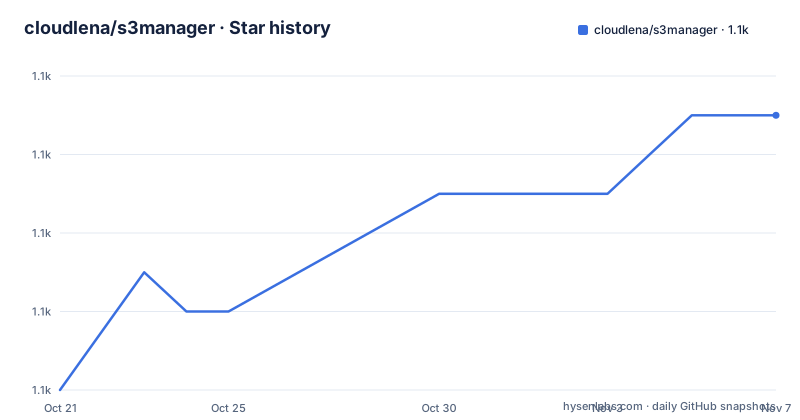
Star history
- cloudlena/s3manager1,069 ★ · +7
| Repository | 2026-10-21 | 2026-11-07 |
|---|---|---|
| cloudlena/s3manager | 1.1k | 1.1k |
7 Stars in the last 17 days, measured from the daily GitHub snapshot. Compare with other projects
Editorial analysis
What the interface covers
S3 Manager is a web GUI written in Go to manage S3 buckets from any provider, and the README is explicit that it is provider neutral rather than an AWS console replacement.
The feature list describes what an operator does with it. Several S3 accounts can be managed side by side and switched between. Buckets can be listed, created and deleted, and a bucket's policy can be viewed and edited, including making a bucket publicly readable. Objects can be listed with search, sorting and pagination, uploaded as single objects or whole folders, downloaded singly or as a ZIP archive of several selected objects, and opened directly in the browser. Single objects and multiple selections can be deleted, a time-limited download link can be created for an object, and the app can check whether an object is publicly accessible and copy its public link. Object metadata, including user metadata, and object versions can be shown.
That last group matters for a bucket that has versioning turned on, and for objects carrying their own metadata rather than only a size and a date.
The project ships as a Go binary and as container images, with releases v0.11.1 from 2026-10-07, v0.11.0 from 2026-09-29 and v0.10.0 from 2026-09-24, and the last push to the repository was on 2026-10-15.
Numbered environment variables for each account
Configuration is entirely by environment variable, and the multi-account scheme is the part to understand first.
Every account the application manages is configured with a numbered set of variables starting at S3_1_. The app stops looking at the first number that has no NAME, so the numbering must not have gaps, which is an unusual but simple rule: an instance is only reachable if every number up to it is present. Each instance appears in the interface under its NAME and is reachable at the path /NAME/buckets, or by its number, so the names have to work inside a URL.
S3_1_NAME=production
S3_1_ENDPOINT=s3.amazonaws.com
S3_1_ACCESS_KEY_ID=XXX
S3_1_SECRET_ACCESS_KEY=xxx

S3_2_NAME=backups
S3_2_ENDPOINT=minio.example.com:9000
S3_2_ACCESS_KEY_ID=YYY
S3_2_SECRET_ACCESS_KEY=yyy
A single instance may also be configured with no number at all, in which case it is called Default, and that is how earlier versions of the app were configured:
ENDPOINT=s3.amazonaws.com
ACCESS_KEY_ID=XXX
SECRET_ACCESS_KEY=xxx
The unnumbered form is kept for compatibility, and at least one instance must be configured or the application has nothing to show.
Per-instance settings that decide how requests are signed
Beyond the endpoint and the keys, each instance has a set of variables that change how the application talks to the server, and they are where interoperability problems usually live.
USE_IAM switches from a key pair to an IAM role, with IAM_ENDPOINT as the place to retrieve that role, which can be blank for AWS. SIGNATURE_TYPE defaults to V4 and also accepts V2, V4Streaming and Anonymous, where anonymous means unsigned requests, the mode used to browse public buckets. USE_SSL defaults to true, and SKIP_SSL_VERIFICATION defaults to false, so TLS certificate checking is on unless you turn it off deliberately.
BUCKET_LOOKUP decides how buckets are addressed in requests and defaults to Auto, which chooses virtual-hosted style for Amazon and Google endpoints and path style for everything else. The README explains when to override it: set it to DNS if your provider answers with Virtual host domain is required while accessing a specific bucket.
PUBLIC_URL is a template for the public links of objects, for when they are served from a CDN or a custom domain. It uses placeholders, with {key} replaced by the object key and {bucket} by the bucket name, and {key} is required. If it is unset, links point at the object on the endpoint following the bucket lookup rule. BUCKETS adds a comma-separated list of bucket names to show in addition to the ones the instance lists itself, which is how you expose public buckets owned by somebody else, and those are shown even when the instance is not allowed to list its own buckets, as happens with anonymous access.
Application-wide settings, and which of them actually restrict
The unprefixed variables apply to the whole application. PORT defaults to 8080. ALLOW_DELETE defaults to true and governs deleting objects, folders and empty buckets. LIST_RECURSIVE defaults to false and lists all objects in buckets recursively. SHOW_VERSIONS defaults to false and shows object versions in the bucket view while enabling version-specific downloads, which requires the bucket to have versioning enabled. SHOW_METADATA defaults to true and controls the metadata action and the metadata endpoint. TZ sets the IANA timezone used when displaying Last Modified times, defaulting to UTC. TIMEOUT is the read and write timeout in seconds, 600 by default, which is ten minutes and matters for large uploads. ROOT_URL adds a prefix when the app sits behind a reverse proxy.
Two of these deserve a closer look because their names overpromise.
BUCKET_NAME shows only that bucket in the list of every instance, but the README is careful: it only filters the list, and other buckets can still be opened by name or by URL, so it is not an access restriction. Anyone using it as a security boundary would be mistaken.
SSE_TYPE and SSE_KEY control server-side encryption for uploads, with valid values SSE, KMS and SSE-C. The SSE-C case has a sharp edge: the key must be exactly 32 bytes and is also sent when reading objects, because they cannot be read without it. Download links and public links do not carry it, so they do not work for such objects.
Why large buckets behave differently from small ones
This is the most useful piece of behaviour the README explains, because it is a property of S3 rather than of the application, and the application is honest about it.
The default bucket view asks S3 for one page of objects at a time, so opening a bucket and stepping through it costs the same whether it holds ten objects or ten million. That works because S3 can only list keys in ascending order and offers no search of its own, which is why the default view is sorted by name ascending and unsearched. Such a view has no total object count and no last page to jump to, since S3 never reports how much it did not return.
Sorting by another column, sorting descending, searching, or choosing All items per page requires the whole location to be held in memory instead, and so does SHOW_VERSIONS. Those listings stop after 10,000 objects and say so on the page, with the counting, sorting and searching covering only that many. The advice is to narrow the listing with a search or by opening a folder to reach the rest.
So the same bucket behaves differently depending on which view you are in, and a search that returns matches from the first 10,000 objects only is not a complete answer. That is a property of the storage API, and no GUI can remove it.
Building it and running it locally
The repository is a conventional Go project with the module named for the repository, requiring Go 1.27.2, and the dependencies tell you the shape of it: minio-go for the S3 protocol, gorilla/mux for routing, viper for configuration and a small adapters package. The Makefile holds the usual targets:
build:
	go build -o bin/s3manager

run:
	go run .

test:
	go test -race -cover ./...
The test target runs with the race detector and coverage, and lint runs golangci-lint. There is a build-image target that uses podman rather than docker, which tells you the author develops against podman.
For local experimentation, the compose file is the shortest path. It starts two S3 servers using the rustfs image and points two configured instances of the application at them:
services:
  s3manager:
    container_name: s3manager
    build:
      context: .
      dockerfile: Containerfile
    ports:
      - 8080:8080
    environment:
      - S3_1_NAME=my-first-instance
      - S3_1_ENDPOINT=s3:9000
That gives you the multi-account arrangement, including two instances with different credentials, without touching a real bucket. The tree also carries a Containerfile and a separate Containerfile.release, a goreleaser configuration for published binaries and a web/ directory for the front end assets.
What to check before putting this in front of a bucket
Three things deserve a look before deployment.
The first is access control. The README documents the S3 credentials an instance uses and every operation the interface offers, including deleting objects and editing bucket policies, but it does not describe an authentication or authorisation layer for the web interface itself. The documented protection for a shared instance is the S3 credential and the ALLOW_DELETE setting, so treat the application as an operator tool and put it behind whatever your infrastructure already uses for that.
The second is the encryption path. SSE-C objects cannot be downloaded through generated links at all, so if you enable SSE-C for uploads, the download workflow changes for those objects specifically.
The third is the licence. The repository metadata reports a custom licence that GitHub cannot classify, with the terms in a LICENSE file, so read it before you redistribute the images or run them as a service.
Beyond that, the honest summary is that this is a compact operator interface with a documented configuration model, built on a mature S3 client, and it tells you plainly where the underlying API stops being able to help.
Editorial conclusion
S3 Manager suits an operator who needs one interface across several S3-compatible stores, including self-hosted ones, and who is comfortable configuring everything through environment variables rather than a file. It is the wrong choice as a shared multi-user console, because the README documents no authentication layer for the web interface itself, and the wrong choice for auditing a bucket with more than 10,000 objects, since searched and sorted listings stop there. Verify first that your provider's bucket addressing works with the BUCKET_LOOKUP mode you choose, that IAM role retrieval works in your network if you use USE_IAM, and that the licence in the repository root permits the use you have in mind.
Frequently asked questions
How do I configure several S3 accounts in S3 Manager?
With numbered environment variables starting at S3_1_, each set carrying a NAME, ENDPOINT, ACCESS_KEY_ID and SECRET_ACCESS_KEY. The application stops at the first number with no NAME, so the numbering must not have gaps, and each instance is reachable at /NAME/buckets or /NUMBER/buckets.
Can S3 Manager browse public buckets without credentials?
Yes. Configure an instance with SIGNATURE_TYPE set to Anonymous and list the buckets to show with BUCKETS, for example BUCKETS=noaa-ghcn-pds. Those buckets appear even when the instance cannot list its own buckets.
Why does a search or a sorted listing stop at 10,000 objects?
Because sorting, searching and version listings have to hold the whole location in memory, and the implementation stops after 10,000 objects and says so on the page. The default paged view has no such ceiling but is limited to ascending name order, because S3 can only list keys in that order and offers no search.
Does the BUCKET_NAME setting restrict access?
No. The README states that it only filters the bucket list, and that other buckets can still be opened by name or by URL, so it is not an access restriction.
Official sources
Add this badge to your README
If you maintain this project, the badge below links readers to this analysis and shows its maintenance status from the daily GitHub snapshot. Paste the markdown into your README; add ?metric=license or ?metric=stars to the image URL for a different field.

[](https://hysenlabs.com/projects/cloudlena-s3manager)Star history chart for your README
[](https://hysenlabs.com/projects/cloudlena-s3manager)Was this useful?