cpplint is Google's abandoned style checker, kept usable by a small group of maintainers
Linter for C++ based on Google's style guide
At a glance
- What is it?
- cpplint is a Python command-line tool that checks C and C++ files against Google's C++ style guide, now maintained outside Google by three named maintainers. It suits teams that want Google's rules applied to existing C++ without adopting clang-format, and it does not suit teams who want style enforcement inside the compiler or a language server.
- Who is it for?
- Adopt cpplint when your team already writes Google-style C++ and wants a linter that needs no compiler, no build system integration and no language server, so it can run in any CI that has Python. Do not adopt it as a fix-it tool or as a replacement for a compiler-based checker, because it reports style by reading text rather than by parsing a translation unit.
- Can I use it commercially?
- Check first. The repository uses a licence we do not classify automatically, so read its LICENSE file before any commercial use.
- Is it still maintained?
- Yes. The repository last received commits 3 days ago.
- What is it written in?
- Mainly Python, according to GitHub's language statistics.
Answers come from the project's GitHub data, last synced on November 7, 2026, and from our analysis. They are not legal advice.
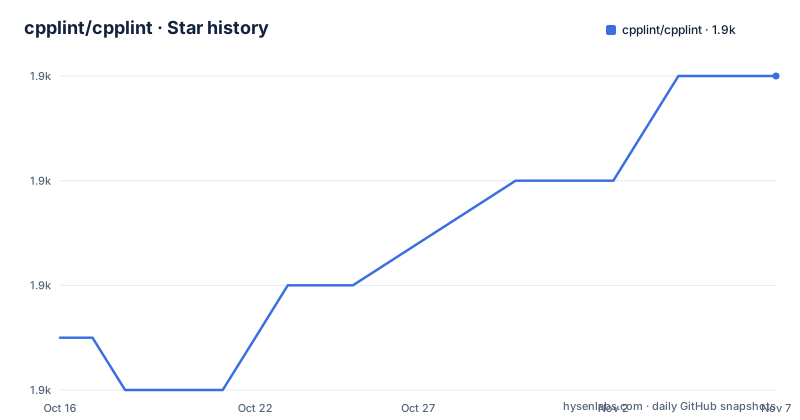
Star history
- cpplint/cpplint1,860 ★ · +5
| Repository | 2026-10-16 | 2026-11-07 |
|---|---|---|
| cpplint/cpplint | 1.9k | 1.9k |
5 Stars in the last 22 days, measured from the daily GitHub snapshot. Compare with other projects
Editorial analysis
Why a fork exists at all: Google stopped maintaining cpplint
cpplint was developed and maintained by Google Inc. inside the `google/styleguide` repository. The fork's README is blunt about what happened next: Google is no longer maintaining the public version of cpplint, and pretty much everything in that repo's pull requests and issues about cpplint has gone unimplemented.
That is the entire reason this repository exists. The stated aim is to update cpplint to modern specifications and to be somewhat more open to adding fixes and features so it can be usable in wider contexts.
So the trade-off is clear. You are not getting Google's tool, because Google stopped. You are getting a community fork that has re-opened the issue tracker. That is a genuine advantage for a stable style checker, where the rules change slowly and unmaintained pull requests mostly accumulate, but it does mean the upstream name carries no guarantee.
The README credits Google for open-sourcing their in-house tool in the first place, and the authors list in `pyproject.toml` keeps that lineage visible: Andrew Davis, Google Inc., Thibault Kruse, and cpplint developers. Google remains the origin, not the maintainer.
What the fork changed, in the README's own list
The changes section is the most useful part of the README, because it tells you what you gain over the version you may already have installed from Google.
Python 3 compatibility is first, and the metadata backs it up: `requires-python = ">=3.10"`, with classifiers for 3.10 through 3.15, and the console script is `cpplint = "cpplint:main"`. More default file extensions means a checkout with unusual suffixes is picked up without configuration.
Three flags do the practical work. `--exclude` skips files, `--extensions` customises which file extensions count, and `--recursive` discovers files below directories rather than requiring every path on the command line. That last one is what makes it viable in continuous integration over a whole tree rather than a per-file local invocation.
Two suppressions matter for real codebases. `// NOLINTBEGIN` and `// NOLINTEND` skip entire blocks of code, which is how you exclude a vendored third-party header or a machine-generated file without scattering per-line suppressions. And `#pragma once` is accepted as an alternative to header include guards, which matters when you lint code that was written to a different convention.
The README also claims support for more modern C++ features and points at `CHANGELOG.rst` for quite a bit more, so the short list is a summary rather than the full delta.
Installing: uv, PyPI, or the pre-commit hook
The README says to use your preferred tool to install the `cpplint` package from PyPI. The example it gives is uv:
uv tool install cpplintThat is the only install command in the documentation, which is unusual for a Python tool and reflects that there is nothing to compile and nothing to configure. The package has no runtime dependencies at all: `dependencies = []` in `pyproject.toml`, with `py-modules = [ "cpplint" ]` and `include-package-data = false`. The whole linter is a single `cpplint.py` at the repository root.
That single-file property is worth pausing on. It is why cpplint runs anywhere Python runs, in a container, in a pre-commit hook, in a CI job with no build step. It is also why there is no plugin system, no configuration file format beyond the flags, and no incremental analysis.
For teams already using pre-commit, the README shows the hook configuration, with two categories turned off:
  - repo: https://github.com/cpplint/cpplint
    rev:  # cpplint version number or git tag
    hooks:
      - id: cpplint
        args:
          - --filter=-whitespace/line_length,-whitespace/parens
Note that `rev` is deliberately left empty in the README, to be filled with a version number or git tag. That is a field you must set yourself, and `--filter` is how you silence categories rather than filtering files, which is a distinction worth internalising: `--exclude` is for paths, `--filter` is for rules.
Usage is one command, and MegaLinter already knows how to run it
The whole command-line surface is:
cpplint [OPTIONS] filesand the README points you to `cpplint --help` for the full usage instructions. The two-command documentation is itself a signal about how much configuration there is: options plus files, with `--filter`, `--exclude`, `--extensions` and `--recursive` being the ones the README bothers to name.
For continuous integration, cpplint ships out of the box in MegaLinter, described in the README as an open-source linter aggregator for CI, with its own descriptor page. That matters more than it sounds. The README links to MegaLinter's own cpplint documentation.
The samples directory is another underused resource. The repository ships `samples/silly-sample/`, plus sample trees derived from real projects: `samples/boost-sample/`, `samples/chromium-sample/`, `samples/codelite-sample/`, `samples/protobuf-sample/`, `samples/v8-sample/` and `samples/vlc-sample/`.
Those are regression fixtures. Running cpplint against them is the fastest way to see how it treats headers, macros, generated code and the C dialects that a small tutorial file never exercises.
How it is built and tested: one module, two test files
The repository is unusually flat. Everything lives in `cpplint.py`, and the tests are `cpplint_unittest.py` and `cpplint_clitest.py`, the second covering the command-line interface separately from the rule logic.
That split is the right one and it explains why the project can make claims about new flags with some confidence: adding `--recursive` means adding cases to a dedicated CLI test file rather than restructuring a suite.
The Python tooling is modern. The build backend is `setuptools.build_meta` with `setuptools>=77`, and the version is dynamic, read from the module attribute `cpplint.__VERSION__`, so the version lives in one place. Ruff is configured for the project's own source with `line-length = 100` and a broad selection of rule families, and there is a `.style.yapf` for the remaining formatting. `tox.ini` drives the test matrix, and `.pre-commit-hooks.yaml` at the repository root is what the pre-commit integration reads.
`regen-defs.zsh` is the one file with a name that explains itself only by reading it, and it is presumably how the style definitions are regenerated rather than hand-edited. `MANIFEST.in` and `CHANGELOG.rst` round out the packaging. `.git-blame-ignore-revs` suggests the project also does large mechanical reformatting, which is a normal consequence of enabling a formatter on an old codebase.
Where cpplint is the wrong tool
Three limitations follow from what the tool is.
First, it reads text rather than understanding a translation unit. A style checker with no compiler front end cannot know whether an identifier is a type or a variable, whether a macro expanded, or whether a header is included twice through different paths. Any rule requiring that knowledge is either absent or produces false positives that get suppressed.
Second, there is no fix mode. cpplint reports; it does not rewrite. The `// NOLINTBEGIN` and `// NOLINTEND` block suppressions make large exclusions manageable, but adopting cpplint on a legacy codebase means either fixing the reported issues by hand or suppressing them, and the honest cost of a first run on unformatted code is a large diff.
Third, the maintenance situation deserves a straight assessment. There are three named maintainers, aaronliu0130, cclauss and jayvdb, plus three former maintainers listed as tkruse, mattyclarkson and theandrewdavis. That is a small number of people for a tool used widely, and the repository topics include `maintainer-wanted`, which is the project's own signal about its capacity.
On the other hand, the release history is recent: 2.0.0 on 2024-10-06, 2.0.1 on 2025-04-02 and 2.0.2 on 2025-04-08, with the last push on 2026-10-14. Development is still happening between releases.
Licence and how it compares to the alternatives
Licence first, because it is unambiguous in the metadata. `pyproject.toml` declares `license = "BSD-3-Clause"`, and the repository carries a `LICENSE` file. The project metadata on the hosting side reports the licence as one it cannot classify, so read the file rather than the badge.
The real alternative is clang-format, and the difference is worth being precise about. cpplint is a Python tool with no runtime dependencies that reports style issues according to Google's C++ style guide.
A reasonable division of labour puts clang-format in charge of layout and cpplint in charge of the Google style items that layout does not cover, such as include ordering, naming and header guard conventions. The `--filter` flag is what makes that division practical, since the pre-commit example in the README disables `whitespace/line_length` and `whitespace/parens`, which are exactly the checks a formatter would own.
Editorial conclusion
Adopt cpplint when your team already writes Google-style C++ and wants a linter that needs no compiler, no build system integration and no language server, so it can run in any CI that has Python. Do not adopt it as a fix-it tool or as a replacement for a compiler-based checker, because it reports style by reading text rather than by parsing a translation unit. Before wiring it into pre-commit, run `cpplint --help` on your own version and pin a specific git tag in `rev`, since the README leaves the tag empty and cpplint changes its rule set between releases.
Frequently asked questions
How do I install cpplint?
The README says to use your preferred tool to install the `cpplint` package from PyPI, giving `uv tool install cpplint` as the example. The package has no runtime dependencies and requires Python 3.10 or newer.
Who maintains cpplint now that Google has stopped?
The README states Google is no longer maintaining the public version of cpplint. This fork is maintained by aaronliu0130, cclauss and jayvdb, and aims to update cpplint to modern specifications.
How do I silence a rule in cpplint?
Use the `--filter` option with a category name prefixed by a minus sign, such as `--filter=-whitespace/line_length,-whitespace/parens`. To skip whole blocks of code instead, surround them with `// NOLINTBEGIN` and `// NOLINTEND`.
Can I run cpplint on a whole directory?
Yes. The fork adds `--recursive` for recursive file discovery, plus `--exclude` for skipping paths and `--extensions` for customising which file extensions are treated as C and C++.
Does cpplint fix the issues it reports?
No, it reports them. It is a text-based checker with no compiler front end and no rewrite mode, so adopting it on unformatted code means fixing or suppressing the reported problems yourself.
What licence is cpplint under?
BSD-3-Clause, declared in `pyproject.toml` as `license = "BSD-3-Clause"` with a `LICENSE` file at the repository root. The original tool was open-sourced by Google Inc.
Official sources
Add this badge to your README
If you maintain this project, the badge below links readers to this analysis and shows its maintenance status from the daily GitHub snapshot. Paste the markdown into your README; add ?metric=license or ?metric=stars to the image URL for a different field.

[](https://hysenlabs.com/projects/cpplint-cpplint)Star history chart for your README
[](https://hysenlabs.com/projects/cpplint-cpplint)Was this useful?